

 Come together with the global Drupal community in Rotterdam, 28 Sept – 1 Oct 2026. Sessions, contribution, connection, and Early Bird savings until 8 June.
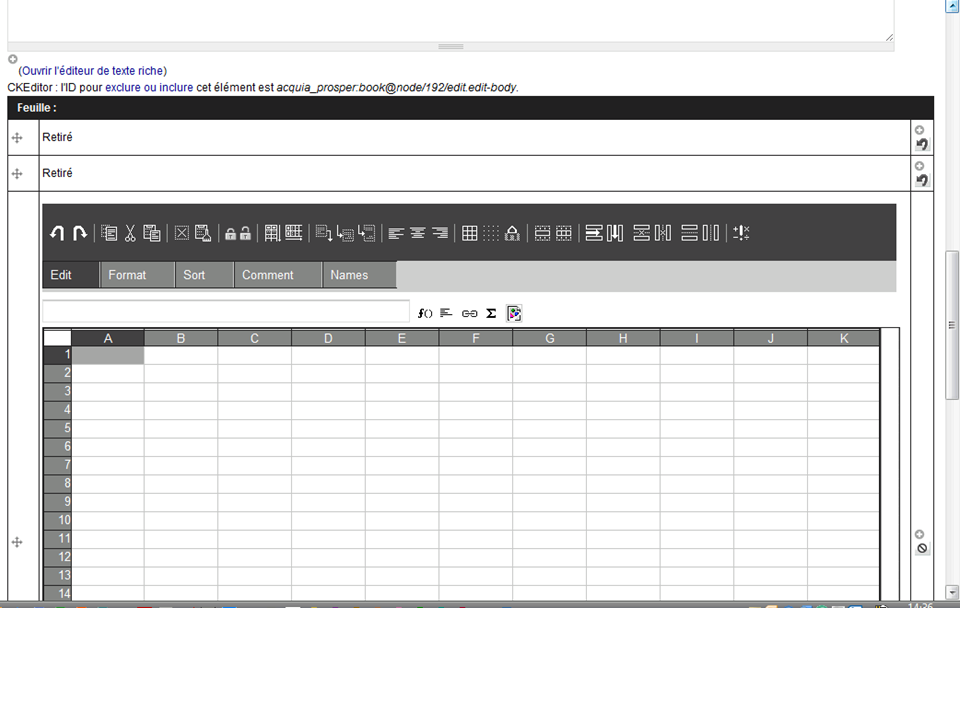
When setting the cck sheetnode field to multiple, the first occurrence appears half cut vertically
- the second added field is ok
- Removing the first insane field let the second one ok
- Adding a new field cuts the first displayed again.
| Comment | File | Size | Author |
|---|---|---|---|
| #6 | localhost screen capture 2012-2-17-13-34-5.png | 386.03 KB | infojunkie |
| HalfcutSheetnodeField.PNG | 75.37 KB | jvieille | |
| Correct sheetnodeField.PNG | 82.66 KB | jvieille |


Comments
Comment #1
infojunkiePlease try with the latest dev and close this issue if it works correctly.
Comment #2
jvieille commentedSame problem with the latest dev
Comment #3
jvieille commentedQuite anoyiing.
Same behaviour in Chrome, FF
No Javascript error
apparently, the vertical scroll bar is set to the middle of the screen when going to edit mode.
After switching to full screen, it behave correctly when back to inline edit
Tried Garland theme instead, same problem.
Am I alone getting this?
Comment #4
jvieille commentedTried the last dev, no change yet.
Tried different browsers,different themes, with and without JQuery update, clearing caches...,
Comment #5
jvieille commentedI made a lot of tests again, on different installs, same behaviour
I am sure you can reproduce.
The problem always appears when the Sheetnode CCK field is set to "Unlimited"
Other settings (1 or any number) work.
Comment #6
infojunkieAttached is what I'm getting on my test environment - it's working fine. In your screenshot, I'm noticing CCK controls that I don't recognize (the arrow and plus icons on the right column) - are you using a CCK add-on?
If you haven't done so already, please try with a plain vanilla Drupal and just CCK + Sheetnode installed.
Comment #7
jvieille commentedI tested in plain simplistic Drupal install, got the same.
I use cck-6.x-3.0-alpha3, may be it is the problem(multigroup capabilities)?
Comment #8
infojunkieOK I'll test with CCK 3.
Comment #9
infojunkieI can confirm the problem with CCK3. I'll work on it.
Comment #10
jvieille commentedThanks again for this very powerful and ever improving module
Comment #11
infojunkieClosing old issues. Reopen if needed.