

Closed (fixed)
Project:
Views Slideshow
Version:
6.x-2.3
Component:
SingleFrame
Priority:
Critical
Category:
Bug report
Assigned:
Unassigned
Reporter:
Created:
4 Nov 2011 at 17:07 UTC
Updated:
14 Dec 2016 at 22:26 UTC
Jump to comment: Most recent, Most recent file

Comments
Comment #1
TelFiRE commentedSo no call back for this then? I have to modify the module?
Comment #2
Arkrep commentedYou could look at the Jquery cycle plugin advance settings
http://malsup.com/jquery/cycle/options.html
Comment #3
Arkrep commentedWell it would seem the problem that I am working on at the moment is going to call for me to use callbacks and I thought it best to add what I find here to help others that might come across this post.
Anyway it is indeed possible to use the advanced functions of the Jquery cycle plugin to call other functions before and after a slide has transitioned.
See the callback section of the Jquery cycle plugin examples
http://malsup.com/jquery/cycle/int2.html
Comment #4
TelFiRE commentedSteven, thanks a lot for the resources, the first I've seen but the second was new info. However I am not understanding how this is implemented, when I run the code as it is shown on that example it doesn't work with views slideshow. Do I need some module to make Views Slideshow use the cycle plugin and respect its callbacks?
Edit, ok with a lot of trial and error I've started to understand how it's supposed to work -- I define the functions in my jQuery but put the options in the advanced options field. But my syntax is wrong or something, no matter what I do I get uncaught type error that onBefore() has no method 'apply'
Someone should really take it upon themselves to document this stuff. It is absolutely awful documentation, and it's sad, because all the information is there, yet people waste dozens of hours on problems like this because there isn't a simple EXAMPLE of actual REAL WORLD use. :(
Comment #5
TelFiRE commentedhttp://stackoverflow.com/questions/3919773/jquery-cycle-plugin-callback-...
I found this document which gave me some false hope, unfortunately the problem still occurs. When I tried creating and calling the function directly in the advanced options I get a Uncaught SyntaxError: Unexpected token null. This occurs in the middle of my freaking doctype.
I'm about to slaughter something.
Comment #6
Arkrep commentedHi TelFiRE,
I've been playing with this for a couple of days and I've managed to get it working. Here's a couple of points that might point you (or anyone else who comes across this post) in the right direction.
First you need to make sure that the cycle plugin is installed. Which is optional to the views slideshow module. Once this is installed correctly you should have the cycle options available to you in the settings dialog box for the views slideshow.
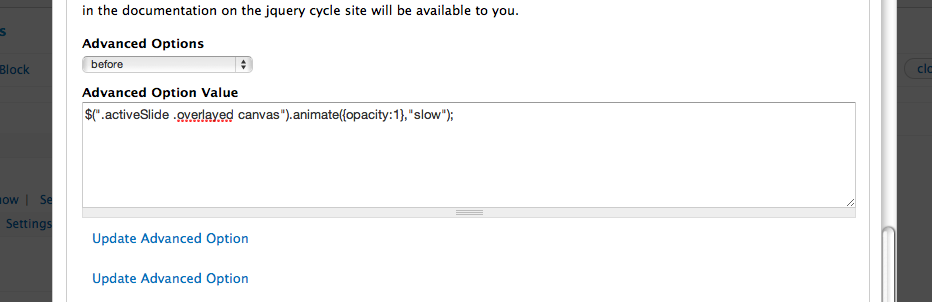
Second you should enter your function code directly into the textarea of the advanced cycle plugin settings with "before" or "after" selected from the dropdown WITHOUT it being wrapped in a function. so for example.
Would simply become
If you could post up your code I'll have a look and see if I can help you out a bit more.
Comment #7
TelFiRE commentedThanks Steven.
In my jQuery I define the functions:
Then in the Advanced Options box for views slideshow, I have tried several variations to no avail.
And they all give me
Uncaught TypeError: Object onBefore(); has no method 'apply'Comment #8
Arkrep commentedah .. right you need to put the script into the advanced options box. but without it being wrapped in a function.
Comment #9
TelFiRE commentedI really appreciate your attempts to help out, but there is no such option on the current version of Views Slideshow on Drupal 6. There is only "Advanced Options". It is a textarea. There is no dropdown.
It appears you are using Drupal 7. I don't know what's changed. But I wasn't wrapping the function at all in the advanced box and wouldn't expect that to work. The function is created in a document.ready. I mean my understanding is that this advanced options box accepts arguments for the jQuery cycle plugin. So, by all means, the code I've tried should work. If I could just be the one to call cycle, instead of views doing it and screwing with my syntax, this would be cake.
This is an extreme failure in usability of this module in my opinion. :( I really hope someone here can help me out. Is this a bug for me? Because I have run Views Slideshow on probably a dozen or so installations, with separate download/installs and I have never seen that dropdown before.
Comment #10
TelFiRE commentedComment #11
TelFiRE commentedComment #12
pelicani commentedTelFiRE, I haven't tried this yet, but ... http://drupal.org/node/754648
Seems you can set a function on one line for drupal 6 that will let you modify the jquery.
Comment #13
pelicani commentedI tried that solution I linked to above and it works very well.
I added a function for the 'before' and within it call another function that has more processing logic.
That way I can stick to the 1 line limit within the module function.
I hope this helps.
Comment #14
shaundychkoIt isn't pretty, but this can be achieved by adding your own code after line 56 of .../views_slideshow/contrib/views_slideshow_singleframe/views_slideshow.js, which is the 'begin' function provided by the module. If someone knows of a way to put this code in a custom module or theme, please leave a note.
Comment #15
TelFiRE commentedThat doesn't make any sense to me. This is clearly a bug and NOT working as intended. There is a field for doing exactly what I'm saying and it simply doesn't work. It does not run the code. What is the point of that advanced options box? It NEVER gets called.
Comment #16
redndahead commented@TelFiRE it obviously get's called because you get an error. Try different function names than onBefore I think that may be conflicting with another method. Try yomama() or something like that.
Comment #17
redndahead commentedClosing from lack of response.
Comment #18
spideep commented#8 rocks!