

Closed (fixed)
Project:
CKEditor 4 - WYSIWYG HTML editor
Version:
6.x-1.x-dev
Component:
Code
Priority:
Major
Category:
Bug report
Assigned:
Unassigned
Reporter:
Created:
7 Nov 2011 at 02:26 UTC
Updated:
18 Oct 2014 at 17:09 UTC
Jump to comment: Most recent, Most recent file



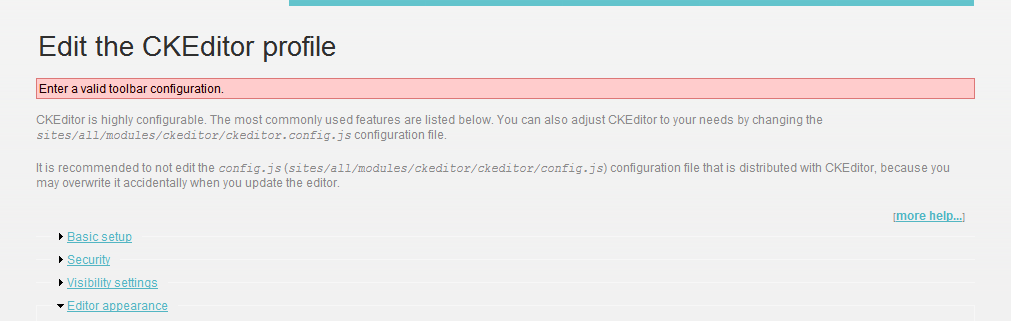


Comments
Comment #1
mkesicki commentedWhere do you see this
?
In latest version of module you should have toolbar configuration by Drag & Drop in "Editor appearance" section of CKEditor profile configuration.
Please check in Firebug console if there are any errors and in Firebug's Net tab if all request are correct.
Did you run update.php (drupal script) and clear Drupal cache after update ?
Comment #2
Chad_Dupuis commentedI don't see any configurable toolbars - this notice is within the editor appearance section of the configuration. I can select a skin and choose the color of the editor box, but no toolbars. Perhaps this was because I had a custom toolbar before updating? I noticed that you changed the code within ckeditor.config.js to configure custom toolbars - perhaps this is part of the problem... either way even without any modifications to that file I still get the above notice instead of a toolbar. Do I need something else installed since these updates? I don't have jquery ui, etc. installed as others do in the previous bug report - but I've never had that installed and all was well up to 1.6.... (and, yes, I did run update.php and clear all caches)...
Comment #3
mkesicki commentedDid you try this http://drupal.org/node/1325178#comment-5197416 ?
Comment #4
chadd commentedi'm also unable to choose or configure any toolbars.
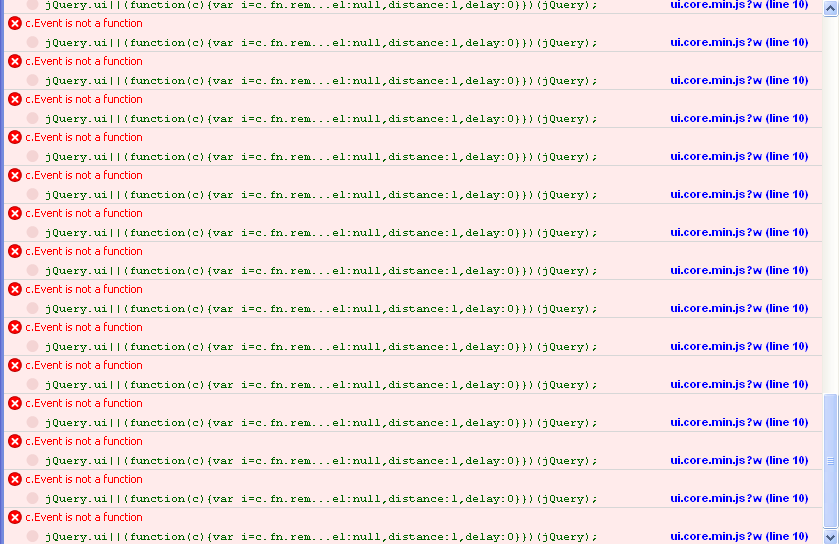
when the page loads, i get the following errors in firebug:
and when clicking the "Load sample toolbar: Basic | Advanced | Full" links, i get the following error in firebug:
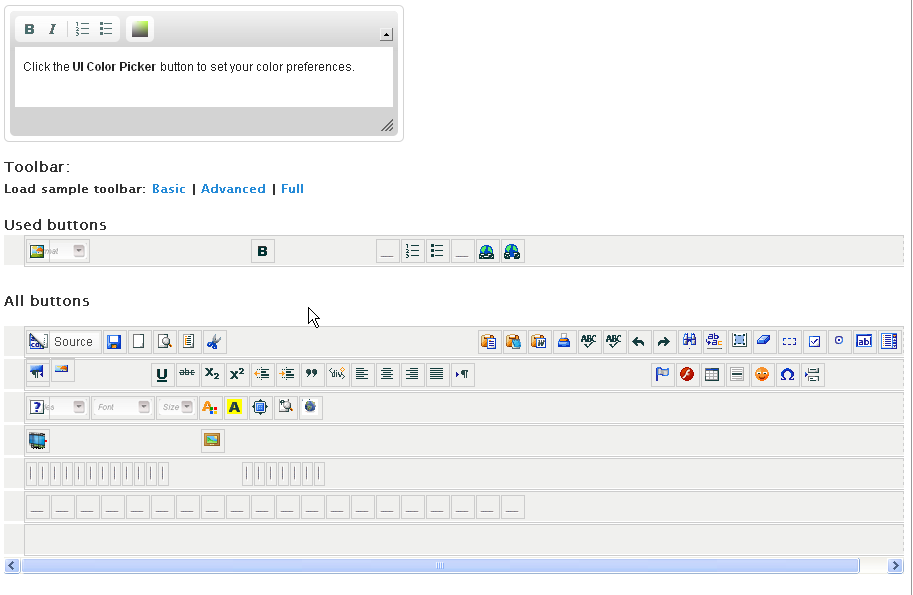
i see the "used buttons" and "all buttons" headlines, with nothing below them.
yes i tried the suggestion in http://drupal.org/node/1325178#comment-5197416 and that's when i get the second javascript error.
Comment #5
chadd commentedattaching screenshot of errors
Comment #6
chadd commentedComment #7
mkesicki commentedWhat others modules do you have enabled ?
Please check in Firebug's Net tab if all request are correct ?
It looks like some issue with jquery.ui problem or some conflict.
Comment #8
chadd commentedjQuery UI 6.x-1.5, jQuery Update 6.x-1.1, along with many other modules. do you want the full list?
no errors are being shown in firebug's net tab on any pages.
no javascript errors are shown in the firebug console tab on other pages of the site, only: admin/settings/ckeditor/edit/*
1.6 works fine, but these errors started with 1.7/1.8
Comment #9
mkesicki commentedIn 6.x-1.8 there is a fix for jquery ui and jquery update modules support. What version of jquery ui (library) do you have in libraries directory ? If < 1.7 please update it.
Comment #10
chadd commentedwhich version of jquery ui are you recommending?
i had 1.6, so i downloaded the latest stable 1.8.16 and now i am showing missing files in the firefox net tab:
/sites/all/libraries/jquery.ui/ui/minified/ui.sortable.min.js
/sites/all/libraries/jquery.ui/ui/minified/ui.core.min.js
neither of those files seem to be included in the 1.8.16 release
Comment #11
chadd commentedjust tried jquery ui 1.7.3 and the profile editor page loads without errors, but i'm getting some very odd behavior when trying to use the drag/drop interface to edit the toolbar for a profile.
and whenever i click/drag in one of the "button boxes" i get continuous js errors displaying in the console tab in firebug
and the buttons seem to slide all over the place and not where i'm attempting to drag
screenshot of errors attached.
Comment #12
chadd commented"button boxes" screenshot attached
Comment #13
mkesicki commentedDid you cleared browser cache after upload new version of jquery ui library ?
Comment #14
Chad_Dupuis commented@michael_cksource - I saw the post you directed to me above about setting a toolbar in the default profile. I tried that but I get the same error in all of the profiles (i.e. I cannot select a toolbar)...
Comment #15
chadd commentedyes, i've cleared all caches with each different version of jquery ui
Comment #16
mkesicki commentedCan you give me access to your site , so I can check this directly there ? If you can send me necessary information in mail. It will be faster to check what happens. You can try one more thing. Disable for test jquery ui and jquery update modules and check if you can select a toolbar.
Comment #17
Chad_Dupuis commentedi know this wasn't directed at me, but I can probably save you some time and tell you that I don't have jquery ui modules installed and I'm still having the toolbar issue....
Comment #18
chadd commentedemail sent
Comment #19
mkesicki commentedI commited changest to GIT. Please try latest DEV version and write if it helps or not.
Comment #20
chadd commentedjust loaded the dev version from 11/15 and jquery.ui 1.7.3 and everything seems to be working as expected.
thanks!
Comment #21
mkesicki commentedComment #22
enomertens commentedSame problem, tried solution from this topic... CKEDITOR still not working,.... still something wrong.
bug is available in 1.7 - 1.8 - dev 'release'
tested them all with, jquery 1.6 and with 1.7.3
Bug not available in ckeditor 1.6 (with jquery 1.6 and 1.7.3)
Any suggestions?
Comment #23
enomertens commentedComment #24
mkesicki commented@enomertens you crated new ticket #1344104: Enter a valid toolbar configuration. This problem was related with jQuery UI and jQuery problems and it is fixed in DEV version.
Comment #25
enomertens commented@Michal_cksource, well I tried with jquery library 1.5 and 1.7.3 - jqueryUI ver.1.5
And I also installed ckeditor DEV release and was still the same, ... after running update.php, ... run cron, ... flush cache.
So if you have any suggestions... always welcome. In the attachment screenshot from .... status page.
Greetz,
Eno
Comment #26
rhache commentedI can confirm enomertens' issues.
Using dev, jquery UI 1.7.3, etc, flushed everything.
I simply cannot drag any items in the "Used buttons" area.
Thanks,
Rene
Comment #27
mkesicki commented@enomertens , @rhache please check in Firebug (Firefox add-on) console if there are any errors. Please also check in Firebug's Net tab if all request are correct. Maybe there is a some JavaScript config.
Comment #28
rhache commentedmichal_cksource,
I checked in Firebug, but no error that I could see appeared in the console or net tabs.
This got me thinking that the browser itself might be at issue here. Turns out it works perfectly in the latest version of Chrome, Opera and Safari for Mac.
I currently have FF8 installed on my machine. Is it possible that Firebug itself might create conflicts?
Thanks,
Rene
Comment #29
enomertens commentedHi,
@rhache, .... using 'Chrome' here, still issues, ... not working, ....
@michal_cksource.... I tried all release between 1.6 to 1.8 and DEV release, .... only 1.6 is working with jquery 1.5 and 1.7.3
I also changed theme to Garland etc... most of all typical debug solutions (wihtout changing code), no performance enabled.
I always put site offline, upload module, run update.php, run cron... and flush cach.
@Michal_cksource, ... if you like, I can provide you all info to check on live website or you can find anything. ... Or me or one of my collegues can have a closer look to the issue.
If not everybody has this problem, we need to find out which configurations is causing problems, ... other modules, libraries, ...
Thanks
Eno
Comment #30
mkesicki commented@enomertens send me details to your site in e-mail. I will try check this but this takes time, so please be patient.
Comment #31
rhache commented@michal_cksource if you want my site credentials I would be happy to send them along as well.
Rene
Comment #32
mkesicki commented@rhache you can send them , so I can try to check what happens and were the problem is.
Comment #33
enomertens commented@Michal, sorry was out of office last days, ... I will provide you the details. How you like the config? ckeditor, 1.8, dev, ... jquery version?
I will install as you want, or if you like also ftp let me know, than I will setup an ftp-account pointing to the modules directory.
Kind regards,
Eno
Comment #34
inetcom commentedHad the same issue. Installed the dev-version as suggested and everything is working fine (so far).
Using jquery-ui 1.6 and jquery-update 1.3.2.
Thank you, Michael! (referring to #19)
Comment #35
mkesicki commented@enomertens
I want to test this with configuration on which you have problems like http://drupal.org/node/1333882#comment-5254210. FTP account also can be helpful.
Comment #36
inetcom commentedMichael, I quickly set up a site (D6.22) with ckeditor 1.8 (not dev) as only external module besides jquery_plugin, jquery_ui and jquery_update. It worked well. But it was a fresh and clean install.
The site I experienced the issue mentioned above was an older installation with many more modules added and, important! an older modified version (which worked well before) of ckeditor.config.js.
The fresh installation with the older and modified ckeditor.config.js failed.
Michael, if you wish I give you access to the test site or I send you the modified (from an older installation) ckeditor.config.js so you could test it yourself. Please let me know.
Hope I could help a bit.
Comment #37
mkesicki commented@inetcom
my last post was to @enomertens (I edited this post ).
Please attach here or send it in mail your modified config.js file .
If I understand you good the problem occurs when to fresh install of drupal and CKEditor module you add your modified config.js file ? Am I right ?
Comment #38
inetcom commentedI did some tests and I think I know what one possible cause for the issue is:
In the new (1.8) config file, the toolbars definition is past the semicolon. If it is not, then it is not showing up in the settings page of ckeditor.
This is not the case with the former config file. There the file ends with an ; The toolbars are defined within the { };
Watch the ending };
Comment #39
mkesicki commentedIn latest version there are different names of toolbars in config file.
Now there are called
and there are defined outside/below
CKEDITOR.editorConfig = function(config)function.This is the reason why 'older' tooblars in config file doesn't work now.
Comment #40
Chad_Dupuis commentedThat's -one- of the reasons, but if you copy a toolbar in the new format (i.e. copy Drupal.settings.cke_toolbar_DrupalAdvanced) and add some tools into a properly named custom toolbar it still doesn't show up. Incidentally wouldn't a complete change to the configuration files be more than a point release?
Comment #41
mkesicki commentedYes, when you copy your toolbar to
Drupal.settings.cke_toolbar_DrupalAdvancedvariable it will be used only in moment when you click 'Advanced' link in 'Load sample toolbar' (below Drag&Drop toolbars). In DEV version in "Global" profile you can use "Use toolbar Drag&Drop feature" option to disable Drag&Drop feature. After this you will have a textarea for toolbar configuration. In this toolbar you can paste your custom toolbar as it was in ckeditor.config.js file before.Comment #42
cknoebel commentedAdding/upgrading jquery_update to 2.0-alpha1 and jquery_ui to 1.5 fixed it for me. I had this problem when upgrading ckeditor from 1.2 to 1.8. I just moved three sites onto a new 6.22-based platform with a fresh ckeditor install. Two of them used the ckeditor module for quite a while, one was using the wysiwyg module. Current specs for all three are:
Modules:
drupal-6.22
ckeditor 6.x-1.8
jquery_ui 6.x-1.5
jquery_update 6.x-2.0-alpha1
From the status report:
ckeditor 3.6.2
jQuery UI 1.6
jQuery Update 1.3.2
Comment #43
cvw commentedI had the same problem with drag and drop not appearing after upgrade from 6.x-1.5 to 6.x-1.8.
upgrade of jquery_update from 6.x-1.1 to 6.x-2.0-alpha1 solved that for me too.
Comment #44
dczepierga commented@knoebel and @CvW, really thx for report it here...
Anyone else can confirm that update to new version of jquery_update and jquery_ui fix this problem?
Again really thx for help.
Greetings
Comment #45
flirpkrahusel commentedSorry, I can't confirm .... I just installed the mentioned versions "jquery_update 2.0-alpha1" and "jquery_ui 1.5" and tried it both with the ckeditor versions 6.x-1.8 and 6.x-1.x-dev. Caches cleared, updated, but nothing changed.
Maybe the following belongs to the problem here: #41 mentioned the option in the dev-version to disable the drag-and-drop-feature for toolbar selection. I disabled (cleared cache etc) but with no effect. The (not given-)toolbar-options are the same. Attached a sceenshot.
Actually, what should happen, when one clicks one of the links? In my installation (and in all variants I tested) the URLs of all links (Basic, Advanced, Full) were the same: "/admin/settings/ckeditor/edit/[Current Profile]#". Surely not the intended path ..
Comment #46
wawjohn commentedI upgraded CKEditor to 6.x-1.8, and editing content gave me an empty body.
I got an error message when running update.php (which I stupidly didn't copy and which I cannot find in Recent Log Entries) about a custom toolbar being invalid for the Advanced profile.
Following the suggestion in this thread, I looked at http://drupal.org/node/1325178#comment-5197416 and clicked on Editor appearance / Toolbar: Load sample toolbar: Full and I can now again edit content with the CKEditor and full toolbar.
However, when I return to Edit the CKEditor profile / Editor appearance / Toolbar: I see two lines, one with Used buttons, the other with All buttons. There are no buttons visible, just the two lines of short text.
I'm using the drupal 6.16-1ubuntu0.1 package on Ubuntu server Lucid 10.04 LTS. Other than that, I have the same configuration as #42.
Any pointers?
Comment #47
modiphier commentedHello,
I am having the same issue.
I went from fckeditor to ckeditor and it was smooth except I can't select a toolbar set for my various roles.. I am wondering if anyone has noticed or if it may be related to this issue.
When i view the ckeditor and fckeditor_settings in my database i notice it is doing some crazy stuff with the toolbar settings.
Maybe it is not updating to the new format of the toolbar naming..
FCKConfig.ToolbarSets['DrupalBasic'] verses Drupal.settings.cke_toolbar_DrupalBasic
my db stuff looks like this
fckeditor:
a:36:{s:15:"allow_user_conf";s:1:"f";s:7:"filters";a:5:{s:5:"faq/0";i:0;s:8:"filter/3";i:0;s:8:"filter/0";i:1;s:12:"pathologic/0";i:0;s:11:"shortener/0";i:0;}s:2:"ss";s:1:"2";s:8:"min_rows";s:1:"1";s:9:"excl_mode";s:1:"0";s:4:"excl";s:0:"";s:11:"simple_incl";s:0:"";s:7:"default";s:1:"t";s:11:"show_toggle";s:1:"t";s:5:"popup";s:1:"f";s:4:"skin";s:7:"default";s:7:"toolbar";s:5:"Basic";s:6:"expand";s:1:"t";s:5:"width";s:4:"100%";s:4:"lang";s:2:"en";s:9:"auto_lang";s:1:"t";s:10:"enter_mode";s:1:"p";s:16:"shift_enter_mode";s:2:"br";s:11:"font_format";s:35:"p;div;pre;address;h1;h2;h3;h4;h5;h6";s:13:"format_source";s:1:"t";s:13:"format_output";s:1:"t";s:16:"autofixplaintext";s:1:"f";s:8:"css_mode";s:4:"self";s:8:"css_path";s:44:"/sites/all/themes/mytheme/editorstyle.css";s:9:"css_style";s:5:"theme";s:11:"styles_path";s:0:"";s:17:"templatefile_mode";s:7:"default";s:17:"templatefile_path";s:0:"";s:11:"filebrowser";s:5:"webfm";s:11:"quickupload";s:1:"f";s:13:"UserFilesPath";s:5:"%b%f/";s:21:"UserFilesAbsolutePath";s:7:"%d%b%f/";s:15:"theme_config_js";s:1:"f";s:7:"js_conf";s:60:"LinkBrowser= true;
ImageBrowser= true;
FlashBrowser= true;";s:10:"excl_regex";s:0:"";s:17:"simple_incl_regex";s:0:"";}
ckeditor:
a:44:{s:15:"allow_user_conf";s:1:"f";s:7:"filters";a:5:{s:5:"faq/0";i:0;s:8:"filter/3";i:0;s:8:"filter/0";i:1;s:12:"pathologic/0";i:0;s:11:"shortener/0";i:0;}s:2:"ss";s:1:"2";s:8:"min_rows";s:1:"1";s:9:"excl_mode";s:1:"0";s:4:"excl";s:0:"";s:11:"simple_incl";s:0:"";s:7:"default";s:1:"t";s:11:"show_toggle";s:1:"t";s:5:"popup";s:1:"f";s:4:"skin";s:2:"v2";s:7:"uicolor";s:7:"default";s:16:"uicolor_textarea";s:92:"
Click the UI Color Picker button to set your color preferences.
";
s:12:"uicolor_user";s:7:"default";s:7:"toolbar";s:98:"[['Format','Bold','Italic','-','NumberedList','BulletedList','-','Link','Unlink','Image']
]";s:6:"expand";s:1:"t";s:5:"width";s:4:"100%";s:4:"lang";s:2:"en";s:9:"auto_lang";s:1:"t";s:18:"language_direction";s:7:"default";s:10:"enter_mode";s:1:"p";s:16:"shift_enter_mode";s:2:"br";s:11:"font_format";s:35:"p;div;pre;address;h1;h2;h3;h4;h5;h6";s:17:"custom_formatting";s:1:"f";s:10:"formatting";a:1:{s:25:"custom_formatting_options";a:6:{s:6:"indent";s:6:"indent";s:15:"breakBeforeOpen";s:15:"breakBeforeOpen";s:14:"breakAfterOpen";s:14:"breakAfterOpen";s:15:"breakAfterClose";s:15:"breakAfterClose";s:16:"breakBeforeClose";i:0;s:10:"pre_indent";i:0;}}s:8:"css_mode";s:4:"self";s:8:"css_path";s:44:"/sites/all/themes/mytheme/editorstyle.css";s:9:"css_style";s:7:"default";s:11:"styles_path";s:0:"";s:11:"filebrowser";s:5:"webfm";s:17:"filebrowser_image";s:0:"";s:17:"filebrowser_flash";s:0:"";s:13:"UserFilesPath";s:5:"%b%f/";s:21:"UserFilesAbsolutePath";s:7:"%d%b%f/";s:20:"ckeditor_load_method";s:11:"ckeditor.js";s:22:"ckeditor_load_time_out";s:1:"0";s:21:"forcePasteAsPlainText";s:1:"f";s:13:"html_entities";s:1:"t";s:17:"scayt_autoStartup";s:1:"f";s:15:"theme_config_js";s:1:"f";s:7:"js_conf";s:0:"";s:11:"loadPlugins";a:4:{s:8:"autogrow";a:5:{s:4:"name";s:8:"autogrow";s:4:"desc";s:16:"Auto Grow plugin";s:4:"path";s:41:"%base_path%%editor_path%plugins/autogrow/";s:7:"buttons";b:0;s:7:"default";s:1:"f";}s:7:"counter";a:5:{s:4:"name";s:7:"counter";s:4:"desc";s:57:"Plugin to count symbols, symbols without blanks and words";s:4:"path";s:31:"%base_path%%plugin_dir%counter/";s:7:"buttons";b:0;s:7:"default";s:1:"f";}s:12:"drupalbreaks";a:5:{s:4:"name";s:12:"drupalbreaks";s:4:"desc";s:51:"Plugin for inserting Drupal teaser and page breaks.";s:4:"path";s:36:"%base_path%%plugin_dir%drupalbreaks/";s:7:"buttons";a:2:{s:11:"DrupalBreak";a:2:{s:5:"label";s:11:"DrupalBreak";s:4:"icon";s:22:"images/drupalbreak.png";}s:15:"DrupalPageBreak";a:2:{s:5:"label";s:15:"DrupalPageBreak";s:4:"icon";s:26:"images/drupalpagebreak.png";}}s:7:"default";s:1:"t";}s:11:"tableresize";a:5:{s:4:"name";s:11:"tableresize";s:4:"desc";s:19:"Table Resize plugin";s:4:"path";s:44:"%base_path%%editor_path%plugins/tableresize/";s:7:"buttons";b:0;s:7:"default";s:1:"t";}}s:10:"excl_regex";s:0:"";s:17:"simple_incl_regex";s:0:"";}
Not sure if the bold text above really belongs in the settings data and it is putting all the toolbar config right in the settings and I am guessing that is because I tried disabling the drag and drop feature which isn't working anyway.
I figure at this point I can just make my changes right in the database and not touch it after that but I am sure that is going to be an issue everytime I need to make changes to that config via the ckeditor admin pages.
Looking for some direction or a fix. I am actually running jquery 1.8 and I have tried the dev version of the ckeditor plugin but saem results...
Comment #48
modiphier commentedOk after giving it some thought I removed the code from the "Default Profile" in ckeditor_settings in my database and then i went to the page and went over all settings and when i saved them the toolbar is now the basic one I still can't do any drag and dropping of toolbar items but I'm not that concerned with that. I can add the customizations either within the .js file or right in the database settings... I guess i dorrected part of the issue and I don't think it had anything to do with jquery or module versions but the data being copied from fckeditor_settings to ckeditor_settings.
Comment #49
mkesicki commented@modiphier , try to use DEV version. You can turn off Drag & Drop feature in global profile. In this way you can simply copy your toolbar from old version to new one . After this everything should be fine (you can use Drag & Drop feature ).
Comment #50
AlexisWilke commentedFor what it's worth, I just posted a new issue with a patch here:
#1434740: [D6] jQuery UI not loaded properly when used with version > 1.6
The title of the issue would imply that my fix may help some of the users having problems here. Although what I've seen doesn't seem to match what I had problems with...
Thank you.
Alexis
P.S. dczepierga, unless you offer a patch, just use status 'active'.
Comment #51
enomertens commentedComment #52
enomertens commentedComment #53
luthien commentedmy main problem is that images are deleted after saving the nodes (I configured ckeditor with WYSIWYG Filter). Trying to fix that problem, I was reviewing the ckeditor settings for advanced users, when I could not select any toolbar, same error mentioned in this post. The versions I used:
Drupal 6
ckeditor 6.x-1.11
jquery_ui 6.x-1.5
jquery_update 6.x-2.0-alpha1
jQuery UI 1.6
what versions do I need to make it works?
Comment #54
dczepierga commentedI try to reproduce this issue with:
Drupal 6.25
ckeditor 6.x-1.x-dev
jquery_ui 6.x-1.5
jquery_update 6.x-2.0-alpha1
And with jQuery UI library 1.6 and 1.7.3 (1.8.x is not supported by jquery_ui module) - for me everything works without problems.
Anyone who have this problem could PM me website with login/password to check that bug and fix it asap?
If I don't reproduce this bug on my Drupal or not analyse this problem in any other Drupal with this bug it woulnd't be possible to fix it quick...
Greetings
Comment #55
mkesicki commentedComment #56
luthien commentedWorking:
ckeditor module 6.x-1.11
jQuery UI 6.x-1.5
jQuery Update 6.x-2.0-alpha1
WYSIWYG Filter 6.x-1.5
JQuery update 1.3.2
jquery.ui 1.6
CKEditor 3.6.1
Broken:
ckeditor module 6.x-1.11 or latest dev version
jQuery UI 6.x-1.5
jQuery Update 6.x-2.0-alpha1
WYSIWYG Filter 6.x-1.5
JQuery update 1.3.2
jquery.ui 1.7.3
CKEditor 3.6.3
Comment #57
luthien commenteddo we need to follow up the instructions from this post in order to install the latest version of jquery ui 1.7.3? maybe the error is related with the jquery library.
http://blog.houen.net/drupal-jquery-ui-complete-guide/
Comment #58
luthien commentedsolution here: http://drupal.org/node/1344104#comment-5939376
Comment #59
edmonkey commentedThis error manifests if you have bluehost/hostgater hosting services as the did a sly update of their servers last week and have turned ON magic_quotes_gpc globally.
You need to update your php.ini files as explained in the reply above #58. All Drupal sites seem to be affected (D6,D7) on their servers.
Comment #60
mkesicki commentedPlease also check #1554546: CKEditor/IMCE suddenly not working? - CKEditor changing image embed code on save .
Comment #62
BeaPower commentedI am still having this problem with Jquery update 1.10 and CK Editor 7.x-1.14
Comment #63
Archimboldi commentedMe too.
Comment #64
BeaPower commentedI got it fixed by downloading jquery tweaks, something like that to a higher jquery
Comment #65
josh_trev commentedI am having the same issue with JQuery Update 1.10 and CK Editor 7.x-1.15.
#64 when you say jquery tweaks can you give some instruction on what you have done to get it to work?
I have tried everything on this thread and cannot get the the CK Editor toolbar to display. I have tried re-installing, disabling certain modules, magic_quotes_gpc, disabling drop and drop feature, setting garland as default theme, clearing browser and drupal caches and I cannot get the toolbar to display.
Any other thoughts would be much appreciated.
Comment #66
BeaPower commentedI meant to say token tweaks. But it might not be relevant to this issue.
For jquery update settings:
Default jQuery Version : 1.7
Alternate jQuery version for administrative pages : Default profived by Drupal
jQuery compression level: Production (minified)
jQuery and jQuery UI CDN : none
I think that should work, works for me.