This is admittedly a strange error, but it's occurred twice so I'm going to submit it. I've had two panel variants on separate pages which stopped displaying their contents without showing any kind of error. The first one I simply recreated from scratch, but when the second failed I became concerned that something was corrupting panels. In either case I didn't change the panels, the only relevant change I can think of is that I've been updating panels, views, and ctools dev releases. The second failure case (attached) is in node views, and it is only one variant which doesn't display. There are three other variants which use the same (custom) layout which display just fine.
The failure scenario appears as follows:
The title will display, and can have any substitutions (no matter how complex). But none of the content below displays. I've tried disabling all the content in each panel, and adding something out-of-the-box (like Page title), but that doesn't display either.


Comments
Comment #1
zabelc commentedQuick update: it appears that the Panel's style is the source of the error. In the case of my problem view the style of each panel was listed as "Default". When I switch the style to "No Style" it appears.
The truly bizarre thing is that I have other variants which use "Default" style for the same layout which work fine.
Comment #2
zabelc commentedI had previously changed one of my pages so that each Panel had the style of "No Style" and it was working fine. I rebooted my development server, and this page stopped working until I changed the style of the first Panel back to "Default".
Is anyone else seeing strange behavior because of panel styles?
Comment #3
merlinofchaos commentedI have seen panels style system disappear from the theme registry cache in the past. I don't know WHY this happens; my believe is that it sometimes happens in a state where Drupal doesn't know about Panels plugins and they are then not able to respond to the hook_theme() properly. It seems to happen on cron. I'm sure there is some module out there that is the root cause of it but I haven't figured out what it is.
Comment #4
zabelc commented@merlinofchaos, that makes sense. This morning I did update Entity API, and there was a DB update to clear one of the caches. That was the first thing I did so I can't verify whether it was that or restarting my Dev VM.
What gets me is why it seems to randomly affect certain panels. E.g. this morning, my panels-created home page broke (disappeared). It came back when I changed the first panel's style from "No Style" back to "Default". "Default" included an extra li, so I switched back to "No Style", and it still worked.
Comment #5
Letharion commentedThere has finally been posted an upgrade path from Panel Nodes to Panelizer over here: #1353542: Upgrade path from Panel Nodes to Panelizer.
And with that, I request that anyone that posts issues regarding Panel Nodes try to upgrade, and then either posts Panelizer issues, or upgrade path issues.
Comment #6
astutonetHi.
I still have this issue. The curious thing is that I don't have the Panelizer module installed.
In my case, the site is still under localhost. There are two available languages and each homepage uses a panel page.
These pages don't use custom styles, so I don't believe that the source of problems is not only the styles of the panels.
I realized some updates yesterday and the content of the panels pages simply disappeared after running the update.php file.
When editing each page, I notice that the pages still exist, as well as your address and layout, but the content really disappeared.
My panels pages are composed of views and the following modules have been updated on the same occasion:
- CKEditor link;
- DS;
- Entity;
- Translation entity;
- Redirect;
- Views;
- Slideshow views, and
- Webform.
Of the above modules, I believe that the more complex and that could cause a problem is the module views.
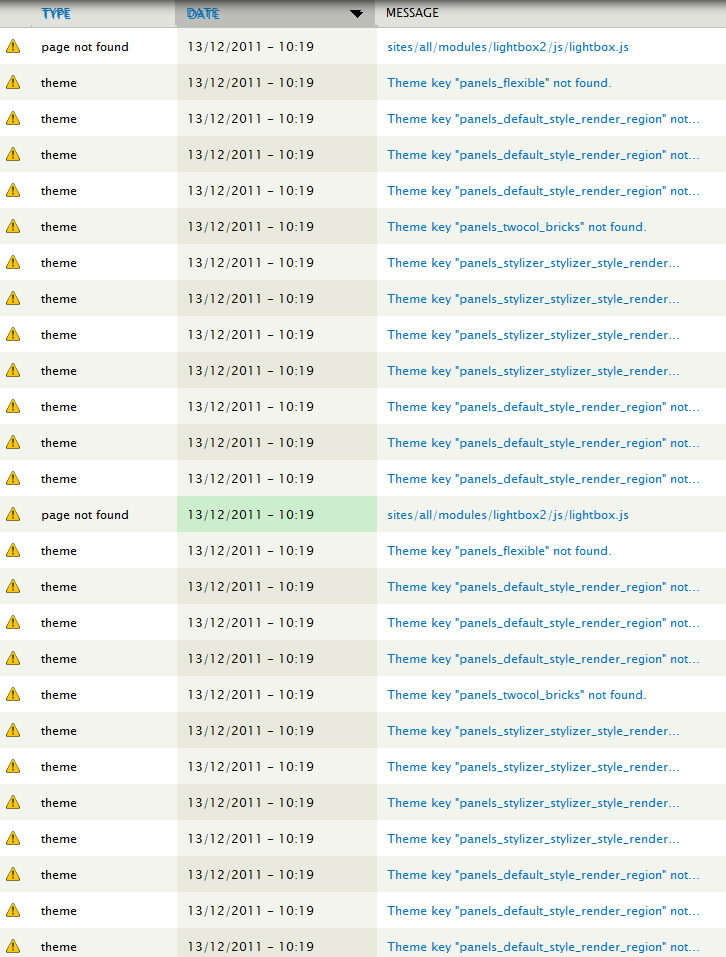
The attached file is a report of dblog. All errors that occurred at 10:19, are related to access one of the homepages. 95% of errors are related to Panels module.
Any ideas?
Comment #7
merlinofchaos commentedThis may be the issue: http://drupal.org/node/1359090#comment-5324720
Comment #8
astutonetI think this problem is related to DS module, because after disable the module, all is working again.
This issue should be reported there?
Tks.
Comment #9
merlinofchaos commentedThat may be a coincidence.
If it's what I linked, it has to do with the theme registry being rebuilt during maintenance mode and leaving all of the panel styles out.
Comment #10
Letharion commentedThe reason I closed this and referenced Panelizer is that the component was set to "Panel nodes". This issue has nothing to do with that module, so the closing and reference was completely irrelevant.
Comment #11
astutonet@merlinofchaos, you're right in #9. It's just a coincidence.
I did a test running update.php again and the panels disappeared.
I'll make the suggested test and return soon with the news.
Comment #12
astutonetComment #13
Letharion commented.
Comment #14
astutonetI did the following test:
I commented the lines 80, 81 and 82 of the panels.module file, as described here.
After this, I ran update.php and the panels pages are working.
Any ideas?
Comment #15
astutonetComment #16
merlinofchaos commentedOk, for the final test, what we need is an actual update hook that forces the theme registry to rebuild to see if a forced theme registry rebuild during update.php will break if that code is removed. If not, I believe we can roll a patch and commit this.
Comment #17
rlmumfordHaving this problem at the moment, made a style plugin but the 'render pane' function never seems to get called. I'm happy to write a patch for it, but I don't really understand whats causing the problem...
I can see where panels registers all the theme functions...
Comment #18
seandunaway commentedI just had a very similar issue, WSOD panels because of missing styles.
#1411550: Missing panel style check
Comment #19
camil.bancioiu commentedI was just debugging this, in Drupal 6, with Panels 6.x-3.10. I have the same symptoms: no content when the pane style is "Default". Here's what I found out, hopefully it helps.
The function "template_preprocess_panels_pane()" sets up the $vars["content"] variable, filled up with the markup you'd like to see in the pane as content, as expected. But it seems like this variable doesn't make it back to the "theme()" function. This means that the template "panels-pane.tpl.php" won't see a $content variable, so nothing gets rendered.
Now, I've lost my touch with Drupal due to some time of doing-something-else, but I remember using template_preprocess hooks and debugging them, and the variables that they set in their $vars argument are always accessible in the tpl.php file.
Am I chasing a white rabbit?
Comment #20
camil.bancioiu commentedSome context:
When you set the pane style to "Default", the style is actually left uninitialized, and saved to the database. When it's the time to render the pane, there's a separation made between panes with defined style, and those with undefined style (i.e. "Default"). This separation is made in
panels_renderer_standard->render_pane(&pane), and it's like this:theme("panels_pane"), which is a template fileWhen number 2. happens, the $content doesn't get to the tpl.php file, as described in #19.
Note: This is just one test case. I didn't get the chance to test & debug more. I can't see any, but there might be other causes too.
Hope this helps.
Comment #21
camil.bancioiu commentedQuick fix
The preprocessor
template_preprocess_panels_pane()insidepanels.moduledoesn't take its $vars as reference (as preprocessors should, if I remember correctly).versus
I added the ampersand and the pane showed up (since the problem described at #19 didn't happen anymore). Is this the fix?
Comment #22
camil.bancioiu commentedIt looks like the development version of Panels (6.x-3.x-dev) already has the
&$varsrepaired. Sorry for the noise, then.Comment #23
vasi1186 commentedThanks camil.bancioiu! I had the same issue, but because I had an older version of panels, the ampersand was not there. Now it works again.
Comment #24
dreamriks commentedI was facing the same problem and #21 solutions helped fixing it. In my case I was facing this because of difference in php versions of my live server and localhost.
Comment #25
yanecek commentedHi guys,
I got similar issue I guess. After publishing a panel I can see teaser only. I've checked content types for panels setting and it's set to full content, also styles are not set to default. Can anybody help ?
http://hnn.yan.webfactional.com/panel-test
I can provide admin access if needed
many thanks
Jan
Comment #26
korba commentedPatch from #21 works! Thank You for helping :)
As it goes to #22
I am not using dev version until it will be official recommended so Your post was very helpful.
Regards
Piotr
Comment #27
chrischinchilla commentedThe 'patch' in #21 worked for me to…
Comment #28
thumperstrauss commented#21 worked for me too. Thanks!
Comment #29
alex.bukach commented#21 worked for me too for 6.x-3.10. Thanks!
Comment #30
ajf__ commentedUsing 7.x-3.4 I'm still getting panels which do not render any content. The fix in #21 is present in this version, and I've tried the changing the panel style. Problem persists. Anyone else still getting this issue on version 7.x-3.4?
Comment #31
asb commentedThis bloody amerpsand can have weird effects. #2227433: After restoring database: Panels panes display as empty
A new recommended release, including the fixes from dev, would have saved me many hours.
Comment #32
dsoini commentedPanels version "7.x-3.4"
Panelizer version "7.x-3.1"
Also using Omega 4 theme if that matters.
I get no content on one of my pages. I cannot figure out what is different about this page. I even rebuilt the page, the content was displayed, and then it disappeared again.
Other pages display their content normally.
Comment #33
dsoini commentedOh wait, here's another clue: I set my page as my site's home page. When I set the home page to something else and visit the panelized page, the content is displayed.
Comment #34
rob230 commentedI have Panels 6.x-3.10.
I was working on a local copy and it was fine. When I went to change the live copy, there were some brief downtime issues and a short period in which the files directory wasn't writeable. When I try to make the same changes to the live version, there is no option to change the Style.
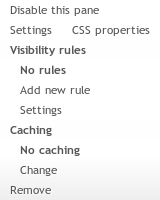
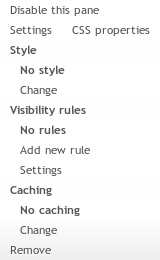
What it should look like:
What it actually looks like:
Notice the Style section is missing. The panels all show fine, but I cannot change their style. Any idea why? I suspect the cause could be related to this issue.
Comment #35
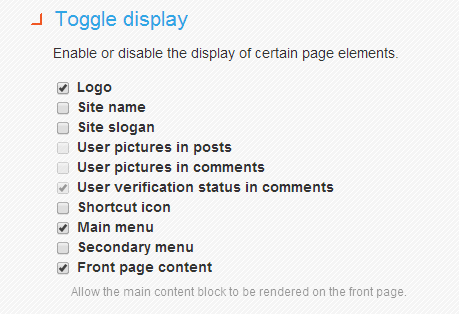
vj commentedI was also facing the same problem. When panel page added as homepage content was not showing. On little debug found " Front page content" in toggle display option for omega theme. Enabled this checkbox and my front page content was showing again.
Hope this will help someone
Comment #36
damienmckennaThis clearly is not RTBC.
Comment #37
Miegapelyte commentedPatch from #21 works! Thank You for helping :)
sorry, this is with drupal core 6.34 after running update.php
Comment #38
kopeboyGuys I'm having this exact strange problem.
I just noticed this because I used to have only a custom block on my frontpage (set to display on
<front>) and not an actual frontpage.Panel page content won't show up when the page (new or existent one) is set as the site's frontpage (either from panels config or site config).
This is at least major I guess?
I don't know what caused this..
Can we investigate further for Drupal 7 please?
In my panels.module the function is already
function template_preprocess_panels_pane(&$vars) {Comment #39
ibraaheem commentedMy site too is down and blank. Panels 7.x-3.4.
Comment #40
kopeboyMore information that might help.
May I put this as Critical to gain some attention please?
At least 4 people here are reporting the exact same problem (and Google isn't very helpful here since we don't get a proper error shown), and I guess not being able to show homepage content is a Critical bug for every Drupal site.
Please share your configurations to find the cause of the problem!
It's weeks I am struggling behind this :/
UPDATE SOLVED: Incredible.. I found I had this setting in my theme configuration (at /admin/appearance/settings/[my_AT_subtheme]):
Under Extensions > Markup Overrides > Hide or Remove: checkbox ticked at
"Do not display the Main content block on the front page"
"Checking this setting will remove the Main content block from the front page only - useful for removing the welcome message and allowing use of another block."
Apparently it would remove everything except for blocks placed from block configuration itself! I am opening an issue at Adaptive Theme to tell them to clarify that description.
Are the others using AT theme as well?
I am leaving this open for easier access but demoting.
Thanks and sorry..
Comment #41
kopeboyComment #42
kopeboyComment #43
Jeff Burnz commentedFor those using Adaptivetheme and running into the same issue as #40, please see #2406667: Clarify usage/description of Markup override feature "Hide or remove" on frontpage (content not showing), the theme includes a setting that will nuke the system_main block on the front page, regardless of its content.
Comment #44
Seraphemme commentedContents of Image fields are not showing up for me, instead the file location is displayed. This is happening on a regular node type (local site) -- not the front page. I've tried changing the style, but that didn't work. I'm new to Drupal and not a coder. Thanks.
**8/7/15 update: And nevermind. The images just showed up. I haven't changed anything. Shrug.
Comment #45
mikeocana commentedIssues on the 6.x-3.10 and 6.x-3.x-dev release,
in the 6.x-3.x-dev release the (&$vars) is included but in the stable version which is 6.x-3.10 the & is not included.
Comment #46
mmlmitchell commentedI just started having the kind of problem described in this thread. Please entertain my details:
I am running Open Atrium 7.x-2.50-rc1 on Pantheon with a sub-theme of OA-Radix (7.3-3.13). When I create new content using a panelized content type, the display is now not using the layout and content I make in panelizer. This just began happening. The nodes are displayed using the following class
"panel-display harris clearfix radix-harris". This is not the layout I chose.When I view nodes that were previously made using the same panelized content type, the display is correct. It's like something changed and all new nodes are not connecting with their panelized style.
I cleared all caches (configuration/development/performance) and I ran update.php. I downloaded the site to my local dev and manually truncated all cache tables.
And, I have searched the universe for answers. This thread is the closest thing I can find that fits my panelized woes.
Similarities between my problem and some of the comments above are as follows.
This problem:
Any ideas?
Comment #47
i2dotnet commentedI had a similar problem, i.e. panel content not showing... It was after using panel stylizer..
I investigated the problem looking for the origin of the problem, and found something interesting that I described in this thread https://www.drupal.org/node/2759869
Comment #48
japerryDrupal 7 is no longer supported, closing.