

Closed (works as designed)
Project:
Views (for Drupal 7)
Version:
7.x-3.x-dev
Component:
Code
Priority:
Normal
Category:
Bug report
Assigned:
Unassigned
Reporter:
Created:
17 Nov 2011 at 12:27 UTC
Updated:
12 Oct 2021 at 21:19 UTC
Jump to comment: Most recent, Most recent file

Comments
Comment #1
dawehnerWhat happens if you configure this filter, and save it?
Comment #2
johnvSame here, with same Views-dev (16 november 2011):
Case 1:
- create an exposed filter (to a user reference field);
- set it required;
- do NOT set 'Options';
- save --> Onscreen Error "No valid values found on filter: Content: User."
Case 2:
- create an exposed filter (to a user reference field);
- set it required;
- set 'options' to 'Select all', since this alllows adding new users later on.
- save;
- run the view: --> Watchdog error "Illegal choice all in user element."
The view page does not stop but runs continuously.
This might be related to / duplicate of #1177882-9: Exposed filters fire "An illegal choice has been detected. Please contact the site administrator." error.
dereine provides a patch in #9, which I did not test yet.
Comment #3
johnv[EDIT] For an export of the Exposed filter, see #7.
Comment #4
csuggs4 commentedSeems I'm having a similar problem. I applied the security update today, and now a pre-existing view (I hope that's nothing like a pre-existing condition!) is not working. I've set a filter for content type, of which there's seven nodes, but Views is telling me "No valid values found on filter: Content: Type."
It also won't let me save the display, but instead gives me that same error message.
Comment #5
dawehner@csuggs4
What happens if you configure the settings of content: type?
Comment #6
dawehnerBtw. you would do us a real big favor if you could provide an export which can be imported by anyone.
Comment #7
johnvHere is the complete view for #2, #3 :
The relevant filter is : /* Filter criterion: Content: Leverancier (field_supplier_ref) */
Comment #8
Toeterniettoe commentedSame problem here. Not only with content type, but with other fields I want to filter content on too.
Comment #9
medienverbinder commentedSame problem with content type: article.
This issue (#1) solved my problem => http://drupal.org/node/1252634
medienverbinder
Comment #10
johnv#1252634: No valid values found 7.x-3.x-dev (not empty filter) didn't help: I have the same filters for all displays, so no differences in Master display, and no broken links.
Comment #12
Toeterniettoe commentedHere it helped for the views I already tested, but I keep having problems with my new installed CiviCRM; in the debug messages it says:
Notice: Undefined variable: data in civicrm_views_plugins() (regel 6917 van xxx/sites/all/modules/civicrm/drupal/modules/views/civicrm.views.inc).
I suppose this has something to do with the views-module, and not with CiviCRM...
Comment #13
bossennec commentedHi,
I had the same problem with Views in Drupal 7.9.
My situation was the following.
My view has two displays. One for the frontpage, one for the RSS output (I'm using the Front Page View, provided by the Views Module). I wanted the page display to show only content of a certain type, but the RSS display to show any type of content. So, I needed the criteria only for the first one.
When I added the extra entry in "Filter criteria" for the Page display only (I thought), I may have forgotten something, or doing it wrong, because after deleting this criteria, to avoid the error message, I kept getting it. I checked the RSS display, and discovered that this criteria was also present with an "unknown" parameter. I deleted this criteria from the RSS display too, and the error disapeared. I tried to add once again this criteria to the Page display only, being more careful, and I don't get the error anymore.
Hope this may help.
Comment #14
mmncs commentedI have had the same problem and I got the error when I had two entity views with different node types in the bundle.
I have now separated them into two views and this works for me.
Comment #15
spoit commentedEnabling the master display in the views settings en checking that the content type filter was correctly set there fixed this issue for us.
Why exactly the master display lost its filter value for the content type filter... no clue.
Comment #16
csuggs4 commentedSorry to just now get back to you about this. I had assumed I'd get an email whenever a new comment was posted here, like what normally happens for me on drupal.org, but that never happened.
Anyhow, I just fixed the problem today: one of the displays (not the master) that I had not been using also had a content type filter, but was set to "unknown". I deleted that display and it seems to be working fine now.
Thanks.
Comment #18
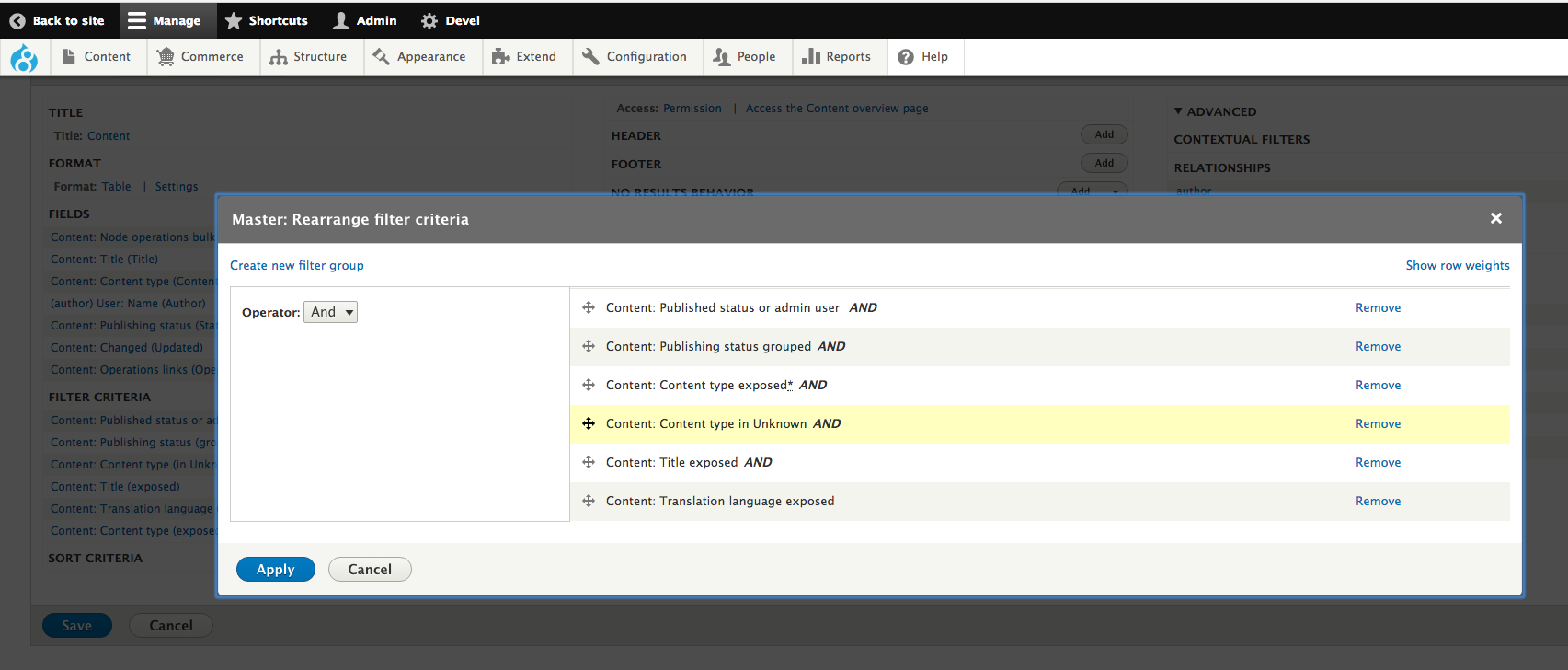
TahitiPetey commentedI'm running into this problem, and I *don't* have any Views with a Content: Type filter set to "unknown". In fact, this error still persists if I remove ALL Content: Type filters in all of my Views! I've tried Removing the filter and re-adding it, configuring the filter and saving, etc. and none of these steps helped...Okay, I figured it out. Go to admin/structure/views/settings and check "Always show the master display". The go back to the Views with that validation error and there will be a Filter with "unknown" content type. Either delete it or select the correct content type, and off you go!
Phew, I'm glad I got that one fixed :)!
Comment #19
tagesk commentedExcellent; struggled with this all morning.
[TaSK]
Comment #20
dawehnerClose as http://drupal.org/node/1177882#new is the same issue from my perspective
If you want to help please help us by explain how to reproduce the issue. Once this is done it's really easy to fix.
Comment #21
bensoi commented#18 worked for me. :) thanks!
Comment #23
netourish commentedThanks you @Summit for posting this and @TahitiPetey for the fix, It worked for me.
Comment #25
granticusiv commentedYay, #18 worked for me too. Thanks heaps
Comment #26
BrianLewisDesign commentedYep #18. thank you TahitiPetey. :)
Admin > Structure > Views > Settings:
[x] Always show the master display
Go to your view, refresh page, click on [Master] tab, find "Unknown" value in filter, set new value, save view!
Comment #27
Road Kill commentedThank you TahitiPetey this was driving me nuts.
Comment #28
rfleming5 commentedThanks! #18 fixed my issue
Comment #31
ramu_bharu commented#18 Worked for me,
Thank you so much...
Comment #32
Tamanda commented#18 fixed my issue too. Thank you so much for sharing.
Comment #33
elgarch commented#18 solved my problem thanks so much TahitiPetey.
Comment #34
IWasBornToWin commentedThe way to reproduce this is by deleting a content type where you already have a view which filters by that type. It then changes the filter to unknown. You either have to delete the part of the view or change the filter. Works as designed.
Comment #35
fraweg commented#18 Worked for me
Thanks a lot for this!
Best regards
Frank
Comment #36
Rosamunda commented#18 worked for me too! THANKS!!
Comment #37
mrcniceguy commented#18 Worked for me, Thank you.
Comment #38
Olara commentedHad the same problem but #18 worked for me. plus I figured out the cause of the missing filter was from a deleted content type...hope that helps some one else later
Comment #39
fengtanThanks #18, works for me.
Comment #40
suman.abc commented#15 worked for me. Thanks.
Comment #41
rcwalsh0 commentedThanks - #18 for me.
Comment #42
RAWDESK commentedI can confirm #15
Hard to believe this is still WAD in D8.3.7 ?
Comment #43
bloke_zero commentedI can confirm #15 as well - Drupal 8.6.13 - master view had a misconfigured filter, fixing that fixed the block display view.
Comment #44
dqdStill a bug as I found out by a test on Views in Drupal 9 world ... This auto creates a buggy master view in case you add a second page if you had filters on the previous page.
#20: No - Not a duplicate. Different story.
#18 and #43 is right.
We should re-open this or create a new issue and fix it in Views 9.x.x Drupal core.