

Closed (won't fix)
Project:
Date
Version:
6.x-2.8
Component:
User interface
Priority:
Normal
Category:
Bug report
Assigned:
Unassigned
Reporter:
Created:
19 Nov 2011 at 11:49 UTC
Updated:
7 Jun 2015 at 20:53 UTC
Jump to comment: Most recent

Comments
Comment #1
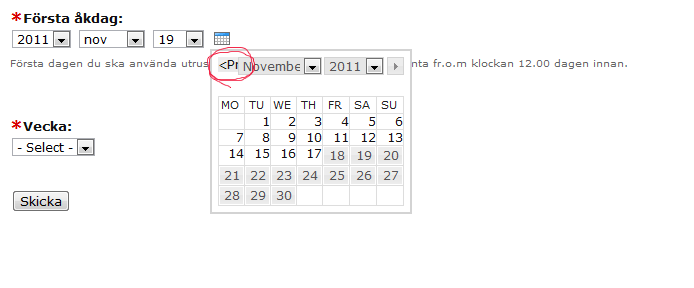
new_B commentedHi I have been experiencing this issue as well, in relation to using the Datepicker with Webform's date pop-up component. After doing a webform upgrade to the latest version, I started experiencing this issue due to the change in how the pop-up component behaved for min./max. date selections. This applies to Date 6.x-2.8 as well. My original issues was posted at http://drupal.org/node/1352014.
Can datepicker.css be updated to take into account situations when the earliest date or latest date possible are selected? The text, "Prev" and "Next" are showing up (not hidden) as in the screenshot provided in my ticket at http://drupal.org/node/1352014 as well as Boletus' one above.
Thanks.
Comment #2
new_B commentedComment #3
karens commentedWebform controls its own datepicker. I assume it also controls its own css. Date has nothing to do with the Webform datepicker.
Unless someone can demonstrate that something in the Date module is affecting this (and I know of no way that it could be), this is a won't fix for Date.
Comment #4
new_B commentedHi, Just following up with the reply. (Making it active again, in case it won't be seen if it's closed...)
Boletus did not mention use of webform though he is getting a similar issue.
Webform datepicker's popup component does use datepicker.css from the Date module so I believe it does affect it. From what I see (I may be wrong) datepicker.css does not take into account min/max. values in the calendar and incorrectly displays the "Prev", "Next" text even though there are no "Prev", "Next" destinations, when the min./max. dates are selected respectively.
This issue was made apparent due to a change in Webform's min./max. generated code behaviour; it use to display links that would go back to the beginning/end so the "Prev" and "Next" arrow images were displayed and were hyperlinked. In the updated Webform, the min./max. "Prev", "Next" options are not hyperlinked to anywhere.
The relevant code in datepicker.css:
So the "Prev" and "Next" text are only hidden if they are hyperlinked. With the min./max. date selected, in the updated webform module, the "Prev" and "Next" are no longer hyperlinked. The grey background box is showing up and the text "Prev" and "Next" are showing up instead of the arrows. So, either it needs to be removed altogether or greyed out with arrows.
Thanks.
Comment #5
jiv_e commentedThank you for your contributions! I'm cleaning up the issue queue. There has been no activity for a while on this issue so I'll close it for now. Please feel free to reopen if needed.