I have set a view, with the name as defined, and the module find the view as a link on the 'edit" mode. When displaying the node, nothing display.
Due to lack of documentation, i did try all possible options for the view:
- FIelds
- Display Suite (my preferred)
with Master, Master + Page or Block or Attached.
All works separately, but nothing displayed on the node.
I have the following modules installed:
- views 7.x-3.0-rc3
- field group 7.x-1.1
- field group views 7.x-1.1
- views fields 7.x-1.x-dev (2011-Sep-13)
- Field suppress 7.x-1.0
I appreciate any help.




Comments
Comment #1
Blooniverse commented... in my case I cannot even find anything functionally new in Views after the activation of this module. What exactly should show up there? I didn't get the description!
However, if you want to attach View data/output to nodes, why don't you make use of:
These modules seem to be quite promising!
Comment #2
Demiska commentedI can't find anything too.
Comment #3
fraweg commentedHello,
for me it is the same..What have I to do to make this module run?
Thanks al lot,
Frank
Comment #4
designingsean commentedAgreed. This looks like a module I need, but after activating it, I see nothing new in the Views UI, either for existing Views or newly created. What exactly are we missing?
Comment #5
zoraxsame thing, no readme file, nothing else in the view....
Comment #6
rohr commentedPlease add more to the description/documentation. This module can be read as having field group functionality in views.
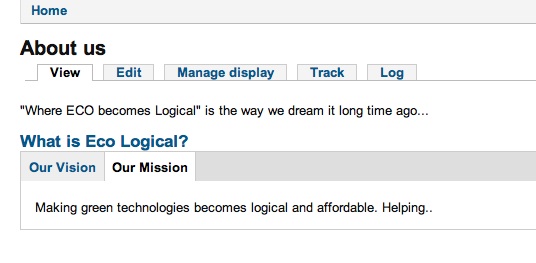
Apparently, I should be getting the "View" option on the content type as shown here from another person's example: http://drupal.org/files/CT-manage-display.jpg. Please add this image to the description or documentation, so that people know what to expect.
Unfortunately, I am not seeing this after installing. I see many others having the same issue.
Comment #7
jordan8037310 commentedI gave this one solid go, but alas, I could not get the content of the views to display on the node.
My steps
Comment #8
dgtlmoon commentedso this module is no good for example if you have a view:block of taxonomy terms, only suitable for when you can handle the output in the "Manage Display"
Comment #9
qasimzee commentedAre there any ways to use this module ? :)