

Closed (fixed)
Project:
Module Filter
Version:
7.x-2.x-dev
Component:
User interface
Priority:
Normal
Category:
Bug report
Assigned:
Unassigned
Reporter:
Created:
27 Nov 2011 at 21:40 UTC
Updated:
13 Feb 2012 at 21:10 UTC
Jump to comment: Most recent file


Comments
Comment #1
greenskin commentedThat is very interesting. What theme are you using? What modules do you have enabled?
Comment #2
klonosI get this too with core Garland as the admin theme. As for modules, the setup is pretty minimal: admin_menu, module_filter, i18n, variable. The "Administration", "Multilingual - Internationalization" & "Other" tabs seem to NOT be effected whatsoever. These tabs happen to also NOT render the module name/version in the yellow(ish) #FFAE00 color.
I wasn't getting the weird, somehow off-the-screen positioning with any of my modules as seen in the screenshot in the issue's summary with the Actions permissions module. So I went on and installed views_bulk_operations (that includes actions_permissions) and still didn't notice any such weird positioning. Then I even went on and enabled the same modules as in Deryck's screenshot (I didn't have admin_devel & admin_views enabled). Still the "Administration" tab was rendered normally for me:
By now ctools, entity and views/views_bulk_operations were added to my installation...
Comment #3
klonos...besides the "Administration" tab, these tabs are also rendered normally: "Chaos tools suite", "Multilingual - Internationalization", "Other" & "Views".
Edit: no reason to have the screenshots inline anymore now that we've found what the offending element is.
Comment #4
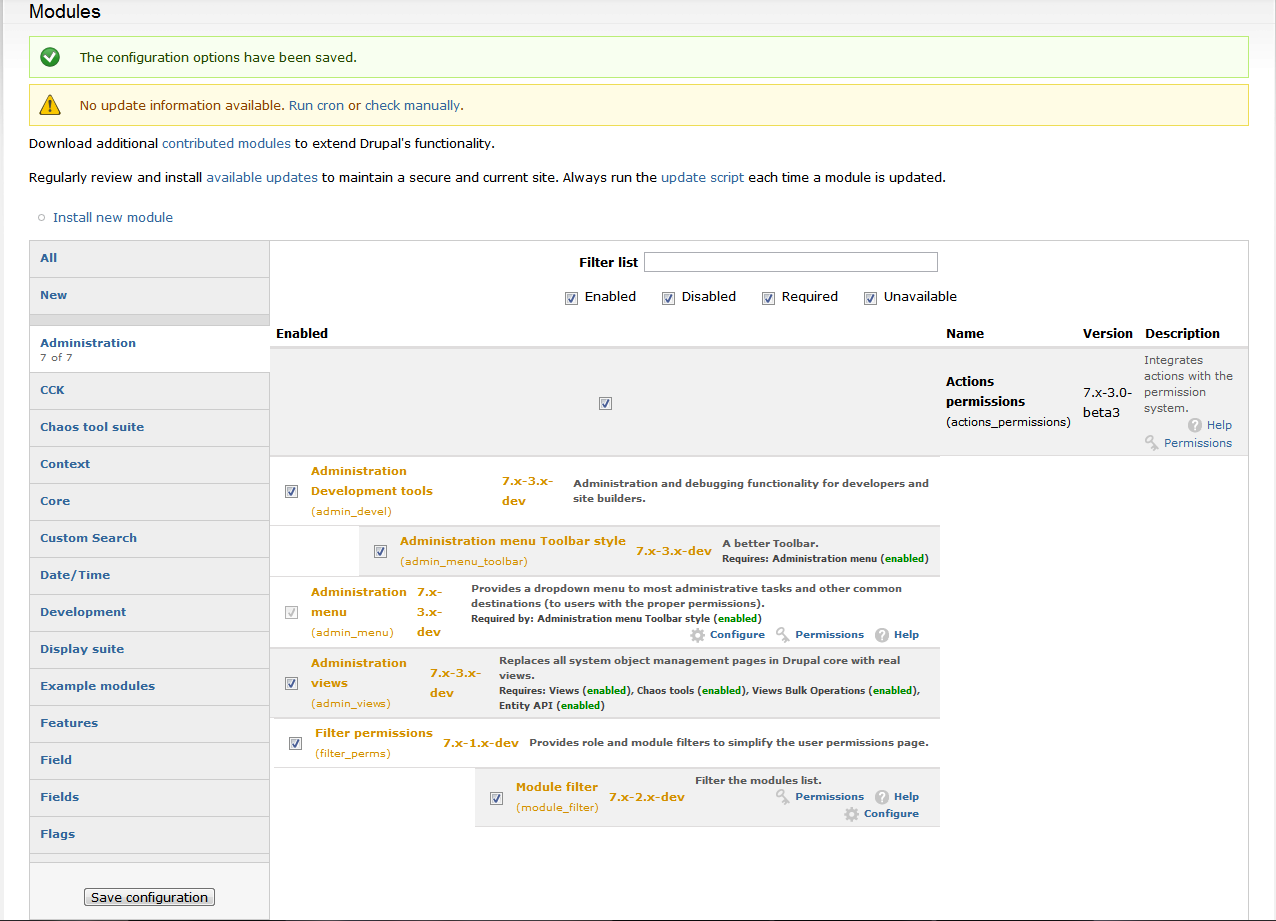
klonos...now, on to the ones with the issue. In the "New" & "Core" tabs, each row seems to be aligned to the right of the "Enabled" column and its width is set to as wide as its module description or its dependencies -whichever is wider-, thus leaving a white/blank space to the left of the same column. It only occupies the full width when one of these fields (+ module name and version) is wide enough to require line wrapping.
What these two tabs seem to also have in common is that they seem to render the whole row content (all table cells) under the "Enabled" column (intended to hold only the enable/disable checkbox). One can clearly see that the "Name", "Version" & "Description" being blank. This leads me to believe that loop that renders the cells is broken or fails to close some tag (...will check the page source and post more info in a while).
Now, as for the "All" tab,
it seems to render some of the modules normally, while others still seem to have the same issue as the whole "Core" & "New" tabs have (all table cells under the "Enabled" column). I fail to see any pattern in those that have the issue or the ones that don't...scratch that. Of course it will render some normally while others not - this is the "All" tab and it holds ALL modules from the other tabs. Those rendered normally in other tabs will still render normally here, and the other way around. So this leaves us with the "New" & "Core" tabs as problematic.Edit: no reason to have the screenshots inline anymore now that we've found what the offending element is.
Comment #5
klonosI managed to narrow this down to the offending class which is the "new" class added to the tr tags. If you remove these classes, the page is rendered just fine (though I guess the "New" tab will stop working).
This also explains the randomness between various installations, because "new" modules are different across them.
Trying to narrow it further down to the offending css rule or js...
Comment #6
klonosThe offending css rule seems to be:
...the
float: right;in specific. If you remove it (or commend it out) the list displays just fine.Now, we cannot change the core theme, so I propose we change the class we use to "new-module" instead (so we are less vague and consistent with "new-tab" at the same time).
Unfortunately, I cannot help with troubleshooting any further because none of my modules display as new any more ;)
PS: ...does anybody now of a way to reset their status back to new? I mean besides the obvious way of adding some extra modules that will be new - this is a production setup and I don't want to mess to much with it.
Comment #7
klonos...besides explaining the randomness, this also explains why some people might not be able to repro this one.
Comment #8
greenskin commentedThank you @klonos!! This patch should fix the issue.
As for reseting a module's status to new, do either of the following:
The 'new' status for a module is determined by the last edited/modified date of the .module file. As not all file systems keep track of a files created date, the best alternative is to check the last edited/modified date. Perhaps though it would be better to check the .info file rather than the .module file.
Comment #9
klonos...yeah no problem James. I've figured it out myself and have tried these changes before you posted the patch. The patch works just fine and fixes this. Thanx ;)
Comment #10
deryck.henson commentedSo klonos you da man, thanks for the patch greenSkin. I do believe the "new" status may be slightly malfunctioning though, as even my installed then enabled modules (that weren't updated later) are showing up in the new tab. And theres enough of them to rival my "all" tab.
However, that might need a new issue created and I also have since switched to HTML5 base themes that I'm building up from for my main project (which do not experience it, just as you mentioned already).
Thanks for the help. I'll be putting this to use on another project I'm doing for a friend. Not sure of issue-closing-status-updating ethics so I'll leave it the same for now.
Comment #11
klonos...ping? Can we get this in?
Comment #12
greenskin commentedhttp://drupalcode.org/project/module_filter.git/commit/c841d1ed3d5a4ab4d...
Comment #13
klonosThanx James! ...one less patch to babysit and have to re-apply each time ;)