Closed (fixed)
Project:
Deploy - Content Staging
Version:
7.x-2.x-dev
Component:
Code
Priority:
Critical
Category:
Bug report
Assigned:
Unassigned
Reporter:
Created:
31 Dec 2011 at 14:23 UTC
Updated:
20 Feb 2012 at 21:10 UTC


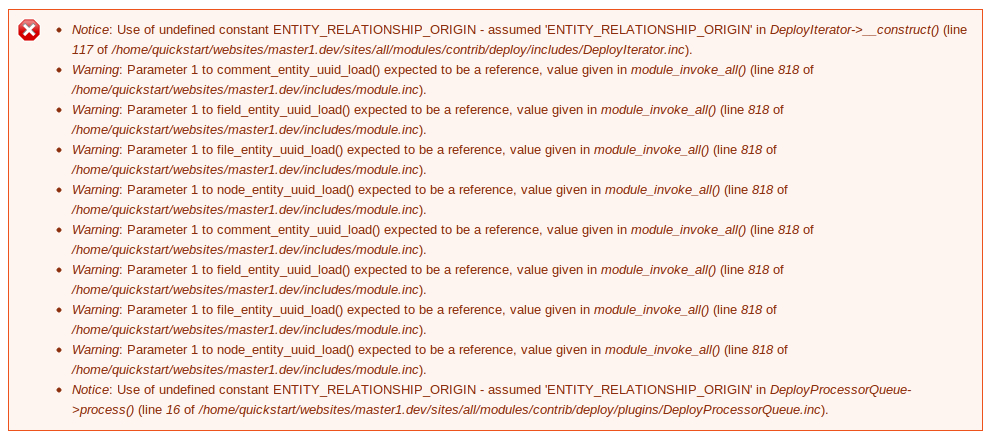
Using the default Deploy Features provided by the Deploy module this error occurs:
Notice: Use of undefined constant ENTITY_RELATIONSHIP_ORIGIN - assumed 'ENTITY_RELATIONSHIP_ORIGIN' in DeployIterator->__construct() (line 117 of /home/quickstart/websites/master1.dev/sites/all/modules/contrib/deploy/includes/DeployIterator.inc).
Using:
Drupal 7.10
UUID 7.x-1.0-alpha2
Deploy 7.x-2.x-dev (2011-Nov-21)
Services 7.x-3.1
| Comment | File | Size | Author |
|---|---|---|---|
| deploy-error-ENTITY_RELATIONSHIP_ORIGIN.PNG | 94.14 KB | silkogelman |

Comments
Comment #1
deanloh commentedJust like to chip in. I added a node to a plan and deployed it, apart from the same error message that I got, the node was never deployed over at all. I'm not even sure if I have done it correctly. In the receiving site, what exactly should I enter in "Path to endpoint" field? Do I just create a path, or it should be something already exist?
Comment #2
krdian commentedI have the same issue.
Comment #3
krdian commentedSo, there isn't any solution for that ?
Comment #4
webchickThis seems to block any successful deployments in the D7 version. Marked #1404358: Unable to deploy to another installation of Drupal 7 as a duplicate.
Comment #5
RMani commentedAny Solution for this . I really need this module to work .
Comment #6
silkogelman commentedENTITY_RELATIONSHIP_ORIGIN seems to be related to the UUID module
http://drupalcode.org/project/uuid.git/blob_plain/b9a48abbd02138f600d1bd...
Testing with latest UUID dev as we speak.
Update:
This issue seems to be solved after installing 7.x-1.x-dev (2011-Nov-20).
it does state that Deployment is successful, but I see NO content on de destination server.
Reports show me 'Login error: 404 Not found: Could not find resource user.' and
'Request response error: 404 Not found: Could not find resource uuid_entity.' in some tests.
I hope it's related to another issue or configuration error on my end.
People that want to help testing, there's step by step documentation now:
Deploy for Drupal 7 documentation
Webchick made a step by step install manual and a basic usage example (thanks!) and I added two basic usage examples today.
Comment #7
webchickWell, I tried to anyway. :) Doesn't mean it's right, since I have yet to get this working either. :D Nice find on the UUID-dev version. I'll update that and try again later.
Comment #8
RMani commentedIt did not work for me either :(
Comment #9
silkogelman commentedTried the setup of the installation docs, and the Deploy Feature setup.
No errors on deployment with that UUID dev, but the nodes are still not appearing on the destination server.
Also tried the latest Services 7.x-3.x-dev (2012-Jan-13) with the updated SPYC (make sure you enable the libraries module on the destination server), but that did not help.
I think Services doesn't have to be enabled on the Source server, and Deploy (UI) not on the Destination server, but I haven't confirmed that yet.
The only errors I can find are those from the Recent log messages Report on the Destination server (when using Deployments default setup Feature)
But that's probably something for another issue.
I hope someone can confirm this current ENTITY_RELATIONSHIP_ORIGIN issue is solved with their setup too.
Another one down, almost done :)
Comment #10
AlanGSMello commentedIt's finally working with dev versions of uuid and services (2012-Jan-20)!
Comment #11
silkogelman commentedThanks for the notice!
Confirmed: Deploying content works with the instructions of the latest installation guide and latest version of the 'Basic usage of Deploy' guide from http://drupal.org/node/1195682. (both the 'installing deploy' guide and 'Basic Usage Guide' are updated today, running cron was the missing piece for me :)
Comment #12
RMani commentedIt worked for me too :)
Comment #13
RMani commentedWith the recent upgrade its not working again :(
This unable to even add endpoints blank screen