IMCE is great. I really appreciate it. It is excellent for many sites where img_assist was overload (or wasn't ported to drupal 5 early enough!)
But, it's UI sucks. It defies about every usability rule that exists, and possibly has even caused new ones to be created. I maintain a travel site where travel editors write travel guides right into drupal, and upload their photos inline. IMCE is great for this, but unfortunately writers are writers for a reason, and they're not technologists for an even better reason. When I first checked out IMCE I thought, "Hmmm, this could be a tough block in the UI/UX for our authors and editors..." And left it at that, expecting to need more patience for this feature than others, but that they'd learn.
Today it only took me about 45 seconds of watching our head editor trying desperately to get some sort of achievement and respoonse out of IMCE's browse interface that I had pretend that it was broken, and that I'd let her know when "the problem was fixed". Of course I well knew that imce was in fact not broken, but her ability to interact with it's interface was the issue. However she can't be blamed for being unconfident with computer's, I'm an incompetent writer.
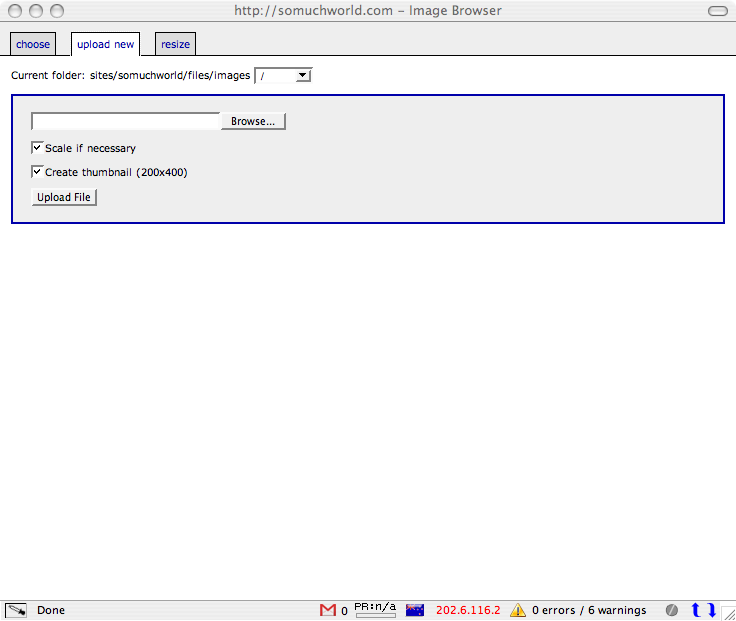
So anyway, I gave IMCE's browse interface an overhaul. Apply the patch to March 31st's dev release if you want to try it out. I'm sure you (and you usuers) will appreciate it!
I haven't tested it extensively yet -- that's partly what our authors and editors are for! I haven't done any testing in IE, as they're expected to use FF when doing content.
It's not perfect, there are a few things that still could be improved:
* a couple of validation errors,
** empty tbody (the table header and table body are sepeerate tables, and the header table has no body)
** id="upload/resizeform" are each duplicated twice. id's must be unique.
** I'll leave those for the IMCE maintainer to consider dealing with. I didn't want to change any ID's or classes as I'm sure there is javascript depending on those IDs.
* the 'resize' tab is blank unless you previously selected an image in the choose tab. It'd be good to disable the resize tab or tell the user to select an image first.
* the directory navigator is usable, but not intuitive. dtree / dhtml_menu / windows explorer files sidebar-style navigator would be more useful here.
* tabs could possibly be more intuitively presented as buttons on a toolbar.
* the design is very simple aesthetically, some graphics / icons etc could considerably further usability. I looked at using tinyMCE's tab interface, but it started looking complicated, and imce is not dependant on tinyMCE, but is optionally integrated with other wysiwyg editors.
Feedback appreciated! :)




Comments
Comment #1
dodorama commentedcan you please post some screenshots?
Comment #2
Bevan commentedSure thing, good idea.
Comment #3
Bevan commentedselect
Comment #4
Bevan commentedupload
Comment #5
Bevan commentedresize
Comment #6
Bevan commentedI found an issue recently where the new UI is broken if you don't have js extras enabled. I put the new UI functionality in the wrong JS file.
I would make another patch file, but I'm not sure if anyone is interested, or if this will make it into the next version of IMCE.
Can the maintainer of IMCE please give me some feedback on this and indication of it's destiny? Tks.
Also, are there any other users using or interested in this?
Comment #7
kvarnelis commentedLooks much better to me. No response from maintainer on an issue I raised either though so, until then, my IMCE is broken.
Comment #8
Bevan commentedYALM
Yet another lost module
I wish maintainers would at least take the responsibility to advise that they're no longer able to maintain...
Comment #9
ufku commentedthanks for the patch.
introducing tabs to IMCE was a feature i was thinking on for the 6th version. i dont know if it will be like yours. let more users try it and see what they think.
and 10 days of inactivity for a project is not enough to say that it is dead.
Comment #10
Bevan commentedSorry, you're right. I'm obviously a bit impatient...! I am quite frustrated about some (other) modules that seem to have been entirely neglected by their maintainers and are therefore completely worthless, as contributions stay in the issue queue. This isn't the right place to vent those frustrations though...
Comment #11
omnyx commentedbevan - nice job!
a quick question: i'm a newbie so I don't really know what to do with the .patch file? should i copy it somewhere or what?
also, the newest release of IMCE is from may15th but i presume your patch still applies to the new version?
thanks
Comment #12
Bevan commentederm, probably. I haven't tried. I think I did the patch against the devel version of the the moment...
http://drupal.org/patch
Comment #13
omnyx commentedbevan - i haven't patched anything before...i read the link you sent...so, to install with cygwin I need to put the patch (your file) and the file to be patched in the same folder. Now, what is the file that needs to be patched? Is it a specific file from IMCE module or what?
cheers
Comment #14
Bevan commentedthe patch file was probably made against the IMCE directory, as it covers several files in the IMCE module
Comment #15
keesje commentedCould you provide the patched module please?
I really like this initiative. The IMCE functionality is great, the looks not, improvement is welcome!
Comment #16
keesje commentedI would like to replace the 'add' and 'delete' options with Icons, could that be done?
I've attached 2 example icons...
Comment #17
Bevan commentedSorry I can't work further on this at the moment.
I hope the attachment helps you.
Comment #18
tomtom2007 commentedI made some additions:
* Larger pop-up window (950x600px)
* Larger file list area (300px)
* Better readability for file list
* Centered pop-up
* Nice graphics
Installation:
No code was altered (2-lines of additions). The rest was made via CSS.
The only thing you have to do is:
1. Download this: imce1.0-pretty.zip (from here: http://fps.gr/node/311
) .Unzip content to ...modules/imce (actual imce folder on server)
2. Clear your browsers cache and Done!
Optional: Enable by Admin>Settings>IMCE Settings>Enable Extras
..for sorting and other goodies.
Have fun!
Comment #19
lias commentedCool modifications and thanks!
Comment #20
mbria commented+1 for those changes. Usability improves significantly.
Comment #21
hedac commentedcool!
never forget user interface !
is it working for last 6.x ?
Comment #22
arlinsandbulte commentedMarking as a duplicate of #281967: Proposal for an improved UI
Comment #23
Bevan commented