

Needs work
Project:
Views Calc
Version:
7.x-1.x-dev
Component:
Code
Priority:
Normal
Category:
Feature request
Assigned:
Unassigned
Reporter:
Created:
1 May 2007 at 21:48 UTC
Updated:
10 May 2017 at 18:47 UTC
Jump to comment: Most recent, Most recent file


Comments
Comment #1
ray007 commentedsubscribing
Comment #2
moshe weitzman commentedSince D6 Views has grouping, this is more likely to be implemented there (if at all).
Comment #3
karens commentedActually, Views won't do any totaling of the group values, so we still need something else. But hopefully the new grouping in Views 2 will make this easier to do.
Comment #4
GregoryHeller commentedI noticed this too. If you select a field in the "Grouping Field" drop down in the "views calc style" settings in views2, the view will be grouped by the field you selected, and the views calc "total" line will show up at the bottom of each "grouping" of nodes, HOWEVER the total will always be the total of all rows! So if you have 5 groupings of a total of 25 nodes, and you are summing a column where the value of all the fields is "1" (thus the total sum is 25) this total will be shown below EACH grouping where one would expect to see a "sub total"
Comment #5
cardentey commentedsubscribing :-)
Comment #6
PRZ commentedsubscribing
Comment #7
gunzip commentedsubscribe. there's another module that does this anyway: http://drupal.org/project/views_groupby
but it's in early developement stage. maybe joining forces ?
Comment #8
wundo commentedComment #9
strykaizersubscribing
Comment #10
visualnotion commentedI've been racking my brain to figure out how to get this functionality only to find out it may not be possible, right now. Any ideas of how to group and total like Sun requested without Views_Calc?
I've got a sports league site I'm trying to finish developing and I was hoping to do a write-up on how it was done (seems to come up every now and then without a decent solution to date).
Any help in getting this implemented would be appreciated.
Comment #11
karens commentedThe views_groupby field works totally differently than views_calc so I don't think they can be combined. Plus it only does counts.
We already have the grand totals and subtotals, so the remaining request would be an option to hide the source data and display only the totals, which should be fairly easy to add.
Comment #12
karens commentedAs to #4, we have both grand totals and sub totals for each page (a recent change to the code).
As to #10, there are no easy alternative ways to do that, that is the purpose of this module. I use Views Calc extensively for things like sports team totals (see http://www.everbloom.us/results for some examples).
Comment #13
karens commentedHmm... well there are actually a number of different things noted in this issue. I just added an option to surpress the details and show the totals only and it now shows both subtotals and grand totals. The one thing left is the original issue, which I mis-read or misunderstood, to be able to group by a field and then to calculations on that total. That is not yet implemented.
I'm going to push out a new release with a number of bug fixes. This feature will take more thought so it won't go in and will remain a feature request.
Comment #14
Daniel A. Beilinson commentedHi, KarenS!
I try to get sum of money cck fields. And when i try to add to my table field with few taxonomy terms i see few rows with one term in one row. If i use group multiple values option i see sum of all rows without grouping multiple values... Can you fix it?
P.S. In new version i choose only sum and module gives me Total COUNT, Total SUM, Total AVG, Total MIN, Total MAX. Can you fix it?
Comment #15
karens commentedPlease don't dump unrelated issues together, this is about a feature request for grouping. There is another issue about problems with multiple values and the project page says this is a known issue. The last thing is a bug that got introduced in the last commit, but it didn't belong in this issue either.
Comment #16
introfini commentedsubscribing...
Comment #17
jrust commentedSubscribe
Comment #18
klahaeck commentedSubscribe
Comment #19
digitalproductionart commentedSubscribe
Comment #20
aren cambre commentedsubscribe. This would be quite useful. If I turn on grouping, I get no calcs at all on certain fields.
Comment #21
seabrawk commentedsubscribe
Comment #22
seabrawk commentedThis isn't the same as displaying all the info on one page at the same time and so probably doesnt work for most of you, but you could create a grouping "taxonomy" for each thing you'd normally group, and and then expose that filter in your view as a selectable list...
Comment #23
li8461 commentedsubscribe
Comment #24
JamieR commentedSubscribe
Also, incase anyone is interested, I solved my need to total a grouped field with a theme override function for my view... it ended up looking like this:
In a template file named views-view-field--field-charge-amount-value.tpl.php.
Hope that helps someone!
Jamie.
Comment #25
JamieR commentedI had someone ask me to explain this in a little more detail, so here goes.
I'm using this technique to total a CCK field that allows "Unlimited" values. You can total it in a view created by the Views 2 module, or in the normal node view. I'll just show how to do the Views 2 one. But I highly recommend installing the Advanced Help module. After installed, you can look to the CCK help page for info on how to theme the node view (help/content/theme-field-templates).
The field that I wanted to total is called
field_charge_amount.It shows the active template that is being used in bold.
views-view-field--field-charge-amount-value.tpl.phpto your theme (/sites/default/themes/your_theme/). You just pick the name of the template that fits the amount of specificity you want for the field. Anyway, at this point click on the Field name at the beginning of this block to get the template file contents. Mine looked like this:drupal_set_message("<pre>".print_r($row,1)."</pre>");. You should be able to see just the important variables like this:drupal_set_message("<pre>".print_r($field->field_values[$row->node_vid],1)."</pre>");Hope that helps someone. Theme overriding can do some amazing, super useful stuff. Totaling a field is just one. :)
Let me know if you have any questions. Thanks! Jamie.
Comment #26
seabrawk commentedFirst of all, thanks...
Secondly, I made it all the way to "updating the theme registry and reload the theme info page on the view to see if the bolded theme has changed to yours."
However, it never changed the bolded theme to mine, even after creating a txt file named (in my case) "views-view-field--field-stat-nonpass-td-value.tpl.php," which contained the default php text, and was placed in my "sites/default/modules/views/theme/" directory...
Lastly, From where does one run this command: "drupal_set_message("
");"
Thanks again for all the help, and sorry if I am asking rudimentary stuff...
Comment #27
JamieR commentedNo problem. The theme template file that you just made would go in /sites/default/themes/your_theme_name/ ... not in the views module's theme folder.
Then to answer your second question, the set message goes into that theme template file that you just put in there... Make sense?
Let me know - good luck!
Jamie.
Comment #28
doknet commentedI made a new post, with a matter related to this.
I want to get a view (with views_calc), with a table that adds a given number field giving separately the subtotal for each group of nodes.
http://drupal.org/node/566714
I desire obtain the sum of values in a given field, separating the subtotal for each content type grouping they belong.
I appreciate the cooperation of the members of the forum.
Sorry for my English
Thanks
Comment #29
aren cambre commentedPlease start a new issue for new questions.
Comment #30
akolahi commentedI'm not sure if this is helpful, but perhaps to help prevent reinventing the wheel, it may be worth mentioning that the Charts module (http://drupal.org/project/charts) is able to perform the following operations from views groupings: sum, count, average, minimum and maximum. The user provides the grouping field, the operation, the field to perform the operation and the field to aggregate the results on. Works well with views.
Perhaps the code may be helpful in getting similar functionality into views calc. Just a thought.
Comment #31
doknet commentedThanks
Comment #32
seabrawk commentedFinally...
its a views patch, so obviously its not a supported thing, but if you NEED it:
http://drupal.org/node/396380
The fix in #29 did exactly what I needed...
Comment #33
tteller commentedsubscribe
Comment #34
tteller commentedHi JamieR,
I think your solution would be a good workaround. I've done what you've said, but thinking about it how do I get the Sum row with your calculations?
I have a computed field that the value is generated from the CCK content creation page (form) and stored into my database as field_rip_points. I'm displaying them as a column in my View. Summing them is the problem for each user.
How do I create the Sum row? Or is that what the CSS wizardry you have to do? Oh, and do I create a new content type to hold the value of the summed field_rip_points?
Thanks in advance.
Tim T
Comment #35
henrijs.seso commented+1
Comment #36
browlands commented+1
Comment #37
henrijs.seso commenteduse latest dev versions of views 3 and ckk 3 to get what you need now
Comment #38
patrickfrickel commentedDid what you suggested and found out that views 3 is only for Drupal 7. heart breaking false hope.
Comment #39
akolahi commentedI think there is a views 3 for drupal 6 as well. Did you look on the views project page?
http://drupal.org/project/views
Comment #40
calbasiYes, there is a Views v.3 but it is an alfa version: Not recommended for productive sites :-(
Comment #41
iSheng commentedI want to know the solution too
Comment #42
jackfoust commentedRegarding the problem in #4 that was mentioned being resolved in #12, how do I make this work? I am at 6.x-1.3, but still seeing the grand total sum being printed on each sub total sum line.
Comment #43
bobgeier commentedSame problem as jackfoust. This thread is very hard to follow because of the multiple issues; was there a solution other than the theme function kludge?
Comment #44
rlnorthcuttThis is great, and I have it working... but the code you post doesn't print anything except "none"... I have been able to get it to print the $data of the field, but can't get a total.
thoughts?
ron
Comment #45
truyenle commented+Subscribe
Truyenle
Comment #46
bsztreha commentedsubscribe
Comment #47
murzCan I get not total, but per group values of views calc with http://drupal.org/project/views_groupby module?
Comment #48
basvredelingI created a patch for views_calc to get grouping to work. So no more theme-based work-arounds or patching of the views core.
Please note that I also applied this patch: http://drupal.org/node/776848
Comment #49
peterparker commentedI am trying to use the patch in #48 but it appears to end unexpectedly in the middle of a line.
Comment #50
basvredelingDid you apply the patch to the latest dev? I tried it just now with a new checkout of cvs /contributions/modules/views_calc [HEAD] using eclipse. Worked flawlessly.
Comment #51
peterparker commentedI did. I might be uneducated about patches and how they work, but when I look at the file linked above it ends in the middle of a foreach statement. Am I missing something or is it normal for a function to end without closure?
Comment #52
steel-track commentedI just patched the latest dev version and I am getting the following error and no calculations:
warning: Invalid argument supplied for foreach() in [installation location] on line 188
Any idea what might be going on?
Thanks!
Dave
Comment #53
basvredeling@peterparker The patch only describes which lines are altered. The ones with + and - signs at the start are the only lines that actually are written to the patched file. In other words: the patch doesn't need to "end with closure" because the closure is in the patched file. And that closure remains as it was before patching.
@steel-track line 188 in which file?
Comment #54
peterparker commentedI got the patch to work, thanks for the primer.
Tested it and got an error on line 188 of the theme.inc, presumable just like steel-track.
I took a look and found a $$ which looked out of place (things looking out of place is the limit of my knowhow for the moment). Then again changing that and clearing the caches didn't help.
Comment #55
basvredelingThe data passed to the foreach statement is probably empty. Are you sure you created a views_calc view using at least 1 calculation? And are you sure you've grouped the view?
To avoid the error try wrapping the foreach statement running from line 188 to line 225 into an
if ($$process)or anif (is_array($$process))so that it reads:Comment #56
peterparker commentedI am in fact using a grouping field and am performing at least one calculation. I also tried performing a count on all of the fields too.
I made the changes recommended in #55 and the errors have gone away, but the view does not display any calculations.
Comment #57
steel-track commentedI can maybe take a look at it more myself over the weekend, but it's good to hear I'm not the only one with the issue.
But yeah, I am experiencing the EXACT same issue as peterparker. I have grouped and done a calculation, and yet I am getting that error and no calculations made.
Maybe it's an issue with what we are grouping by? I am grouping by a timestamp that I am changed to have a granularity of month in the field settings. What are you trying to group and calculate peterparker?
Comment #58
peterparker commentedI am grouping by date field and am trying to calculate the sum of decimal fields.
Comment #59
steel-track commentedI have read that some people have had issues running SUM on decimal fields in Views Calc, so that mightbe a different issue.
However, if you are using a date as well to group, that might be the key to this issue. Maybe there is some sort of issue with gauging granularity of each group?
Comment #60
basvredelingIf you folks could export the problem into a feature, and mail me the feature (or attach it to this thread). Then I can try debugging it.
Comment #61
basvredelingComment #62
askibinski commentedI can confirm the patch at 48 works with one small fix. See new patch included.
In patching theme.inc:
Should be:
Note: I didn't need the patch at #776848: Calculate subtotals for non-node views, e.g., Ubercart orders.
Comment #63
basvredelingThanks for the addition askibinski. Patch seems to work as meant.
Comment #64
Tokoh commentedThanks everyone for the work on the view calc module. I have been trying to get grouped totals for my app and the patch at #48 and its minor amendment worked, with the problems cited with respect to foreach warning problems if no sums are included.
However as I introduced more data I realised that I need to use the View's pager feature and unfortunately it broke the patch (maybe it also doesn't work with unpatched view calc but I haven't tried this). With the pager feature invoked each group total (say called a TOTAL SUM in bold) is preceded with a new total (say called a Page SUM in normal text) which in fact is the grand total of that column for the application. Furthermore the pager links do not appear at all at the foot of the page and consequently you cannot access pages past the first page.
Although I'm an experienced programmer, I'm still pretty new to Drupal and to PHP. But I need this problem fixed as grouping and totaling are critical to my application. I will spend as much time as it takes to fix this problem, but I'd be interested in hearing from others who might be grappling with/have solved this problem.
I think view calc is a really vital module for Drupal Views and would hate to resort to custom code when others can leverage off this initiative, but I'm interested to hear other views.
Comment #65
basvredelingI don't really like the grouping solution I posted above. After giving it some thought I reckon the best way to rewrite the grouping support is actually run completely different queries. The way the grouping support works now is actually a loop of the normal views_calc calculations. This results in a couple of empty tables with just a "total" row. What we'd like instead is a single table with the grouped results on each row and a total row at the bottom. It would require a complete rewrite of the grouping patch and probably a partial rewrite of the module. The "grouping" check should be earlier in the process, before the database is queried. And not in the theme.inc, where it currently resides.
Comment #66
miro_dietikerSome rework happened in the core of views_calc. It should be some cleaner now.
I'll open a views 3 branch soon. Due to the new features and current dev state i'd expect something like grouping will officially not be supported by views_calc with views 2.
If you like to push this feature, check views 3 capabilities and start helping us port things cleanly to views 3.
Comment #67
inky@inky3d.com commentedThanks! The patch in 48 with 62's update works for me.
Comment #68
jhodgdonAh, I wish I had seen this issue...
Here's another patch for Views 2, which adds support for grouping. It works well for me... It also adds some additional theming capability, so you can theme the label of the summary rows.
It takes a slightly different route than the patches above.
I am not yet using Views 3, and when I tried migrating to Views Calc 3.x-dev and Views 3.x-dev, the views I am using completely didn't work even as a starting point, so I'm not all that interested in working on the 3.x port at this time...
Anyway, maybe this patch will be useful to someone, and maybe you'd consider adding it to the 1.x branch so at least grouping would be supported.
Comment #69
jhodgdonSomehow the change for theme.inc didn't make it into the last patch. So this additional patch needs to be applied... still getting the hang of the git workflow... sorry!
Comment #70
acouch commentedI tried a different approach to this for Views 3.x, performing calculations on the field output instead of using SQL, that might be useful for some folks. Let me know if you have any thoughts or feedback: http://drupal.org/node/1083142
Comment #71
ayalon commentedAttached you find a patch working with Views 3 and 6.x-3.x-dev ViewsCalc.
Diesplaying of Subtotal for each group is possible.Based on #69
Comment #72
pragnatek commented@jhodgdon: can't get your patch to apply to:
patching file views_calc_table.inc
Hunk #1 FAILED at 10.
Hunk #2 succeeded at 18 (offset -2 lines).
Hunk #3 succeeded at 33 (offset -2 lines).
Hunk #4 succeeded at 44 (offset -2 lines).
Hunk #5 succeeded at 59 (offset -2 lines).
Hunk #6 FAILED at 83.
Hunk #7 FAILED at 96.
Hunk #8 FAILED at 114.
Hunk #9 FAILED at 165.
Hunk #10 succeeded at 187 with fuzz 2 (offset -10 lines).
Hunk #11 FAILED at 197.
Hunk #12 succeeded at 229 (offset -24 lines).
Hunk #13 FAILED at 243.
7 out of 13 hunks FAILED -- saving rejects to file views_calc_table.inc.rej
applied to views_calc 6.x-1.3.
Any ideas - I'd like to try this? Thanks
Comment #73
jhodgdonSorry, I gave up on Views Calc with grouping. It doesn't work well with calculated fields from other modules, and that's what I needed. So I ended up creating a simpler table with column sums views style plugin that works better for my purposes. If anyone's interested, post here... it should be up on d.o in a sandbox as soon as I can figure out Git, and I can post a link (although the sandbox project will have several other components to it).
The patches above were against the 6.x-1.x dev branch, not against 6.x-1.3 specifically, so that could be why they don't apply, or maybe the dev branch has been updated since I made the patch.
Comment #74
pragnatek commented@jhodgdon: thanks for the update and yes, of course, we'd be interested to see your dev solution up on d.o. Thanks
Comment #75
jhodgdonThis is the sandbox project I set up, which has my "add up a column in a table" views style plugin as part of it:
http://drupal.org/sandbox/jhodgdon/1100780
Comment #76
pragnatek commented@jhodgdon Thanks for sharing this.
Comment #77
k3n3dy commented#68 and #69 worked for me.
Drupal 6.22
Views 6.x-2.12
Views Calc 6.x-1.x-dev (2011-fev-25)
Comment #78
MBroberg commented#68 and #69 worked for me when details are showing but not when I hide the details and want just the group results.
Comment #79
sdsheridanRe. #62, I had to make a couple of small alterations to the code in views_calc_table.inc after applying the patch to 6.x-1.3 to get it working. Not sure if these things had already been done in the -dev version at the time this was being discussed, but... Both of the changes were to the function query_sub_total as follows:
$this->view->query->orderby = array();after the code that also cleared the fields array. This made my unknown column issue go away.node.nid, but the line above it hadn't been commented out, thus having both limiting clauses in the WHERE clause. So, I commented out that line.The result is the function below:
I'm now getting group sub-totals with correct sub-totals. Unfortunately, the overall totals are not showing up... anyone else experiencing that problem?
Shawn
Comment #80
westie commentedsubscribe
Comment #81
delty commentedI attempted to use the patch in #71. It applies to the 3.x dev version OK, and I get the subtotal rows in the view, but nothing is calculated. I don't get any errors either. Had anyone else tried the 3.x dev patch and were you able to get it working?
Thanks,
-=Delty
Comment #82
daniels____ commentedsubscribing
Comment #83
frishaynes commentedI managed to port #71 to version 7.x.1.0 and attached the modified files to display group totals. :)
I'm sure it can be refined as I just made it work, especially views_calc_table.inc line 323 as I don't fully understand how the theme() function works in this context.
Comment #84
portulacasubscribing
Comment #85
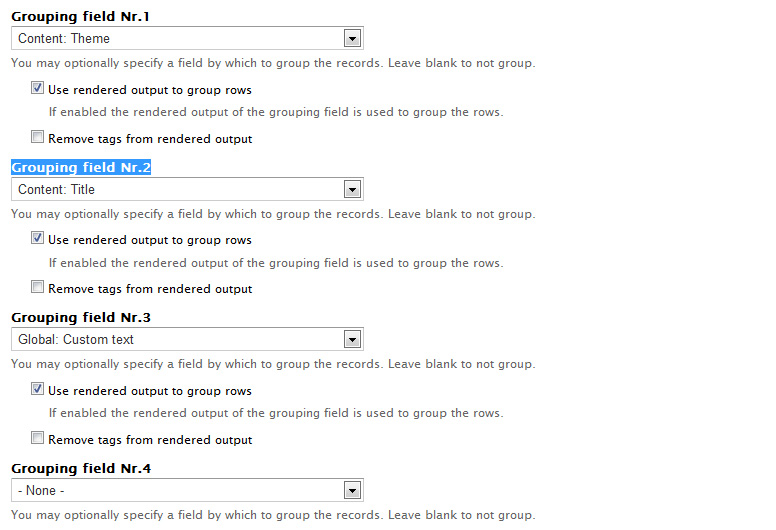
Sinan Erdem commentedI tested the files on #83. They work as desired if you do only one grouping. If you select another grouping field (Grouping field Nr.2), the fields are not displayed correctly.
Comment #86
petednz commentedCan anyone confirm if the patch in #83 has been committed at all?
I see the 'dev' release is showing as older than the released version which has me scratching my head.
Thanks for any updates.
Reason for asking is I want to use 'grouping' on a Calc Table such that the sub-total for that grouped set of rows shows - whereas currently it gives me a Total row on each Grouping of results, but that Total shows the Total for all results, not just those that are 'grouped'
Sounds like #83 is what I might need
Comment #87
petednz commentedJust to confirm - i used the files supplied in #83 and updated my Views Calc module with them - and hey presto i have a Total row for my Groupings that is only summing those rows - plus an extra Total at the bottom of the last Grouping with the grand total.
Not sure if that counts as 'reviewed by community' - but it is doing what I expected at least for Sums. Thanks @ frishaynes and ayalon and others who may have contributed earlier in the ticket.
Can/should this be committed?
Comment #88
Andrew Edwards commentedI can confirm (as per #85) that there is a problem with the files on #83.
All works well if using only 1 grouping. Works with pagination too, which is great!
Using 2 groupings breaks things though. Tables lose all of their values (each table cell is empty). The extra tables that should be created for the second grouping do not appear.
Comment #89
adamtong commentedI can confirm the #83 is working well on only 1 grouping. if more than 1 grouping, the situation is the same as #88.
Comment #90
fmesco commentedThe views style plugin in the sandbox project from #75 worked like a charm...Gave me sub-totals by group and then a grand total at the bottom. I just wish there was a way to include it in the views_calc or even regular views module, because I really don't need all the other modules that you have to install to use it.
Using
Drupal 6.28
Views 6.x-2.16
Comment #91
hallg9999 commented#83 - Thanks for sending out the attachment. Now I can total Views with group fields. One thing to note is that the label "Total" does not specify the calculation type (i.e., Total Sum, Total Avg, etc.). This can easily be fixed my modifying the theme.ini file. On the "views_calc_table_total" function, concatenate the Total label with the $calc variable (contains the type of calc):
$Total_and_Calc = "Total" . ' ' . $calc;
$label = t($Total_and_Calc, array("!Calculation" => $calc));
Comment #92
hallg9999 commentedThis patch is in response to #83. Ability to group field and also displays the Total labels (i.e., Total AVG). In #83 you can group by one field, but the type of calc label was not displaying. This patch also fixes the label issue.
Comment #93
hallg9999 commentedComment #94
Anonymous (not verified) commented#92 works for me. I applied the patch manually. Cheers!
Comment #95
jiakomo commentedI am getting errors applying #92 to current -dev
Comment #96
jason.fisher commentedProbably related to the patch altering CHANGELOG.txt?
Comment #97
deejmer commentedI'm in pretty critical need of grouped totals, but I am getting errors applying #92 to current -dev as well.
I attempted to apply it manually like rhclayto did, but found it too difficult as i'm a newb with patching. Maybe @rhclayto, you can share your entire views_calc directory including the patched files themselves that I can simply deploy out to my site?
I'm stunned this hasn't been applied to the main module yet as it seems like basic functionality.
@hallg9999, maybe you could update your patch to work against the latest dev?
Thanks in advance...
Comment #98
karens commentedThe D6 version is no longer supported.
Comment #99
Anonymous (not verified) commentedSince 6.x is no longer supported, & this functionality is still not included in the 7.x branch as far as I am aware, & the patch in #92 is for 7.x & works for me, I am changing this to 7.x-1.x & marking as RTBC. It would be great to have this added.
Comment #100
Anonymous (not verified) commentedAdding a patch for the latest 7.x-1.x-dev cloned from git. This is based on the patch at #92, which did not apply cleanly: it looks like that patch was based on 7.x-1.0, & also had a lot of extra stuff, looks like it was made against an already patched 7.x-1.0.
In addition, I've added the ability to have the totals label for grouped totals specify 'subtotal' or 'total' depending on whether it is a group total or the final total, & also maintain the ability to have the label 'page total' for paged views, which was lost with the patch at #92.
Note: This does not apply against the dev version I downloaded in the gz archive on the project homepage as of 3:35Am, 16 February 2014.
Please review & hopefully this can get committed, since it's an important functionality that has been desired since 2007!
Comment #101
Anonymous (not verified) commentedAn issue I found: When using this patch with a view of pager type 'none' (Display all items'), the 'Page' total labels usually displayed on paged outputs will display on every group (with blank values, since it's not really paged). I isolated where the problem lies & made a quick fix.
In
theme.inc, withinfunction template_preprocess_views_calc_table(&$vars), I made the following change (commented line is original, following line is the fixed one):This simply checks if the pager is 'none' (
views_pager_plugin_none). If so, it skips the Page subtotals.Comment #102
uwe mindrup commentedI have tested #100 and #101 together with the git-version of views_calc from today and can say, it works very fine! I have a big table with several number columns grouped by classes. The results page shows my tables wonderful with a subtotal SUM at the end of every group-table and a Total SUM line at the end of the last table. Very good! It is exactly what I need.
It would be great to have this functionality in the next views_calc release.
Comment #103
Anonymous (not verified) commentedUwe, great that it works for you. Since the patch I supplied is really just a re-roll of the patch at #92 to get it to apply cleanly to the current dev (with a couple simple extras), & that version has been tested & found to work by several people, I will mark this as RTBC.
Comment #104
AndreasST commentedI applied #100 and #101 manually to 7.x-1.x-dev from Feb 15th 2014
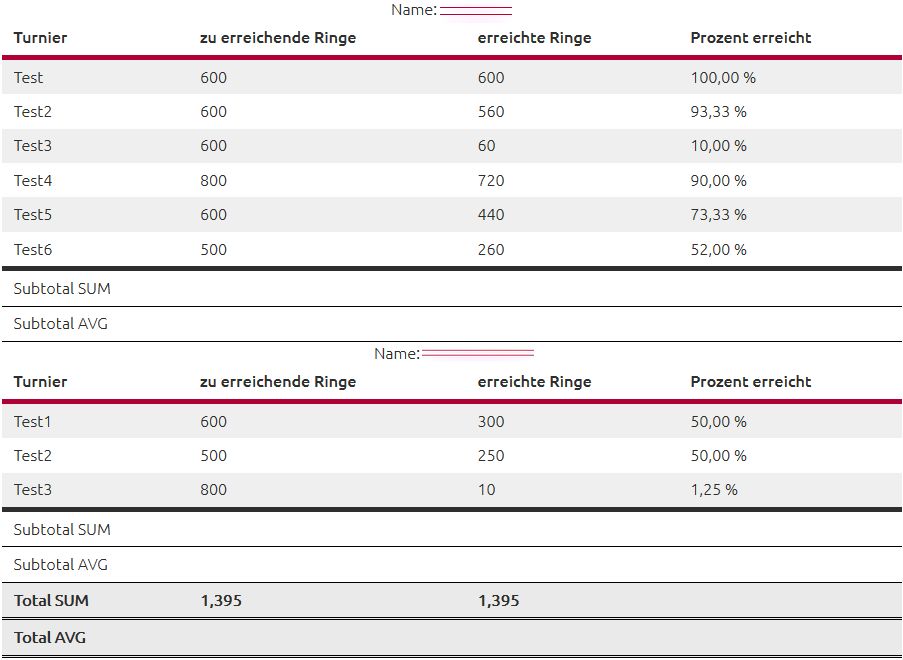
In a view i added submitted fields from a webform and added a computed field ([erreichte_ringe]/[zu_erreichende_ringe])*100 - see screenshot.
1.)
I only get wrong an no calculations on SUM, AVG, ...
The wrong calculations where there before applying the patch.
2.)
I get an error:
Notice: Undefined property: stdClass::$nid in views_calc_table->calc_group_totals() (Zeile 341 von /xxxx/www.mysite.at/sites/all/modules/views_calc/views_calc_table.inc)
Line 341 is:
$ids[] = $value->$field;in following piece of views_calc_table.incComment #105
scott.browne commentedWorks amazingly with 100 thank you rhclayto and the others whom did this.
You should update that with the live asap.
This just went from an average module to a very awesome module!
Thank you for your update and work.
Comment #106
scott.browne commentedThe pager section:
Display all items adds an error:
Notice: Undefined property: stdClass::$field_data_field_name_add_node_entity_type in views_calc_table_total() (line 311 of /mysite.com/sites/all/modules/views_calc/theme.inc).
It goes away by picking anothe pager option. I'm not sure if that is an easy patch but still works going the other route for me.
Thanks
Comment #107
Niremizov commentedUnfortunattely patch #100 does not work with view aggregation enabled.
One of the possible reasons of this error: "Notice: Undefined property: stdClass::$nid in views_calc_table->calc_group_totals()" - is that views_calc uses base_field to execute summary query (base field used as filter for aggregated summary query). In previous versions of Views module base field was included automatically in each view.
There is one more reason to refuse using base field, this reason is aggregation. To summarize already aggregated view we must use a subquery.
Comment #108
Niremizov commentedSo here is the patch that is based on #100 and https://www.drupal.org/node/2036817#comment-8801273. Patch supports subtotals and grouping with or without aggregation by using subquery.
I suppose that further code refactoring is needed.
Comment #109
Niremizov commentedComment #110
Niremizov commentedHere is new patch. Now subquery used for every request (cause it is more stable even for hardcoded views), some code clean up was made. There still some redundant code left.
Comment #111
Pierre.Vriens commentedTo whom it may concern: maybe consider a new approach using module forena to address various topics in this interesting issue? For more details checkout the various documentation links mentioned on the project page.
Comment #112
jcam88 commentedWould be great if this patch also worked when the "Show Details" selection was set to "No". -- Select 'Yes' to show detailed values followed by column calculations, 'No' to suppress details and show only calculated column totals.
Comment #113
dbassendine commentedAdding a patch for (very old) 6.x / Views 2 that implements the fix for #62 in #79 point number 2.
Comment #114
dbassendine commentedUpdate for #113 - patch did not apply.
Comment #115
CandC540 commented#110 did not work for me. I ended up using jQuery to solve the problem for now. I'm posting this in hopes that it may help someone else out. The source that I adapted my code from was found here: Drupal 7: jQuery and Subtotaling Views Calc Tables
The only problem is that parseFloat() doesn't work when you're using a comma for the thousands separator, so I ended up having to remove commas and added them back after the subtotal was calculated.
I then used JS Injector to add the script to my site.
Comment #116
dobrzyns commentedSince this issue is marked as version 7.x-1.x-dev please only add patches for Drupal 7. Once the patch has been committed for Drupal 7, a patch for version 6 can be developed.
I've reviewed and tested the patch from comment 110. I've also verified that it does not break when aggregation is turned on, aggregation is probably redundant now. Although there is still some redundant code, the patch does work. Unless someone is willing to take on eliminating redundant code (making this DRY), I recommend it be committed. I say this knowing that the focus now is on Drupal 8 and that will be de facto relatively soon.
Comment #117
dobrzyns commentedComment #118
Kleinast commented#110 Work well with classic number but not with price field.
Comment #119
big_smile commentedI am having the same problem as Kleinast (in #118). My price field is of field type "float". Views Calc displays the total as 0.00.
Comment #120
kristofferwiklund commentedDoes not work with latest stable or dev version.
Comment #121
kharbat commentedI have a related issue that I'm attaching a screenshot for. A General Ledger for Jornal entries (transactions) Grouped By account. I'm trying to acheive one of two possible solutions
1- Either display Total SUM per group correctly. (right now each groups displays the total of the whole page)
2- Or remove the Total SUM from each group, and just keep it at the end of the page.
#110 Didn't work for me, the Total SUM always displays Zero. I have a float field
I will see if i can resolve this and include a patch. Any suggestions or workarounds will be appreciated.
Thanks
Comment #122
delacosta456 commentedhi @kharbat
i am having zero too .. whatever i tried
have you found a solution please?
thanks