Closed (fixed)
Project:
AdaptiveTheme
Version:
7.x-2.2
Component:
CSS/HTML
Priority:
Normal
Category:
Bug report
Assigned:
Unassigned
Reporter:
Created:
18 Jan 2012 at 23:58 UTC
Updated:
6 May 2012 at 17:07 UTC


Hi,
I may not be on the right path with this issue, but I didn't think you'd mind me posting here even in the event that I'm wrong.
I am setting up a secure user login node on my site, but I get a mixed content error indicating the page has resources that are not secure. See the attached image.
When I view the page source, the only non-secure portions (http references, not https) seem to be related to the theme. Here are some pieces of the code as an example:
<!--[if (gte IE 9)|(gt IEMobile 7)]><!--><html lang="en" dir="ltr"
  xmlns:content="http://purl.org/rss/1.0/modules/content/"
  xmlns:dc="http://purl.org/dc/terms/"
  xmlns:foaf="http://xmlns.com/foaf/0.1/"
  xmlns:og="http://ogp.me/ns#"
  xmlns:rdfs="http://www.w3.org/2000/01/rdf-schema#"
  xmlns:sioc="http://rdfs.org/sioc/ns#"
  xmlns:sioct="http://rdfs.org/sioc/types#"
  xmlns:skos="http://www.w3.org/2004/02/skos/core#"
  xmlns:xsd="http://www.w3.org/2001/XMLSchema#"><!--<![endif]-->
<link type="text/css" rel="stylesheet" href="http://fonts.googleapis.com/css?family=Open+Sans" media="all" />

<!--[if lt IE 9]><script src="http://html5shiv.googlecode.com/svn/trunk/html5.js"></script><![endif]-->
Am I correct to think this code is triggering the ssl error? I know this is a commerce supporting theme, so I know it must function in secure mode. Any guidance would be wonderful; I'm very new to all this. Thanks!
| Comment | File | Size | Author |
|---|---|---|---|
| https-slash.jpg | 45.21 KB | starbucksguy |

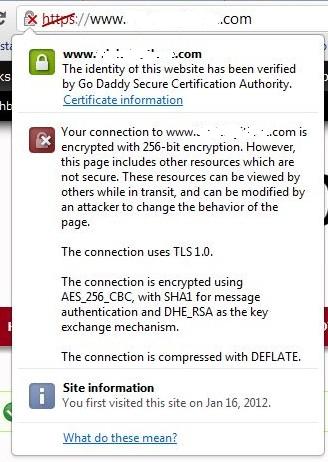
Comments
Comment #1
Jeff Burnz commentedThose are the two offending lines, I know I fixed this in the dev version of Adaptivetheme (its a core theme issue), but I need to check if I committed it (pretty sure I did), the fix is to remove the http//: bit, it works perfectly.
Comment #2
starbucksguy commentedJeff, Thank you for your speedy response; your support is another reason this theme is so outstanding.
I couldn't ask a more basic question, but in what file do I remove the http//: bit, and where do I find that file?
Thank you again.
Comment #3
Jeff Burnz commentedJust download and use the DEV version, it contains some other fixes and is perfectly stable.
Comment #4
starbucksguy commentedSorry for the follow up, but I want to be certain I do the correct thing.
I need to install the DEV version of AdaptiveTheme and *not* AT Commerce, is that right?
Also, will I retain all of my layout and custom color scheme settings? I'm so close to "going live" with the site that I don't want to mess anything up.
Thank you for your patience.
Comment #5
starbucksguy commentedI went ahead and backed up my AdaptiveTheme directory and then installed the DEV version. The mixed content error is fixed, and all layout and color settings remain in tact. Thank you.
Comment #6
Jeff Burnz commentedAwesomeness. Yeah, you did the right thing. Thanks for reporting back, much appreciated.
Comment #8
agerson commentedI am having this problem with adaptivetheme + corolla + footheme. Just downloaded it last week
Comment #9
Jeff Burnz commentedagerson - are yo using Google fonts, and what versions of each theme are you using?
Comment #10
agerson commentedNo google fonts.
AdaptiveTheme 7.x-2.2
Corolla 7.x-2.2
Footheme 7.x-2.0
is this the problem:
Comment #11
Jeff Burnz commentedIf it is, then its not a theme issue, this is core adding the xmlns definitions via the $rdf_namespaces variable.
Comment #12
Jeff Burnz commentedThis is fixed in all versions using Google fonts.