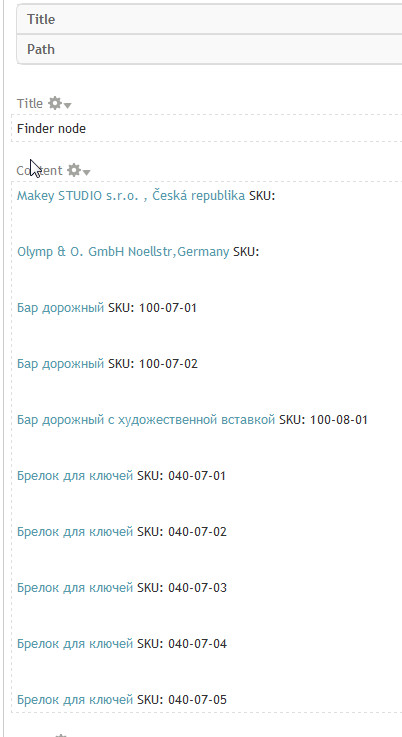
I'm using Commerce module for my e-shop.

so, it's working by creating products and assign them displays (nodes). For example

create product with title PRODUCT and sku 123456. After that, create a new node (product display) and make a reference to already created product.

So, now, i want to use Finder module to search by title or sku at the same time from same field.

Edit finder content_finder
add element with field Commerce Product: SKU
doesnt work.

add field Commerce Product: SKU to already existing element.
doesnt work.

edit View Finder node
add relationship Commerce: product
doesnt work

any advice please? how to search by SKU?

thanks.

Comments

danielb’s picture

What do you mean by 'doesnt work' exactly?
Set it up how you think and post the export here
see tips for that here: http://drupal.org/node/add/project-issue/finder

Also note that if your view has a relationship, you need to configure that in finder as well if it applies to the field.

dgastudio’s picture

Hi!

thank your for your help.

my finder export:

$finder = new finder;
$finder->disabled = FALSE; /* Edit this to true to make a default finder disabled initially */
$finder->api_version = 2;
$finder->name = 'content_finder';
$finder->views_view = 'finder_node';
$finder->views_display = 'page_1';
$finder->title = 'Content finder';
$finder->description = 'This is an example finder that finds nodes by title using an autocomplete element.';
$finder->path = 'content-finder';
$finder->block = TRUE;
$finder->status = TRUE;
$finder->settings = array(
  'search_tab' => 'node',
  'block' => TRUE,
  'form_on_page' => TRUE,
  'find_button' => TRUE,
  'find_text' => 'Find',
  'go_button' => TRUE,
  'go_text' => 'Go',
  'ajax_effect' => 'none',
  'show_results' => 'completed',
  'results_style' => 'views',
  'no_results' => 'default',
  'pager' => 10,
  'redirect' => 'never',
  'element_logic' => 'AND',
  'url' => 'enabled',
  'url_delimiter' => ',',
  'i18n_string' => array(
    'title' => 'finder:content_finder:title',
    'description' => 'finder:content_finder:description',
    'settings' => array(
      'header' => 'finder:content_finder:settings.header',
      'footer' => 'finder:content_finder:settings.footer',
      'find_text' => 'finder:content_finder:settings.find_text',
      'go_text' => 'finder:content_finder:settings.go_text',
      'no_results_configured' => 'finder:content_finder:settings.no_results_configured',
      'contextual_filter' => 'finder:content_finder:settings.contextual_filter',
    ),
  ),
);
$finder->elements = array(
  'product_id' => (object) array(
    'id' => 'product_id',
    'finder' => 'content_finder',
    'settings' => array(
      'field_logic' => 'OR',
      'value_logic' => 'AND',
      'match' => 'e',
      'fields' => array(
        'field_data_field_product.field_product_product_id' => (object) array(
          'table' => 'field_data_field_product',
          'field' => 'field_product_product_id',
          'relationship' => NULL,
        ),
      ),
      'max_suggestions' => 10,
      'autocomplete_field_logic' => 'OR',
      'autocomplete_value_logic' => 'OR',
      'autocomplete_match' => 'c',
      'i18n_string' => array(
        'title' => 'finder:content_finder.product_id:title',
        'settings' => array(
          'description' => 'finder:content_finder.product_id:settings.description',
          'header' => 'finder:content_finder.product_id:settings.header',
          'footer' => 'finder:content_finder.product_id:settings.footer',
          'field_prefix' => 'finder:content_finder.product_id:settings.field_prefix',
          'field_suffix' => 'finder:content_finder.product_id:settings.field_suffix',
          'contextual_filter' => 'finder:content_finder.product_id:settings.contextual_filter',
          'choices_rewrite' => 'finder:content_finder.product_id:settings.choices_rewrite',
          'maxlength' => 'finder:content_finder.product_id:settings.maxlength',
          'size' => 'finder:content_finder.product_id:settings.size',
          'max_suggestions' => 'finder:content_finder.product_id:settings.max_suggestions',
          'autocomplete_delimit' => 'finder:content_finder.product_id:settings.autocomplete_delimit',
        ),
      ),
    ),
    'weight' => 0,
    'title' => 'product id',
    'element' => 'autocomplete',
  ),
  'sku' => (object) array(
    'id' => 'sku',
    'finder' => 'content_finder',
    'settings' => array(
      'fields' => array(
        'commerce_product.sku' => (object) array(
          'table' => 'commerce_product',
          'field' => 'sku',
          'relationship' => NULL,
        ),
      ),
      'max_suggestions' => 10,
      'autocomplete_field_logic' => 'OR',
      'autocomplete_value_logic' => 'OR',
      'autocomplete_match' => 'c',
      'i18n_string' => array(
        'title' => 'finder:content_finder.sku:title',
        'settings' => array(
          'description' => 'finder:content_finder.sku:settings.description',
          'header' => 'finder:content_finder.sku:settings.header',
          'footer' => 'finder:content_finder.sku:settings.footer',
          'field_prefix' => 'finder:content_finder.sku:settings.field_prefix',
          'field_suffix' => 'finder:content_finder.sku:settings.field_suffix',
          'contextual_filter' => 'finder:content_finder.sku:settings.contextual_filter',
          'choices_rewrite' => 'finder:content_finder.sku:settings.choices_rewrite',
          'maxlength' => 'finder:content_finder.sku:settings.maxlength',
          'size' => 'finder:content_finder.sku:settings.size',
          'max_suggestions' => 'finder:content_finder.sku:settings.max_suggestions',
          'autocomplete_delimit' => 'finder:content_finder.sku:settings.autocomplete_delimit',
        ),
      ),
      'field_logic' => 'OR',
      'value_logic' => 'AND',
      'match' => 'e',
    ),
    'weight' => '0',
    'element' => 'autocomplete',
    'title' => 'Search by sku',
  ),
  'title' => (object) array(
    'id' => 'title',
    'finder' => 'content_finder',
    'settings' => array(
      'field_logic' => 'OR',
      'value_logic' => 'AND',
      'match' => 'c',
      'fields' => array(
        'node.title' => (object) array(
          'table' => 'node',
          'field' => 'title',
          'relationship' => NULL,
        ),
      ),
      'max_suggestions' => 10,
      'autocomplete_field_logic' => 'OR',
      'autocomplete_value_logic' => 'OR',
      'autocomplete_match' => 'c',
      'match_custom_operator' => '',
      'match_custom_prefix' => '',
      'match_custom_suffix' => '',
      'i18n_string' => array(
        'title' => 'finder:content_finder.title:title',
        'settings' => array(
          'description' => 'finder:content_finder.title:settings.description',
          'header' => 'finder:content_finder.title:settings.header',
          'footer' => 'finder:content_finder.title:settings.footer',
          'field_prefix' => 'finder:content_finder.title:settings.field_prefix',
          'field_suffix' => 'finder:content_finder.title:settings.field_suffix',
          'contextual_filter' => 'finder:content_finder.title:settings.contextual_filter',
          'choices_rewrite' => 'finder:content_finder.title:settings.choices_rewrite',
          'maxlength' => 'finder:content_finder.title:settings.maxlength',
          'size' => 'finder:content_finder.title:settings.size',
          'max_suggestions' => 'finder:content_finder.title:settings.max_suggestions',
          'autocomplete_delimit' => 'finder:content_finder.title:settings.autocomplete_delimit',
        ),
      ),
    ),
    'title' => 'Title',
    'element' => 'autocomplete',
    'weight' => '0',
  ),
);

ok, as i understand, add relationship in views it's only for display results.

how to configure relationship in finder?

"doesnt work" means that search doesnt return any result

dgastudio’s picture

in finder export i see:

'fields' => array(
        'commerce_product.sku' => (object) array(
          'table' => 'commerce_product',
          'field' => 'sku',
          'relationship' => NULL,
        ),
      ),

relationship = null.

but editing this field in UI, it returns me "There is nothing to configure for this field. ". So, how to add an relationship?

danielb’s picture

The option to configure relationships in a finder field only appears if the views display has relationships configured in it. I don't really know any other way of getting the relationships options.

dgastudio’s picture

StatusFileSize
new10.2 KB
new86.22 KB
new53.46 KB
new12.92 KB
new57.83 KB

sorry, but in my finder_node view i have relationship configured. but there are no options to set relatinship in finder.

see attached images.

danielb’s picture

Bugger. Could be a bug, I'll look into it.

dgastudio’s picture

ok, thanks.

frixos12’s picture

subscribing

danielb’s picture

frixos12, you don't need to reply to a thread to subscribe, there is a "follow" button at the top of the page that does the trick.

danielb’s picture

I found an interesting comment here which might suggest there is need for two relationships
http://drupal.org/node/1166540#comment-4513700

Not sure finder supports relationships that complicated (and there isn't really any info around on how to support it).

Unfortunately testing with ecommerce systems is kinda hard since I'd need to actually set up a fake store and products, etc... I already have e-commerce and ubercart installed, and now they've come out with another ecommerce module? *sigh*

I don't know if I'll be able to solve the problem even if I was motivated to install commerce.

If anyone knows what finder is doing wrong, or can provide support please reply.

I can offer you a workaround solution: Use a computed field to repeat the SKU data in a node. The field api integrates with Finder pretty well.
http://drupal.org/project/computed_field

Pretty much any kind of "problem filter" in finder can be worked around using a computed field. It often improves Finder's performance over complicated table relationships too.

dgastudio’s picture

StatusFileSize
new130.58 KB

first of all, thank u for your help

about the comment and 2 relationship: this is only for orders, not for list of products

in my case, i have enough with only one relationship. take a look

finder_node view
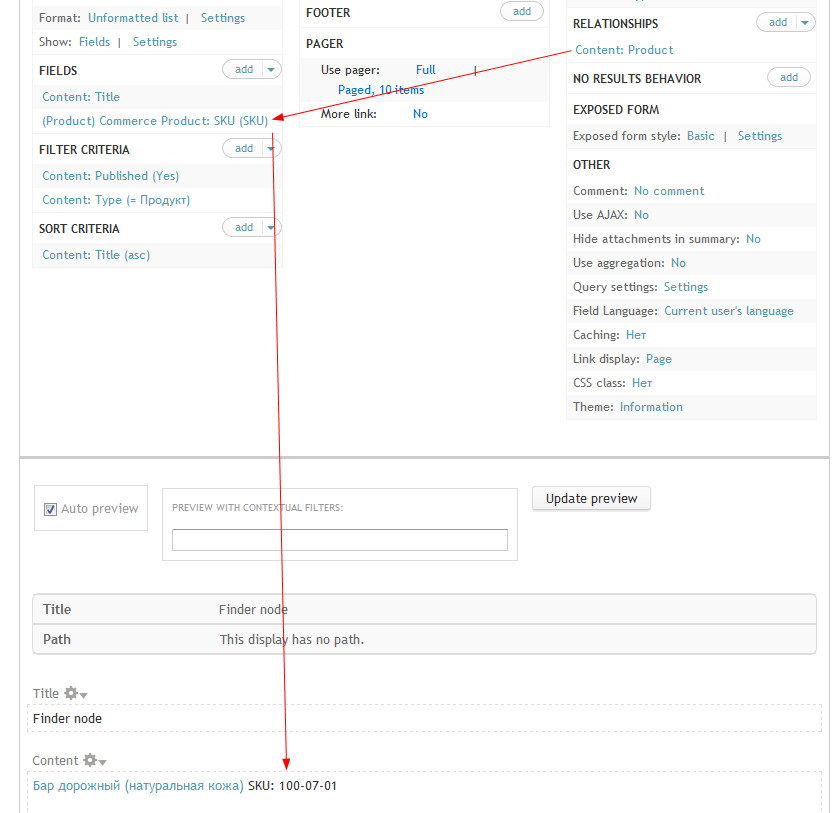
1

so, again.

if in admin/structure/finder/list/content_finder/edit i have only one field (title), i can use finder block to search by title.

if i add field "product: sku", the search doesnt work.

i u want, u can install http://drupal.org/project/commerce_kickstart to rapidly configure commerce shop.

or i can provide you access to my website.

thank u!

danielb’s picture

Status: Active » Closed (won't fix)

This is really quite an imposition. I have explained my position clearly in #10 and offered an alternative. I do not wish to go to such great lengths for someone that can't even be bothered to type the word "you" or press the shift key.

dgastudio’s picture

ok, forget it.

divined’s picture

I can offer you a workaround solution: Use a computed field to repeat the SKU data in a node. The field api integrates with Finder pretty well.

Oh, one node containts 1-10000000 SKU's. So, "computed field" not a solution.

I found an interesting comment here which might suggest there is need for two relationships

It's solution for "order view", not for standart product display.

won't fix

So, delete module from org if it not working for simple relationship view.