

 Come together with the global Drupal community in Rotterdam, 28 Sept – 1 Oct 2026. Sessions, contribution, connection, and Early Bird savings until 8 June.
A problem on site on the main page.
Only in IE white background appears in element style.
If I make css-rule like "opacity:0" or "filter:alpha(opacity=0)" slideshow doesn't work in IE.
I need a transparent background.
What should I do?
Thanks
<!--//--><![CDATA[//><!--
jQuery.extend(Drupal.settings, { "basePath": "/", "admin_menu": { "margin_top": 1 }, "lightbox2": { "rtl": "0", "file_path": "/(\\w\\w/)sites/default/files", "default_image": "/sites/all/modules/lightbox2/images/brokenimage.jpg", "border_size": 10, "font_color": "000", "box_color": "fff", "top_position": "", "overlay_opacity": "0.8", "overlay_color": "000", "disable_close_click": 1, "resize_sequence": 0, "resize_speed": 400, "fade_in_speed": 400, "slide_down_speed": 600, "use_alt_layout": 0, "disable_resize": 0, "disable_zoom": 0, "force_show_nav": 1, "show_caption": 1, "loop_items": 0, "node_link_text": "Подробно", "node_link_target": 0, "image_count": "Фото !current из !total", "video_count": "Видео !current из !total", "page_count": "Страница !current из !total", "lite_press_x_close": "нажмите \x3ca href=\"#\" onclick=\"hideLightbox(); return FALSE;\"\x3e\x3ckbd\x3ex\x3c/kbd\x3e\x3c/a\x3e чтобы закрыть", "download_link_text": "Оригинал изображения", "enable_login": false, "enable_contact": false, "keys_close": "c x 27", "keys_previous": "p 37", "keys_next": "n 39", "keys_zoom": "z", "keys_play_pause": "32", "display_image_size": "", "image_node_sizes": "()", "trigger_lightbox_classes": "", "trigger_lightbox_group_classes": "", "trigger_slideshow_classes": "", "trigger_lightframe_classes": "", "trigger_lightframe_group_classes": "", "custom_class_handler": 0, "custom_trigger_classes": "", "disable_for_gallery_lists": true, "disable_for_acidfree_gallery_lists": true, "enable_acidfree_videos": true, "slideshow_interval": 7000, "slideshow_automatic_start": 1, "slideshow_automatic_exit": 0, "show_play_pause": 1, "pause_on_next_click": 1, "pause_on_previous_click": 1, "loop_slides": 0, "iframe_width": 600, "iframe_height": 400, "iframe_border": 1, "enable_video": 0 }, "nice_menus_options": { "delay": 800, "speed": 1 }, "viewsSlideshow": { "Katalog_nedvizh-block_1": { "methods": { "goToSlide": [ "viewsSlideshowPager", "viewsSlideshowSlideCounter", "viewsSlideshowCycle" ], "nextSlide": [ "viewsSlideshowPager", "viewsSlideshowSlideCounter", "viewsSlideshowCycle" ], "pause": [ "viewsSlideshowControls", "viewsSlideshowCycle" ], "play": [ "viewsSlideshowControls", "viewsSlideshowCycle" ], "previousSlide": [ "viewsSlideshowPager", "viewsSlideshowSlideCounter", "viewsSlideshowCycle" ], "transitionBegin": [ "viewsSlideshowPager", "viewsSlideshowSlideCounter" ], "transitionEnd": [  ] }, "paused": 0 } }, "viewsSlideshowCycle": { "#views_slideshow_cycle_main_Katalog_nedvizh-block_1": { "num_divs": 24, "id_prefix": "#views_slideshow_cycle_main_", "div_prefix": "#views_slideshow_cycle_div_", "vss_id": "Katalog_nedvizh-block_1", "effect": "fade", "transition_advanced": 0, "timeout": 5000, "speed": 700, "delay": 0, "sync": 1, "random": 0, "pause": 1, "pause_on_click": 0, "action_advanced": 0, "start_paused": null, "remember_slide": 0, "remember_slide_days": 1, "pause_when_hidden": 0, "pause_when_hidden_type": "full", "amount_allowed_visible": "", "nowrap": 0, "fixed_height": 1, "items_per_slide": 1, "wait_for_image_load": 1, "wait_for_image_load_timeout": 3000, "cleartype": true, "cleartypenobg": false, "advanced_options": "{}" } } });
//--><!]]>| Comment | File | Size | Author |
|---|---|---|---|
| #1 | Capture.PNG | 22.46 KB | info@cgfix.com |

Comments
Comment #1
info@cgfix.com commentedI had the same problem.
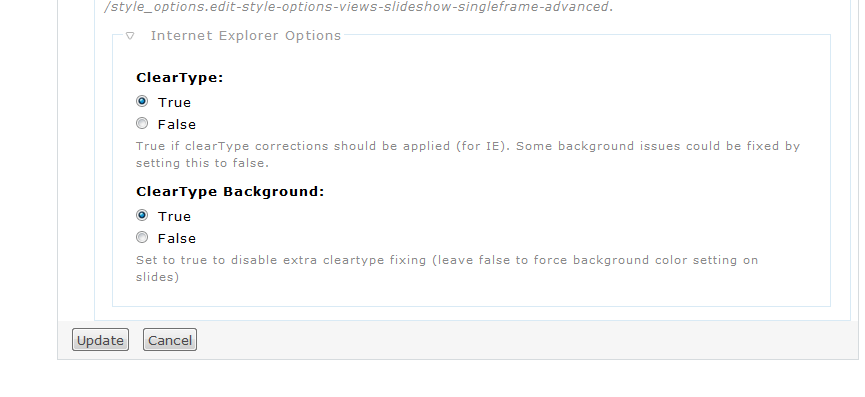
I found the section at the bottom of the slideshow settings page ( click on the gear next to slideshow in the view edit panel). Under "Internet Explorer Options", check "true" for "ClearType Background:".
Comment #2
redndahead commented