

Closed (fixed)
Project:
D7 Media
Version:
7.x-2.x-dev
Component:
Code
Priority:
Normal
Category:
Feature request
Assigned:
Unassigned
Issue tags:
Reporter:
Created:
3 Feb 2012 at 01:36 UTC
Updated:
3 May 2013 at 16:05 UTC
Jump to comment: Most recent file

Comments
Comment #1
becw commentedHere's a patch. Dave, can we review this in the sprint tomorrow?
Comment #2
becw commentedAlso, this issue is somewhat related to at least these three other issues:
Comment #3
gmclelland commented@becw - your patch isn't applying with the latest media 2.x-dev release and drush make. Can you reroll the patch?
Comment #4
becw commented@gmclelland hmm, it applies cleanly with
git apply 1426730-1-media-edit_after_upload_in_browser.patchand withpatch -p1 < 1426730-1-media-edit_after_upload_in_browser.patch. Is your makefile block like one of these?Comment #5
rooby commentedwhen you run drush make you could also use -vd options and hopefuly it will tell you why it is failing.
Comment #6
gmclelland commentedSorry @becw - your patch does apply. It was conflicting with another patch.
Comment #7
gmclelland commentedAfter a quick test, I get the following warning after uploading a file.
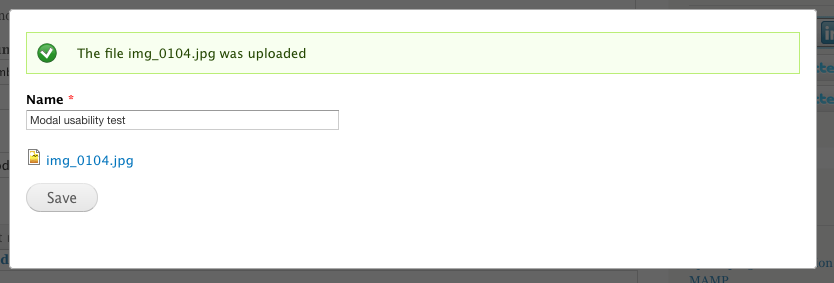
Everything still seems to work fine. After the file is uploaded, I can immediately edit the name and an added caption text field.
I'm running with the latest dev version of File Entity and Media 2.x.
Comment #8
gmclelland commented@becw
That error message is related to this commit of the file entity module http://drupalcode.org/project/file_entity.git/commit/d8975331aa752a229e4... from #1447790: image_load makes admin/content/media unusably slow.
If I back up commit earlier, I no longer see the warning and everything works as intended with the patch.
So, I'm not sure if this patch needs to be reworked to accommodate the changes in the latest commit of the file entity module or if we need to open a new issue with the file entity module?
Hope that helps,
-Glenn
Comment #9
swentel commentedI was getting also troubles when trying to apply the patch (but maybe because of some other commits that occured since march 22, haven't checked).
Did a reroll. I think the edit entity form could use some padding still.
A related question maybe, but somehow the view library denies clicking on a link - I was just trying to add an edit link underneath a file. With this patch, people would be allowed to browse the library and edit from there as well if they wanted.
Comment #10
gmclelland commentedThanks @swentel - I tested the file uploading and immediate editing portion of your patch and everything seems to work as you said. I didn't test the second part of the patch for the edit links.
The errors I was getting in #7 were just fixed in the file_entity module with this patch http://drupal.org/node/1533576#comment-5882834.
Hope that helps
Comment #11
gooddesignusa commentedThanks @swentel this patch works for me. A couple thing I noticed
* the modal that renders automatically after you upload a file is different than when you click on the edit media button. Not a big deal. Seems like when you click edit it uses ctools.
* the modal that renders after uploading a file is kinda small and causes a scrollbar. Its using the same size as the upload modal was. I looked at the code and it looks like it resizes the iframe. I'm not sure why it isn't working - if i add #media-browser-page-wrapper div.messages.status{display:none;} to my styles the scroll bar goes away.
* Once the modal switches to the edit screen console throws a js error but still works. Uncaught TypeError: Cannot read property 'browser' of undefined in media.popups.js:103
Comment #12
gmclelland commentedrelated discussions #1553114: Adding files should be a multi-step process over in the file entity issue queue.
Comment #13
dave reidDoesn't looks like this currently checks if the user has permission to edit files? In which we shouldn't open the file edit modal?
Comment #14
steinmb commentedShould work with #1227706: Add a file entity access API also.
Comment #15
gmclelland commented#9: 1426730-9.patch queued for re-testing.
Comment #17
gmclelland commentedThe patch in #9 no longer applies against the latest dev versions of media and file_entity modules.
Comment #18
redndahead commentedLet's try this one.
Comment #19
fangel commentedIn the
media_form_alter, theif-statement that control whether or not set the new submit-handler on thefile_entity_edit-form looks like this:However,
$paramsisn't defined anywhere in the functions scope, so I don't see how this could ever be triggered. I changed all$paramsinto$_GETand it worked as expected.Otherwise, very nice patch.
Comment #20
redndahead commentedThis one fixes the issue found in #19 and provides user access support as requested in #13.
Comment #21
redndahead commentedAnother one using media_access() instead of user_access() per davereid
Comment #22
gmclelland commentedThe patch in #18 didn't work, but the patch in #21 DID work. I didn't test the access calls. I just tested that it would automatically open the file edit modal when you upload a file.
Thank you @redndahead
Comment #23
redndahead commentedSo after reviewing the access control really doesn't make sense quite yet. I think we can leave it as is for now, but once the access api goes in we may have to revisit it. Since @gmclelland tested the patch and it works and access isn't an issue I'm marking this as rtbc
Comment #24
dave reidI think we should move this logic to media_form_file_entity_edit_alter() instead so we're not calling drupal_get_query_parameters() on every single form ever?
What happens if we add 'destination' => 'media/browser?render=media-popup&fid=' . $file->fid to 'query' in this redirect? Do we even need the second redirect form logic then?
Why is this being removed? Can we leave it in for now or does it cause problems?
Comment #25
dave reidWhen I have the patch applied, after I submit the upload form, I see the modal window changes pages, but then it shrinks down to a 20px high dialog and I cannot see or do anything with the modal.
Comment #26
dave reidThis seems to work just fine when used with the WYSIWYG button, but not when I am selecting a media file for a normal file/image field. The JS errors I get are:
Uncaught Error: can't load XRegExp twice in the same frame
Uncaught TypeError: Cannot read property 'browser' of undefined in media.popups.js:103
Comment #27
dave reidRevised patch with the changes, but still encountering the JS error.
Comment #28
fangel commentedI'll take a stab at trying to get the above mentioned error fixed, and review the patch today.
If it doesn't already do so, I'll try to get multi-select/upload working too, as I need that for an upcoming project... But that might belong to a separate issue :)
Comment #29
fangel commentedThis error
Uncaught TypeError: Cannot read property 'browser' of undefined in media.popups.js:103is easily solvable.It's because
Drupal.media.popups.mediaBrowser.mediaBrowserOnLoadchecks to see ifthis.contentWindow.Drupal.media.browser.selectedMediacontains anything. If it does, it should auto-"submit" the dialog, by "clicking" the OK, button.However, on the edit-page,
Drupal.mediaisn't set, because it's only set on 'media/browser' by the MediaBrowser plugin.So the onload-function just needs to check if Drupal.media exists before trying to read properties from it. The patch is trivial, so I'll continue with a few other clean-ups/todos before updating this issue with a new patch.
Haven't been able to recreate the
Uncaught Error: can't load XRegExp twice in the same frameerror in Safari - which browser is that in?Comment #30
fangel commentedOkay, here's the patch that solves the above mentioned JS bug.
I've also added support for multiselect upload-edits (that is, uses plupload to upload multiple files, then ask you to edit all of then, then returns). Note that this requires plupload and multiform.
I've tested this in the browser-testbed, and appears to work fairly solidly.
Comment #31
mrfelton commentedTried with patch in #30, and I'm still experiencing the problem with the window shrinking down to 20px or so in height after seleting and confirming the file. This makes it impossible to finalise the added media. Looks like the some fields show for a split second before the modal being reduced in height and breaking.
I'm trying to attach a pdf file to a file field with the media file selector widget.
I have a js error in the console:
Uncaught TypeError: Cannot read property 'browser' of undefined media.popups.js:103Comment #32
fangel commentedmrfelton: I'll try to take a look at it tomorrow. What browser are you using when you experience this?
Comment #33
mrfelton commented@fangel Chrome, OSX. Although I tried with Firefox too and had the same problem.
Comment #34
fangel commentedmrfelton: Could you verify that you have the latest edition of the patch, and that you have refreshed the JS in your browsers cache? I have my line 103 as
if (this.contentWindow.Drupal.media == undefined) return;which is specifically there to prevent the error you're mentioning above. (Note, I had a lot of trouble getting my browser to properly refresh the JS files, it kept reading the old from it's cache, even after reloading. I had to manually visit the JS file directly in the browser and hit refresh there)
--
I believe the problem with not resizing to the correct size, is caused by the JS error, halting JS execution, so you never get to the JS that resizes the popup.
Comment #35
mrfelton commentedMay have been a caching issues after all. Patch in #30 is now eorking. Nice one fangel!
Comment #36
redndahead commentedI think this is ready to go. @davereid is your issue fixed with this?
Comment #37
vood002 commentedTested and working great for me, thank you!
Comment #38
fangel commentedOkay, I was wrong about my assumption about what could force the dialog to resize to a incorrect size.
It was a incorrect way of figuring out how much "air" was above the dialog, that didn't take page-scroll into account, so if you were scrolled down on the page when you launched the Media browser, it would resize incorrectly if it didn't fit in the size dictated by Media.
Here's an updated patch. Only changes made is the re-ordering of the setting of padding, and the resize routine (to help get the size closer to the real size) and then the crucial addition of
$(top).scrollTop()Marking as 'needs review' again, so please test out the new changes and mark it as RTBC if it works for you.
Comment #39
dave reidComment #40
lsolesen commentedComment #41
redndahead commentedRerolled
Comment #42
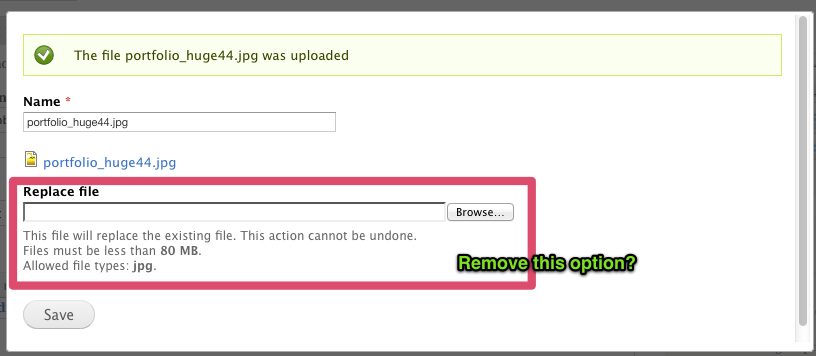
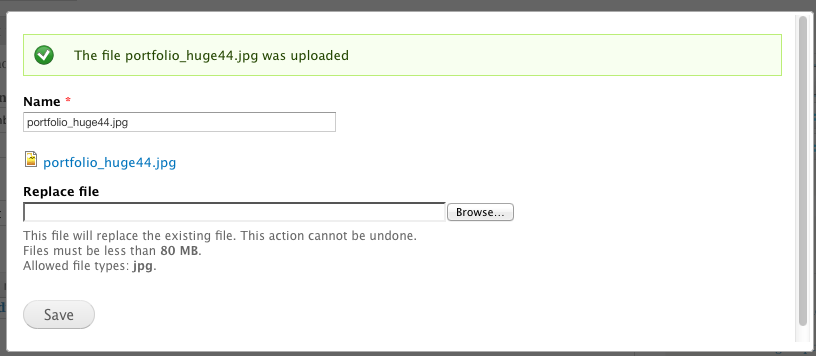
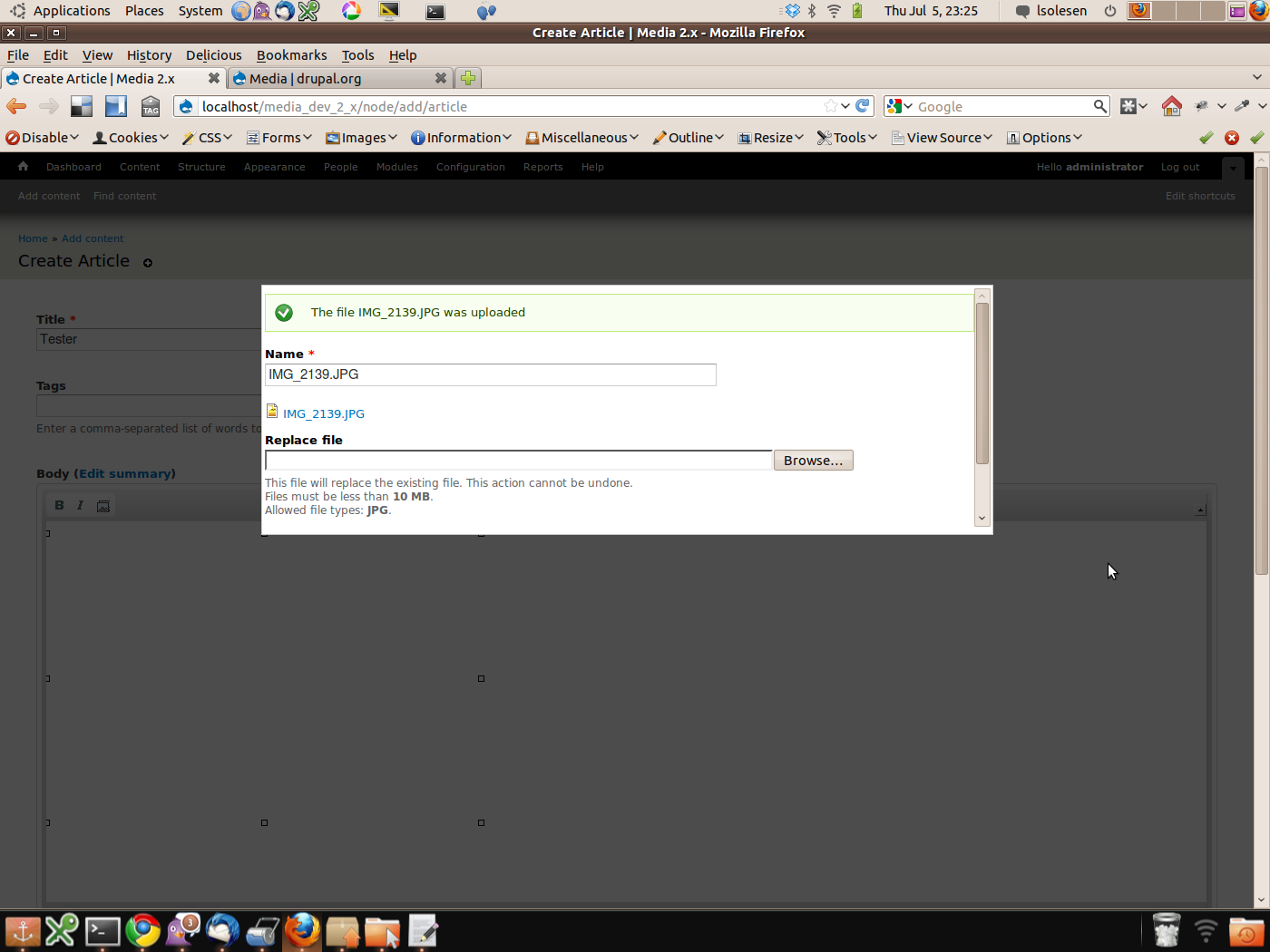
lsolesen commentedI think the behavior is a bit strange after applying the patch (see attached screenshot). Why does that page need to show (and it is strange that I already get a chance to replace the file just uploaded).
Comment #43
fangel commentedHi Lars: The page need to change into the edit-page - it just shows you file/:fid/edit. And the standard behaviour isn't to have a replace file-field, that must be another contrib module you have installed that enables that functionality.
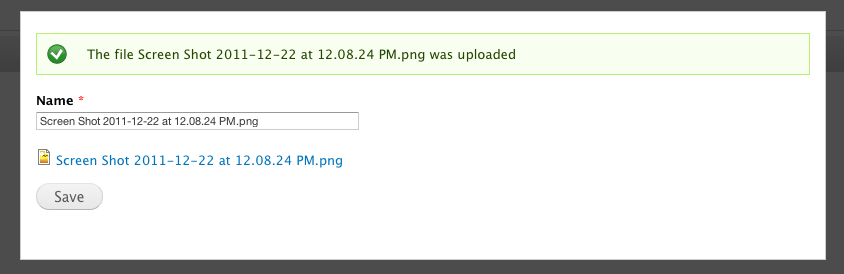
I've attached a screenshot of a vanilla Drupal 7.14 with latest git checkout of Media 7.x-2.x and the patch applied (I've also rerolled my patch against latest git, just in case)
Comment #44
gmclelland commented@lsolesen Haven't tested yet, but the recent commit on the File Entity module #1123570: Replace file while retaining field metadata might be showing you the file replace stuff.
Comment #45
steinmb commentedEnv
PHP 5.3.6-13ubuntu3.8 with Suhosin-Patch
Drupal 7.14
Applying against latest 2.x-dev:
Attached screen show of modal after I submit upload image and it this work's OK. What not is working just right is if you now click 'Replace file' and upload another file. This will close the modal and you are not able to change the media title without reopening the media file.
Comment #46
fangel commentedsteinmb: So what you're saying is that you want the 'edit'-dialog to keep popping up, if you keep replacing the file? Like Upload -> Edit -> Replace -> Edit -> Replace -> Edit -> [repeat] -> OK?
Why would you want to replace a file you just uploaded? Wouldn't it make more sense to not have the option to replace files that was just created?
Comment #47
steinmb commentedI'm just pointing out inconsistency in the user experience. If we want to keep the replace function, I do think we have to loop back and repeat, though a much better idea, as you pointed out, is simply to remove the replace option as it does not make any sense to me either.

Comment #48
fangel commentedI agree, but that is an issue to bring up with the File Entity module, as it's them that introduced it (in #1123570: Replace file while retaining field metadata).
Comment #49
dave reidI think it would be ok to hide the replace file field in this context. It doesn't make sense to show it in this context and it's causing problems (although it does if you're using the 'Edit media' button).
Comment #50
redndahead commentedThis one removes the replace field in the modal.
Comment #54
steinmb commentedThe patch remove the field though I have not reviewed the code but to me is it RTBC.

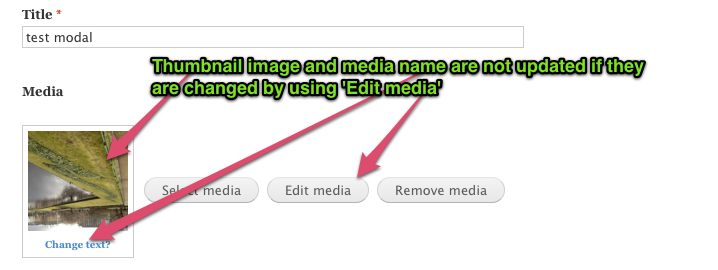
I also played with 'Edit media' button and found another problem. It might be unrelated to this issue but I should still mention it:
If you click 'Edit Media' and choose to replace media file or/and media name, press save. The modal is then closed but the form is not updated to show the new image/name.

If I preview the node or save it I then get the drupal_set_message() 'Image my_image_name has been updated.' and the thumb and name is updated.
Comment #55
fangel commentedYes, the edit-button is unrelated to this issue, as it only deals with being able to edit just uploaded files – but you have a very valid point. It is a weird behaviour.
Comment #56
redndahead commentedPushing this to RTBC then
Comment #57
Jackinloadup commentedLets open another issue for the problem stated in #54. It would be nice to have that solved eventually but probably shouldn't hold back this from reaching out end users.
Comment #58
pomliane commented#50 works as expected. Nice enhancement!
Comment #59
becw commented@davereid re: #49, I don't think it makes sense to remove the "replace file" field as a part of this patch.
Comment #60
becw commentedIf we want to hide the "replace file" field, we should discuss it in a separate issue.
The patch from #43 is RTBC; here's a re-rolled version so it applies without fuzz.
Comment #61
dave reidCommitted #60 to Git (with the missing js file from the patch as well): http://drupalcode.org/project/media.git/commit/1a0304d
Let's file followup issues as new issues.
Comment #62
klonosHave different issues been filed for removing the "replace file" and the issue mentioned in #54? Are we following up on these?
Comment #63
bbdata commentedOut of curiosity, if I prefer not having the modal popup after an image is uploaded. What is the best way to disable it?
Comment #64
RobW commentedGood point. I'd like to see the modal on by default, with some smart logic for popping up (e.g., don't pop up if there are no fields), and a configuration checkbox per file field to enable/disable.
Comment #65
Jackinloadup commentedCan someone tell me how this works? I don't understand how this break is accomplishing the task the comment states.
I ran into this while trying to re-roll #1658452: Regression: Views Library doesn't support mutliselect, 1.x library did
Comment #66
fangel commentedJackinloadup: The reason it's there is because Drupal.settings.media.files sometimes contain the file-entity multiple times (if the file is present in more than one tab), so the array can look like this
So therefore, we break out of the loop going through the array as soon as we've found the first instance of the file. Otherwise we would add all instances of the file in the Drupal.settings.media.files to selectedFiles, which - if you have multi-selection enabled - ends up selecting the same file multiple times.
Was that a good enough explanation?
Comment #67
Jackinloadup commentedYeah, it took a new day and that great explanation to realize where my thought process was wrong.
Goodbye and thanks for all the fish ^_^
fish = hard work
Comment #69
David_Rothstein commentedNot clear there's a way yet, but looks like an issue for that exists at #1823622: Provide a way to suppress the edit screen after file upload.
Comment #70
elijah lynnJust upgraded from 7.x-2.x-unstable7+6 to unstable7+38 (latest dev) and it appears this has been reverted/removed since then. When I upload a file it does not present a modal to enter additional information. It does work when I click the 'edit media' button though.
Comment #71
ericduran commentedIssue is closed. No re-opening :-p
Comment #72
Olivier Beerens commentedI have the same has Elijah Lynn, i can't make it working, either on unstable 7 or last dev...
Comment #73
ericduran commentedI tested this on the latest dev version of media and file_entity and it seems to be working.