On a fresh multi-language drupal-7.12 site with Captcha-beta2, the label for comment body persists on not being translated.
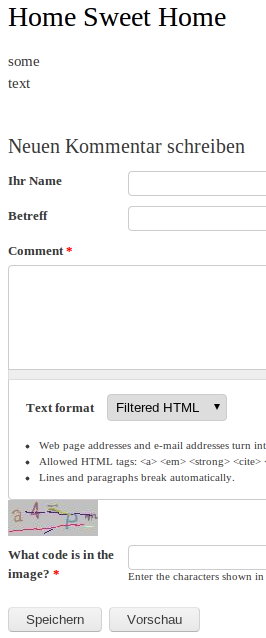
In the sample image attached, showing a basic page at /node/1?lang=de, I can for example fix "What code is in the image?" by adding its translation, but "Comment" (label of comment body) seems to be already properly translated, but the translated text does not show up.
I noticed an untranslated label 'Comment' in comment.module file, possibly corresponding to this comment body label. But even after the attached patch, body label still persists.. :(


Comments
Comment #1
webbykat commentedI was able to reproduce this on a clean install of Drupal 7 by:
I got the same results as the one in the screenshot above. In the translate interface, I noticed that Comment in the context of field:comment_body:comment_node_page:label hadn't been translated, but even after I added a translation manually, it didn't update.
Not sure if this is a bug against Internationalization or Drupal core. Leaving it here, but someone with more knowledge may want to move it. May be related to #1157426: Field system uses t() incorrectly and inconsistently.
Comment #2
webkenny commentedI am fairly sure this is an i18n problem. My understanding of #1157426: Field system uses t() incorrectly and inconsistently is that all
t()directives were remove in Drupal 7.1 for fields. A follow up exists over on Gabor's excellent post on the topic: http://groups.drupal.org/node/149984I don't know i18n enough to move this but following the thread it does appear the lack of the
t()wrapper is intentional.Comment #3
webkenny commentedGot a little trigger happy there with my settings. Moving this back to comment.
Comment #4
webbykat commentedI agree that the lack of functionality with t() is intentional, but there has to be a way to translate the Comment heading. There are lots of multilingual sites that use comments, so even if t() isn't the right solution, it's essential for them to have an intuitive way to get that heading in the new language.
From that post you cited, there's a relevant comment from Gábor Hojtsy:
This seems like that kind of bug, so I'm moving this to Internationalization in hopes that it'll be a useful bug report.
Comment #5
jose reyero commentedDoes this happen only with Captcha module?
(If so, I guess this should be moved to that module)
Comment #6
webbykat commentedSadly, I don't think so -- I didn't have Captcha installed on the site where I tested it out. It was a fresh install with only the modules necessary to get translations working.
Comment #7
jose reyero commentedAFAIK, it can be translated with i18n, just tested it and it works.
(Of course you need to enable i18n_field, and translate the string manually on the field settings tab)
Comment #8
webbykat commentedThat was it - I'd done everything except enabling Field Translation! Thanks for that detail. Hopefully this was the original poster's issue as well. :)
Comment #9
miguel commentedI dont' know the internals of drupal but for a normal user it is not an intuitive way to download i118 and Variable to translate this only field (all other fields as Name, Homepage are correctly translated).
Is this really by design?
Comment #10
codemuncher commentedUsing Drupal 7.15
It's not fixed by turning on field translation:
I tried to use the field translation in the comment field section for a content type.
I get errors like : '...non-object in i18n_field_page_translate()...', and following the thread on this it says I should use i18n DEV version. I shy away from using a DEV version since the Site already deployed in Production.
I had hoped i could fix the label using hook_form_alter(...),
but that didnt work either. It has not effect on either
$form['comment_body']['und'][0]['#title'] or
$form['comment_body']['und']['#title'] or
trying to set the values inside hook_after_build.
Strange since ALL the other labels can be changed in the hook_form_alter.
Then I tried the method : template_preprocess_comment(&$vars)
but it is never invoked NOR is the comment template.
Please understand that because I live in Quebec, I can not have an english label.
I would get sued by the Language Police lol.
Well I guess i'll use Javascript!
Comment #11
jbd44 commentedAccessing $form['comment_body']['und'][0]['value']['#title'] allowed me to change the label.
Comment #12
prins310 commentedSame problem here. 24ma13wg could you please elaborate on how you managed to get
$form['comment_body']['und'][0]['value']['#title']to work? What is the full syntax of your function? And which file did you put the code in? template.php?
Many thanks in advance!
Comment #13
prins310 commentedManaged to change the label thanks to the solution provided in another thread.
For a site in a single non-English language this should do.
See post #4 by 4kant at:
http://drupal.org/node/1691780
With a big thank you to 4kant!
Comment #14
jbd44 commented@prins310 place in template.php
Comment #15
kiwad commentedIn custom module :
Comment #16
drupalerocant commentedThanks Jose in #7!
I have been puzzilng my head for months on this issue.
More detailed for Article (for example)
That's it! thanks!
Comment #17
bcjmpr commented#7 worked for me too, thank you!
Comment #18
dotoree commented#7 was for me also, Thanks!
Comment #19
Anonymous (not verified) commentedOh man. Thanks.
I struggled with this for a minute.
Comment #20
anton.safin commented@princ310 #13 Thanks, it works!
Comment #21
Molson_Ice commentedThanks! Number 16 worked for me...even 4 years later ;)