

Closed (cannot reproduce)
Project:
AdaptiveTheme
Version:
7.x-2.x-dev
Component:
Module Support
Priority:
Normal
Category:
Support request
Assigned:
Unassigned
Reporter:
Created:
7 Feb 2012 at 03:29 UTC
Updated:
7 May 2012 at 12:22 UTC
Jump to comment: Most recent file


Comments
Comment #1
Jeff Burnz commentedOK, I will take a look.
Comment #2
Jeff Burnz commentedUpdating component.
Comment #3
Jeff Burnz commentedOK, I have tried to figure out what you mean by:
- all the "Conditions" and "Reactions" are added to my settings and can't be removed
- they're still listed in the dropdown boxes and...
- both display boxes are disabled and doesn't display anything
I have tested with Context quite a few times and frankly I don't really understand what you are talking about. Can you try to explain better and provide some screen-shots so I can see the problem you are trying to describe.
I can't find any real differences between this theme and how Seven handles the same pages (assuming we are looking at the same page, I don't know, its not clear from your description).
Comment #4
Vc Developer commentedHere's the images. I'm trying to configure a demo site using the Demo Module so you can login and see whats going on. Let me know if your not still able to do anything even with the images. As soon as I get the demo up and running I'll let you know.
Comment #5
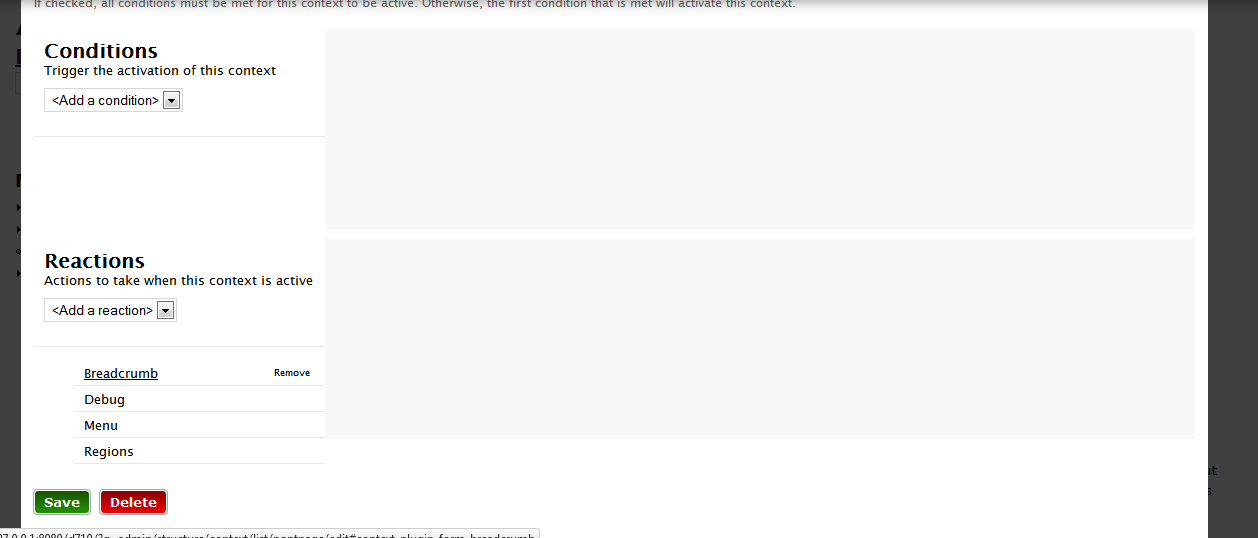
Jeff Burnz commentedYeah, I'll need to actually look at it, I can't reproduce it on my system even with Overlay enabled. This is what I see - the screenshot is in FF10, but its the same in Chrome as well. I am hovering one of the added reactions and you can see the little remove button appearing (for breadcrumb).
Just a thought, have you gone to the theme settings for AT Admin and saved the theme settings - please do this once and see what happens, really the theme should be taking up the full width of the Overlay, but in your screenshots its not.
Comment #6
Jeff Burnz commentedAs per the many issues posted regarding Context UI, I have never, even once, been able to replicate the issues, so I just not sure what is going on.
As per all other issues, I will state this again - you MUST save the theme settings for AT Admin at least once, to write the layout and other configuration to files and the database. Then you will have no issues with Context, I believe this the actual issue.
As per this issue also, I have asked, oh, probably half a dozen times for people to try this and get back to me, number of people who have? None.
I will close all issues regarding Context UI from now on as cannot reproduce unless it is shown to me extactly, in intricate detail, how to reproduce such issues, I am sick of this.
I USE CONTEXT UI MODULE EVERY DAY.
Comment #6.0
Jeff Burnz commentedaddition..