Closed (fixed)
Project:
Image javascript crop
Version:
7.x-1.x-dev
Component:
Documentation
Priority:
Normal
Category:
Bug report
Assigned:
Unassigned
Reporter:
Created:
7 Feb 2012 at 10:50 UTC
Updated:
9 Apr 2012 at 09:40 UTC


Image's display is broken in croping interface. It looks like there would be another (smaller) image displayed above the original one. Image tells it all....
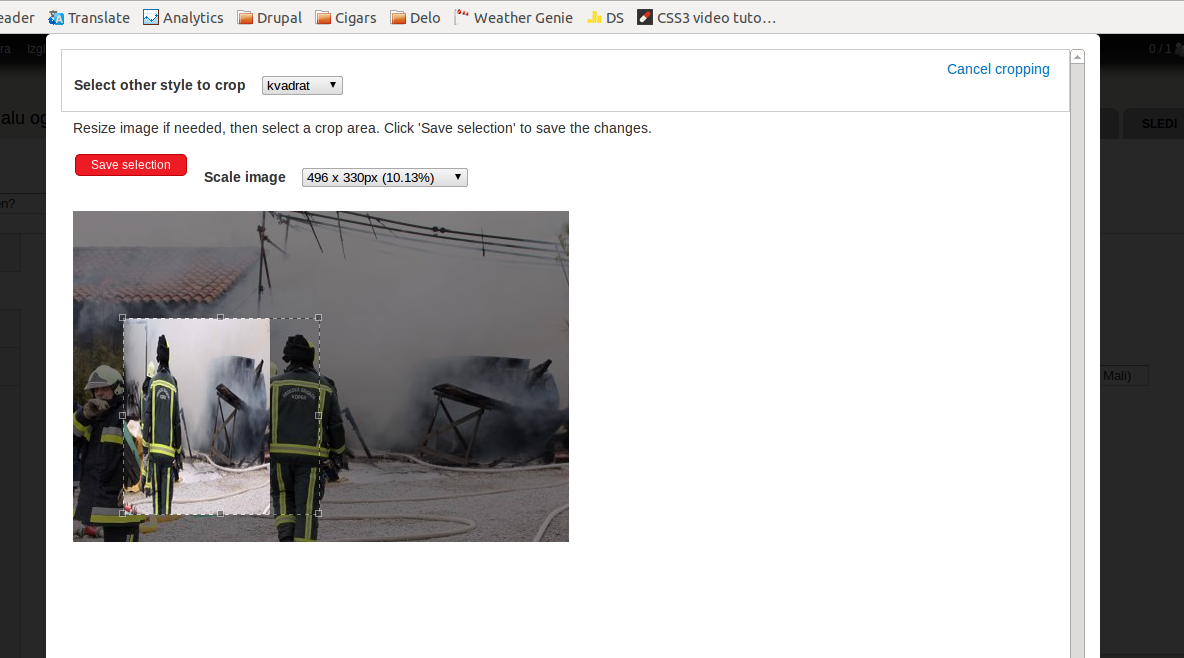
| Comment | File | Size | Author |
|---|---|---|---|
| imagecrop_display_broken.png | 228.34 KB | slashrsm |


Comments
Comment #1
nils.destoop commentedWhat browser / OS are you using?
Comment #2
slashrsm commentedUbuntu 11.10, Chromium.
Comment #3
bryancasler commentedHad a similar problem. I had some CSS applying
img{max-width:100%}. This may be your problem. I noticed it because it looks like the popup uses the site's theme and not my admin theme #1491494: Site theme used in popup instead of admin themComment #4
nils.destoop commentedCan you check if it's fixed after applying following patch?
http://drupalcode.org/project/imagecrop.git/patch/b9f7e3955c1b5de7b46a06...
The frontend theme was default beïng used. This is now changed to admin theme.
Comment #5
bryancasler commentedThis problem should be fixed by this patch, unless a users admin theme suffers from the same issue I described in #3. The only way to be certain would be override any set img dimensions from the theme with something like...
Comment #6
slashrsm commentedFixed in -dev for me.
Comment #7
nils.destoop commentedI added the !important css rule.