

This project is not covered by Drupal’s security advisory policy.
Drupal 7 alternative
Drupal 8 alternative
Overview
This module makes a 'Javascript crop' effect available for Image styles (Imagecache in Drupal 6). Because this happens when the image is displayed the original image is always preserved and can be cropped in different ways depending on where it is used.
Note: Drupal 7.20 and up currently require the dev version. If you want to help get a new version released, see the meta issue. If you are a new user, consider the Manual Crop module, which does a similar thing but is more actively supported.
Usage
Typical Configuration
Go to Configuration > Media > Image styles and click the Add style link. Choose a name for your style, then on the next page choose to add the JavaScript crop effect and configure as appropriate.
To use your new image style with an image field, first enable it for the field (Structure > Content types > [type name] > Manage fields > [field name] > Available image crop styles) and then ensure the Image style is selected on the appropriate Display.
Imagecrop can also be used for profile pictures and the media edit form by enabling the options at Configuration > Media > Image javascript crop.
For Authors
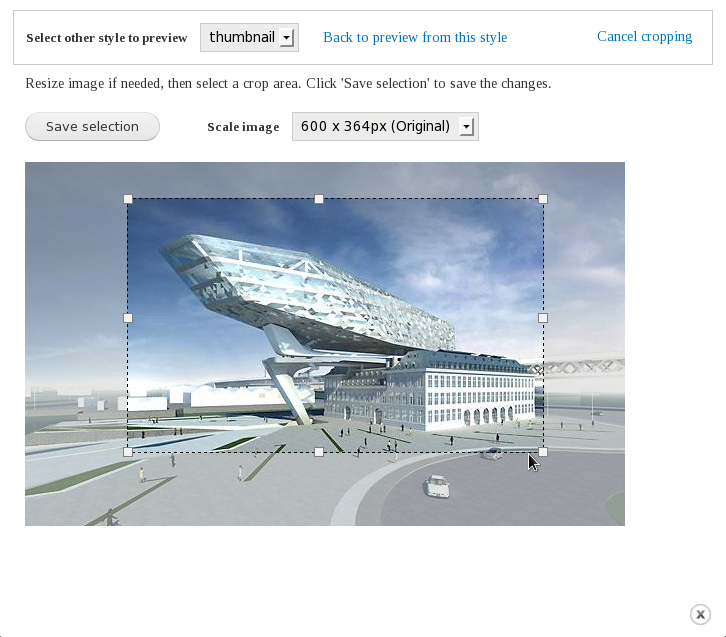
Once an author with the appropriate imagecrop permissions has uploaded an image to a node, they will be shown a 'Crop image' button on the node edit page. Clicking the button will open a popup with a dropdown list of all the imagecrop styles available. The author then chooses the appropriate style, applies the desired cropping, scaling and other effects and clicks save. The crop settings are reused wherever the image is shown with the same style, so there is no need to repeatedly crop the same image.
Supported modules
Image (Drupal core field type)
User (Drupal core) for the profile picture
Media module 7.x-1.x and 7.x-2.x
If you'd like the module to support another type of image then please submit a patch in the issue queue.
Screencasts
Three screencasts are available:
http://www.screencast.com/users/timmillwood/folders/Jing/media/ef47425b-... : Drupal 6
http://realize.be/imagecrop-5x10-out : Drupal 5
http://realize.be/imagecache-2-and-imagecrop : Drupal 5 (early development)
More info is in the README.txt file.
Drupal 8
There are no plans for a Drupal 8 version of this module. Consider using Image Widget Crop instead.
Project information
 Unsupported
Not supported (i.e. abandoned), and no longer being developed. Learn more about dealing with unsupported (abandoned) projects- No further development
No longer developed by its maintainers. - Project categories: Content editing experience, Site structure, Developer tools
 815 sites report using this module
- Created by swentel on , updated
 This project is not covered by the security advisory policy.
Use at your own risk! It may have publicly disclosed vulnerabilities.


