

Closed (fixed)
Project:
Mailhandler
Version:
7.x-2.4
Component:
Mailhandler
Priority:
Normal
Category:
Support request
Assigned:
Unassigned
Reporter:
Created:
12 Feb 2012 at 05:16 UTC
Updated:
30 Apr 2019 at 20:15 UTC
Jump to comment: Most recent, Most recent file


Comments
Comment #1
danepowell commentedCan you please enable the "Testing" module and run the tests for Mailhandler? If the tests fail, please save the test results page as HTML or take a screenshot and post here.
Comment #2
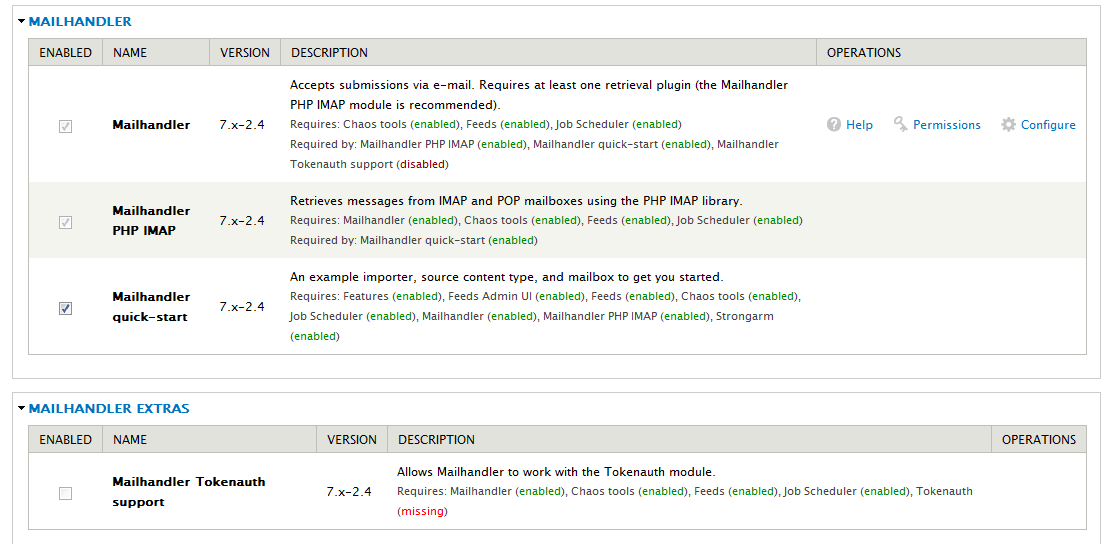
otcassetmgmt commentedI attached a screenshot of what I enabled. I did a search on Drupal for a "testing" module I did not find one posted. Thank you for your help if I am missing a module could you post the link(s).
Comment #3
danepowell commentedTesting is included in Drupal 7 core. Let me know if you have trouble.
Comment #4
otcassetmgmt commentedI found the testing module... I was not able to enable it I received this message.
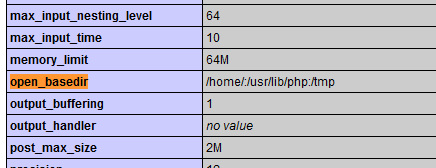
The testing framework requires the PHP open_basedir restriction to be disabled. Check your webserver configuration or contact your web host. (Currently using PHP open_basedir restriction Enabled)
I am using 000.webhost.com I am not sure how to disable the open_basedir (I am not that experienced)
I figure I will install this on my local host later this evening or try another development environment called kodingen.com unless it's easy to disable this on 000.webhost.com set up that I am using?
I attached another pic after running a search in the PHP link that I found in the control panel.
Thank you for helping me out I am not that experienced (Drupal & PHP) like I mentioned, but I have built a module and have good knowledge of the feeds module as I have been teaching myself for the last 4 months about 12 hours a day.
Comment #5
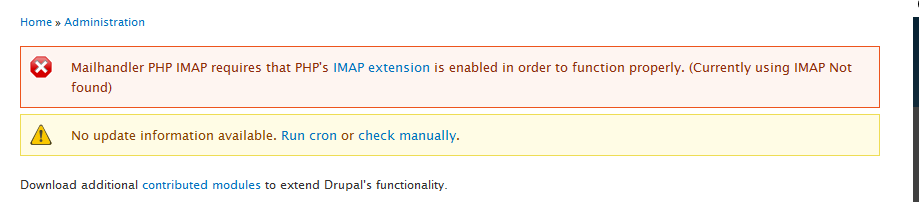
otcassetmgmt commentedI now have testing enabled using a kodingen.com account set-up I just installed. Now I am getting the attached error
Comment #6
otcassetmgmt commentedI think the attached png image has my answer? but I am not sure...?...I have read some of your older posts to other users on this subject, but it's still difficult for me to grasp. Before I really explore this (info in the attachment) I wanted to run it by you to verify this is my answer and if so I will follow the instructions to complete my configuration unless you tell me otherwise.
Comment #7
otcassetmgmt commentedI do not know how to find the php.ini file w/ in Kodingen. So I have been working again with 000.webhost I have been searching and reading and configuring, but I still can not get a connection.
Comment #8
danepowell commentedOkay, well the testing module isn't strictly necessary, it's just something that would provide clues as to the root problem on your original server. Just to check, php_imap *is* available on your original server correct? And if you visit your Drupal status report ($base_url/admin/reports/status) does 'IMAP' report as 'Enabled'?
Comment #9
otcassetmgmt commentedFirst I checked the report to be sure the IMAP was enabled and it was. Then I imported the script and ran a test and it did not give any message at all the Ajax wheel spun for a wile and then ended. So I then clicked edit and looked at the settings and that was helpful because I was setting it up wrong. Next I saved the configuration again and received a error message attached.
I assume it is a 000.webhost configuration setting problem? I think a password somewhere is killing the connection? Anyway I am very grateful for your help and I think if I were using a paid host I may not have this issue. By the way my project that I am building is a tool for handicapping NFL Football and I hope to have it ready for next season. It's called The Blizzard of Odds it is not a betting site just one to help users during halftime pick bets using many variables. Half-time Harry will be the "wizard" who advises users on four choices per game/event (over,under,home or away) He (my system will one day) ranks those actions and users subscribe to his advise or not all records are kept and hopefully if I program it correctly he will be right more than wrong? Most of the other info I found as XML or RSS feeds.
Meanwhile I am using Basketball to practice my workflow and as it turns out it's not very easy to get free scores off the internet as XML or RSS feeds, But I found a free site http://www.sportsalert.com/register/ that emails the scores this is why I need to import the content into Drupal from an email. Earlier today I created a new Gmail account and found a site called https://freemyfeed.com/free that turns the email into an XML source on the internet and I successfully queried emails from that configuration, but it only works with Gmail and in the future may need to make it more secure. I suspect I will be using Mailhandler in the future for this when I pay for hosting. Again I am still learning and I am very appreciative of your help hopefully I can program this and learn (that actually is my main motivation) I have had many cool people help me here on Drupal... Have a great day and I hope to here from you in the future.
Comment #10
danepowell commentedIt would help to have access to the IMAP error message(s), but unfortunately Mailhandler doesn't collect them. If you have access to server logs, you could see if there are any errors related to IMAP there. On dedicated servers this log would be in /var/log/mail.log but I'm not sure for a shared host.
Anyway, one action item resulting from this issue would probably be to collect error messages returned by imap_errors() in MailhandlerPhpImapRetrieve.class.php . Sorry I don't have time to work on this at the moment, but if you feel like doing some hacking you could look up the PHP documentation for imap_errors(), assign the output to a variable and then use dsm() or watchdog() to display the error.
Comment #11
otcassetmgmt commentedI will try this configuration tomorrow.
Lets assume I am successful connecting Mailhandler are there settings for importing the emails? I would like to filter them in? Because my alert service emails me many different kinds of emails and every one I want to receive...some are duplicate...some are more important than others... some are time sensitive...etc..all have distinct characteristics most important are the half and final scores. I am writing my own module called bliz_2_util to work some of this out. Is it possible to, "plug it into Mailhandler as custom filter?" I have other ideas here but I am trying to keep this short.
After Drupal captures the content my plan is to automate stuff by using Feeds, Rules and Flag for example. I feel I can further sort things out using modules and configuration rather than code. I have done all this updating using Feeds, but not as an automated process. Drupal is very good at managing data like this and I will try use Rules, Flag and Views to Handel a lot of the functionality. As I write my module I am thinking how to better provide so I can lessen the code.
My last resort is using the Data module and MySql querying.
On an unrelated issue I had to post this on a different problem http://drupal.org/node/1445346
Comment #12
danepowell commentedIt's been a few months, were you able to solve this? If not, can you try 7.x-2.x-dev? It includes a number of improvements, esp. to error reporting, which might help here.
Comment #13
otcassetmgmt commentedThank you for responding I have learned a lot since then as I spend most of my time learning. I am now using my paid host and my Drupal rarely crashes and the 000.webhost does crash and I am sure that was the problem anyway I am able to use google mail and https://freemyfeed.com/free and I think that will work good for me now because it helps me sort the incoming info using feeds and rules. I am weak writing PHP code, but have been studying and I really appreciate your help thank you very much for checking on my situation.
Comment #14
danepowell commentedComment #16
s33 commentedThis is the error I got:
"Unable to connect to mail. Please check the connection settings for this mailbox."
Thanks!