

Closed (fixed)
Project:
Syntax Highlighter
Version:
7.x-1.x-dev
Component:
Code
Priority:
Major
Category:
Bug report
Assigned:
Unassigned
Reporter:
Created:
1 Mar 2012 at 14:22 UTC
Updated:
18 Apr 2013 at 23:40 UTC
Jump to comment: Most recent file



Comments
Comment #1
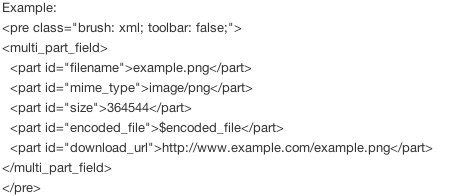
mattyoung commentedplease attache a file of your XML listing text, you have it already, so I'm not going to type that again...
I'm not going type that....(x)
See, you only show picture image of your xml but no raw text formated whatever you want to show.....
...you or whoever look at the picture above....translate that into utf8 encoded xml text file,
:)
Comment #2
mattyoung commentedSee the demo page, there is XML example:
http://zen.hddigitalworks.com/syntax-highlighter
Comment #3
BassistJimmyJam commentedI have looked at the example but it has not helped. I have tried both the
{syntaxhighlighter brush: xml;}and<pre class="brush: xml;">syntaxes and they both result in the XML all on one line. I have attached a text file with a snippet from a sample node.Comment #4
mattyoung commentedI copy you input and add an example in http://zen.hddigitalworks.com/
the input is like this:
{syntaxhighlighter title="XML" class="brush: xml"} <multi_part_field> <part id="area_code">717</part> <part id="prefix">609</part> <part id="line_number">0029</part> <part id="extension">123</part> <part id="country_code">1</part> <part id="type">United States</part> </multi_part_field> {/syntaxhighlighter}Comment #5
BassistJimmyJam commentedIt looks like this only works in the dev release, not the stable 1.1 that is available. It also only works if you use the
{syntaxhighlighter brush: xml;}syntax, the<pre class="brush: xml;">syntax still results in a single line.Comment #6
mattyoung commented>the
syntax still results in a single line. <pre> only works in D7, D6 must use the {syntaxhighlighter} syntax. This will never change. Only use <pre> in D7 version and change your content accordingly to the new <pre> format for complete WYSIWYG editor friendliness..Comment #7
BassistJimmyJam commentedI am using D7 (see the version for this issue).
Comment #8
skipshot4 commentedHaving the same problem. Running D7 and XML syntax is being put all on one line.
Happening with both the stable release and the dev release.
Anyone have recommendations on how to fix this or get around it? It's a big problem for us.
Comment #9
skipshot4 commentedThe problem goes away if you go into
Administration › Configuration › Content authoring › Text Formats
Select the text format you're using and having problems with.
Uncheck "Correct faulty and chopped off HTML"
Comment #10
mattyoung commentedHm, that interesting. I put <pre> tag around each SH code block. All filter should leave everything inside alone and not muck with it.
How exactly does "Correct faulty and chopped off HTML" filter work? What does it do?
Again, no filter should touch stuff inside <pre> tag, yes?
Comment #11
fizk commentedI was able to reproduce this, and #9 resolves the issue.
This should be added to the documentation.