

 The 2026 Drupal Business Survey is open. Your response will help shape the future of the Drupal business ecosystem.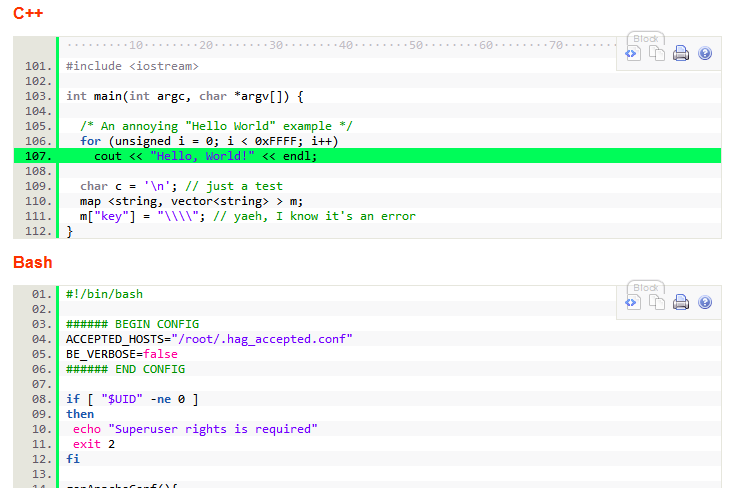
This module integrates the SyntaxHighlighter Javascript Library into Drupal for source code list syntax highlighting within any Drupal contents.
Note: the SyntaxHighlighter Javascript library is not included and must be downloaded and installed in sites/all/libraries. See README.txt for more details. This module is compatible with both the 2.x and 3.x versions of the Javascript library.
To markup your code, use the <pre> tag with the class attribute and optionally the title attribute:
<pre class="SYNTAXHIGHLIGHTER-OPTIONS" title="My title">
  program code
  ...
</pre>
Very important!!!: ordered the input format filters as follow:
- HTML filter or Wysiwyg filter or whatever HTML filters you use. They must come before.
- Syntax highlighter. This come after any and all filters that can modify content input.
- Line break converter. This must be after, If you see <br/> at the end of every line in your output, then you know what's wrong.
Note: Ajax and autoloader do not work together. If you Ajax load syntax highlighted code, do not enable Autoloader. Or you must make sure the initial page load already has the language brush loaded.
TinyMCE wysiwyg editor integration:
See #617758: Integration with wysiwyg module
Read this blog post on how to setup this.
D7 update of this module see http://drupal.org/node/1727638

D7 WYSIWYG intergration:
http://drupal.org/project/syntaxhighlighter_insert
Old 1.x branch:
In the 1.x branch, the <pre> tag format is only suitable for the Full HTML format. This is because of the unusual class string format (i.e. class="brush:php;gutter:false"), both the HTML filter and the WYSIWYG Filter filter out the class string as something illegal and not allowed. The final output end up with no class attribute. To get around this, instead of using the pre tag, this format is used:
{syntaxhighlighter class="SYNTAXHIGHLIGHTER-OPTIONS" [title="title"]}
  program code
  ...
{/syntaxhighlighter}
This {} format makes things compatible with the built-in HTML filter and the WYSIWYG Filter.
Old D6 1.x {syntaxhighlighter} to <pre> to D7 automatic conversion:
konstantin.komelin has created the {syntaxhighlighter} to PRE Converter module to automate the conversion from D6 1.x branch format to D7.
If you already use the D6 2.x version, then you don't need any conversion to move to D7.
See more details and a demo of this module.
Install the Multicolumncheckboxesradios module and the checkall module to enhance the settings form.
Alternatives:
- GeSHi: performs syntax highlight rendering on the server side, whereas this module does rendering on the client browser. See the end of that module page for a fuller list of alternatives.
Project information
 Maintenance fixes only
Considered feature-complete by its maintainers.- Project categories: Content display, Developer tools, Integrations
 351 sites report using this module
- Created by mattyoung on , updated
 Stable releases for this project are covered by the security advisory policy.
Look for the shield icon below.
Releases
8.x-1.0
released 9 November 2022
released 9 November 2022
Install:
Development version: 8.x-1.x-dev updated 8 Dec 2017 at 17:13 UTC


