Installed and configured this module, I browsed to my page taxonomy/term/1, which display a few nodes. I clicked "move up" links under the nodes, I got an message:
You are not authorized to access this page.
But I'm the administrator (user 1).
I went to user management/access control, gave authenticated user the permission of "order nodes within categories". In this case I clicked "move up" links under the nodes, I saw an massage like this:
this node was moved in this term ...
but the node I tried moving was still there, not moved.


Comments
Comment #1
marcp commentedWas this working for you in 4.7? Did you start with a clean 5.1 installation?
Could you please attach a screenshot of page taxonomy/term/1 before clicking the "move up in XXX" link.
Thanks,
Marc
Comment #2
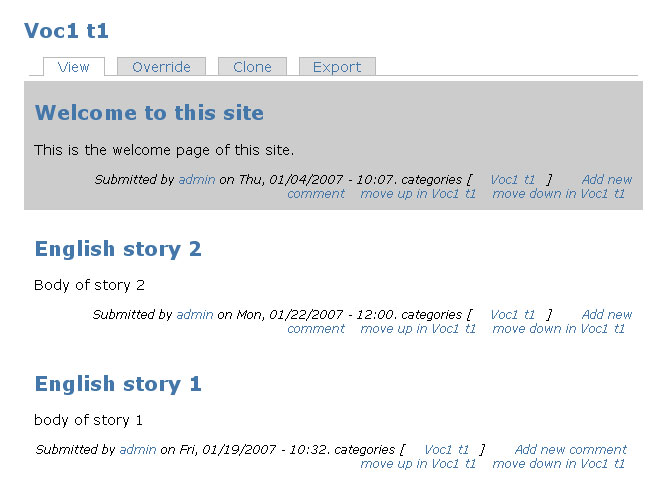
astra commentedMy site runs with a clean 5.1 installation, not upgrates from version 4.7. Here is a screenshot of my page taxonomy/term/1
Comment #3
marcp commentedLooks like you may have a view overridden that's causing this. What happens when you show the page nodeorder/term/1 -- do you see the order that you want?
Search back through the Nodeorder issues to see if there's anything regarding Views integration. I can't remember what the current status is, but I'm pretty sure there's an easy way for your view to use the weight_in_tid field (that was added by Nodeorder) from the term_node table for ordering nodes in your taxonomy Views.
Please report back here with the solution and/or continued debugging info.
Comment #4
astra commentedIf browse to the page nodeorder/term/1, I get almost same display as the page taxonomy/term/1, but plus a link "Set the order of nodes in xxx" between the term title and the nodes. Clicking this link I get a fatal error:
Comment #5
marcp commentedThe fatal error is a whole separate ballgame. In order to use drag-and-drop ordering, you need to install the jQuery Update, jQuery Interface, and jQuery Interface Sortable modules. So, if they're not installed then we shouldn't let you see that "Set the order of nodes in xxx" link and/or when you go to that page it should tell you some useful information.
If you are on nodeorder/term/1 and you click move up or move down on one or more of the nodes links, do you see that the order has changed? You may need to go back to nodeorder/term/1 after pressing move up or move down.
Do you have the taxonomy view(s) overridden?
Comment #6
astra commentedAccording to the instruction of the module Nodeorder:
I first installed jQuery Update, jQuery Interface and Message Effects before I installed Nodeorder. Also I had a test and notice that Message Effects works well. After that I installed and tried using Nodeorder. But got this problem.
By the way, I didn't install Interface Sortable module because the instruction do not mention that.
On the page nodeorder/term/1, if I click move up or move down on one or more of the nodes links, sometime can move but somtimes get a blank page body with message below:
What do you mean about taxonomy view(s) overridden?
Comment #7
marcp commentedI need to update the documentation -- this module requires the jQuery Interface Sortable module in order to use drag-and-drop ordering.
You may be getting the Access Denied message when you try to move the top item up or the bottom item down. Neither of those operations should be allowed (there is another issue that addresses this).
Please test to see whether it's just these end-cases that are causing Access Denied messages. If you get the drag-and-drop ordering working, you won't go back to using those links to move the nodes anyway.
Comment #8
astra commentedI get the Access Denied message when click move up or move down on one or more of the nodes links BETWEEN the top item and the bottem item. For the end-cases, there are the same problem to try moving the top item up or the bottom item dowm.
I will install the jQuery Interface Sortable module to use drag-and-drop ordering, and see what happen. But hope it also works without using drag-and-drop ordering.
Comment #9
marcp commentedLet us know how the drag-and-drop goes. Please feel free to contact me via my contact form and I will try to help you debug this on your site.
Comment #10
astra commentedInstalled the jQuery Interface Sortable module, I can go to the page nodeorder/order/1 to drag and drop nodes to change their ordering. But when I go back to the page taxonomy/term/1, these nodes still have the original order, not changed.
How to display the node list with the new order what I want?
Comment #11
marcp commentedPlease contact me and I will try to help you get to the bottom of this issue.
Comment #12
karlrees commentedI also have the problem where drag-and-drop doesn't change any of the weights. Has there been any progress on figuring out what's wrong? Might a "submit" button be an easy workaround for this?
Comment #13
marcp commentedI'm starting to suspect that the problem may be with the Ajax callback. In nodeorder.module there is a line that looks like this:
Try changing "/nodeorder/reordered" to "http://yourdomain.com/nodeorder/reordered" (replacing http://yourdomain.com with whatever it is that gets you to your Drupal site) and let me know if that fixes it. If it does, then I'll fix the code to automatically create the full url.
Thanks,
Marc
Comment #14
marcp commentedTry the new 5.x-1.2 release and let me know if it fixes the problem for you.
Comment #15
astra commentedUpdated to 5.x-1.2 release, the problem of my site is not fixed yet. I can't see anything changed.
Then I try to have a test what you said in #13, but in nodeorder.module (5.x-1.2) I can't find this line
Comment #16
marcp commented@astra - In the 5.x-1.2 version I tried to fix what I thought might be your problem, so you won't find the offensive line. The problem must be something else. I don't really have the ability to reproduce the problem so I'll need access to your site.
Please contact me and I will try to help you get to the bottom of this issue.
Comment #17
pvanderspek commentedHas this problem been solved already? At least I'm getting the same message when using the latest official release (5.x-1.2).
Comment #18
marcp commentedpvanderspek - what is the message that you are getting?
Comment #19
pvanderspek commentedExactly the same one as above:
Even though I'm logged in as user 1.
Comment #20
marcp commentedI think this went away for astra when jQuery Interface Sortable was installed. Do you have that module installed and activated?
Comment #21
pvanderspek commentedI've already installed jquery interface sortable, jquery interface library and jquery update.
Comment #22
pvanderspek commentedLittle update: it appears that its just not possible to move the top item down or the bottom item up. Tried in both FF2 and IE7, but that doesn't make a difference.
Comment #23
pvanderspek commentedOK, I finally discovered what I was doing wrong. Apparently you can order nodes on the page 'taxonomy/term/TID' but if you do that, it doesn't work with the top or bottom node. Everything works fine when you do it on the page 'nodeorder/term/TID'. Problem solved I guess.
Maybe its a good thing to update the README, because it doesn't say anything about the special nodeorder page. I found that in another support request.
Comment #24
Subtropical_305@drupal.org commentedHi,
I'm having the same problem astra was having - when I access nodeorder/term/tid page, I am able to see nodes in the order I have set, and move them, and see the new order. But when I access the page from the menu or the link, I don't see the changes. I looked through the discussion here but I'm not clear on whether a resolution was found for this problem, and if so, what the resolution was?
I am trying this with the standard image gallery content type, where each image is its own node. I am using Drupal version 5 and nodeorder v1.2
I am a noob @ drupal so I hope I have provided enough information here...Please let me know if I've left out anything important.
thanks
Comment #25
marcp commentedYou may try searching for nodeorder and image on drupal.org. I know there are folks who have gotten stuff like this working together -- read through all of http://drupal.org/node/117587 for some possible insight. Please post here if and when you solve this.
Comment #26
halftone commentedFollowing on frpm #25, you may hope and expect that just installing and using Nodeorder will allow Drupal to display nodes in the order you have set. Unfortunately as far as I know no modules are coded to utilise the weight_in_tid field that Nodeorder utilises, and they will just display in the usual 'sticky+upload date' default Drupal order. To get them them to honour Nodeorder's running order you will need to dig into the module code and locate and modify the SQL that selects the nodes for display, along the lines mentioned at the link Marc gave. The final msg. in that thread shows how the SQL of the Image module has been hacked to use weight_in_tid if present but default to normal Drupal ordering if not. See the bits where it says //HACK.... //END OF HACK.
(This really ought to be an Image module patch but I'm not a developer, I barely know WTF I'm doing, and am on Windows where I have a terrible time patching using Cygwin. I haven't managed to produce a patchfile. So it is a deplorable, horrible hack instead. But it does work:).
All this confused the hell out of me when I first began using Nodeorder as I assumed Drupal modules would be inherently capable of working together. It really should be the case, and it would be nice if module authors would support Nodeorder 'cos if you need it, it is absolutely indispensible. But until then, you'll just have to bodge the SQL yourself in any module where you want explicit control of its nodes.
Comment #27
Subtropical_305@drupal.org commentedthanks halftone & marcp,
I read the other thread that was linked, that is pretty much exactly the problem I am having (I want to use nodeorder for image gallery). I am not really familiar w/ mySQL but it sounds like the hack is the way to get image gallery to play nice w/ node order. I'll see if I can get it sorted out.
thanks again!
Comment #28
halftone commentedHere's the code to make the image galleries respect Nodeorder in Drupal 5.n. NB that if Nodeorder isn't installed it defaults to normal Drupal sticky+upload date behaviour.
Find image_gallery.module in /sites/all/modules/image/contrib and replace the entire image_gallery_page function with the code below.
Comment #29
marcp commentedSetting this to fixed. Re-open if there are still issues.