

The nodeorder module gives users an easy way to order nodes within their taxonomy terms.
By default, the taxonomy module orders listings of nodes by stickiness and then by node creation date -- most recently posted nodes come first.
The nodeorder module gives the user the ability to manually put nodes in any order they wish within each category that the node lives.
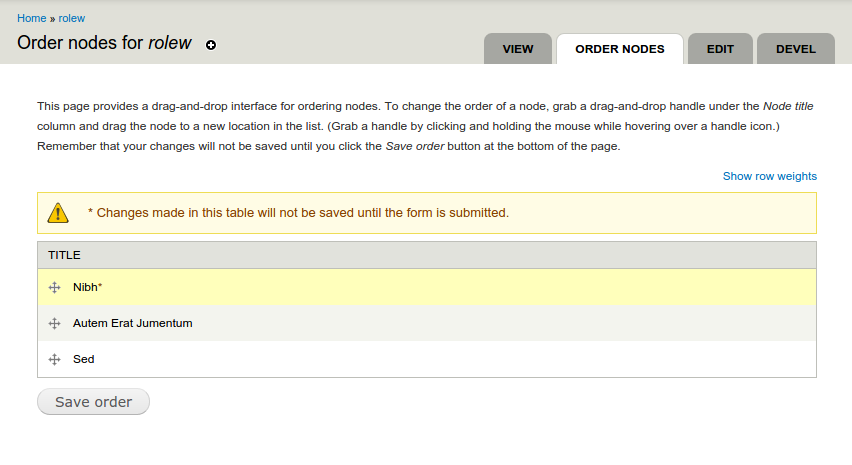
There are two ways that a user can order nodes within a category. The first is to use the "move up" and "move down" links that can be configured to appear on each node (especially useful when looking at lists of taxonomy terms). The second is to use drag and drop, which appears on the administrative listings of nodes in a category.
For a comparison of nodeorder with other node ordering modules have a look at this handbook page: http://drupal.org/node/398508.
Install Nodeorder in Drupal 7 and 8
- Put the nodeorder directory in your modules directory.
- Navigate to admin/build/modules and enable the nodeorder module.
- Navigate to admin/user/access and assign one or more roles the right to "order nodes within categories".
Using the Nodeorder module
- You may turn on "orderability" on a per-vocabulary basis by visiting your vocabularies' administration pages (admin/content/taxonomy). This module adds a checkbox on the "edit vocabulary" page titled "Orderable" -- it defaults to being unchecked. After checking this box and saving your changes, you'll be able to order nodes that are classified in this category.
- To use drag and drop node ordering, you will find a tab called "order nodes" on any admin/content/taxonomy/VID pages where the vocabulary has been set to orderable.
- Navigate to admin/settings/nodeorder, where you can set some options that determine the way nodeorder works.
- There is Views support for ordering taxonomy views by weight_in_tid.
Technical notes
Upon installation, this module adds a new column (weight) to the taxonomy_index table.
Development
Nodeorder was initially developed by the friendly primates at FunnyMonkey.
Nodeorder (D7 only) is currently maintained by dieuwe.
Project information
- Project categories: Content display, Site structure
 2,089 sites report using this module
- Created by marcp on , updated
 Stable releases for this project are covered by the security advisory policy.
Look for the shield icon below.


