I'm passing a date (without hours or seconds) or date range as a contextual argument to a View.
When the underlying date object in the content field is a normal date, then an argument (start) date that is identical to the field date of the viewed content matches, as you'd expect.
When the underlying date object in the field is a Unix timestamp, then it doesn't match.
So if I have a view of, say, articles, to which I have added a Date (Unix timestamp) field and have entered 11 Mar 2012 for a number of article nodes and then filter the view via a default fixed contextual argument of 20120311, then the content does not show up in the View. I have to go back a day and enter 20120310--20120311 for the content to appear.
When the date field is a 'plain' Date, then 20120311 or even 20120311--20120311 does match 11 Mar 2012 and the content does show up in the View, as expected.
Rik
PS: Keep up the great work on a great module!




Comments
Comment #1
rdeboerThe Date (ISO) works perfectly too, i.e. this where clause as generated by Views via the Date module works as expected:
But when a Date (Unix Timestamp) is used, the equivalent STR_TO_DATE function, i.e FROM_UNIXTIME, does not produce the right input for DATE_FORMAT when used as a start date.
Comment #2
karens commentedFirst of all '20120311' is not the format used for date arguments, it is '2012-03-11'. But even using the wrong format I can get the right results in the latest code.
Start by getting the very latest code (the 'dev' version) and try again. If you still have trouble there I need specific details about how to reproduce the problem, which is going to include details about what timezone you have for the site timezone, exactly how you configured the date field, and exactly how you set up the view. Along with an example of the specific value you entered into the date field.
Comment #3
karens commentedNo response, closing.
Comment #4
rdeboerSorry for the delay. Re-opening as this is still an issue in 7.x-2.6.
Happy to use
format_date($timestamp, 'custom', 'Y-m-d')rather thanformat_date($timestamp, 'custom', 'Ymd')-- both work perfectly for plain and ISO dates and both demonstrate the problem with Unix dates.Basically when I programmatically pass a date range from, say, 24 Oct to 25 Oct, then it gets interpreted in the Views query as if I passed 25 Oct to 26 Oct.
I will prepare a reproduceable test case.
Comment #5
rdeboerFollowing on from #4 above.
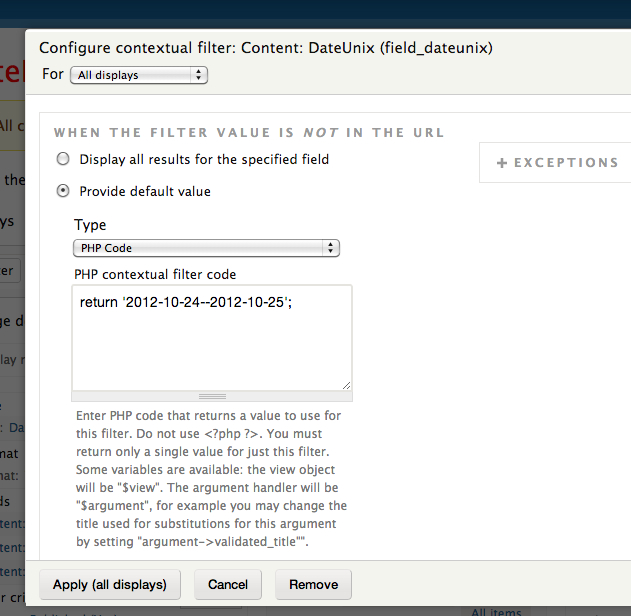
Here's a test case (see screenshots)
a) I added to core's Basic Page content type, two fields: DateISO and DateUnix. Year/Month/Day only, no hours/mintuse/seconds. No End Collection.
b) I created two pieces of content by this type. On the first I set both the DateISO and DateUnix to 25 Oct 2012, on the second I set both these dates to 26 Oct 2012
c) I created a View that displays Basic Pages in a table format.
d) On the View I added a Contextual Filter for the DateUnix field with a date range set to 24 to 25 Oct
e) I observe the output and find that I'm seeing the content for 26 Oct, 1 day beyond the filter range.
If I set the Context Filter for DateISO with exactly the same date range it shows me only the content for 25 Oct, which is what I expect.
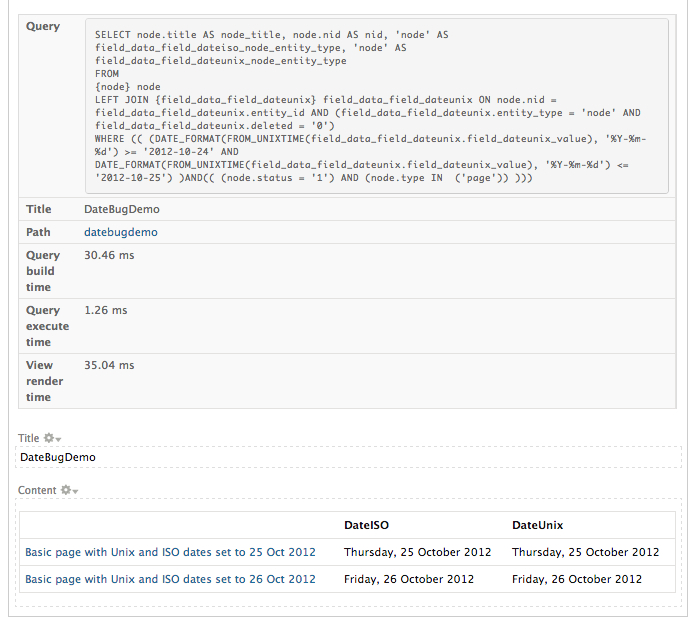
The timezone in all of the above is Australia/Melbourne
Comment #6
rdeboerPS: the reason why this is espicially important is that the Views Global Filter module relies on the contextual filter.
Comment #6.0
rdeboerMention hours & seconds
Comment #7
anouHello,
did you find any solution for date field based on Unix Timestamp?
Comment #8
rdeboer@anou:
Nope.
Comment #9
anouI've used hook_views_query_alter to make it "right".
My context is:
Here is my simple (and repetitive code):
And thanks RdeBoer to answer me so fast on this old issue ;-).
Comment #10
rdeboerThank you for your solution!