Overview:
I'm sorry to post this, but I've been digging through docs and issues for hours and can't seem to define the direction I need to go.
I'm attempting to configure Media and WYSIWYG to work together well enough that a non-technical client could use the system. In Drupal 6 I was able to accomplish this with the WYSIWYG Image Upload module, but I was hoping I could move my current project to D7 and rely on the power of the Media module.
What I'm requesting:
Again, wish I could figure this out on my own but with the state that this module and documentation are in it's difficult. If someone can point me in the right direction to develop solutions to the below needs. EG can they already be done with hooks (I'm happy to write a solution), do options already exist in patches that I haven't turned up, can it not be done, etc. etc.
Specific Needs:
- In WYSIWYG Dialog, specify alignment (float) of image. I believe there is some discussion on this here: http://drupal.org/node/1492556, but from what I can tell this is a solution that involves printing a file entity's fields as attributes of a div wrapper. Maybe I'm wrong here...but what if you want to float an image right on one node, then left on another?
- In WYSIWYG Dialog set Alt text. For my particular use I would prefer to use the File Entities title, preferably as an overridable default.
- After an image is inserted, it shows up in both TinyMCE and CKEditor---awesome---but if I highlight it and click the "Media Browser" button again it should reopen the same dialog so I can change options
- Secondary needs: not necessary but would be nice: Allow specification of a class on images when they're inserted, allow only certain image styles to be selected on the WYSIWYG dialog
Thank you very much in advance to anyone who has some input! I'm happy to help develop some solutions if some of these are close, just trying to figure out where I stand first.
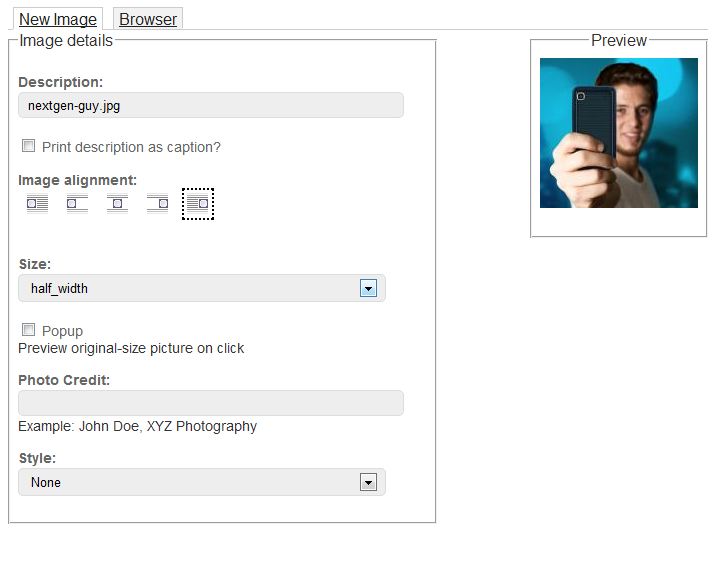
I've attached a screenshot of what my customized WYSIWYG Image Upload dialog looked like in D6...not perfect, but this is about what I'm aiming for ultimately, it's powerful and intuitive enough for beginners to use.


Comments
Comment #1
radiobuzzer commentedFirst use the toolbar button to insert image. Then double click the image. This should give you all options, namely float, alternative text, etc
Comment #2
Nick Lewis commented(edit: fair enough, Dave).
Comment #3
dave reid@Nick: Please try to keep this issue queue constructive. We're aware there's WTFs involved when getting the WYSIWYG set up and using it with non-image files.
The original issue here needs to be split up into several different feature requests, some of which may have existing issues in the queue.
Comment #4
tsvenson commented@Nick Lewis: Yes, it would of course be very nice to have this out-of-the-box. However, should it then be using inline CSS, CSS classes depending on custom file based CSS or something else? Personally I want to avoid as much as possible to use inline CSS in content and instead have it in separate files in the theme. Others don't really care and so on.
Therefor my standpoint for this kind of feature request is that it should not be part of the core Media module. It is much better handled by add-on modules where user can then opt for the method they prefer.
The core Media module should be as lightweight and lean as possible and not make choices such as the one needed here. We need to focus on the basic functionality that is needed and there is still a lot to do there.
@Dave Reid: Is it possible for add-on modules to modify the bundled WYSIWYG integration, adding functionality such as this?
Comment #5
vood002 commentedThank you for the quick responses! I appreciate the direction that Media is moving in, it should eventually be able to fill what I feel was a giant gap in usability in D6.
I think all of these options can be boiled down to one request, whether it should go into core or a contributed module I can't/won't comment on, I've only been working with media thusfar for about 48hours so my understanding of it is extremely limited.
The form that pops when I double click appears to be a function of CKEditor. This needs to be a function of Media so that it can be available after the image is first selected, and upon selecting the image and clicking the 'media embed' button. This form would then be available for addition/subtraction/modification via hook_form_alter (or maybe it should have its own hook, I'm not sure). From what I can tell looking at media.filter.inc the output cannot be overridden, although even in D6 I never screwed around with filters so I may be wrong here...but this would be another requirement, so you could add a field on the form and modify the output given the value of that field.
This sounds useful right? Ultimately with this functionality most anything could be done with the WYSIWYG input button, coding in functionality like this is a little over my head but if it existed I would gladly write a hooked in contrib module that would--in my opinion--go an awful long way in making D7/media usable by non-technical people. Whenever I explain something to a client like "Click this button to place an image, THEN double click the image, ignore all of these fields, you'll want to enter "10" and "10" in hspace and vspace" suddenly something that shouldn't require any direction at all needs a paragraph in a user manual.
Hoping for a response from someone who knows the module. TY!
Comment #6
vood002 commentedCurious if anyone has any input on this.
I see that Media's WYSIWYG integration is designed to work only with CKEditor.
Does anyone else see an advantage to Media module handling this itself? I don't want to make a feature request unless those who are more involved agree that it's necessary.
Using hook form alter and hook_media_token_to_markup_alter two of the four steps are already in place.
It appears to me that there are two steps that are necessary to get this to work:
1) Get media_format_form to interpret tokens and open when an embedded image is highlighted and the Media button is clicked, (or when an embedded image is double-clicked). This could go a different direction and instead of interpreting tokens parameters could be stored for each embed in the database, but I'm not sure that this is necessary.
2) I'm still a little underwater trying to interpret wysiwyg-media.js, but I believe some modification would have to be made here to allow data passed from media_format_form to be parsed into tags, and tags to be properly interpreted for display within WYSIWYGs specifically. Some potential complications exist here.
Again I would like to help move this functionality along, I'm working on a project with a little extra space in the budget that I could use to develop something...but I'm not sure if this is within the vision of the Media module developers, and I would need some basic strategic direction.
Comment #7
Nick Lewis commentedMy best success with images (at least) has been the combination of CKEditor, and media_crop for wysiwyg integration. Here's one problem I do have a temp solution for: Applying image-float-left, image-float-right, image-float-center styles using ckeditor. Turns out clients want to have their images aligned left, or right in the body of articles. Go figure. This didn't work using wysiwyg styles a few weeks ago. Here's how I got around it. Using a custom module, I implemented this hook as so (obviously replace"GLOBOCHEM" with whatever your custom module might be called).
Here's my the-shiznat.wysiwyg.js file;
The CSS is pretty standard. Just have your css file have the right classes, and floats, etc...
Note
*just realized how little sense i may have just made.
Comment #8
devin carlson commentedUnfortunately, as mentioned in #3 and #4, there are currently a lot of outstanding issues with Media. I've outlined the issues working towards fixing the problems described in the original post.
Comment #9
kirilius commented"Floating images can be accomplished through the WYSIWYG editor directly (see Nick Lewis' comment in #7)."
How about centering an image? WYSIWYG + CKEditor only give you float left and right but no centering. Is there any workaround for this?
Comment #10
gmclelland commentedI haven't tested this yet, but it might be doable with the following modules:
http://drupal.org/project/shortcode as indicated here #1784708: Compatability with the media module
See the following video for what shortcodes do: http://demo.lumi.sooperthemes.com/content/shortcodes/wysiwyg-integration
http://drupal.org/project/stf_wysiwyg - say's it uses media modules on the project homepage
http://drupal.org/project/sc_basic
I think it also provides clearfixes for wrapping an object with a div and clearfix.
-Hope that helps
Comment #11
rajmataj commentedFor floating with inserted images, try the excellent float filter module. For some approaches on image insertion, have a read of this article.
Comment #12
osopolar@kirilius #9:
You can set centering to default behavior in your css. If the editor uses ckeditor to float right or left, this option will be overridden automatically.
Comment #13
osopolarComment #14
osopolarWhile asking for best practice, the following solution includes ability to align images left, right and center and add caption to the image which is positioned well (below) the image:
I use current dev of wysiwyg (with ckeditor), file_entity and media with the patches #1792738: Allow custom file view modes for WYSIWYG display #185 and #2126697: Wysiwyg -- Alt and Title fields require some special handling. #47. In
admin/structure/file-types/manage/image/displayI enabled the display of title (used for caption) (and also for a custom field copyright).Adding images via wysiwyg (media_wysiwyg should enabled) and filling all necessary filds now should result in the display of the image and the fields. Floating is already working, but only for the image and not the caption.
To achieve this, I added the following code to my custom themes template.php (workaround for #2018075: Media inline filter: Delegate "float" to outer element):
And this to the themes css:
Now the wrapper div with the image and the caption gets centered by default or floated left/right if set by wysiwyg ckeditor.
Finally I also cleaned up the file entity template by adding file--image.tpl.php to the theme with the following code (this is optional, but I didn't like the hidden h2-Tag):
As this is a support request and #8 only refers to feature request this issue shouldn't be marked as duplicate. But hopefully the question is answered now, so I set it to fixed.