

Closed (outdated)
Project:
Event
Version:
5.x-1.x-dev
Component:
User interface
Priority:
Minor
Category:
Task
Assigned:
Reporter:
Created:
15 Jun 2007 at 12:06 UTC
Updated:
13 Apr 2018 at 20:57 UTC
Jump to comment: Most recent, Most recent file


Comments
Comment #1
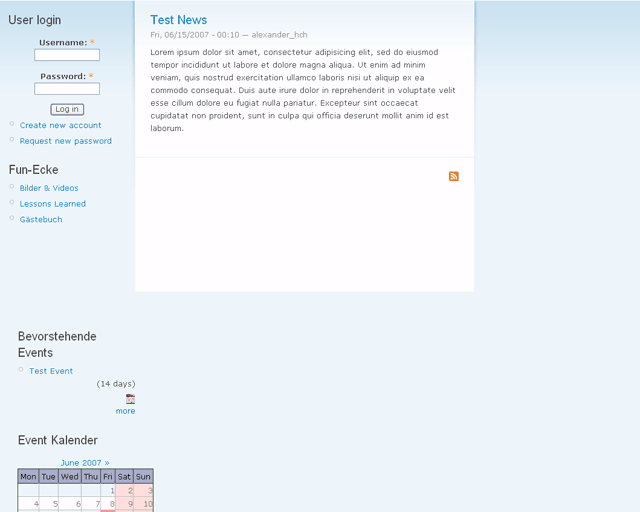
account-deletion-needed commentedHere's the screenshot showing the display bug in UE6.
Comment #2
Anonymous (not verified) commentedI'm guessing that it has something to do with the width of the calendar. If objects are wider than their containers, IE will often push them below the rest of the content. Without specifically seeing the XHTML and CSS it's hard to say exactly what's causing the problem.
Comment #3
account-deletion-needed commentedYeah I though the same thing. Tried to reduce the calendar width in the CSS file but it didn't solve the problem. Not sure if I changed the width at the right place though.
Comment #4
beert commentedIt indeed is a problem with the calendar width.
It can be 'solved' with dropping a letter of the names of the days: e.g. 'Mon' -> 'Mo'.
However, I don't think this should be a definitive solution...
Comment #5
nancydruAre you sure you don't have an extra
<div>in there somewhere?Comment #6
anjali8507 commentedyeah.. i'm facing the same problem here.. did anyone got the solution for this bug? i really need help on this.. thanks in advance..
Comment #7
grunthus commentedI am also finding the same issue with the Garland theme in IE6. There are 3 images posted on the site with the problem here. Once again IE proves to be such an irritating and obnoxious PITA.
I expect I ought to install 5.x-2.x and see if that makes any odds. Time to fire up the test server.
Comment #8
grunthus commentedSorry, in my previous post I was referring to 5.x-1.0. I have just installed 5.x-1.x-dev on a test server. Sadly with IE6, the block shifting the div problem persists.
In IE7 however the presence of the calendar on the right hand div (garland) does not destroy the positioning, all works well. CSS to reduce calendar font sizes? Could IE6 users just get the 'UpComing' events block instead of the calendar?
Comment #9
ddv commentedOk, what am I doing wrong here? I opened event.module, located the following lines:
if (!$weekdays) {
if (variable_get('date_first_day', 1)) {
$weekdays = array(array('day' => 'Mon', 't' => t('Mon')), array('day' => 'Tue', 't' => t('Tue')), array('day' => 'Wed', 't' => t('Wed')), array('day' => 'Thu', 't' => t('Thu')), array('day' => 'Fri', 't' => t('Fri')), array('day' => 'Sat', 't' => t('Sat')), array('day' => 'Sun', 't' => t('Sun')));
}
else {
$weekdays = array(array('day' => 'Sun', 't' => t('Sun')), array('day' => 'Mon', 't' => t('Mon')), array('day' => 'Tue', 't' => t('Tue')), array('day' => 'Wed', 't' => t('Wed')), array('day' => 'Thu', 't' => t('Thu')), array('day' => 'Fri', 't' => t('Fri')), array('day' => 'Sat', 't' => t('Sat')));
}
}
return $weekdays;
I changed it to shorten the contractions for the days of the week, like so:
if (!$weekdays) {
if (variable_get('date_first_day', 1)) {
$weekdays = array(array('day' => 'Mo', 't' => t('Mo')), array('day' => 'Tu', 't' => t('Tu')), array('day' => 'We', 't' => t('We')), array('day' => 'Th', 't' => t('Th')), array('day' => 'Fr', 't' => t('Fr')), array('day' => 'Sa', 't' => t('Sa')), array('day' => 'Su', 't' => t('Su')));
}
else {
$weekdays = array(array('day' => 'Su', 't' => t('Su')), array('day' => 'Mo', 't' => t('Mo')), array('day' => 'Tu', 't' => t('Tu')), array('day' => 'We', 't' => t('We')), array('day' => 'Th', 't' => t('Th')), array('day' => 'Fr', 't' => t('Fr')), array('day' => 'Sa', 't' => t('Sa')));
}
}
return $weekdays;
}
I saved the file in the events directory but it didn't change anything. The names of the days are still the original 3 letter contractions. I tried disabling and re-enabling the events module in case it was a cache issue, to no avail. What am I missing?
Comment #10
beert commentedUse Manage Strings (in Site Config > Localization)
to change (parts of) strings.
Comment #11
ddv commentedI enabled the localizer module and went to "Manage Strings", but there aren't any to manage. The search function turns up nothing even when searching all languages for all strings in that language. I'm just using the default English provided with Drupal. I tried exporting but got nothing that way either. I'm guessing I should at least get some default strings from the core, right???
And why wouldn't changing the text in event.module work?
Comment #12
ddv commentedWhat if I uninstall the module, then re-install it using the modified event.module? Would that shorten the names or are the names stored somewhere else that I haven't found yet?
Comment #13
ddv commentedIt turns out that simply uninstalling was insufficient. I had to disable all the event module items, then uninstall, then delete the entire event directory from the modules directory, then refresh the modules page, then reinstall everything from scratch and re-enter all my events. But it worked -- the names are now shortened to two characters as per my modification of events.module in the above post and IE 6 is happily displaying everything correctly. Kludgy perhaps, but it worked. Thanks for the tips.
Comment #14
samuelet commentedCheck also this:
http://drupal.org/node/196023#comment-675275
Comment #15
Extrix commentedCheck this out, it might help
http://drupal.org/node/211058#comment-695355
Comment #16
bardkerbie commentedIf you add the following line to either your theme's stylesheet or the event.css stylesheet:
It fixes the problem.
Comment #17
lordmaji commentednm. I figured it out. :) Thanks.
Comment #18
japerryEvent for Drupal 8 is unrelated to older versions. If an issue similar to this one exists, please open a new issue with the 8.x branch.