

 The 2026 Drupal Business Survey is open. Your response will help shape the future of the Drupal business ecosystem.
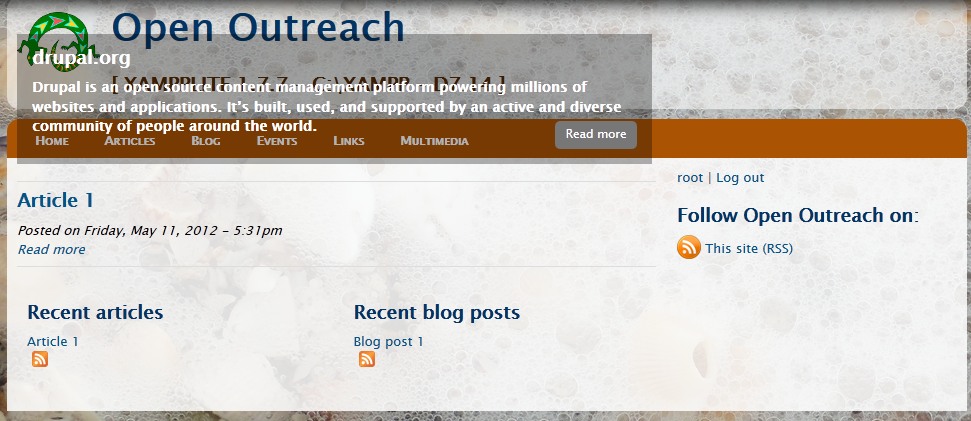
I need a block/panel/..., not something that prevents me to click on links "under" that view.
At the moment it floats over other blocks/panels/... .
| Comment | File | Size | Author |
|---|---|---|---|
| #3 | hardcopy.png | 480.61 KB | wusel |

Comments
Comment #1
nedjoI'm not sure what the issue is. Can you provide a screenshot? Sounds like this may be theme-related. What theme are you using?
Comment #2
wusel commentedI use "Open Outreach", Version 7.x-1.0-rc1 (http://drupal.org/project/openoutreach).
I have made a new install and then I added some highlited links. They are shown "over" the head of the webside, so nobody can click on a link from the main menu.
When I put this to another place, it is always "over" the other blocks or panels.
I can add a screenshot at the weekend...
Comment #3
wusel commentedplease look at the hardcopy

I can not click at HOME, ARTICLES and the other menu-items.
Comment #4
rosemarymann commentedThanks for the screenshot. This looks to be a CSS issue.
No images are showing. Have you uploaded images to accompany the 'highlighted' content?
What browser, version, and operating system are you using?
Comment #5
wusel commentedI use XAMPP 1.7.7 on a Win7-64 bit-client as a local websever. The browsers run on the same computer.
The Hardcopy was build on a Firefox 12.0. But IE 9.0.8 with Update 9.0.6 and Safari 5.1.7 show the same page.
It is "Open Outreach", version = "7.x-1.0-rc1" from 2012-05-10. No changes.
The "Highlighted"-node:
Title ="drupal.org", Kicker ="Drupal is an open source content management platform powering millions of websites and applications. It’s built, used, and supported by an active and diverse community of people around the world.", Link = "http://drupal.org/". Nothing else in the other fields.
Comment #6
rosemarymann commentedIn double checking this, I can see that we have not made the image a required field, which we'll do as that is the whole point of the slideshow. We'll also add help text about the best image size to use. See the Open Outreach user documentation for more information.
Comment #7
wusel commentedyes, that is it.
With an image, the "block" moves "in the correct place".
Thank you very much.
A tipp:
The link to another webside may call another browser-window/-tab (target="...").
Comment #8
Taxoman commentedComment #9
wusel commentedIn Version 7.x-1.0-rc2 of Open Outreach this error is NOT stopped yet.
Please fix it soon.
Thank you very much.
Wusel
Comment #10
nedjoFixed.
Comment #11.0
(not verified) commentedI add information