

Closed (fixed)
Project:
Image
Version:
6.x-1.x-dev
Component:
imagemagick toolkit
Priority:
Normal
Category:
Task
Assigned:
Unassigned
Reporter:
Created:
28 Jun 2007 at 14:11 UTC
Updated:
10 Sep 2007 at 08:11 UTC
Jump to comment: Most recent file


Comments
Comment #1
drewish commentednot a bad idea. i wouldn't mind adding a few options for things like this and the -strip parameter.
Comment #2
drewish commentedi posted a patch on http://drupal.org/node/133215 that adds the -strip parameter as an option. i guess that should go in before this. do you have a file with a CMYK profile that i could use for testing?
Comment #3
drewish commentedhere's a patch... i wonder if it would be better to offer it as a combo box so you could select the colorspace... RBG and GRAY would be nice...
Comment #4
Hetta commentedThe checkbox for RGB on admin/settings/image-toolkit won't stay checked. That's using imagemagick.inc (timestamped 09Jul 2105) from the latest .dev, copied to /includes/, with the 133215 and the 155313 patches.
(The -strip checkbox stays checked).
Comment #5
drewish commentedhumm, looks like i'd used the wrong variable name when reading it. i've fixed that in this patch and moved the colorspace setting into a combobox. it doesn't seem like it's being used though. i added a setting to display the imagemagick commands and output to help debug this.
Comment #6
Hetta commentedThings stay checked now. Nice!
Now for a couple options to
- set image quality (-quality 55),
- set color depth (-depth 8)(?)
- set DPI (-density 72x72 -units PixelsPerInch)
- add some text of choice (-annotate +0+5 "Photo by me!") in a corner of choice (-gravity NorthWest) on a background color of choice (-fill white -box '#00000080') using a font of choice (-font /$fontpath/$fontname.ttf -pointsize 13)
- to sharpen the image (-sharpen 0.0x1.0)
- and to make fresh coffee (-coffee latte)
I'll try my hand at some of those in a few weeks.
Comment #7
drewish commentedi'd be open to adding some of those settings. maybe not the annotate or latte options, they seem a bit too complex for this point.
so the attached patch adds quality.
i couldn't get the -depth option to do anything on my machine. the files all came out identically.
we could add density but is it really that useful? won't all browsers display at 72 dpi anyway? it's also worth noting that the originals won't be affected unless the original is resized.
i'd be into -sharpen or -unsharpen but they both have a ton of options... i want to make sure we get the form elements setup correctly...
Comment #8
Hetta commentedDPI is for when you want to reduce 300dpi (or 2700dpi) images to 72dpi:
1) to save space
2) to deter the use of website photos in print.
Yeah, depth doesn't seem to do anything, at least on jpegs.
-sharpen 0.0x1.0 is the "default" sharpen setting - almost the same as most "sharpen" settings in programs like photoshop and the gimp. Perhaps call it "simple sharpen" and add other sharpen options if there's a demand for them?
Comment #9
drewish commentedchanged the title to better reflect what this will do now.
here's a patch that adds an -unsharp option. i think that's really the preferred way to sharpen images. i'm not convinced that the -density setting will really do anything useful.
Comment #10
drewish commentedi should say that i'm not convinced that the -density setting will really do anything because it doesn't affect the number of pixels so it doesn't affect the file size. from the imagemagick docs:
Comment #11
zoo33 commentedDrewish pointed me to this discussion. I'm the author of Image Enhanced Scaling, a module that basically overrides the resize function in image.imagemagick.inc and adds some advanced options. However, it has some drawbacks: It only works with image.module images and it can't stop the original resize operation, which means that each image has to be resized twice!
I've been thinking of a better solution and had planned to suggest that a hook be added to image.imagemagick.inc (should have done so long ago). Something like:
This way my module could adjust the filter of all resize operations performed everywhere in Drupal. That would be a real dream come true!
A benefit of this, regardless of my intentions, is that advanced options such as those you are discussing here could be placed in a contrib module called image_im_advanced.module so that beginners don't have to be bothered with complicated settings unless they want to. Such a module could be merged with Image Enhanced Scaling or they could live side by side.
To make this work, the image processing functions in image.imagemagick.inc would have to be rewritten. "Resize" would look similar to this:
It would of course also require that
_image_imagemagick_convert()be rewritten.Sorry, I know this is really a whole new issue, but it relates to what you're doing here. Would you guys consider this to be a good idea? Should I work on such a patch?
As for the filter options discussed here, I have some comments:
* -colorspace sounds like a good idea.
* -depth is only practical when working with 16 bit images, which is not supported by jpeg.
* -density doesn't change the image data and is only relevant when printing an image.
* -sharpen can really ruin an image. -unsharp which I am using gives you better control.
Comment #12
drewish commentedmarked http://drupal.org/node/20703 as a duplicate of this.
zoo33, i've had similar ideas for an imagemagick_command_alter(). i like your idea of making that a separate module, i suppose it could just form alter the imagemagick settings form. hadn't thought of putting the call to it inside of the _resize, _crop, _rotate functions that would make it much easier to pass information into the alter hook about what was being done to the file. you might not want to call unsharpen on a rotate, that sort of thing.
so yeah, lets collaborate on this. it sounds like you've give this quite a bit of thought.
Comment #13
zoo33 commentedAlright!
I'll have a go with image.imagemagick.inc to begin with. Once the hook is in place we can start creating the new module!
(I thought about creating a new issue for this, but I guess we're still working on the original task, only with a slight detour...)
Comment #14
zoo33 commentedOK... Attaching a patch. A few thing to note though:
* Is there too much repeating code (the module_implements stuff)?
* The array keys in $filter are useful when modules want to check if another module has already added a certain filter. Ths and other stuff will deed to be documented.
* I added another $op: 'all', which is used every time an image is modified, regardless of the operation.
* I kept the -strip option to keep the current functionality. It could be moved to another module though?
* I've added three characters (/ \ and _) to the list of allowed characters in filter strings. They are important if you need to specify a file patch, like we're currently doing in Image Enhanced Scaling for the color profile conversion.
What you think?
Comment #15
zoo33 commentedI was really tired last night when I wrote the above. What I meant with the fist point is, do you think it would be better to add a new function like:
...and simply call
_image_imagemagick_alter_invoke($filter, 'resize')for instance?Hope the rest makes sense. If not, just ask me and I'll try to explain it better.
Comment #16
drewish commentedwhy not use module_invoke_all() and just stipulate that implementors return the $filer array?
Comment #17
zoo33 commentedI'd like to be able to pass $filter by reference so that modules can operate on the original array. That way they can change and remove filters added by other modules (and of course add new ones).
I don't think module_invoke_all() allows you to pass arguments by reference. I know that hook_form_alter() for instance is invoked this way and not with module_invoke_all().
I'm attaching a new patch with the suggested helper function. A lot cleaner that way...
Do you think the -strip stuff should be in there or should it be moved to the upcoming _advanced module? I'm leaning towards moving it I think.
Comment #18
Hetta commentedYou need to call -density before -resize (or -scale).
That way, the images are at the required dpi, with the required width x height.
If -density is called after -resize (or -scale), the images are at the required dpi, with width x height all over the place.
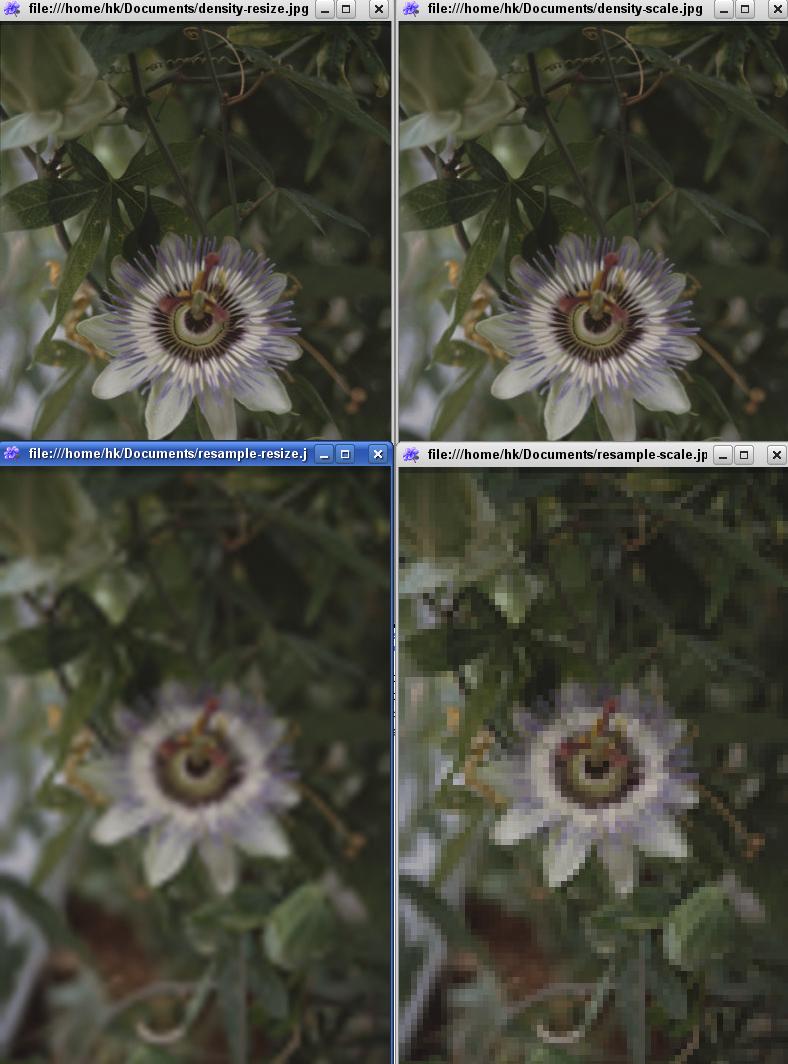
Here's a quick test run, for the various options you've given in the comments:
convert -density 72x72 -units PixelsPerInch -resize 600x600 img.jpg density-resize.jpg
convert -density 72x72 -units PixelsPerInch -scale 600x600 img.jpg density-scale.jpg
convert -resample 72x72 -resize 600x600 img.jpg resample-resize.jpg
convert -resample 72x72 -scale 600x600 img.jpg resample-scale.jpg
(adding -units PixelsPerInch doesn't do anything with -resample.)
-resample sucks.
Thanks for the data on -sharpen vs. -unsharp !
And I love the idea of a separate module (or whatnot) for this - thanks for working on it!
Comment #19
drewish commentedi don't think we should add \ to the list of filtered characters, i think we should convert dos paths to the unix / character separators. allowing \ just makes it too easy to escape anything else into the string. _ and / should be fine to add though.
do we really need the 'all' operation. i.e. if you're adding -strip to all you could just do:
when would we need to something different an all of them and then another thing for all together?
and should we break up the filter parts? i.e. :
Comment #20
zoo33 commentedFair enough, removing \.
Yes, the 'all' operation is superfluous, removed that.
About the "-filter" filter. This is what imagemagick.org says:
So my interpretation is that -filter should be removed if we're gonna use -scale rather than -resize. I tried without it and I couldn't see a difference. And I'm not sure why the QUADRATIC filter is even used in the first place rather than just using the default. I compared a -resize operation with and without -filter QUADRATIC, and the result was definitely better without it. I also compared -scale to -resize, both without -filter, and the result was very similar if not identical.
So, I say we remove -filter. We might also consider switching from -scale to -resize since that apparently uses a more powerful algorithm. What do you think?
(For those interested in the history of this module, I found that the -filter option has been around since the very first commit back in 2002, however uncommented. -scale was introduced in revision 1.16 for compatibility reasons that are now outdated.)
So, three things removed. Less is more and all that...
Shall we get this in before starting to work on any new bundled modules? Haven't really tested this yet though, so that needs to be done first.
Comment #21
drewish commentedit was causing warnings so i removed the call time pass by reference.
i added some comments and punctuation.
i switched -scale to -resize. lets run with the better choice. with the whole atler thing we've got going some one could change that back easily enough now.
i dropped the -strip option. if we're going to ship some sort of add-on we can move that option there.
i'm also thinking we should rename $filter to $args or $options. thoughts?
Comment #22
zoo33 commented* Call time pass by reference: those weren't meant to be there. Thanks!
* Using -resize: Yay!
* Dropping -strip: Totally agree.
* Renaming $filter: Yes, they're command line "options" or "arguments", so any of those two would be better. $args is perhaps least likely to be misinterpreted? Not sure.
* I'm missing / and _ in the preg_replace(). We will need those for specifying paths to color profiles etc.
This is all so great! I'll try to find some time to start working on the add-on module. Perhaps that warrants it's own issue...
Comment #23
zoo33 commentedI've started working on the module image_im_advanced, or ImageMagick Advanced Options. So far I have only done the settings form, but I wanted to post a screenshot here so you all have a chance to give feedback. Please have a look and see if you find the options reasonable.
As I mentioned before, there is still one more thing in image_imagemagick.inc that I need for everything to work:
Comment #24
drewish commentedChanging $filter to $args I realized I didn't like the $op being after $args. Most Drupal APIs have $op as the first parameter so I changed that.
Also put _ and / back into the regexp.
If this looks good to you I'll commit it.
Comment #25
drewish commentedforgot the patch...
Comment #26
zoo33 commentedYeah, good call with moving the $op argument.
I looked through the patch and it looks good to me. One thing I thought about though is that we should probably be very clear about that all implementations of the hook have to get the $args parameter by reference. So, maybe change the comment to:
I also tested the patch quickly and everything seems to work fine!
You've been talking about a 5.x-2.x branch, is this going in there or into the current branch?
Comment #27
zoo33 commentedHm... I'm beginning to think we might have overlooked something. I'm thinking that modules implementing this hook will sometimes want to examine the image before deciding what to do with it. So maybe there has to be an argument providing the path to the image, or perhaps an $info array from image_get_info().
Example: I'd like to be able to choose what sizes of images are stripped of their metadata (see the screenshot above). I want larger derivative images to keep their color profiles and exif data etc. while thumbnails are as small as possible. The way it is now, there is now way to find out what size the image is when it's about to get rotated. (When resizing and cropping it's possible to find out the resulting image size from the values of $args['resize'] and $args['crop'].)
This is not a huge problem, but there may be other similar situations where information about the image is needed. The -quality argument should really only be used with jpegs for instance...
Comment #28
drewish commentedokay, make that change and committed to HEAD.
Comment #29
zoo33 commentedOh, looks like you comitted it to DRUPAL-5 instead?
What are your thoughts about #29?
Comment #30
drewish commentedwhoops i'll back that out and commit to head.
Comment #31
zoo33 commentedOops again... I meant to say: "What are your thoughts about #27?"
Comment #32
drewish commentedi hadn't seen that. good point though. perhaps we should add another parameter for the current filename? i don't think it would be a good idea to mix it in with the args parameter.
Comment #33
zoo33 commentedI agree. You want me to make a patch against HEAD or will you do it?
I'm almost finished with the new module using this hook, will upload it here soon! Would it be a good idea to add it to the image/contrib directory or should I start a new project for it?
Comment #34
drewish commentedyeah, please roll a patch.
i'd really prefer to have it as part of the image module. it would make it much easier to keep it in sync with the image.imagemagick.inc file.
Comment #35
zoo33 commentedAgreed. Here's a patch with the new $image argument included + the new module! It probably needs some review and it has a couple of debug messages in there, but I'm pretty happy with how it's working. Please take a look at the interface texts – my English isn't always 100%.
Comment #36
zoo33 commentedAh, the patch.
Comment #37
drewish commentedi didn't test this out but made a few changes based just on looking at it:
i renamed the parameter to hook_imagemagick_alter() to $filename rather than $image. also this wasn't being passed to $function().
used $image to store the result returned by image_get_info().
i removed some tabs and replaced them with spaces.
i'd really like to put all the image magic advanced settings into one variable. i think it end ups bing it's much cleaner. the patch on comment #9 shows what i'm talking about.
Comment #38
drewish commentedhere's the patch...
Comment #39
zoo33 commentedNo objections.
But about the settings array... How do those settings get saved, if the form items aren't named exactly as the settings variables? Or is there some special magic that looks at the parent item and determines that it's a setting array? (If so... wow.)
I guess I could just follow your example from #9, but please explain!
Comment #40
drewish commentednot much time right now but i wanted to point you towards the field set that has
'#tree' => TRUE,, it's the trick.Comment #41
zoo33 commentedGotcha, will look into that. Cool stuff!
Comment #42
zoo33 commentedIndeed a lot cleaner like this. Are we getting there?
I could use an extra pair of eyes on: a) the default settings, and b) the interface text. And of course we should do some testing. A nice thing is that this will also work outside of image.module – in imagecache for instance. So that should probably be tested too...
Comment #43
drewish commentedchanged a few things:
- ensure that the form is only altered with imagemagick is the selected image toolkit.
- validate our fieldset rather than the whole form.
- tried to simplify the validation code. also check that the profile is a file (you could specify a directory before).
- reworked some of the comments based on what it looks like the code is doing.
- added whitespace to improve readability.
- added the "more info" links that i'd had in my patch on #9.
- made colorspace a drop down so i can force them to grayscale or rgb.
should the color profile only be assigned when resizing? wouldn't it make sense for rotation as well?
Comment #44
zoo33 commentedYou keep teaching me new FormAPI stuff all the time – thanks! I didn't know you could assign a #validate property to fieldsets.
No objections to your changes.
I'm a little unsure about the -profile option. You might expect that a rotated image will have the same profile as the original. Or you might expect that all images that Drupal touches follow the settings you choose. I don't know. If you feel strongly either way, I'll change it. In most cases i guess a rotated image will also be resized at some point, so the result should be the same.
Comment #45
zoo33 commentedAnother thought: The module will overwrite any filters that other modules may have already defined in $args. But maybe that's alright, if you consider this the "base" module for this hook and let other modules use a higher weight to override it.
Comment #46
drewish commentedyeah anyone who wants to modify it after this module needs to make sure they're weight is greater than this.
made a couple of small changes, comments and fixed the colorspace option (it was always set to RGB). if we're offering the colorprofile as an option it seems like it should be applied consistently.
committed the attached. we can fix any bugs in new issues.
Comment #47
zoo33 commentedExcellent! I have one or two small issues that I will submit separately.
Comment #48
zoo33 commentedComment #49
(not verified) commented