

 The 2026 Drupal Business Survey is open. Your response will help shape the future of the Drupal business ecosystem.
Subissue of #1469956: [Meta] - Improve Views-powered Geofield proximity searches
I've had a few requests for this come at various times while we've been working on our proximity searches, so I wanted to create a separate issue to point people towards and to keep track of it.
How I picture this would work is that in order to calculate the distance from one geofield, the other geofield needs to be added as a field on the view. A common use case that's discussed is having an attached view that shows the distances of nodes in comparison to the node the user is currently viewing, which should be doable via a relationship attached to the field.
| Comment | File | Size | Author |
|---|---|---|---|
| #60 | views-pager.png | 24.99 KB | robcarr |
| #50 | geofield-distance-filter-1561336-50.patch | 9.59 KB | robcarr |
| #48 | geo filter.jpg | 218.33 KB | IWasBornToWin |
| #44 | geofield-distance-filter-1561336-44.patch | 9.36 KB | robcarr |
| #40 | masterchief.patch | 8.39 KB | MasterChief |




Comments
Comment #1
phayes commentedWould we handle this as a special type of relationship instead?
You create a relationship from one set of geofields (your base set, might even be 1), to another set of geofields using a "proximity" relationship. I haven't thought this through but I think using a relationship would be the right way to do it.
Comment #2
Brandonian commentedMaybe, I think it works conceptually from an SQL perspective, but I don't know if that's my first instinct when I'm creating views. I'm picturing a dropdown as one of the options on the handler which points to any geofield currently added to the view, sort of how the geofield_proximity currently works.
If it's easier to implement via relationships, though, as long as it doesn't impede how we would normally use views relationships, then I'm cool with it.
Comment #3
Brandonian commentedGeofield views integration can calculate distance from other geofields, but it isn't terribly efficient. Currently, it (potentially) calculates the distance multiple times. The SQL queries themselves run quickly, but it's a bit ugly. This could use some refactor.
Comment #4
sokrplare commentedIn the meantime, if others are looking for this an easy hook into Views should do the trick. Not an expert with Views so might be a better hook/functions to use, but at least this works!
Here are the steps:
First Page Example
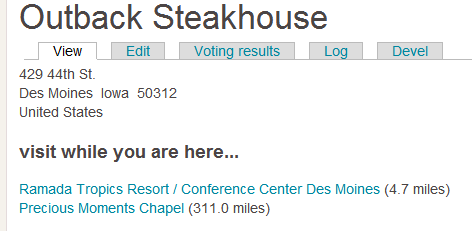
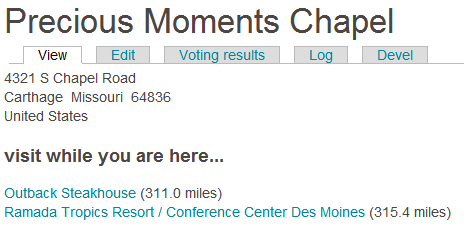
Second Page Example - long story with Precious Moments Chapel :)
Comment #5
sgp913 commentedFor my current project, I just created another "Source of Origin Point" and hacked in similar to what you have above and it seems to work fine. Less logic processing, as well, and no custom module extra stuff. Ultimately, it would be nice if relationships would do this (grab the current node's geofield data for source). When I get some free time to figure out how that works (right now working 16 hour days and China internet is not cooperative...so I don't think it will be soon), I'll give it a shot and see what I come up with.
Comment #6
IWasBornToWin commentedUntil we're able to see the miles between a geofield and the current user would I be wasting my time trying to use geolocation with their proximity search module? Right now I'm geocoding an address field to a geofield.
I need to show the distance and also create a few views filtered by distance from current user. I installed geofield and geocode yesterday and I'd like to stick with using these in the future. What would you suggest I do, if anything, while the distance issue is being sorted out here?
Comment #7
sokrplare commentedIf you're fine jumping into code it shouldn't be hard to do what you're suggesting using the code samples above. You'd just pass in the user's lat/long to the View.
Comment #8
IWasBornToWin commented@ #5 Can you share how you did this? I'd rather stay away from creating a module If I can. I'm not that experienced.
Comment #9
sokrplare commentedMy understanding of what sgp913 did in #5 is added code to this module to build out another option in the drop-down. Just as much code as the solution in #4 unfortunately. If you're wanting to have someone else do it I can jump in and just bill you for the time it takes and then we can contribute it back to the geofield module. I'd envision just adding a drop-down "Current User Location" and then selecting a field from the user profile. PM me if you are wanting that!
Comment #10
IWasBornToWin commentedThe challenge with paying (unless you're talking very minimal) is this - I already have location module installed and out-of-the box it holds address, calculates distance, shows distances from current user, allows filtering and searching by distance, etc. Where is gets tricky is it's lack of rules integration.
So I looked into the very-confusing options of geo this and geo that, then geo code here, proximity there (i'm not complaining, just giving the outside view) and I've finally arrived at addressfield, geocoder, and geofield. But, after all this confusion I'm still left without the very basic ability of seeing, viewing, and filtering the distance between addresses. I realize this is all a work in progress, and I'm following the threads about it, so I am trying to get a feel for when this ability will be available, and trying to determine - do I stick with Location mod for right now, try another angle, or pay, or maybe chip in.
As a side note - what would be wrong with using the same code Location mod uses in views so that when a proximity/distance field is added it asks if you want proximity from a certain point or from logged in user. I assume it then looks at lat/long of logged in user when doing its calculations? I'm ignorant in this area so I don't know if cross-coding from others is proper module building or not.
thanks for all your help.
Comment #11
robcarrI'd echo IWasBornToWin's comments - Location has good Views integration for proximity, and it would certainly be good to implement this with GeoField. In reality what would be useful as an origin point for any proximity measurements is a Field and Sort handler for:
(See http://drupal.org/files/location-proximity-field.png for a screen shot of Location's options in D6).
I had a go at 1 and 3, but can't get my head around the Views handler code, so ended up writing a short hack in SQL. And as for a distance filter or exposed filter for postal code [as origin] - my head truly exploded.
Would be willing to chip in if anyone thinks they could get something up in the next week.
Comment #12
sgp913 commented#8,
I put the code I used here: http://drupal.org/node/1469956#comment-6133620
Just remember to change the name of the field. Also, it's very hacky and really shouldn't be done this way, but it works.
Comment #13
sokrplare commented@IWasBornToWin - I'd have to say stick with Location for now. Unless there is expected functionality to be released soon, Geofield is still a little behind on proximity filtering. We're going to be building on to our geofield system soon so wanted to makes sure we didn't get stuck in the dark ages with Location, but if your site is more a one-hit-wonder and you don't expect to do a ton of modification to the setup in the coming years, Location is your best bet.
Comment #14
IWasBornToWin commentedHere's my dilemma - location blows everyone away with its proximity features. But, it lack big time with Rules. Also, it's going by the wayside so I will end up with addressfield/geocode/geofield anyway. Worse, I have rules firing to a. Validate address identity and b. give credit to people for doing certain things with certain nodes within a certain distance. All of those rules would have to be changed even if location had a smooth port into addressfield and geofield. Your solution in #4 is starting to look more enticing. What I can't figure out is - if anyone looks anywhere in drupal they will NOT find a proximity feature even close to location. (unless i'm missing it) so your solution in #4 does seem close.....why isn't that being added to geofield as a patch while we all wait in anticipation?
Comment #15
sokrplare commentedYeah, that is what I ran into as well. It isn't a patch yet because nobody has taken the time to make it one. It would need to be extended not a ton, but definitely some hours of work, to have a list of content type fields / user profile fields that could be chosen from.
Comment #16
MasterChief commentedHi arrrgh!
IWasBornToWin contacted me to know if i can do something, i already worked for him on another module.
Could you explain what you want exactly, do you prefer to use geofield or location ? or the both modules ?
Explain in details what you need and what must be done with #4 post :)
Comment #17
IWasBornToWin commentedMasterchief - we want to use geofield (location is not moving forward). And we'd like to do something similar to what covenantd did with the code above and then his suggestions in #15. The bottom line - I at least need to be able to see how many miles are between the current logged in user and the address on another node or user. And also need rules/views to be able to see that information.
Thank you!
Comment #18
IWasBornToWin commentedMasterchief see http://drupal.org/node/1469956
To bring you up to speed, geofield holds geographical info (longitude/latitude) of an address. It gets that infomation autmatically from geocode. Geocode is told where to pull it from - addressfield, location, etc.
So basically we need to be able to compare the geofield of logged in user to the geofield data of a particular node or other user field and then calculate the distance.
Comment #19
MasterChief commentedThe information is saved definitively or it must be display when you look a member's profile for example ?
Comment #20
IWasBornToWin commentedI dont think I can answer that. I believe with location module it does not save or store distance, rather it calculates and allows you to see in views. It has an available view field to show that calculation. I also need it in rules, which location does not have.
Comment #21
IWasBornToWin commentedLook at #4 in this post. geofield already has a funtion in views to calculate distance but only if you manually enter latitude and longitude. Where the dropdown says "Manually enter point" I need to be able to choose "Logged in user" and then have code that grabs the user's point instead of having to manually enter.
Comment #22
IWasBornToWin commentedMasterchief, also see #9. That would work
Comment #23
MasterChief commentedOk i beginning to understood.
So you need to be able to select something because you want points, but another person would like an adress with geolocalization obtained via geocoder module for example.
Maybe a custom php views field could do the trick, i need to see which function are available in the module, but could you explain why you use userpoints? because it's to calculate distance no ?
Comment #24
IWasBornToWin commentedMasterchief - Points and userpoints has nothing to do with this project. I simply contacted you because you've done work for me (with userpoints) and you're good, fast, and reasonably priced, so I wondered if you could do the patch that connantd talked about in #15?
Comment #25
MasterChief commentedSo i would like to test on my own, what is your configuration?
Geocoder + Geofield and ? You use a module like addressfield with geocoder ?
Comment #26
IWasBornToWin commentedCorrect. I have addressfield for user. I have a geofield for user. I tell geocoder to geocode the address to geofield using google geocoding. What a tonGEO twister! :)
Comment #27
MasterChief commentedDon't you dream of geocodes during your nights? haha (^_^)
I will looking at it tomorrow :)
Comment #28
robcarr@MasterChief I echo all of the above from IWasBornToWin, although I need a field/sort handler to allow a nid contextual filter input (ie, another node that has a populated Geofield) to be used as the origin point for calculating distance.
Comment #29
IWasBornToWin commentedarrrgh, masterchief has agreed to make us a patch - for a fee. I've dicussed pay options with him and he is supposed to send you a private message. He is very good.
based on what you said, it sounds like we need at least three origination options:
manual
logged in user
manual node id
Is this correct?
Comment #30
MasterChief commentedI think the best method is just to select directly the field which regroup all the existing geofield fields, maybe restrict them with a views relationships, i need to see how views works with drupal 7, i am more friendly with drupal 6, but i don't think it doesn't work in the same way :)
Comment #31
robcarr@IWasBornToWin all correct: messages passed; dosh discussed. If it all works, the patch should be posted on this queue for additional review and eventual commitment back to the project.
Comment #32
IWasBornToWin commentedThumbs up
Comment #33
MasterChief commentedI just finished the part for current user (^_^) but let me understand why use manual nid why don't just copy the geocodes from the node you want for example with manual method, i am trying to do it like say arrrgh but it's just a pain lol xD
I need to see why it's needed, what it's the problem with what i said just before.
Did i miss something?
EDIT:
It doesn't work hahaha, now i understand xD
EDIT2:
Ok i understood the problem, i just don't take the right datas, i am a fool lol :p
Comment #34
IWasBornToWin commentedI don't think you're a fool. You do excellent work....thank you!
Comment #35
MasterChief commentedNow i have 2 things working :
1) user and another user
2) an user geofield(in the case you have 2 geofields for example like address 1 with a geofield and address 2 with another geofield) with a node geofield.
The point 2 is what you want arrrgh ?
Comment #36
IWasBornToWin commentedAwesome!
Comment #37
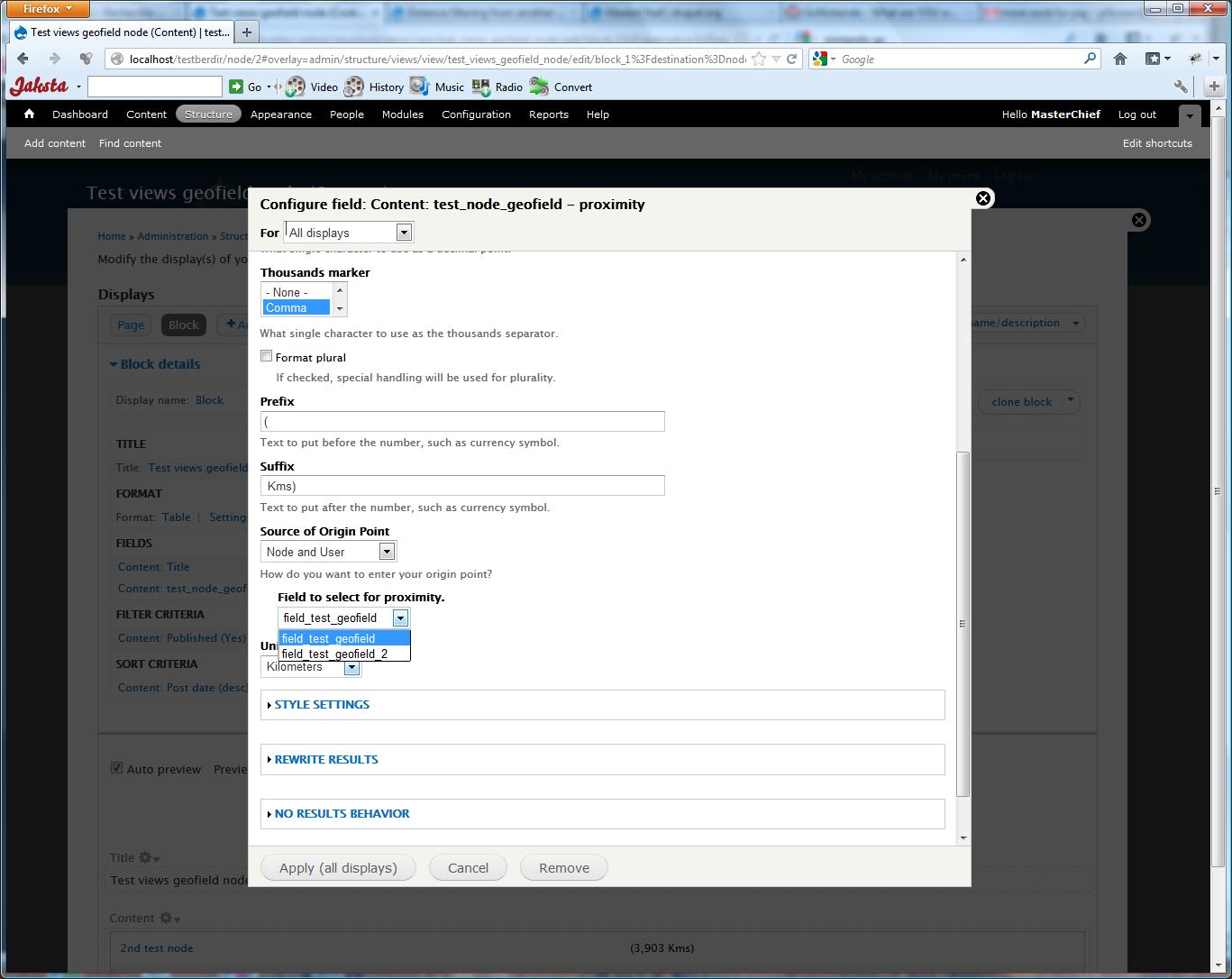
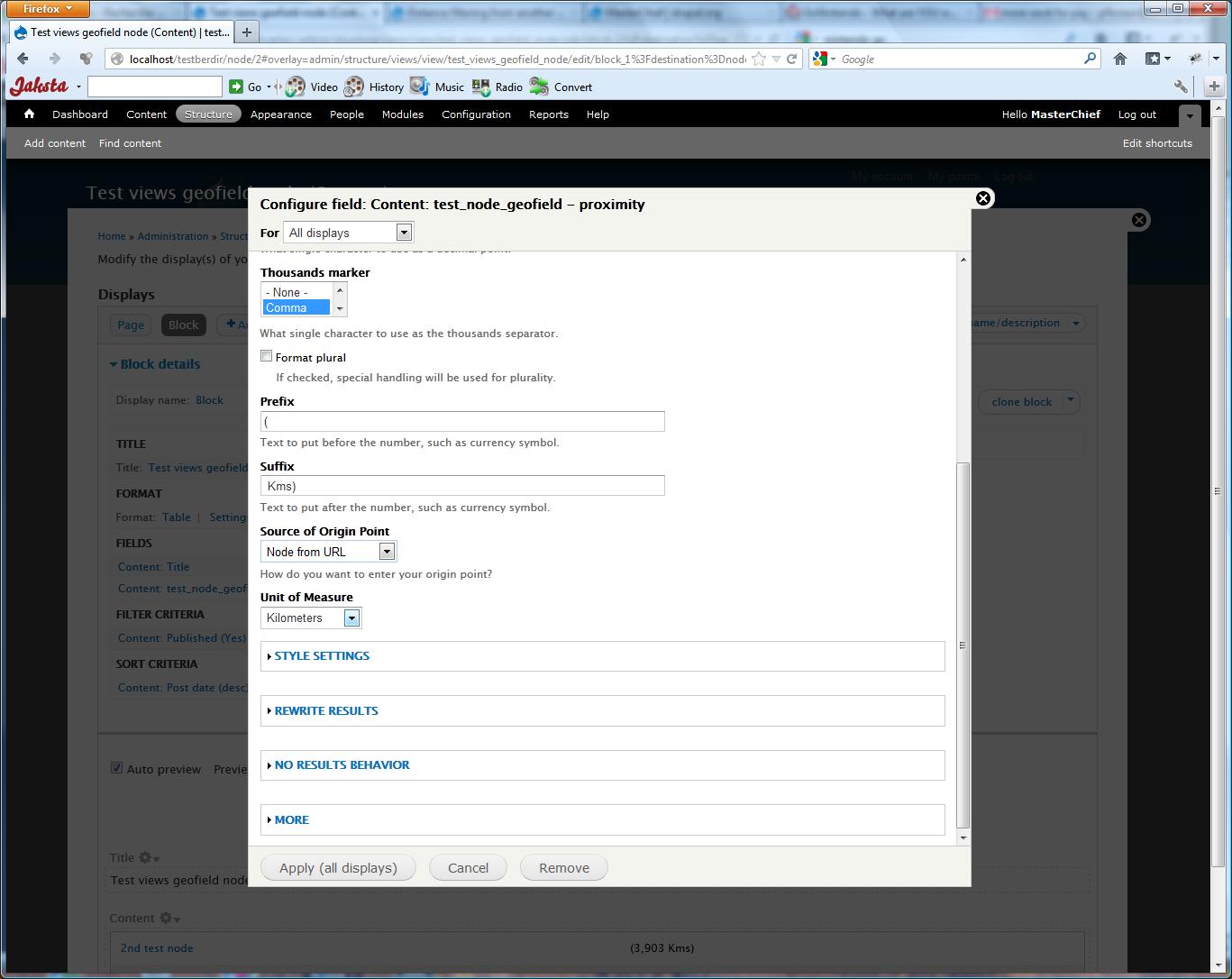
MasterChief commentedHere some screenshots about what i added with my patch.
Comment #38
IWasBornToWin commentedLooks great, Masterchief. I'm ready for delivery if arrrgh is.
Comment #39
robcarrMe too. Great work
Comment #40
MasterChief commentedHere the patch :)
Comment #41
sokrplare commentedWay to go, MasterChief! Definitely a solid start and might be all arrrgh and IWasBornToWin need for now. If this is going to get committed back to the module there are a few tips (I'm not familiar enough with the module to speak to architecture so will let others hit that, just Drupal coding style tips)
I recommend taking a look at Coder. This module can point out and help with a lot of the work to make your code Drupal-friendly. Alternatively, reading through http://drupal.org/coding-standards will help too. That will make your patch far more likely to get easily added to the module!
I'm curious (and didn't dig enough into the patch for the answer), how does "Node from URL" and "Current User" work without a "Field to select for proximity" option - or do those have one now? Does it just loop through the node/user and check if any of the fields are geocoded fields? What happens when you have two geocoded fields in a node/user?
Cool to see progress on this!
Comment #42
IWasBornToWin commentedI just got around to trying out my version is Masterchief's new work. So far is meet my immediate needs. I will play around with it more tomorrow. I think this is a huge step forward for anyone wanting to leave Location module. Thanks
Comment #43
robcarrWorks well for my current use case - which is Node from URL (so it's a View embedded as a Content Pane within another node). For me this was essential to provide a 'Other venues close by' function
This option works by seeing if any of the [origin's] node fields contains a 'lat' and a 'lon'.
Great job and adds tremendous functionality to Geofield.
Comment #44
robcarrQuick re-roll of MasterChief's patch to comply with coding standards. Fixed a minor typo too. Please review
Comment #45
Brandonian commentedCool patch, all. I'll do a more thorough review ASAP, but one thing that stands out is the function get_geofield(). A few notes...
Comment #46
IWasBornToWin commentedGreat job!
I'm glad I was able to contribute to this. I think this promoted geofield/geocoder to a whole different level - at least from the time [alot] I spent looking for another alternative.
Comment #47
IWasBornToWin commentedMasterchief - little problem....can't do an exposed filter by proximity. We need the identical options that you allow in the view please - current user, etc.
Thanks
Comment #48
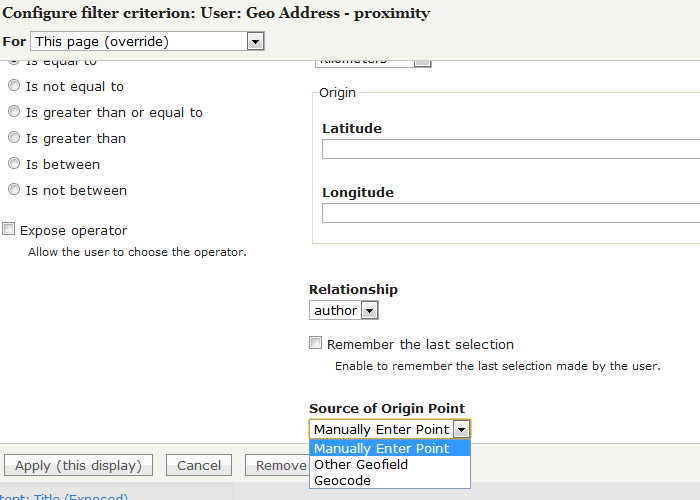
IWasBornToWin commentedMasterchief, see dropdown for filter. It doesn't have "current user" or any of the other choices that the field view has:
Comment #49
robcarrA filter (exposed or otherwise) on proximity requires another handler (geofield/views/handlers/geofilter_handler_field.inc) to be reworked. The field and sort handlers have been addressed by the sterling work done by MasterChief, but a filter handler is quite a lot more effort, and probably a separate issue (although it's a feature I wouldn't mind seeing).
If you are working with OpenLayers at all, then the OpenLayers Proximity module may help you if this is urgent.
We also need to get a few others to review the functionality and maybe address the issues raised by @Brandonian at #45 so that this feature can move forwards.
Comment #50
robcarrChanged function name from get_geofield() to geofield_get_geofields(). Changed DB query to abstracted API. Re-roll of MasterChief's patch again.
Comment #51
MasterChief commentedNice re-roll arrrgh :)
I can't explain better than Arrrgh about exposed filter in #49.
And about exposed filter, i think this must be fixed before something could be done :
http://drupal.org/node/1594640
Comment #52
Brandonian commentedRegarding #51, that's (mostly) done. See http://drupal.org/node/1594640#comment-6124760.
Comment #53
IWasBornToWin commentedI'm lost. All I know is, I need to be able to allow a user to do a search and type in 50 for the number of miles away they want to see a list of content from a view. That list being content which has a geocode and can be calculated to be within 50 miles and who in the view. This is what I do now using location module and what I said I needed to do with this module. If I can do this right now can you please let me know how?
Comment #54
phayes commentedpatience IWasBornToWin,
We have our greatest minds working on it around the clock!
Comment #55
IWasBornToWin commentedI'm fine phayes, just not everything I expected when I paid for the patch. Masterchief does great work, I'm sure we will get there. I'm about to check to see how it works with rules, I'm afraid I may run into the same problem.
Comment #56
Brandonian commentedSo, I'm reviewing the patch at #50, and I'm having trouble deciding what's actually supposed to happen versus what should happen. It seems like if I select either the "Node from URL" or "Current User" options, I should still get to select a geofield to calculate the origin point, but I currently don't see any additional form items. Are we trying to find the distance from the current geofield, as it's attached to either the node nid or user, or am I missing something obvious?
Also, using db_select in geofield_get_geofields does not address my point in #45. We're still pinging the database unnecessarily, because Drupal already keeps a list of all the fields available (again, see field_info_fields). The basic code in geofield_get_geofields should look something like this...
Doing this will obviously affect how we process data in the individual views plugins, but we should be able to clean up that code as well. I would suggest having the array returned by geofield_get_geofields be keyed with the field name, which should make finding field info easier.
Also, code like this...
...could be a little cleaner. The following would achieve basically the same thing (starting with keys at 0 instead of 1 of course)...
$proximity_field_options could also be keyed to field names as well, instead of an incrementing number, which would make retrieving useful data easier later in the query method.
All of that being said, I think the progress on this issue is promising, and I hope to see a solid contribution come from this issue soon. :-)
Comment #57
IWasBornToWin commentedI can answer your first part, from what I am using it for. I have a geofield for user's address. I have created a view of a node which is related to the author of the node. I show node fields and user fields on the view. One of those fields is the view is the geofield proximity because I want the current user who is viewing the node to see how many miles the node author is from them.
So I assume the user-field-geofield is being calculated with the origination point (I selected current user) in order to give me to proximity value I need.
Comment #58
bjalford commentedCan we add 'Current User (HTML5)' to the list?
Is there a new patch for current dev. Happy to start testing.
Comment #59
Sinovchi commentedIn my case I'm using "Node from URL" option. As a user I can say that the re-rolled patch #50 is working very good, but the actual node is also included when you show the block in the node page. How can we exclude the current node from the list in the block?
Comment #60
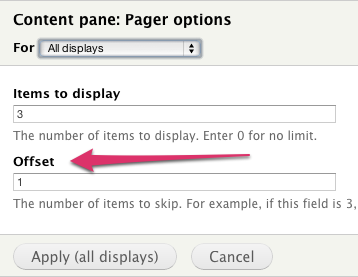
robcarrYou have to go to your Views pager and exclude the first result (ie, offset of 1)
Comment #61
bjalford commentedEdit: error message disappeared on clean install
Comment #62
IWasBornToWin commentedI just learned [the hard way] that Masterchief's patch isn't in the latest version in case someone finds themselves on the module updates page and forgets.
Comment #63
bjalford commentedWhat needs to happen to move this forward and get something comitted? Would it be better to separate some of out into separate issues?
I've tested field display and sort:
- Node from URL
- Node and User
and both work
I was going to suggest opening separate issues for:
1) Add proximity filter so that results can be filters by distance
2) Add proximity contextual filter so that results can be filtered using parameter in URL
3) Add 'Current User (HTML5)' for field display, sort and filter so that we can filter results based on position of current (logged out) user
Does that make sense?
Comment #64
IWasBornToWin commentedStill wondering when we can filter on distance?
Also, when an anonymous user views content, there's obviously no field with an address to get geo info from. So the distance calculator is returning a value of 5,755.3 Miles. I'm using in this views, I tried to tell it to display a "no results" value but apparantly views does see 5,755.3 as results. Just wondering how geo is coming up with that value. It appears it is defaulting to a certain lat/long.
Comment #65
B0ZE commentedi tried to apply the patch from #50 with git and aptana. it said it contained multiple patches and didn't work. is this the right place to ask for help? :)
Comment #66
giorgio79 commentedEven anonymous users could supply their HTML5 geolocation...Would be great to have an HTML5 geolocaiton call if address field is empty or the user is anonymous.
Comment #67
Sinovchi commented@BOZE I manually applied the patch from #50 and it works. the current dev version is differ from one used for that patch.
Comment #68
IWasBornToWin commented@phayes, I'm still waiting and wondering when I will get the distance filtering I paid for, and was expecting in the patch by Masterchief?
According to your comment at #54, you asked me to be patient and told me you have your greatest minds working on it around the clock. That was over two months ago.
I'm being both patient and understanding, but I really needed this feature back when I paid for it....and much more now. Can you give me an update please?
Thanks
Comment #69
phayes commentedHi IWasBornToWin,
The patch submitted, #50, has a bunch of issues identified by Brandonian in #56. Until.those issues are resolved and a new patch submitted, we cant merge it in. I appreciate you are in a difficult situation, but most of us are volunteers here.
Comment #70
phayes commentedIf you need this I would suggest working with the developer you paid until the patch is in a state where we can merge it, or reach out to another developer who can.
Comment #71
Brandonian commentedThose interested in this issue should check out and test the patch at http://drupal.org/node/1469956#comment-6761140.
Comment #72
Brandonian commentedChanges have been committed to the 7.x-2.x branch. Please open a new ticket for any followup concerns.
Comment #74
windsurfitaly commentedcan you post the code for doing this? tnx
Comment #75
ptmkenny commented@windsurfitaly This issue has already been fixed and the patch is linked in #71.
Comment #76
windsurfitaly commentedtnx but is all is discussed here in the last dev version of the module? i cannot see all is here in https://drupal.org/files/masterchief_1.patch in to the version of the module i have.. (?)
Comment #77
ptmkenny commentedThe patch should be committed in 2.x-beta1 and in 2.x-dev, so as long as you have either of those you should be fine. There will not be a patch file once the patch is committed; it will just be part of the module.
Comment #78
System Lord commentedI hope everyone in this thread is still around. After many many weeks of searching I finally found this thread! You all make it sound so easy, but it’s driving me crazy!
I hope you can/will help.
I need help with: Geo Proximity between two geofields
I’m using: D7.26; Geofield 7.x-2.1; Address Field 7.x-1.0-beta5
Here’s what my site is and how its structured...
I have a classified ads listing site (using project/ed_classifed). Right now users, in their profile settings, must select their State and up to 20 surrounding cities (their target audience). Visitors would use Views filters to search State > City > Category > Item. If the visitor’s selected “State” and “City” is one the user included above, then that ad will appear in the results. This method works well, but it’s not flexible at all. I want to move away from this method and go to geo proximity.
I’ve begun by adding the project/addressfield to the user profile and a geofiled for storing their address. But I’m having a really hard time getting Views to produce results correctly.
This is what I would like to have...
I would like authenticated visitors to be able to select 5, 10, 20, 40, 60, 100 miles to list ads within those distances. PLUS show the distance (miles) between the authenticated visitor’s address and content (the ad) author’s address. I would like the same for anonymous visitors using their IP address. Although, for anonymous visitors I may leave out distance as an incentive to create an account, but I still need them to use the preset distances above. I guess I’m assuming that collecting content/ads using the presets is simpler to setup and adding “distance” takes more work..from the developers perspective.
The “distance” is less important to me since only the City, State, and Zip Code are required in the address fields (I removed “Address 1” field requirement). Most of my users will NOT include their street address, and without a street address “distance” could be +/- a factor of 20 miles in some cases. Ultimately I may really want this. Google maps accepts cross roads very well, so in Address 1 (of Address Field) a user could have a cross road for their street address and google will still provide “distance” very accurately.
NOTE: The ads (content) do NOT have an address field. Only the author does (in their profile).
A clearer example would be as follows: You’re logged onto my site and go to the search page. There you will select a category and item to search for, and lastly select the preset radius you wish to search, 20 miles for example. The results will be all ads in your selected category within 20 miles of YOUR address (which is already in your account profile settings). The results also show the number of miles between YOUR address and the address of the content/ad author.
i.e., Between the “User viewing the content” (assuming they are logged in), and author of the content. The Address Field and Geofield are in the profile of both.
Sorry if the examples are overkill. Just want to be sure.
I’m prepared to pay for any extensive service. I’m also willing to pay extra for a tutorial of the method so that the rest of the community will have it.
Thank you so much!