Closed (works as designed)
Project:
AdaptiveTheme
Version:
7.x-3.x-dev
Component:
Theme Settings
Priority:
Normal
Category:
Bug report
Assigned:
Unassigned
Reporter:
Created:
7 May 2012 at 21:59 UTC
Updated:
8 Nov 2012 at 19:33 UTC


Hi,
I'm using flexslider this way:
I have a content type called 'slideshow' with one image field. This field has unlimited values and has 'flexslider' selected in 'manage display'.
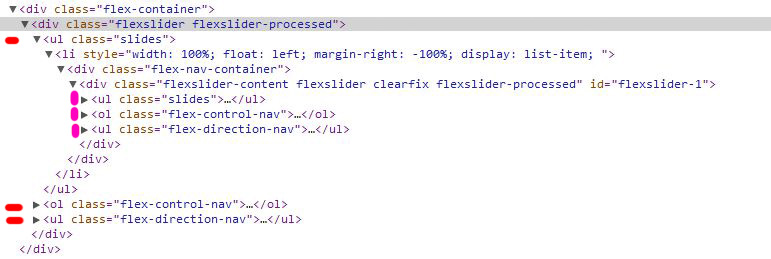
The problem is that the slideshow has again same duplicated slidshow inside.
I attach images. In settings, if I turn off navigation arrows (prev / next), then they only appear 1 time.
Is this a bug? Am I doing something wrong?
I'm using Adaptivetheme 7.x-3.0-rc1 with AT Commerce 7.x-3.x-dev as subtheme.
Thanks
| Comment | File | Size | Author |
|---|---|---|---|
| img-code.jpg | 73.06 KB | Chimos | |
| img-slider.jpg | 65 KB | Chimos |


Comments
Comment #1
Chimos commentedComment #2
Chimos commentedNow I made a block with views that uses flexslider in the same page. And now the problem is not anymore in the main slide, but now it happens in the new block of the bottom
Thanks
Comment #3
Chimos commentedIs very strange, what I say in the first post, when I am only using this in 'manage display' for one image field.
Comment #4
Chimos commentedI've found the problem:
I'm using flexslider in AdaptiveTheme, and the field name or the machine name of the content type was somehow coming into conflict with the integrated slideshow of AdaptiveTheme (although slideshow is disabled in AT settings!!), because it uses "slide" in the machine name or in the field name.
It was a sildeshow of slideshows with odd behavior and duplicated controls.
Solution: So I deleted the image field for the slideshow and created the same again with another name (not "slide") and now its solved.
(I'm not sure about the cause and the solution, hope it helps)
Comment #5
Chimos commentedComment #6
Chimos commentedChimos, bringing problems and solutions to you
Comment #7
muranod commentedBingo! Chimos, I think you solved my problem, but it's too late in the evening now to know for sure.
I've been trying out so many slideshow modules and creating content types that I think I inadvertently resused the name from the Galleria content type. Thanks for posting this here!
Dan
Comment #8
muranod commentedNo, that didn't do it for me. I'm getting double nav dots (none of which work) and a double pause / play . Frustrating - it was working. I've replaced the module and library files, but that didn't change anything. Created a new content type with different field names, but no change. Back to the beginning. But, thanks all the same for posting your experience. It helps to have some place to look.
Comment #9
AdrianGuerraH commentedHi Guys, I guess I've been able to find the problem about duplicate content on the Slider. (We talked about white images small in height and navigation controls).
Let me tell you also that I use the Omega base theme for developing adaptive web sites.
So the problem is not the names of the types of fields, but the problem is in the view that applies to the Slider.
The occurrence here:
Views -> (Name of the View) -> "Block Details" -> FLIEDS (Content).
Then please click on "Content: Name of the Field" ... and then, in the selection list entitled "Formatter", choose the option "Image".
The mistake is to use "FlexSlider" as "Formatter" since doubled the Slider with blank entries. Also, the type of Field does't exist we define ours.
That will make The View works correctly and duplicate elements disappear.
I hope I have been helpful! ... All the best!