

 The 2026 Drupal Business Survey is open. Your response will help shape the future of the Drupal business ecosystem.
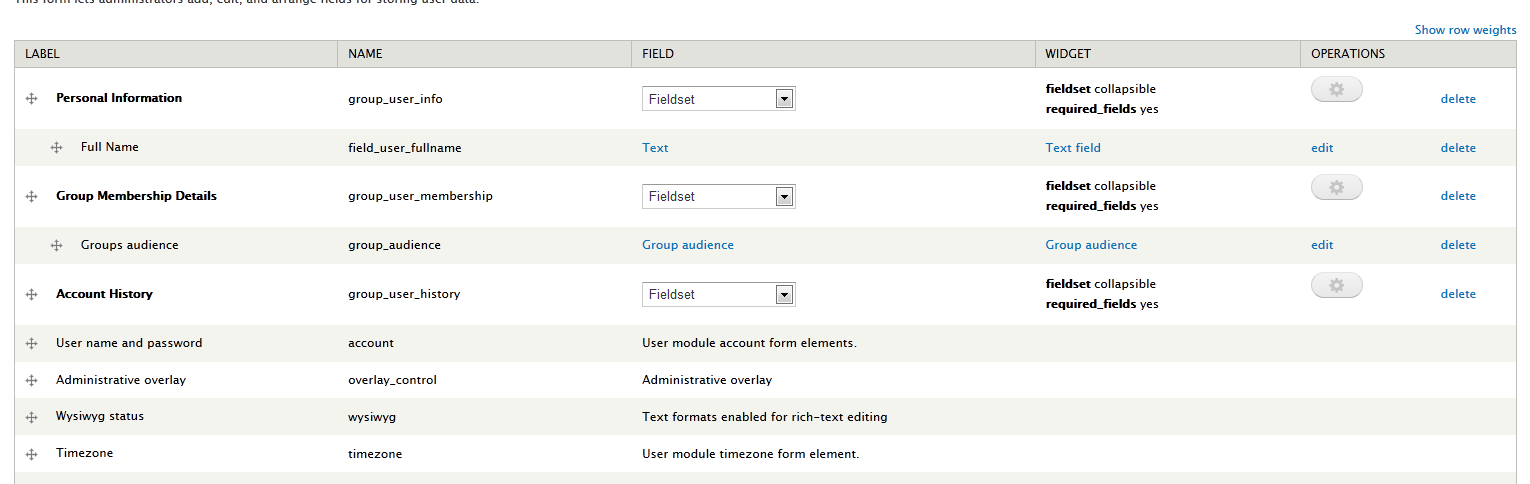
I have all the options for limited field access on custom user profile fields, but what I'd really like to do is hide the standard fields. For example, when my user manager role adds users, I don't want them to see the "Use administrative overlay" field or the "timezone" field.
However, I seem to only be able to access the field permissions settings on fields for which there is an "edit" option on the managed fields page.
Is there a way to edit ALL the user profile fields? Or is it only applicable to custom fields?
Here's what I'm looking at: 
I'd really like to control the permissions for the last four fields. Another big example is that users should not be able to edit their own account information.
Thanks!
| Comment | File | Size | Author |
|---|---|---|---|
| #1 | Capture.PNG | 44.41 KB | allio_froggio |

Comments
Comment #1
allio_froggio commentedDamn it.
Here's the screen shot, attached.
Comment #2
allio_froggio commentedMy apologies - this request is related to beta2, not the dev version.
Comment #3
mariacha1 commentedI believe the request is to handle properties instead of fields for the permissions. It's not allowed in the D7 version now, and given the limited support for that version, I'm closing this one.