

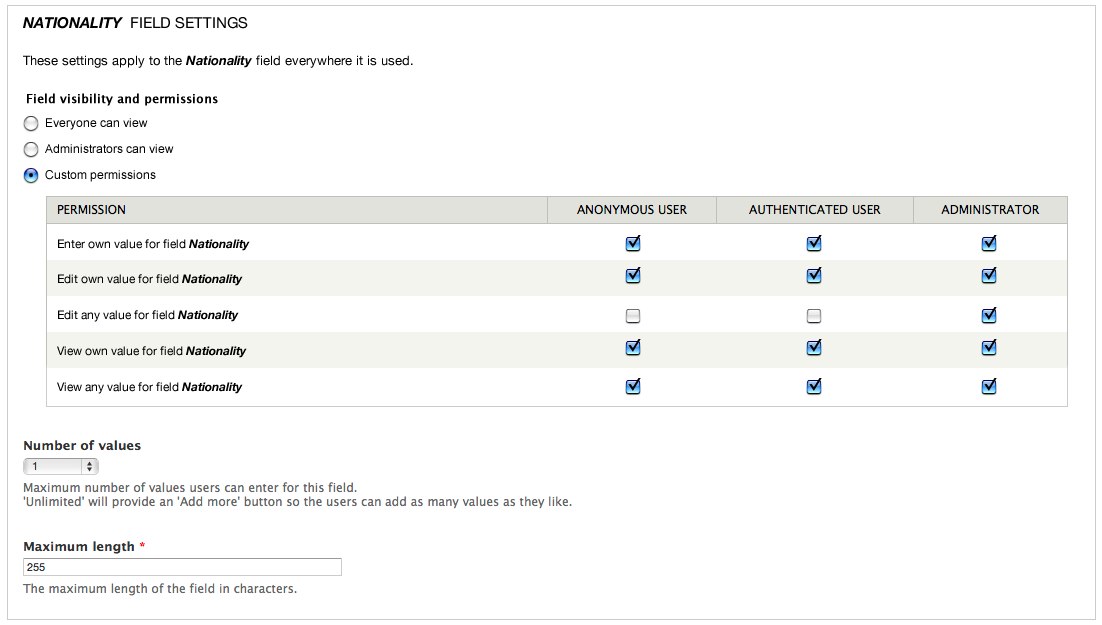
The Field Permissions module allows site administrators to set field-level permissions to edit, view and create fields on any entity.
Features
- Enable field permissions on any entity, not just nodes.
- Role-based field permissions allowing different viewing patterned based on what access the user has.
- Author-level permissions allow viewing and editing of fields based on who the entity owner is.
- Permissions for each field are not enabled by default. Instead, administrators can enable these permissions explicitly for the fields where this feature is needed.
- Field permissions overview
Instructions
Once Field Permissions module is installed, you need to edit the field settings form to enable permissions for each field where you need this feature. You can enable any of the following permission types:
- Create own value for the field
- Edit own value for the field
- Edit anyone's value for the field
- View own value for the field
- View anyone's value for the field
Use these options to enable role based permissions for each field. When permissions are enabled for a particular field, access to this field is denied by default and explicit permissions should be granted to the proper user roles from the permissions administration page. On the other hand, when these options are disabled, field permissions are inherited from node view and/or edit permissions. In example, users allowed to view a particular node will also be able to view this field, and so on.
Notable Credits
- Maintained by Jonathan Hedstrom and Maria Fisher
- Initial port to Drupal 8 by ale Sibona
- Major Drupal version compatibility readiness japerry
- Previous maintainers: Rob Loach, markus_petrux, and David_Rothstein
- Tests by Gábor Hojtsy
- Revamped user interface by David_Rothstein, Jeff Noyes, Stellina McKinney, Gábor Hojtsy
Project information
 Minimally maintained
Maintainers monitor issues, but fast responses are not guaranteed.- Project categories: Access control, Content display
 69,263 sites report using this module
- Created by markus_petrux on , updated
 Stable releases for this project are covered by the security advisory policy.
Look for the shield icon below.
Releases
released 9 January 2026
Development version: 8.x-1.x-dev updated 9 Jan 2026 at 18:19 UTC


