

 The 2026 Drupal Business Survey is open. Your response will help shape the future of the Drupal business ecosystem.
Enabling Form Builder removed the ability to enable functionality provided by the Select (or other) module. The option for other exists on the relevant fields prior to enabling Form Builder, but the options disappear once it is enabled. Form Builder seems to be missing integration with Select (or other).
For others looking for a quick fix: disable Form Builder module, enable the other option on your desired select boxes / radio buttons / check boxes, re-enable Form Builder.
| Comment | File | Size | Author |
|---|---|---|---|
| #27 | form_builder-select_or_other-support-1575064-27.patch | 3.72 KB | torotil |
| #23 | form_builder-select_or_other_integration-1575064-23.patch | 4.86 KB | markus_petrux |
| #15 | form.png | 30.49 KB | estoyausente |
| #15 | result.png | 11.4 KB | estoyausente |
| #11 | form_builder.diff | 6.74 KB | estoyausente |


Comments
Comment #1
jlyon commentedHere's a patch that adds rudimentary integration. The select or oher options should appear on the Other Options fieldset in the Options tab, but I had all sorts of problems when In tried to put it there. There are a lot of calls happening between form_builder_webform forms, options_element, select_or_other and webform, and I got a little confused.
Comment #2
jlyon commentedComment #3
jlyon commentedTODO: I just created a patch to hide the 'Other options' textfield unless the checkbox is checked, but for some reason it does not work with this patch: #1667662: Hide Text for "Other..." textfield by default for Select components. Perhaps form_builder is ignoring the #states array?
Comment #4
synesthete commentedThe patch in #1 works great on the first time setting up the Webform components with Form Builder. If I come back to the Webform tab after saving, the Select items that have the Other... option enabled do not show up. Subsequent saving the form completely knocks out and select items with the Other... option enabled.
Comment #5
jlyon commented@synesthete: I have observed the same behavior. I'll look at a fix in the next couple days.
Comment #6
hyperglide commented@jlyon any updates?
thank you.
Comment #7
estoyausenteI'm working in this issue, I need it for a project.
The patch starts very good but the new element created don't be processed. You can complete the webform but when you try to edit, the element has not been process (you can see it if inspect the class of the element).
I try resolve and if i do it, share the solution. ;)
Comment #8
jlyon commentedGreat, thanks! Post back with whatever you learn. I have tried looking into it on a few occasions with no success.
Comment #9
estoyausenteGrr... Almost i finish the module. Now, the patch run perfectly but they throw 2 notices for 2 vars:
I'm sure that this solution isn't perfect, but I need a hand with this. I try do it, if any want help me, will be great. I try finish the patch, if i can, i post the solution.
regards. :)
Comment #10
jojo76 commentedSorry but patch at #9 didn't work for me. When applying, I get the error;
Hunk #3 FAILED at 763.The other 5 hunks succeeded.
If it helps, the contents of the reject file are;
I applied the patch via
patch -p1 < form_builder_2.diffIs this correct?The Form_Builder module continues to function but access to the built-in lists such as Country still not integrated.
Hope you can help. Many thanks for this so far.
Comment #11
estoyausenteYou apply the patch correctly, it is posible that the file isn't good.
I made the file again, and attach to this message. Send me feedback, plz.
Comment #12
jojo76 commentedMany thanks SamuelSolis for your response. Unfortunately I get the exact same error again on the patch but in 'fiddling' some more I came up with the following recipe which seems to work for me.
1. The test installation is a clean install of D7.17. The only contributed modules installed and enabled are Webform, Form builder, Form builder Webform UI, Options element and Token.
2. Create the form as normal - Add content / webform
3. Add required fields to the form using the Form builder UI. Add a Select List field (I want mine to be Country name). At this point the Options to use built-in lists (Country, US States etc) does NOT appear. Just continue to add field descriptions as you would wish them to be.
4. Now Disable the Form builder Webform UI module. No need to disable anything else.
5. Go back to the form, edit the 'Country' field - the Options for built-in lists appear as normal. Change the field to be Country (or whatever) and save.
6. Enable the Form builder Webform UI module.
7. Go back to the form, the built-in Options still NO NOT appear and the List field is NOT the Country list you changed it to in step-5.
8. Make an edit to any of the fields in the form and when you exit from that edit, the Select List field immediately changes to the Country list (or whatever you choose).
9. Subsequent edits to the form retain the Select List field in the desired form.
Many thanks again for the patch.
Comment #13
estoyausenteThank for the feedback. I try work again about it, and I try to do the patch with Git (never do it, but I need a first time! :-) ). If any other work in this patch, please, share the solution.
Regards.
Comment #14
estoyausenteComment #15
estoyausenteI could apply the patch with the next code:
patch -p0 < form_builder.diffI know isn't very good solution, but if any can help me, apply the patch and make other with git, i don't know exactly the way of do this.
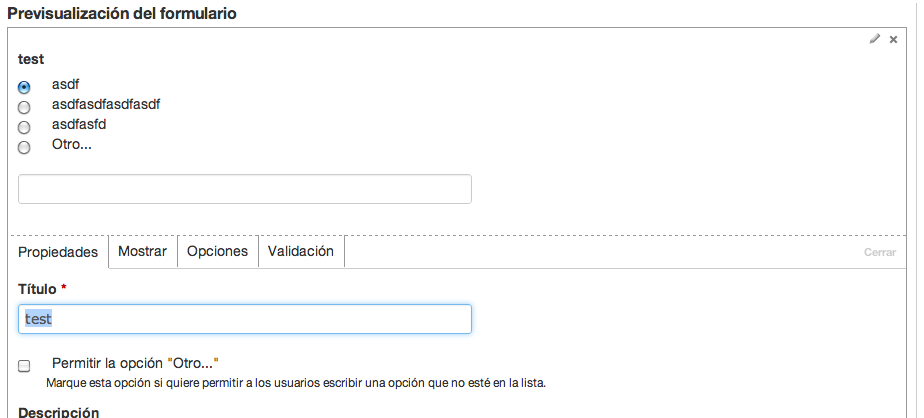
The patch run correctly, only have Notices:
Share two captures of this:
Thank for the help.
Comment #16
torotil commentedHere is an updated patch, that works quite well for us.
Comment #17
estoyausenteYeah, thank you. I'm going to test it.
Comment #18
barrapontoIt seems to work, but... it doesn't update the preview properly.
Also, I see a lot of undefined indexes:
Comment #19
barrapontoRerolled the patch. I just tweaked
_form_builder_select_or_other_form_element_pre_renderto improve its readability.Comment #19.0
barrapontoFixing grammar.
Comment #20
heyyo commentedI just apply the patch from #19 on forum_builder 7.x-1.4, it works correctly, but I don't see the possibility to change the text "Other" ?
Comment #21
softone commentedComment #22
amerie commentedI also applied patch #19 using the patch command (patch -p1 < patchfile.patch). It does restore Select (or Other) functionality, but the select list preview in form builder does not show the "Other..." option (it does show in the actual live form, and the preview works for radio buttons).
Comment #23
markus_petrux commentedHi all. I'm attaching a patch that adds support to change the "Other..." text, which is a feature of Select Or Other module already integrated in Webform.
It's basically the same as #19 (with fixes for a few coding standard issues) + the mentioned option to alter the "Other..." text.
Cheers
Comment #24
markus_petrux commentedComment #25
torotil commentedHi,
just looking at the code there are a few things that stop me from committing this right away:
IMHO shuffling around the element['#type'] shouldn't be done in a theme-function. Why is this needed anyway?
Does this also work for newly added fields?
EDIT: never mind the 2nd comment.
Comment #26
markus_petrux commentedNot sure on 1). It was present in previous patches.
Comment #27
torotil commentedI've removed the changes to the theme function (they were only needed due to #2240995: Unset $element['#type'] in select_or_other_element_process() causes other modules to throw errors) and fixed up the pre_render function (needed to set the $form['#form_builder']['element_type']).
Comment #29
torotil commented