Closed (fixed)
Project:
Barracuda
Component:
Code
Priority:
Critical
Category:
Bug report
Assigned:
Unassigned
Reporter:
Created:
18 May 2012 at 20:26 UTC
Updated:
2 Jun 2012 at 03:01 UTC


2.0.3 stable install on Ubuntu 12.04, Barracuda only (I exclusively use custom platforms).
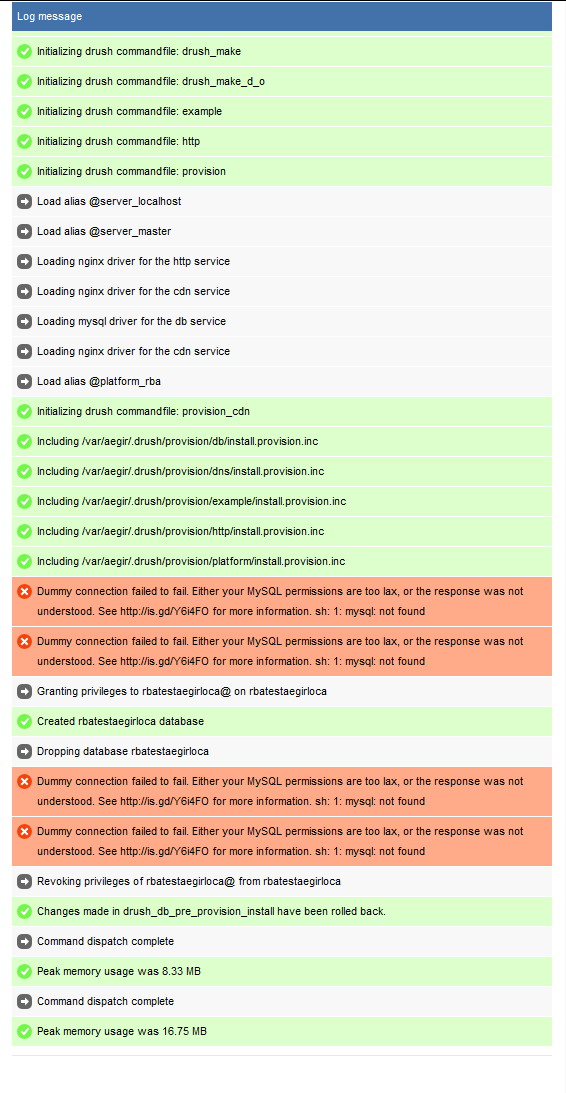
After completely fresh install of barracuda, I install a custom platform, which verifies just fine. However, upon attempt to install a site on that platform, I get 4x of the error:
Dummy connection failed to fail. Either your MySQL permissions are too lax, or the response was not understood. See http://is.gd/Y6i4FO for more information. sh: 1: mysql: not found
As user aegir, mysql command line interface works (though requires credentials of course). Drush sql-cli in Barracuda hostmaster site context works. As user root, mysql command line interface 'just works'. As a matter of fact, I cannot find a way to make the system fail to find the mysql executable.
Screenshot of Aegir install log w/ errors, and Barracuda install log files attached.
| Comment | File | Size | Author |
|---|---|---|---|
| barracuda.cnf_.txt | 1.36 KB | obrienmd | |
| barracuda_log.txt | 209 bytes | obrienmd | |
| mysql issue.PNG | 62.36 KB | obrienmd |

Comments
Comment #1
omega8cc commentedHave you tried this with just hostmaster platform or any other basic platform, to make sure it is not platform specific? I don't see any reason for this.
Comment #2
obrienmd commentedI have tried D7 vanilla, Pressflow 6 vanilla and hostmaster.
Comment #3
omega8cc commentedI just reproduced this. Weird.
Comment #4
omega8cc commentedOuch, what a stupid bug.
Please run this:
sed -i "s/^PATH=.*/PATH=\/opt\/local\/bin:\/sbin:\/bin:\/usr\/sbin:\/usr\/bin/g" /var/spool/cron/crontabs/aegirComment #5
omega8cc commentedHot fix applied both to stable and HEAD: http://drupalcode.org/project/barracuda.git/commit/627c44b
Thanks for the report!
Comment #6
obrienmd commentedThanks, works great!
Comment #7
obrienmd commentedOops, old stale form submitted...