hi dave,
just also sent this request to aaron at the issues of the 'styles' module:
i would like to add a file field (for downloads) to an image style, so that in the configuration list of image styles
there would be the option 'filefield' for instance or 'zip file for download'.
i'm making a website with several screensavers for free download and i would like to attach download links to views galleriffic.
the views galleriffic gallery shows the screensavers that are available and i would like to add a zip file containing a mac and pc version of the screensaver + some info on how to install the screensaver.
this is the step by step set up of a views galleriffic gallery i used in drupal 7: http://drupal.org/node/1578774
in order to be able to upload an image to be made available for download it's necessary to have the option of selecting an image style that is a file field but it has to be 'converted image content' (otherwise it doesnt work with galleriffic >integrated in the slideshow >download link under the picture of the slideshow).
do you know how to do this?
this would allow for me to make a website with all functions i need in 1 page. that would be awesome.
hope you can help me.
best,
ciao,
blacktigerclaw
ps in this version of the galleriffic gallery there is a download link connected to the separate slides but it points to the original image (also an image style available at the configuration).
http://www.twospy.com/galleriffic/example-2.html


Comments
Comment #1
devin carlson commentedNew "display" or view modes can be created by using the Entity view modes module or the Display Suite module.
This is outlined on the File Types documentation page.
Comment #2
blacktigerclaw commentedhi devin,
i tried to use both. I think Display Suite would have a better chance to work.
still trying to get an extra image style (see attachment - this is under configuration)
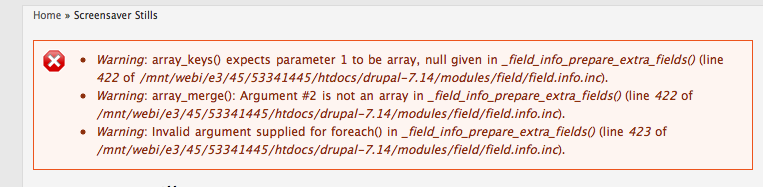
i went into extras to configure extra functionality, but it doesnt really work, i get some errors when i type this in the box extra fields "GalleryNodeGallery|Image|FileField " i get some errors (see attachment).
i'm pretty new to this and can't figure it out by myself somehow. could you explain to me step by step how to add an image style (under configuration) but instead of getting options for size and scaling etc, i would like to get the option FileField, so that i'm able to use a download link in galleriffic (which links to a zip file, not the original image).
hope you can help.
best wishes,
blacktigerclaw