

Active
Project:
ShareThis
Version:
7.x-2.x-dev
Component:
Code
Priority:
Normal
Category:
Bug report
Assigned:
Unassigned
Reporter:
Created:
30 May 2012 at 14:55 UTC
Updated:
4 Nov 2018 at 14:33 UTC
Jump to comment: Most recent, Most recent file


Comments
Comment #1
michaelgc commentedThis has been asked before, and I get the same issue msyelf. I'm going to try the latest Dev version and I'll let you know if it's fixed in it.
Comment #2
michaelgc commentedStill getting it in Dev.
Comment #3
Nigeria commentedSame with Twitter and others
Comment #4
ShareThis Support commentedHello,
Unfortunately, right now we don't have a way to turn of URL shortening for Drupal plug-in.
ShareThis Support
Comment #5
Nigeria commentedYou don't need to turn off the URL shortening, just include the title of the node even if you can't make it a link.
Comment #6
Nigeria commentedAll you have to do is included the title as text so that it as context even if it s not a link. No need to get rid of the URL shorterning.
Comment #7
ioanmar commentedHave you managed to fix that? I'm also facing this problem. URLs are posted short. I also have problems with thumbnails - sometimes only the Logo of the website accompanies the FB post, sometimes user cannot select which photo to include in FB post - the module chooses for him instead...
Comment #8
ohcray commentedI am having the same issue with the shortened URLs and would love it if (as posted above) the node title was used instead of the short URL. Also, there is no image thumbnail included, but that is probably a different issue.
Comment #9
sethulakshmy commentedsubscribe
Comment #10
calefilm commentedwow, big downer for me. subscribe
Comment #11
quickly commentedsubscribe
Comment #12
zil0484 commentedThis issue fixed yet??
Comment #13
calefilm commentedThe only time it will post the title for me is if I choose the display type: "Multi-Post Widget" ...then if the user clicks the "share" icon and types the message and shares on facebook, for instance, the title of the page that they are sharing shows up on their wall.
Comment #14
zil0484 commentedYes same for me. Only Share button showing up the page title, image and description. But not for all pages. I need Facebook n Twitter to show separately with counter..
Comment #15
mossill commentedsubscribe
Comment #16
Thanos Lappas commentedsunscribe
Comment #17
edutrul commentedsubscribe
Comment #18
alexj1234 commentedI haven't found any way around the shorted URL for facebook share posts... whenever something is shared from site on facebook, the facebook post links back correctly but shows "shar.es" instead of my URL. If anyone figures out a workaround please let me know.
The Metatag module helps out with controlling what is displayed on the post when someone shares something from your site on facebook though. http://drupal.org/project/metatag. Pay special attention to the Open Graph fields for the entity your users can share when you configure this module.
Also check http://developers.facebook.com/tools/debug to see what types of of metadata facebook wants to see from your site.
Comment #19
jorkby commentedmay you can try with this change:
in your html.tpl.php before add:
stLight.options({publisher:"add here your PUD KEY", shorten:false});Comment #20
pankaj.shukla commentedHello,
Please find below the answers for you concerns-
1. URL shortening - Unfortunately, right now we don't have a way to turn-off URL shortening for Drupal module.
2. Facebook sharing issue - You are expecting that some additional information should be shared alongwith the URL. Actually Facebook crawls the page (shared URL) and takes sharing information from Open Graph fields ("og" tags) implemented in shared page, but in your case "og" tags are not present in shared page. This is the reason why facebook is sharing only given URL and not other information.
Please refer http://developers.facebook.com/docs/opengraph/howtos/maximizing-distribution-media-content/ for more details about OG tags, and also check http://developers.facebook.com/tools/debug to see what types of metadata facebook wants to see from your site.
Below are some basic OG tags-
og:title – The title of your article, excluding any branding.
og:url – This URL serves as the unique identifier for your post. It should match your canonical URL used for SEO, and it should not include any session variables, user identifying parameters, or counters. If you use this improperly, likes and shares will not be aggregated for this URL and will be spread across all of the variations of the URL.
og:description – A detailed description of the piece of content, usually between 2 and 4 sentences. This tag is technically optional, but can improve the rate at which links are read and shared.
og:image – This is an image associated with your media. We suggest that you use an image of at least 1200x630 pixels.
Thanks
ShareThis Support
Comment #21
browneandrae commentedIn the sharethis.module around line 468 change
to
which adds the command to stlightoption that tells the url not to shorten as directed by sharethis. Not sure if it works though.
Comment #22
Anisorf commentedHy @browneandrae and thanks for the help,
I've add this code to line 487 for the $paramsStLight array, and indeed now it doesn't show anymore the share.es but the URL.
For sharing teaser information (as title, img, short description), should I use metatag or is better maybe to code my template.php theme?
Thanks a lot for any suggestion you can give me.
Comment #23
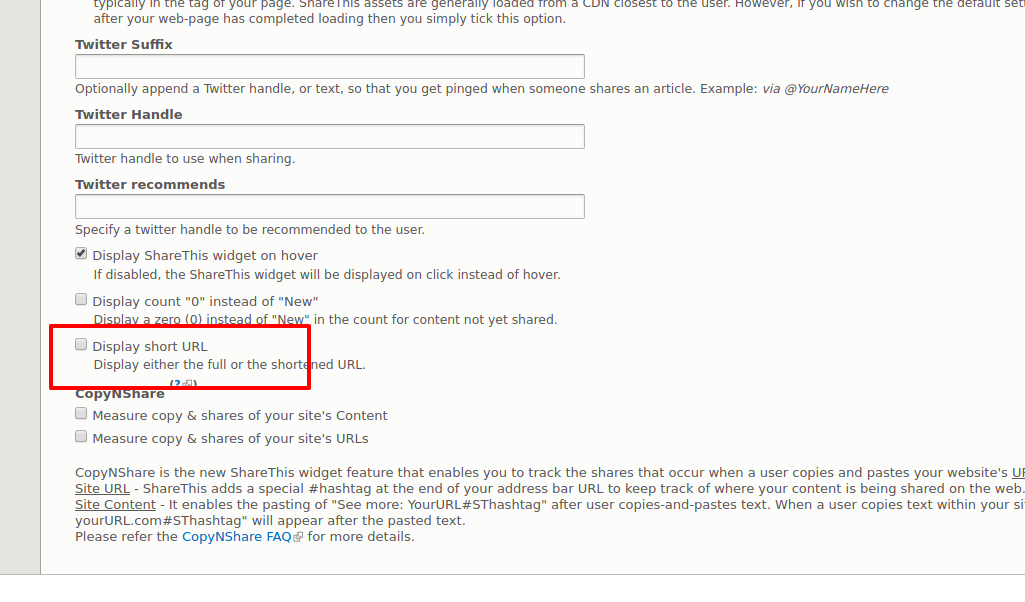
omar alahmedThe same issue at 8.x versions so I think 'Display short URL' should be disabled by default until fixed it.