I have a problem with the current date module version and drupal core 7.14.
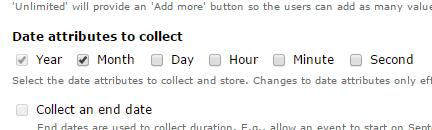
I use several date fields to enter the time. The date attributes are year, hour and minute.
I use the custom time format (H:i) (24-hour format of an hour with leading zeros:Minutes with leading zeros). The field works fine, but if I try to enter a time with a leading 00 (e.g. 00:15), I receive the following error.
PDOException: SQLSTATE[22007]: Invalid datetime format: 1292 Incorrect datetime value: '-0001-12-31 23:51:39' for column 'field_aus_value' at row 1: INSERT INTO {field_data_field_aus} (entity_type, entity_id, revision_id, bundle, delta, language, field_aus_value, field_aus_value2) VALUES (:db_insert_placeholder_0, :db_insert_placeholder_1, :db_insert_placeholder_2, :db_insert_placeholder_3, :db_insert_placeholder_4, :db_insert_placeholder_5, :db_insert_placeholder_6, :db_insert_placeholder_7); Array ( [:db_insert_placeholder_0] => node [:db_insert_placeholder_1] => 109 [:db_insert_placeholder_2] => 109 [:db_insert_placeholder_3] => einsatz [:db_insert_placeholder_4] => 0 [:db_insert_placeholder_5] => und [:db_insert_placeholder_6] => -0001-12-31 23:51:39 [:db_insert_placeholder_7] => 0000-01-01 11:51:39 ) in field_sql_storage_field_storage_write() (Zeile 448 von ../drupal/modules/field/modules/field_sql_storage/field_sql_storage.module).
I made several tests and found a workaround for this issue. I can enter the time if I expand the custom format with a year (H:i Y) (e.g. 00:15 2012)


Comments
Comment #1
hyperglide commented@e_gori having a similar issue -- did you make any progress?
Comment #2
DominiqueGijzen commentedSame problem here. But only on a date field which collects year only.
Already tried:
-Recreate field;
-Change input variables.
Comment #3
karens commentedThe original report says "year, hour and minute", which is not a valid or tested combination. You skipped month and day -- without that nothing will work correctly.
I see no way that could work, so I'm not surprised it doesn't. There is another issue for trying to provide flexible granularity like this, but it won't work now.
We need to keep people from creating fields that use settings like this, that is the bug to fix.
Comment #4
karens commentedI'm not able to reproduce a problem on a year-only field. I need steps to reproduce (it may the the specific configuration or widget).
Comment #5
yanniboi commentedDon't know if my issue is a duplicate, but I got a very similar error on my drupal-7.14 when I tried saving a field that was either just the year attribute or the year and month attributed. But it then worked fine when I had day month and year.
My Issue:1718974
Comment #6
mingis commentedSame issue for me on Drupal 7.15 and Date 7.x-2.6
Happy to provide more info / feedback if necessary.
Comment #7
rodrigo panchiniak fernandes commentedI'm getting an error of datetime format as well, when importing data and trying to saving it with node save. There is a possibility it is related to dates before the linux epoche start, i.e, January 1, 1970.
Comment #8
sreynen commentedI'm getting this error on a date field attached to a field collection. The error happens when the field collection is saved within the node edit form, but there's no error when the same field is saved from the field collection edit form. My field includes year and month. There may be something else unique about my case, but here are steps to reproduce as far as I can tell so far:
1) add a field collection to a content type
2) add a year-month date field to the field collection
3) create a node of that content type and populate the field with year-month values, e.g. 2013-07 to 2013-08
4) see error
Comment #9
yassersammanThe 'datetime' value assumes the "YYYY-MM-DD HH:MM:SS" formatting , any other format will not be accepted in the database.
I have a similar case to #5 and #8 where I have select lists for year and month only , and I got this :
PDOException: SQLSTATE[22007]: Invalid datetime format: 1292 Incorrect datetime value: '2014-01' for column 'field_property_duedate_value' at row 1:
INSERT INTO {field_data_field_property_duedate}
(entity_type, entity_id, revision_id, bundle, delta, language, field_property_duedate_value)
VALUES
(:db_insert_placeholder_0, :db_insert_placeholder_1, :db_insert_placeholder_2, :db_insert_placeholder_3, :db_insert_placeholder_4, :db_insert_placeholder_5, :db_insert_placeholder_6); Array ( [:db_insert_placeholder_0] => node [:db_insert_placeholder_1] => 30 [:db_insert_placeholder_2] => 30 [:db_insert_placeholder_3] => property [:db_insert_placeholder_4] => 0 [:db_insert_placeholder_5] => und [:db_insert_placeholder_6] => 2014-01 )
the passed value of the date is invalid here. can someone tell how we can modify the date module to bypass this error ?
Comment #9.0
yassersammanexample added.
Comment #10
teknocat commentedI have Drupal 7.34 and 2.8 of the date module, same issue with a field that is year only.
If you are going to be allowed to optionally choose which parts of the date can be selected, then it needs to handle saving it properly without causing a database error. If you choose to omit time, for example, it automatically sets the time to 00:00:00. So, if you choose to omit month or day, then why does it not make the assumption of January for month and 1 for day? So if you have year only, it should insert [selected-year]-01-01 00:00:00 into the database to avoid errors.
My work around for now will be a presave hook that completes the date for me and ensures it is inserted in the correct format to avoid database errors.
Comment #11
teknocat commentedOk, scratch my last comment. Not sure what's going on, but the problem just suddenly went away. Go figure.
Comment #12
teknocat commentedOk, this is really bizarre. The problem went away, then it came back again. I don't know how to recreate. I'll have to have my hook function check if the format needs adjusting or not on save.
Comment #13
teknocat commentedI figured out my issue, though it doesn't actually make sense. I was editing a user with date fields, but after saving it redirected me back to the view for user 1, not the one I was editing. It was only when saving user 1, for some reason, that it had this issue with date fields. Very bizarre.
Comment #14
cyberranger commentedI'm seeing this issue with Drupal 7.37 and Date module 7.x-2.8. I've checked the "Date attributes to collect" for 'Year" and "Month".
However, that throws the error other have reported. And it is the same error reported in https://www.drupal.org/node/1718974. The module is allowing only the Year and Month to be checked but then isn't adjusting the date into an acceptable format when inserting into the database.
Comment #15
kulvik commentedI'm experiencing the same problem. Trying to collect and save only "Year" in a Date field and get the same error. D 7.34.
-Kulvik
Comment #16
solomojo commentedIT WORKS!! I was getting this same error. I had to mess around with the field's "date entry options" After trying a few different options one finally took.
If you go to the field > Edit > More Settings and values > Date Entry Options.
The one it liked for my use case was: d M Y - h:i:sa
I am using the Pop-up Calendar Widget. Setting an appointment date and time on a user profile (profile2).
Drupal Core 7.39
Date 7.x-2.9
Comment #17
bdecarne commentedTell me guys : do you have any conditional fields with "required" property ?
Comment #18
wrg20 commentedConditional fields with "required" property was causing my issue. I had to remove conditional fields.
Comment #19
kyle.veldhuizen commentedI can confirm that the issue is required conditional fields.
Comment #20
_dcre_ commentedSame problem for workflow_fields.
When i make the date field invisible for a certain state, the same error occurs on save.
Comment #21
alieffring commentedA hacky workaround if conditional fields are triggering this for you is to implement hook_date_combo_pre_validate_alter and get it to run the conditional_fields validation function that strips out untriggered field errors, like so:
Comment #22
blast0344 commentedI can confirm that this is caused because of Conditional Fields module.
Since I need to use both, fix from #21 is working for me. Thanks.
Comment #23
Scott Smith commentedI just ran into this as well. I'm on Drupal 7.28. I know, I should update it. It's more of a personal archive, reference utility for my day to day work.
Anyway, I was attempting to edit and save a page using "Full HTML". There were > and " escape characters in my code. This was code I'd had in a Word Press site which was converted from Liferay. Don't ask. You seriously don't want to know.
Removing any and all escape characters or special characters from the source eliminated the problem of trying to save. Hope this helps someone. It was not immediately apparent what was causing this seemingly unrelated invalid date SQL error.
Comment #24
capysara commented#21 worked for me! Thanks!
I'm using the latest Conditional Fields 7.x-3.0-alpha2 and I'm on Drupal 7.6.
Update: It didn't work perfectly. It allowed me to save, but threw notices:
Comment #25
capysara commentedThis patch resolved my issue: https://www.drupal.org/project/conditional_fields/issues/2835625.
Comment #26
steinmb commentedRe-read the issue and ended up utterly confused :) To me it seems to have started out differently than the latest reports, that seems to be a compatibility problem with Conditional Fields. Not sure if there is anything that needs to be addressed, if so, perhaps there are two different issues in here?
@capsara have found an solution for Conditional Fields in another issue. Head over to that one and see if you can get that patch RTBC. If anyone feel up for it I think this issue summary needs to be updated.
Comment #27
steinmb commentedNo feedback. Closing as outdated.