Closed (fixed)
Project:
Commerce Kickstart
Version:
7.x-2.x-dev
Component:
Code
Priority:
Critical
Category:
Task
Assigned:
Reporter:
Created:
14 Jun 2012 at 10:03 UTC
Updated:
30 Jul 2012 at 03:42 UTC
Jump to comment: Most recent file


When user clicks on the “ do not install demo store “ option:
- Ideally they would choose which “features” they want to install
FEATURES
- Slideshow
- Product ads/pushes
- Social login
- Social links
- Multiple product image thumbnails (should go to both architecture)
- Image zoom (should go to both architecture)
- Read more on product descriptions
- etc....
Things that would still be installed by default include, shipping, tax configuration, product grid, product & order management, etc...
CONTENT CONFIGURATION
- 3 blank products that include
- Title
- Image (i guess it should be on product variation and not the product display)
- Body
- Price
- 1 product display type
- 1 product type
- 3 menus - Primary, Secondary, Footer
- 3 vocabularies - Sample color (sample white, sample black), Sample size (sample small, sample large), Sample product category (sample category A, sample category B)
- [if slideshow enabled] 2 blank slideshow examples
- [if product ad enabled] 1 product ad
- [if blog enabled] 1 blog entry
- [if faceted search enabled] Search set-up with sample facets
| Comment | File | Size | Author |
|---|---|---|---|
| #11 | installation.png | 114.79 KB | bojanz |
| #11 | interdiff.patch | 97.11 KB | bojanz |

Comments
Comment #1
guguss commentedComment #2
guguss commentedComment #3
mandreato commentedFirst: I've tried the alpha1 and it looks AWESOME!
BTW, after store configuration (just EUR currency and European tax), I've tried to "manage demo" navigating to admin/demo and pressing the "Kill me !" button (since it was not possible to avoid example store contents installation before).
My hope was to get rid of all demo contents in order to start with my specific setup (then migrate from Ubercart 6.x-2.9...); instead I received the following errors:
Comment #4
bojanz commentedThe admin/demo functionality still needs serious work, so I'm not surprised. Avoid it for now.
Comment #5
hazaComment #6
AngryWookie commentedThe option for importing content is there when running the Kickstart 2 Alpha 1 installer but the radio buttons are disabled so there is no way to select "No"
Comment #7
haza@AngryWookie : because it's not really working for now. This is there to say "we're working on that" :)
Comment #8
guguss commentedWhen installing the no-demo-store-content, the user could ideally choose to enable the:
The 2 last ones need further discussion.
Comment #9
guguss commentedComment #10
guguss commentedHere's my answer for 1 & 2 on #8 :
Comment #11
bojanz commentedAaaaand merged!
Spent two days reviewing and polishing this code.
Attached an interdiff detailing my changes against Haza's latest code.
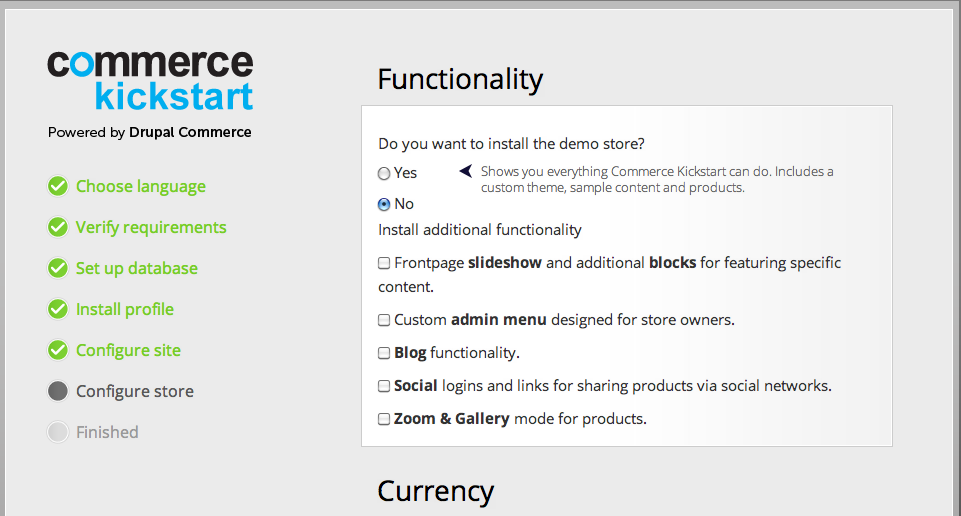
Also attached a screenshot showing how the selection looks right now.
You'll notice that it isn't as granular as #8 specified, so it could obviously do some more work (Haza's patch had it as granular as #8, but it wasn't separated in code, so I just made the UI match our current state of code).
What I changed:
1) Rewrote commerce_kickstart.profile, fixing the issues I had with it (it was reverting some changes made for alpha2 due to a faulty rebase, had a bit wonky language, separate codepaths with very different pages and page titles for demo store and "no demo store", demo store modules enabled all at once which could lead to timeouts, etc)
2) Added Inline Entity Form to the base "no demo store" product feature, it was missing.
3) Added commerce_backoffice and commerce_kickstart_content_ui (which needs to be merged into backoffice) to the "no demo store" install, it was previously missing due to a dependency on one of the demo store modules (which was a quick fix for the shipping field not appearing in the megarow).
Removed that dependency, so we'll need to find another fix for the shipping field situation.
4) Removed "sample" from the name of the new fields, product and node types, since there's nothing "sample" about them.
Made it rely on the Commerce provided default product type.
5) Cleaned up the group names of migrations.
6) Disabled the grid view in Omega by default, since the red stripes made the theme look quite odd, my first thought was that something was broken.
Critical followup that needs your feedback:
#1686600: Figure out the correct directory structure for the custom Kickstart modules
Other followups:
#1672212: Make sure the node templates are no longer harcoded
#1686610: Commerce Backoffice doesn't show shipping by default in the order megarow
#1686586: [No demo content] AutoSKU not configured for default product type
#1686594: [No demo content] commerce_kickstart_blog should not depend on commerce_kickstart_merchandising
#1686590: [No demo content] Custom user pages not available (commerce_kickstart_user not installed)
#1686598: No products page found when the custom admin menu is disabled
#1686602: [No demo content] Addressbook doesn't work
Comment #13
krisrobinson commentedCan't wait to try this out.