

Active
Project:
Service links
Version:
7.x-2.x-dev
Component:
User interface
Priority:
Critical
Category:
Bug report
Assigned:
Unassigned
Reporter:
Created:
17 Jul 2012 at 03:12 UTC
Updated:
7 Jul 2015 at 16:37 UTC
Jump to comment: Most recent, Most recent file





Comments
Comment #1
andrew_mallis commentedditto
Comment #2
Anonymous (not verified) commentedNewly, in addition to the symptom mentioned above, a facebook progress-bar shows up while loading the share button.
Comment #3
jeffschulerI'm experiencing this as well in 7.x-2.x-dev, (though not the progress bar.)
Comment #4
erald commentedkind of the same the link is not displayed anymore.
The element is declared invisible and the image is not there anymore.
Actually same happens with google plus widget.
It was working and just happens at once not anymore.
Anyone any idea?
Comment #5
hameerabbasi commentedSame here. Can't see facebook share and/or use it.
Comment #6
Carlos Miranda Levy commentedSame thing here
Comment #7
patrik.meneguot commentedi have some problem....
if i have 4 post:
1 show share on facebook (only text no link)
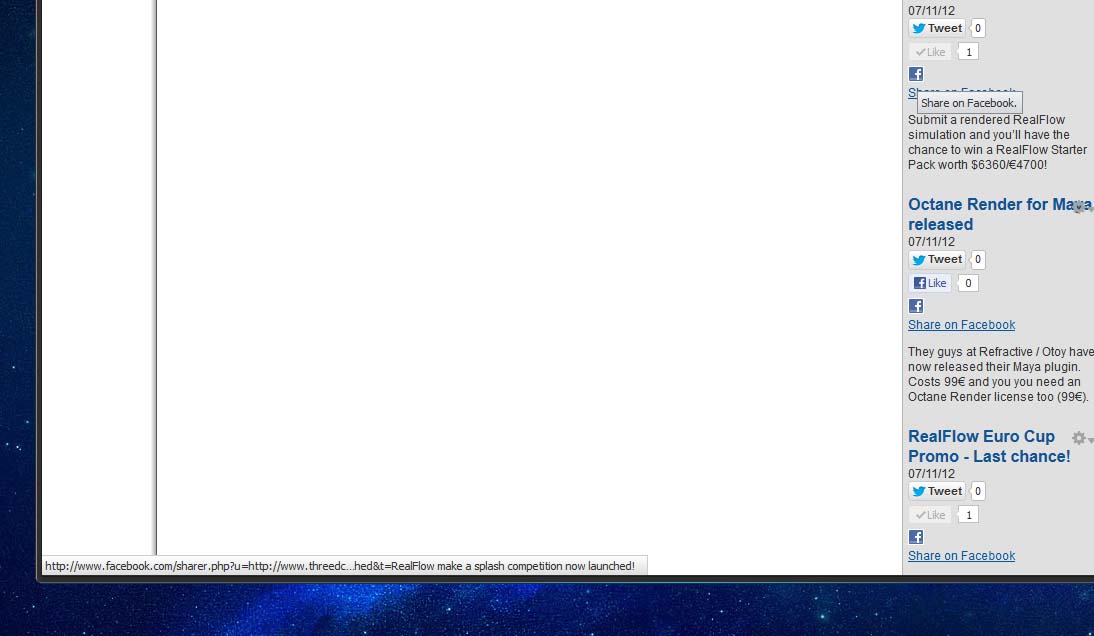
2 show share on facebook (only text, but link http://www.facebook.com/sharer.php don't run correctly, not display on my post the article that i share)
3 show share on facebook (only text no link)
4 show share on facebook (only text, but link http://www.facebook.com/sharer.php don't run correctly, not display on my post the article that i share)
please fix...
Comment #8
rv0 commentedsomewhat similar behavior in a D6 site I'm maintaining. Facebook api changed slightly maybe?
Comment #9
qasimzee commentedping
Comment #10
hoff331 commentedProblem fixed!
Go to Configuration > Service Links > Widgets and change the Facebook Like Locale setting to "en_US" or remove it all together
Comment #11
gomino commentedThanks!
Although it is not a complete fix, since some people would like the localized share button.
From what I have read, Facebook has deprecated this version of the share button, but there is another version which is usable. I am sorry I can not help any more for now.
Comment #12
radiobuzzer commentedThe dev version works. The only problem is that the number of shares appearing is always the same as the number of likes. I cannot explain this
Comment #13
facal commentedThe issue gomino was referencing is well explained here
http://stackoverflow.com/questions/11537996/facebook-share-button-is-it-...
Is anybody able to patch this module accordingly ?
There also is this sandbox
http://drupal.org/sandbox/xrampage16/1712852
Comment #14
facal commented@hoff331
I don't understand how this is solving the problem with the "Share" button. You are talking about "Like" button, right?
Setting back to active, please change if I misunderstood
Comment #15
nothinghere commentedSame problem here.
Configured with "en_US". Instead button display in french (my website langage).
Strange, but works. :-)
[EDIT] : work in one site, not on the other one... very strange. Maybe conflict with other options of facebook's service links...
[EDIT2] : display correctly in full node view, not in teaser. Layout for facebook should set to "standard". Strange. any tips for facebook button on teaser view?
Comment #16
matas.k commentedIt probably do not work because Facebook dropped (deprecated) the Share button and now they have Like button. Share button stopped working in many websites after this announcement, not just Drupal related.
Comment #17
facal commentedIt's not a problem with Facebook having deprecated Share button. It's a problem with the specific implementation of the Share button that this module relies on.
The button would still work if this module used the FBML version, please see the link I posted in #13.
Unfortunately I am not personally able to provide a patch so will probably be forced to abandon Service Links.
Comment #18
magtak commentedremoved comment
Comment #19
TheCrow commentedThis is just a temporarily patch to test, next i will fix the options from the admin interface. Once patched, clean also the browser cache or refresh the page.
Comment #20
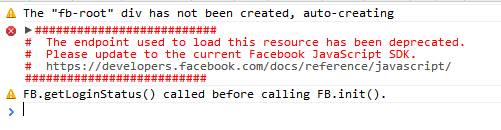
radiobuzzer commentedI don't know if this helps. I am posting here the Javascript errors I am getting at the javascript console
########################## # The endpoint used to load this resource has been deprecated. # Please update to the current Facebook JavaScript SDK. # https://developers.facebook.com/docs/reference/javascript/ ##########################and two notices
Comment #21
radiobuzzer commentedThe suggested solution for configuring locale at EN_US does not work. My locale has always been this, and the problem already occurs.
I still do not realize why this is not a bug. The module is already offering a functionality (aka feature), which does not work. Changing the backend to FBML won't change the functionality or add a new one. So it is clearly a bug.
Comment #22
radiobuzzer commentedthis occured on the dev
Comment #23
TheCrow commentedSomeone confunded facebook share with facebook like, the locale params has been used only for the second so is not related to facebook share, and yes facebook share has been deprecated so we have to use the FB SDK directly.
@radiobuzzer try this:
patch -p0 < service_links-1688494.patchComment #24
emilorol commentedHow do we do that?
Comment #25
TheCrow commentedthe patch is at #19
Comment #26
emilorol commentedI am getting the same error as in 22. Should upgrade to DEV?
Comment #27
TheCrow commentedof course the patch above is for the dev, here for 2.1
Comment #28
emilorol commentedThe last patch worked, but it made all icons disapear, so I deleted the module and I installed the dev version. The icons are all back, but the facebook share is out of alignment. See image below:
Should I still apply the patch #19 to the current dev version or do it have already?
I am asking because I am still getting the error:
Comment #29
TheCrow commentedcomment or delete this row on js/facebook_share.js, then refresh the page:
f_text.setAttribute('style', 'text-align:left;vertical-align:top;margin-top:4px');if you want you may also adjust the style changing the string as i did, if this can be useful i will add this as separate configuration field.
Comment #30
RAFA3L commentedWith the Dev version and the patch #19 work fine but I notice this error in the browser inspector:
All.js - connect.facebook.net
Other Issue
FB.init has already been called - this could indicate a problem
Comment #31
TheCrow commentedHi Rafael,
what browser are you using? is it the same for this page: http://servicelinks.altervista.org/?q=sample ?
are they errors or warnings?
Comment #32
RAFA3L commentedI'm using Safari and this happen only when the share link is enabled. I have this related modules enabled too, but if I disabled all the problem continue. Today I'll try using only Service Link in a clean Drupal.
In your link not show any error.
fb_autopost
fb_social
fboauth
fboauth_role
Comment #33
RAFA3L commentedSorry, the problem was a conflict with the fbsocial module...
Activating the option "Output the facebook opengraph tags for the above content types" in the fbsocial module fix the problem.
Comment #34
TheCrow commentedThank you Rafael! in the old version the conflict with fbsocial was fixed let me see if i can do something for the new one.
Comment #35
marc angles commentedHi, I'm still using the 2.1 version. I applied the patch from #27.
The patch applied correctly but did not fix the problem. Facebook share link does not grab anything from the page. All the other share buttons are working fine.
Should we give a try to the dev version ?
Comment #36
marc angles commentedI did try the dev version and all seems very good. waiting for the release.
Thanks for this great module.
Comment #37
emilorol commentedAre your icons aligning? or are you having a similar issue I mention in #28
Comment #38
TheCrow commentedCommitted!
Comment #40
RAFA3L commentedSorry for reopen this theme...
I'm getting again the alert message:
FB.init has already been called - this could indicate a problem
Unknown RPC service: widget-interactive-I0_1369923202877
I did update the module to the last dev version and work fine the shared button, but show this alert message in all browsers.
Comment #41
TheCrow commentedRafael it conflicts with fbsocial module... btw this is just a warning message, i will see if i can shut this message
[Edit]
the only way seems comment the code on fb_social.module:
Comment #42
RAFA3L commentedThanks TheCrow, I think I can live with this alert message
Comment #43
summit commentedHi,
Got the same as https://drupal.org/node/1688494#comment-7365952
Using:
ANyone solved the aligned situation of facebook share?
I do not see this line in the module anymore: https://drupal.org/node/1688494#comment-7367312
Thanks a lot in advance for your reply!
Greetings, Martijn
Comment #44
chefnelone commentedSorry to open but I just downloaded the dev version and the problem persist. Is the fix committed?
The facebook link is not shown at all.
Comment #45
simon georges commentedThe fix should be in the -dev version, it should even be in the 2.2 version...
Comment #46
chefnelone commentedI tried all these available version and the issue is still there for me:
7.x-2.3-beta1
7.x-2.2
7.x-2.3-beta1+3-dev
I'm testing them in localhost. Could this be the cause?
Comment #47
pixelula commentedHi,
The facebook widgets can't be loaded when you try from localhost . A workaround it's to add a new entry in the hosts file, something like 127.0.0.1 www.example.com
Comment #48
Poieo commentedIs anyone still having problems with the original issue:
"Service Links Field Share on Facebook" No longer displays Picture or links to article."
When using the Facebook Share button, only the shortened URL is shared. I'm not getting the image or a summary with the latest dev and I'm not using any other Facebook modules.
I also have both declared as open graph meta tags.
Comment #49
miccelito commentedFor those with the issue that Facebook Share doesn't show image, description etc properly, I would advice you to try this:
1. Install module Metatag https://www.drupal.org/project/metatag (easy to understand module). Use the module and make your configurations
2. Clean cache (admin/config/development/performance)
3 Go to https://developers.facebook.com/tools/debug/og/object And click "Fetch new scrape information" button to ping/update your meta tags to Facebook server.
Comment #50
plousia commentedI'm having this issue as well. I tried the solution miccelito suggests in #49 and it made no difference. There's a Metatag: Facebook module, but when enabled provides no configuration options. Going to the Facebook developer debug URL and clicking "Fetch new scrape information" correctly picked up the blog post information, and clicking the "See this in the share dialog" link works perfectly, picking up the title, image, and URL. Back on the node, the "Share on Facebook" link shows no image and does not pass the correct information to facebook.com/sharer.php, as described in other posts above.