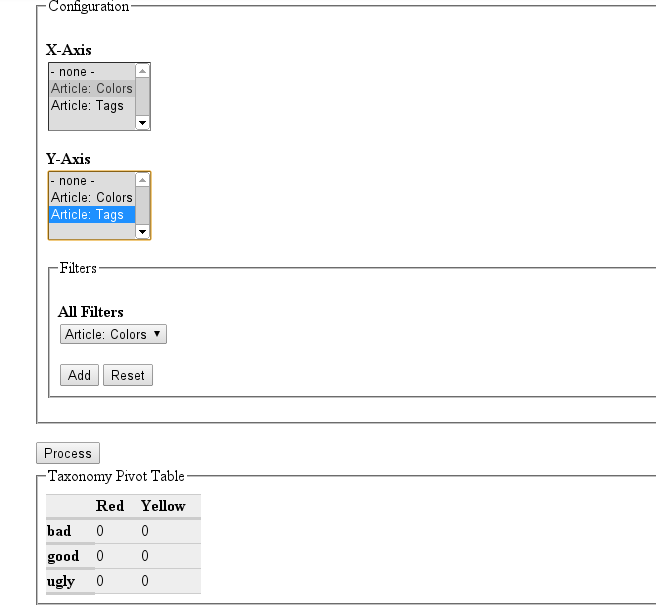
The Taxnomy Pivot module generates a pivot-style Table with vocabularies as dimensions on the axes. As values in the cells of the table it shows the number of nodes attached to the terms of the vocabulary.
Example:
The nodes in the system are classified by the vocabularies Voc1 (with Terms a,b,c) and Voc2 (with Terms x,y,z). If Voc1 is chosen for the x-Axis and Voc2 is chosen for the y-Axis the resulting table will look like this:
      a     b     c
x    1     5    13
y    0     4      3
z    4     5     6
In this example there is 1 node classified with a & y and there are 6 nodes with c & z.
In contrast to a view not only the output as a pivot table differs, but also the configuration of filters. Not only the filter values (terms) can be selected by the user, but also the configuration of the filters (vocabularies) is made available to the user.
Features
- Multiple vocabularies on x- & y-axis: Each term is combined with each other
- Applying multiple filters: If multiple vocabularies and multiple terms are selected, terms from same vocabulary are connected by "OR", while different vocabularies are connected by "AND". Example: Filter for a & b from Voc1 and x from Voc2. The node needs to have either a or b and needs x to be displayed.
- Support for hierarchical vocabularies: From each vocabulary just the upper most level is shown and all data from childterms is aggregated. (See drill-down in upcoming features)
- Excel Export: The generated table can be exported to excel by downloading an xls-File.
- Display nodes: For each cells the nodes 'behind' the figure can be displayed and are listed below the table
Install / Configuration
- Install dependency phpexcel
- Install module
- Call /taxonomy-pivot on your Drupal site
Drupal version: 7.x
Project page: https://drupal.org/node/1705412
git clone --recursive --branch 7.x-1.x git.drupal.org:sandbox/majestixx/1705412.git taxonomy_pivot
For preparing the review I already removed all errors & warnings found by http://ventral.org/pareview



Comments
Comment #1
patrickd commentedwelcome!
Automated stuff looks good, just delete the master branch:
Make sure your README.txt follows the guidelines for in-project documentation.
It's the best if you keep your readme and project page in sync.
We do really need more hands in the application queue and highly recommend to get a review bonus so we can come back to your application sooner.
regards
Comment #2
Anonym commentedAutomated test looks good: http://ventral.org/pareview/httpgitdrupalorgsandboxmajestixx1705412git
But your code is not good:
Fatal error: Call to undefined function filter_filter() in /.../sites/all/modules/taxonomy_pivot/taxonomy_pivot.module on line 36.Patch to fix
Notice: Undefined index: triggering_element in function taxonomy_pivot_user_form() (line 163 in file /.../sites/all/modules/taxonomy_pivot/taxonomy_pivot.module)..Patch to fix
Comment #3
majestixx commentedThanks for the reviews!
I deleted the master branch and extended the README.txt.
1. and 2. are fixed
@3. Did you connect the vocabularies to a contenttype with a "term reference"?
As the pivot table has nodes as the values the vocabularies need to be referenced to a contenttype. I will extend the documentation to avoid this misunderstanding.
The other issues (4.to 6.) I will address asap.
I have a question to 7.: The icon used is licensed under the LGPL (http://www.everaldo.com/crystal/?action=license). Isn't that compatible with Drupal?
Comment #4
Anonym commentedhttp://drupal.org/licensing/faq/
Licensing FAQ
Comment #5
majestixx commented@4: I changed the generation of the table to theme_table. Thanks for the advice. I did not know this method.
@5: I removed workaround for jQuery and am now used noConflict
@6: All static db_queries are replaced by dynamic one. Except of one huge query (line 579). The query is build in a complex process and a full rewrite of the method is necessary to change the query. This refactoring will be done later on.
@7: As LGPL code (and therefore I assume also images) can be used in a GPL software (https://www.gnu.org/licenses/gpl-faq.html#AllCompatibility) the usage of the icon should be OK.
Comment #6
cubeinspire commented1. Remove the javascript alert(s).
2. You still have some code lisibility improvements todo: see http://ventral.org/pareview/httpgitdrupalorgsandboxmajestixx1705412git
3. Your git branches are not following naming conventions. Please read again http://drupal.org/node/1015226 to know more about it.
4. Try to use GPL image icons, here you have a list: http://groups.drupal.org/node/20380
If you cannot find what you want use: http://www.iconfinder.com and check the allowed for commercial use no link required. On the right side you will see information about the licence.
5. On line 297 you have an empty function. This should be removed.
6. You have an ajax call that points to an non-existent page, there is just a small problem about paths on line 11 of the taxonomy_pivot.js. There are several ways to get the url for sending the request. An example would be to get it on the Js file using:
var pathname = window.location.pathname;Another to create a hidden input in your .module file with the URL, and then get it as you made on line 10.
7. You shouldn't be using jQuery(document) ready.
Javascript should be loaded with:
this will avoid to have variables names already used by other modules.
8. On line 802 it would be nice to make a drupal_set_message() explaining to the user that she/he has to activate the module phpexcel.
9. On the CSS file line 7 you are using an image from an external website, this practice increases the page load time and is not really useful as the image can be copied inside the module folder.
10. Your install file can be deleted. The taxonomy_pivot_install() is empty and should be deleted.
Comment #7
klausiClosing due to lack of activity. Feel free to reopen if you are still working on this application.
Comment #8
majestixx commentedExcuse the long absense. I was very busy at work.
@cubeinspire: Thanks a lot for your thorough inspecition of the code. It must have take some time!
I adressed all the issues:
Comment #9
drebroff commentedHello.
It may sound strange, but I cant confirm module functionality. For test case I have several Article nodes and they have 2 taxonomy vocabularies attached (Tags and Colors). I added some terms to vocabularies and after that to nodes. And as I understand, number of nodes which have terms must appear at taxonomy_pivot output. So I have only zero values. But there is definitely nodes with some taxonomy terms.
Also I'm not sure if translation files should be in git branch.
Code and code style seems Ok.
Thank you.
Comment #10
majestixx commentedHello aliaric,
that's really strange!
Did you try it on a testing system? Is it possible that you send me the DB dump?
Comment #11
drebroff commentedmajestixx, I send you via email a profile info for account where I was testing your module.
Comment #12
majestixx commentedThanks for your support! If was able to figure out the issue:
The pivot table was not regarding nodes with an undefined language (e.g. in a system with only english as the language).
The bug is fixed and pushed to the repo. Please retest.
Comment #13
senpai commentedReviewing...
Comment #14
kscheirerRemove
print_r("wrong");, otherwise the code looks great. Seems to be a rather complex module, but no major issues found.----
Top Shelf Modules - Enterprise modules from the community for the community.
Comment #15
senpai commentedSeconded.
Comment #16
kscheirerThere's a few input errors reported at http://git.drupal.org/sandbox/majestixx/1705412.git. The
raw $form_state['input']is a security issue and printing the unsanitized node title, marking "needs work" for that. But otherwise this looks ready to go.----
Top Shelf Modules - Enterprise modules from the community for the community.
Comment #17
PA robot commentedClosing due to lack of activity. Feel free to reopen if you are still working on this application (see also the project application workflow).
I'm a robot and this is an automated message from Project Applications Scraper.
Comment #18
majestixx commentedThank you for the additional feedback, kscheirer.
I have removed the print statements, which were used for testing, escaped the output of node->title, and reduced the use of $form_state["input"]. It is still used 4 times (accessing the attribute "_triggering_element_name"), but just for comparsion, and should be no more threat.
Comment #19
kscheirerYou have a few issues reported here: http://pareview.sh/pareview/httpgitdrupalorgsandboxmajestixx1705412git.
You can remove the taxonomy_pivot_page_access() function, instead, in the menu hook, just set 'access arguments' => array('taxonomy pivot access'). And remove the 'access callback' line. The default is user_access(). So this way you're still calling the same user access check, without an additional function in the way.
Seems good otherwise!
----
Top Shelf Modules - Crafted, Curated, Contributed.
Comment #20
majestixx commentedThanks for the tipp using "access arguments".
Regarding the pareview results:
- I will remove the translations as soon as I am able to translate the module on localize.drupal.org. This is not possible for sandbox modules and I needed a German translation for personal use.
- I know that t() should not be used for variables, but I do not know an alternative way for getting the translation of taxonomy terms. Perhaps you can help me?
- the usage for $form_state["input"] I explained above. To be honest I am not 100% why I had to use this data. It had somethink todo with determining the submit-button on ajax-requests, which was just possible using $form_state["input"]. However, the data is just used for comparison and is not input into the db or printed out to the user. Therefore, the should be no possible point for attacks.
Thanks again for your thorough review!
What are the next steps I have to do?
Comment #21
kscheirerNo further action is required, but the best thing you can do is get a Review Bonus by reviewing other applications. That will get you to the top of the list of projects to get reviewed (and hopefully approved). Only manual reviews count, just using http://pareview.sh is not enough.
----
Top Shelf Modules - Crafted, Curated, Contributed.
Comment #22
kscheirerIt's been a month without any problems reported, so I'm promoting this myself as per https://drupal.org/node/1125818.
Thanks for your contribution, majestixx!
I updated your account to let you promote this to a full project and also create new projects as either a sandbox or a "full" project.
Here are some recommended readings to help with excellent maintainership:
You can find lots more contributors chatting on IRC in #drupal-contribute. So, come hang out and get involved!
Thanks, also, for your patience with the review process. Anyone is welcome to participate in the review process. Please consider reviewing other projects that are pending review. I encourage you to learn more about that process and join the group of reviewers.
Thanks to the dedicated reviewer(s) as well.
----
Top Shelf Modules - Crafted, Curated, Contributed.