

Closed (fixed)
Project:
IMCE
Version:
7.x-1.5
Component:
User interface
Priority:
Normal
Category:
Support request
Assigned:
Unassigned
Reporter:
Created:
9 Aug 2012 at 11:22 UTC
Updated:
30 Apr 2020 at 19:49 UTC
Jump to comment: Most recent, Most recent file


Comments
Comment #1
laoguxintan commentedHi, I have got the same problem. If you solve it, please do tell me. Thanks.
Comment #2
GinaF commentedI have this error as well.
Comment #3
GinaF commentedMy IMCE image upload was working fine up until recently.
I have recently upgraded to Drupal version 7.15. - anyone else noticed it post-upgrade?
I also recently had my IT dept amend some folder permissions. I was wondering if this could have had an effect - I have the following permissions (although I think it may have still worked after this amendment):
sites/default = 755
sites/default/files = 775
sites/default/files/image = 775
I believe this is the recommended level by Drupal - what do others have sites/default/files and /images set to?
Comment #4
GinaF commentedI resolved this by changing the ownership of the default/files folder back to Apache.
Although Apache had permission to write to it, it had stopped working when the ownership had been changed.
Comment #5
clecioespindola commentedIf you're using Drupal 7, Check out IMCE Configurations (admin/config/media/imce), look if the column Public Files has a Role defined for the editor role (it comes NONE by default). I hope it helps...
Comment #6
marko b commentedClecioespindola that was my problem also, this public files column always gets into second row and this is not intuitive, I also did configure first row which was for you tube and didnt look for second row and had also this problem.
I suggest to IMCE dev. to put public files column in first place, people will make the same mistake a we did.
Comment #7
ufku commentedComment #8
Anonymous (not verified) commentedI am also having the same problem. When I open the IMCE file browser, the only directory I see is <root> (with no subdirectories). When I click on <root>, I get the error messages "Directory . is not accessible. Unable to get a working directory for the file browser!"
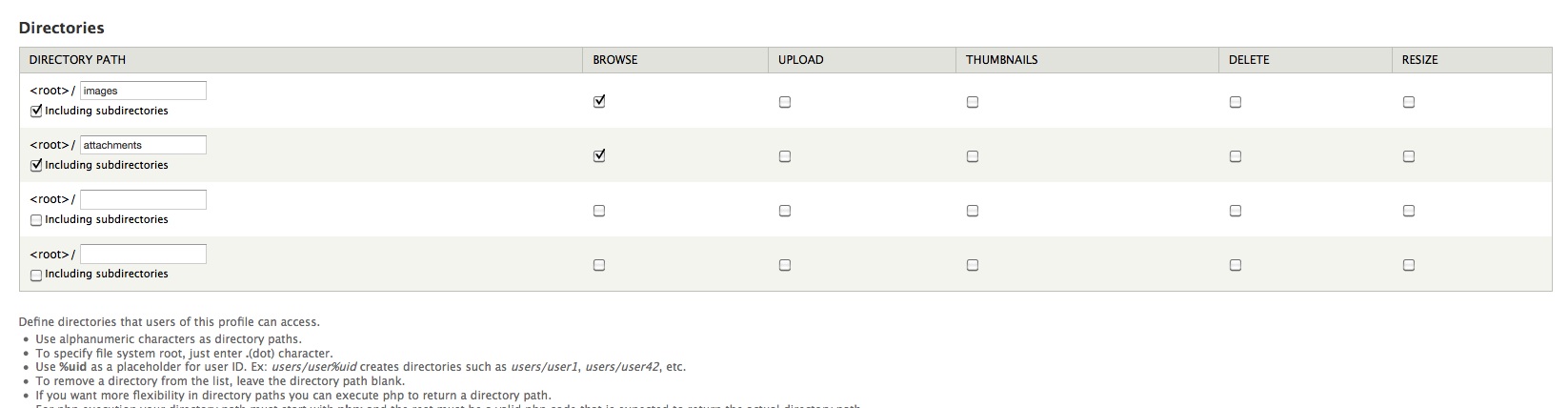
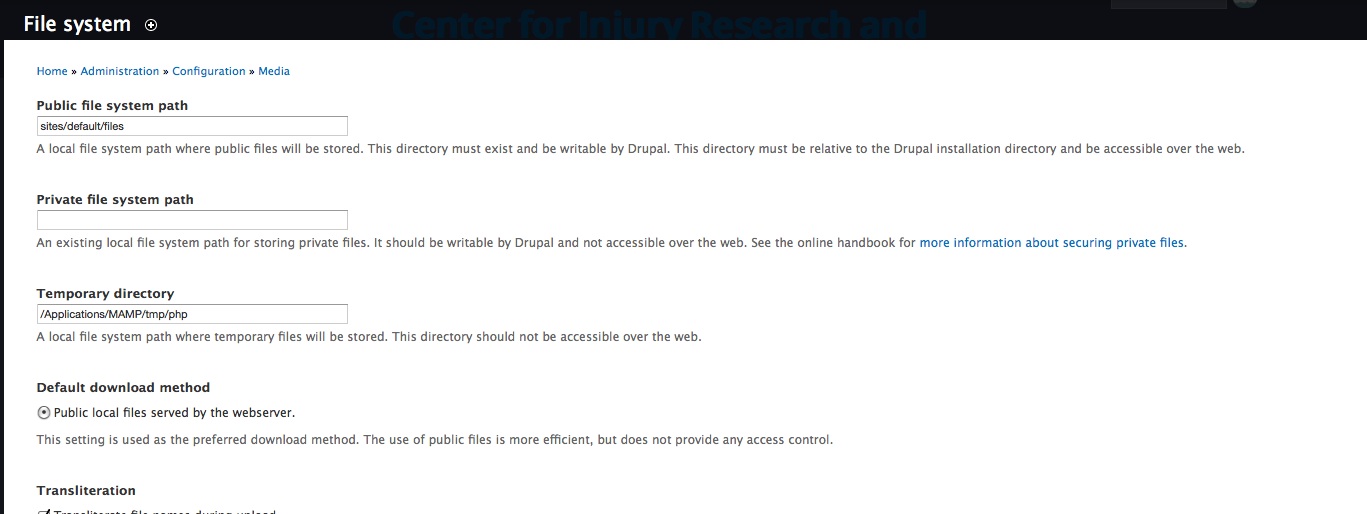
I've verified that my public files directory is set to sites/default/files. In the IMCE configuration, under directories, I have <root>/images set with browsing enabled and "Including subdirectories" checked.
The files directory and all of its subdirectories are owned by the same user as apache is running under, and the directories are set to 777 (which I would rather not do, but wanted to test).
I still get the same error message.
Any suggestions?
Comment #9
Anonymous (not verified) commentedTo make this issue even weirder:
When I use the Link button in WYSIWYG editor, the "Browse server" button (which uses IMCE) works fine and can see all the files.
It is only the "File browser" for the Image field on the content type that gives these errors.
Does anyone have any ideas? This is rather frustrating :(
Comment #10
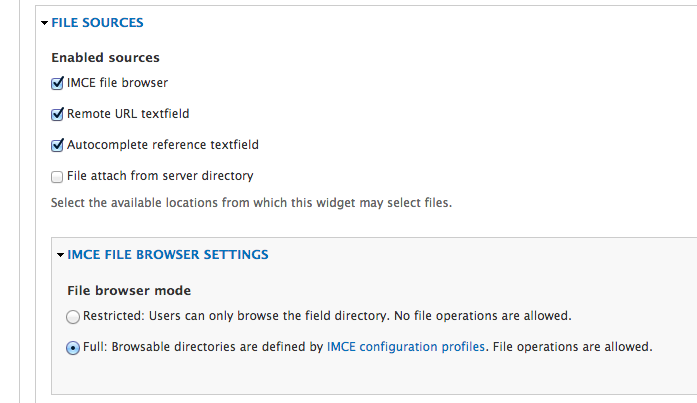
andrew_mallis commentedIf you are using the filefield sources module, and have set IMCE configuration profiles, you may need to set the field's "File browser mode" to "Full" or risk being denied!
Comment #11
batigol commented@Andrew_Mallis thx for helping me out. I can see all IMCE icons but it still don't see images inside folder :(
Comment #12
andrew_mallis commented@Kirsehn you might want to set a path to a Private filesystem path!
Comment #13
Anonymous (not verified) commented@Andrew_Mallis Thanks for the suggestion :) I admit, however, that I already ended up switching over to using the Media module for this project and have since uninstalled IMCE, since I was unable to get it working. The next project that I have, perhaps I will try it again.
Comment #14
skt commentedI have a similar issue with directory access using IMCE file browser with filefield sources. I have three content types that have an image field, and for each I'm setting the file path in the field's File (Field) Paths area. All paths point to subfolders in the sites/default/files/images directory, which I've listed in the WYSIWYG profile along with access to subdirectories.
All works perfectly in one of the content types. For the other two, uploaded images are placed in the correct folders, but can't be accessed in the IMCE file browser. Instead, the level is shown without any subdirectories.
I've tried the fix in #10 (thanks @Andrew_Mallis), and while that does solve the access problem, it also provides access to the entire "files" folder, and also allows the user full access to all of IMCE's file operations (eg. upload, delete). This is more access than I'd like for my users. I'd have given up & tried something else, but since it works as desired for one content type I thought there may be a way to make this work for the others?
Many thanks in advance.
Comment #15
skt commentedFound the solution here.
File (Field) Paths ignores the specified directory, and instead uses what's set in the regular image upload field. Bug report: https://drupal.org/node/2009626
Comment #15.0
skt commentedadded how I receive the error
Comment #16
imperator_99 commented@Andrew_Mallis, thanks for your suggestion, this worked for me perfectly!
Comment #17
SkyBuzz commentedI'm facing the same issue when I tried to configure the IMCE in my live server. I thought it is a permission issue, but the issue is showing up even after setting the permission of files directory to 755.
And I'm mainly facing in PHP returned path.
php: return 'users/'.$user->name;Here is the errors:
Can anyone help with this.
Comment #18
francescosciamanna commentedFor whom is still looking for a solution:
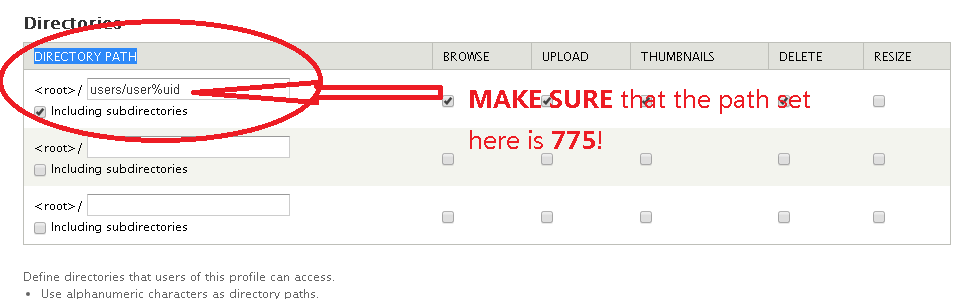
MAKE SURE that the imce writing folder aka “DIRECTORY PATH”, has permissions set to 775! (*in other words, give imce profile/role the permission to write inside the folder!)
Look at the attachment
Comment #19
ajayg commentedI am still seeing this on latest D7-1.10 and D6-2.5 as well.
The users themselves can see the file. But the user 1 and other user with Admin permission can't see.
Comment #20
thallesLeave me know if this issue was solved.
Comment #21
thalles