

Closed (fixed)
Project:
Hierarchical Select
Version:
5.x-1.1
Component:
Code
Priority:
Normal
Category:
Support request
Assigned:
Reporter:
Created:
4 Sep 2007 at 18:54 UTC
Updated:
25 Oct 2007 at 20:32 UTC
Jump to comment: Most recent file





Comments
Comment #1
manuj_78 commentedI have the same question as well
Comment #2
armand0 commentedWhen I installed it didn't make any change in my categories. The change saw it in the exposed filters of the module Views. The filters stopped to list all the parents and children in a single and long list. In their place they appeared list of parents and list of DEPENDENT children!!!.
Comment #3
wim leersYou have to create a hierarchical tree of categories. Please post a screenshot of your vocabulary if you're not sure what that means, so I can point you in the right direction.
Only category selection on node forms are transformed into hierarchical selects, by the way. But out of my head, that's pretty much the only place where it's used in Drupal core anyway.
Comment #4
vanderlip commentedScreen Shots per your request - snippet of my category
Comment #5
vanderlip commentedAnd a screen shot of the settings page.
Comment #6
wim leersYou can't set comment titles: it always affects the issue's title. So please don't change it :)
Those screenshots look ok. Perhaps it doesn't work for content_taxonomy fields selects? I've just found a bug in those. If that's not the case, I'll need more detailed information. The easiest would be for you to give me access to your site temporarily.
Comment #7
wim leersThe content_taxonomy bug was fixed in commit #80179. Get the tarball in a couple of hours if that was the problem.
Comment #8
talatnat commentedI, too, am still having the same problem of not seeing any changes to the Taxonomy selection box for a custom node I created. I tried both the 5.x-1.1 and 5.x-1.x-dev versions on my local test system, and on a staging server. I have a simple two-level deep hierarchy, and have set the vocabulary for Multiple Hierarchy and Multiple Select. I activated HS, jquery_interface, and updated jquery.js, but I'm obviously missing something really basic here because I don't see any changes... :(
I can let you on the staging server if that would help. Thanks.
Comment #9
vanderlip commentedI too am still unable to make it work.
Comment #10
wim leersServer access to resolve this would be necessary yes. Contact me to arrange this.
Comment #11
o0Loco0o commentedI'm having this same problem, I follow all the instructions and see no change, maybe this has something to do with the version 5.2 of drupal?
Comment #12
wim leersYou probably both haven't copied the jquery.js file included in the jquery_update module to the "misc" directory.
Comment #13
o0Loco0o commentedI had followed that step that you mentioned. I'm going to try an all new installation of drupal and just try and get this module working. I'll let you know how it works out. Now that I've seen your module in action, I have to have it! Good work and great looking mod.
Bryon
Comment #14
o0Loco0o commentedhehe, something must have been fishy, because asfter a total reinstall of drupal and the modules, it works great!
Heres the order that I installed the modules, dont know if it makes a difference...
1. Install Drupal
2. Install jquery update module and copy the jquery.js file to the misc folder
3. Install jquery interface module
4. Install Hierarchical Select module
Also I would like to note that instead of installing all of the modules to the main drupal modules folder, this time I installed them to the /sites/all/modules folder. I dont know if this makes a difference.
Thanks for the great mod!
Comment #15
vanderlip commentedThanks for the demo. As o0Loco0o said this looks like a great module. I followed the same instructions that he did (save for the fresh Drupal install), but I am still unable to make it work. And I believe the the jsquery file is correctly placed in the misc folder. I will contact you to give you access to my server. It would be great if you could take a quick look. Thanks.
Comment #16
hansrossel commentedI had the same problem. It was quite obvious that it could not work as after activating the hierarchical_select module there was no hierarchical_select.js in the html source code, so the module could not work.
I could simply solve it by following the hint of Oolocolo:
"Also I would like to note that instead of installing all of the modules to the main drupal modules folder, this time I installed them to the /sites/all/modules folder. I dont know if this makes a difference."
I had indeed my modules in the old fashioned way for that site still stored in a subfolder of the main "/modules".
Simply desactivating and then moving the hierarchical_select module from /modules to the /sites/all/modules folder and reactivating solved the problem. Immediately all my taxonomy selects became dependend as in the demo.
It a great an very easy to install module that was really needed. I had been searching for that solution for a long time, thanks!
Comment #17
wim leersThe strange thing is that this is *not* hardcoded. I've reproduced this problem and found out that for some extremely odd reason, the form element processing callback is *not* being called! I have absolutely no clue why that is.
Perhaps a core bug? Seems a long shot, but I have no better explanation at this point. I don't have the time to dig into this deeper.
Comment #18
OwnSourcing commentedmoving to 'sites/all/modules' just now solved same problem for me.
aaahhhhh - so far this new module is a godsend! (now on to showing that even someone like me, all thumbs when it comes to code, can manage to implement it)
Comment #19
sgdev commentedAfter posting my previous comment (http://drupal.org/node/179342) I saw this thread. Sorry about creating a parallel. I closed that one and creating a follow-up here.
Like others, my module was installed in /modules rather than /sites/all/modules. I disabled Hierarchical Select, moved it to /sites/all/modules, restarted and no luck. As hansrossel noted, I'm not seeing hierarchical_select.js loaded in the HTML.
Also I'm not seeing interface.js loaded in the HTML, but I do see misc/jquery.js (v1.1.2) loaded. On the Modules summary page jQuery Update and jQuery Interface Library are enabled, as is Hierarchical Select ... any advice I what I might do?
Comment #20
wim leersAre you using eAccelerator? If yes, clear its cache.
Comment #21
sgdev commentedNo I'm not, but I did some more testing and have further feedback. First, I realized "Multiple Select" was selected in the vocabulary hierarchy info. Since this module only allows for a single item to be selected from the hierarchy, this was causing a problem.
Removing "Multiple Select" caused the Hierarchical Select to display, but from the attached pictures you can see it shows some rather odd behavior --
Hoping this offers some clarification to the issues ... thanks for your assistance.
Comment #22
sgdev commentedHere is the second image ...
Comment #23
sgdev commentedAnd the third image.
Comment #24
sgdev commentedOne other thought just popped into my head ... could the Hierarchical Select display issue be due to Turkey and Russia having two parents in the vocabulary (being part of both Europe and Asia)? Not sure how the code would handle this situation.
Comment #25
wim leersDoes "Turkey" have multiple parents? Then that might be the cause, I didn't take that into account.
Or are there multiple "Turkey" terms? Then it should work just fine.
This can't be caused by the Hierarchical Select module. Disable the module and then look at the form, it should still display "Geo Location".
This can't be caused by the Hierarchical Select module either.
Comment #26
sgdev commentedAlso just a general question in regards to Drupal and data schema. I'm relatively new to using Drupal, but have developed on many other platforms. I understand the notion of categories is meant to be a bit more freeform, but how does Drupal ensure any level of data integrity with all the various modules and ways to categorize content?
Here's an example that has me confused ... I can use Hierarchical Select to create a hierarchy filled with Activities like sports, cooking, etc. and place it on various nodes. However there is also a Profile module that lets me add a field called "My Favorite Activities" and it prompts me to enter in a textarea field each select option on a separate line. Am I missing something or is this a huge data integrity issue? Shouldn't it be one centralized source of data which can be used on any node?
Comment #27
wim leers1. That's not officially supported (never tested it), so that may be the reason for it not working. You can either submit a patch to fix it or sponsor me to do it for you - I've got too many other things going on right now to justify it.
2. Hierarchical Select does not affect the label at all. A Hierarchical Select is *identical* to a normal select, the "hierarchical stuff" is done entirely via JavaScript. Disable JavaScript in your browser for a sec, you will see the "normal" select. All it does, is hide the original select, put the hierarchical ones instead, and keep updating the original select. That's what's called "progressive enhancement" or "graceful degradation" (not sure yet which one applies).
3. Ok.
In Drupal 7, we'll be moving towards the Data API. First, only files (so images, videos, pdfs, whatever) will benefit from this. It's a test case, you could say, since the current node system is too important to mess up.
But in CCK for Drupal 6 already, widgets (the method presented to the user to enter/select data) will be much more "universal", you'll be able to select what widget you want to use: select, textarea, etc.
Currently, in both Drupal 5 and 6, everything non-CCK has a "hardcoded" input widget. The only way to change it at the moment, is to do some really ugly Form API hackery.
Comment #28
sgdev commentedThank you for the feedback, much appreciated. Unfortunately I don't have the time either at the moment to create a patch. I'm trying to determine if this might be a critical enough issue to warrant sponsorship, or if there is a different approach to handling it.
For example, in regards to the Activity vocabulary I discussed earlier, a term such as "Cooking" can be a subcategory of both "Food" and "Health". When people are using Views to find activities, I want to ensure if they select "Cooking", they are receiving results that have been categorized under the term "Cooking" in "Food" and "Cooking" in "Health".
I could probably just design the View to retrieve both groupings, correct? However having two "Cooking" terms (one under "Food" and one under "Health") seemed to be an incorrect approach to data structure when there really is only one "Cooking" term. Things like that just seem to lead to long-term data integrity problems.
So why don't you give me your thoughts on whether or not you think this is best served with a patch to fix it or as I described using some Views manipulation to hide the behind-the-scenes data integrity issue ... or something else. If you think a patch is the best approach, let me know your thoughts on sponsorship and how long it might take you to do.
I'll close this thread and you can send me a message directly.
Comment #29
wim leersWe don't mark issues as "closed", the bot does that after 2 weeks. We mark them as "fixed".
Comment #30
sgdev commentedSorry, didn't know. Why is closed a status option?
With some further research, I think I have a much better understanding of the issue with one of the points I was making. Wanted to share with you and see if you had any other thoughts about it.
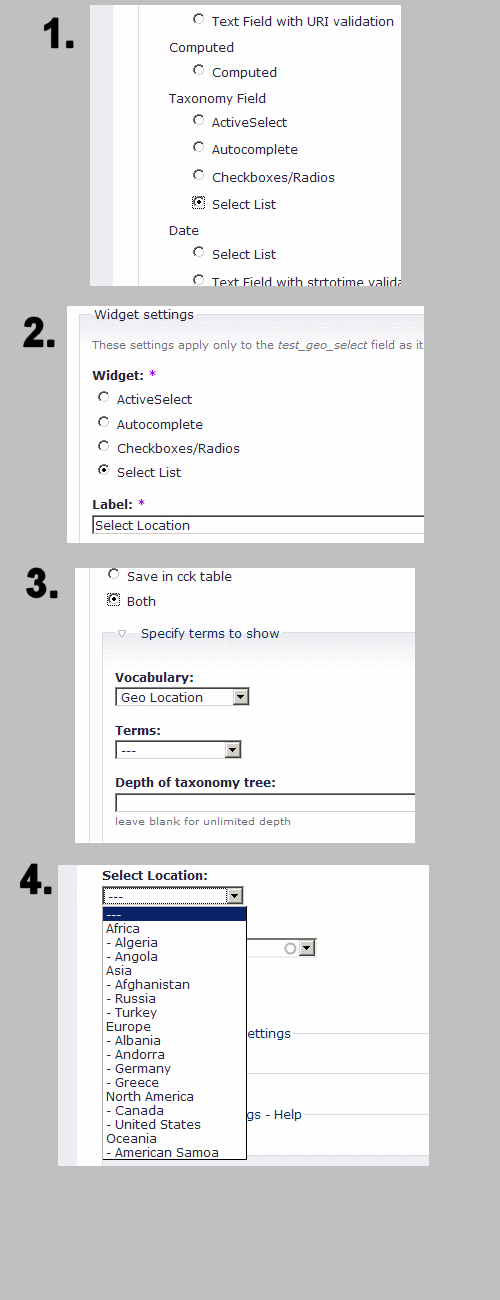
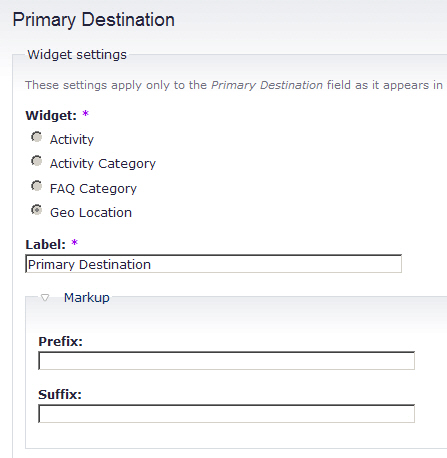
Based on the following post (http://drupal.org/node/169083) the reason for the two select widgets (shown again on the attached image -- "Geo Location" followed by "Primary Destination") is because the vocabulary is associated with a Content Type. If the Content Type is removed as he suggests in point #3 (and shown in the 2nd image below), only the CCK Taxonomy form and not the taxonomy.module-provided form appears on the node creation page.
Great, this fixes the problem of having two select widgets displayed ... but on my custom node creation page, the widget that was removed is the one where the Hierarchical Select is applied (3rd image below). So for this situation, am I safe to say Hierarchical Select does not make changes to select widgets associated with the CCK Taxonomy form?
Comment #31
sgdev commented2nd Image as mentioned above.
Comment #32
sgdev commented3rd Image as mentioned above.
Comment #33
wim leersAs stated in the module's description:
content_taxonomy is a different module than cck_taxonomy! (I know, this is confusing.)
Comment #34
sgdev commentedSo this should work when I choose the Select List option for content_taxonomy? I tried to do this but saw no change. I currently have CCK Taxonomy and CCK Taxonomy Super Ultra Select disabled, and Content Taxonomy/ActiveSelect/Autocomplete/Options and Hierarchical Select enabled. Pic is included ... text below matches picture.
Comment #35
wim leersThat should be a Hierarchical Select then. Could you give me access to your website, so I can try to find out where things are going wrong?
Comment #36
mcreature commentedsubscribing
Also having same prob, even after moving modules as mentioned above, etc.
Comment #37
wim leersAnd are you sure the jquery_update module is installed properly? If it is, clear your browser cache. If that doesn't fix it, give me access to your website.
Comment #38
mcreature commentedTried both
Its a test site so feel free
edit perms is on
http://insectsoftheworld.net/D5/node/22
if you need more access just let me know
Comment #39
sgdev commentedUnfortunately I don't have a public version yet available to test, so hopefully the other person's site is providing what you need. FYI, I do have jquery_update installed properly. There are other modules currently using it with no problems. Also had cleared out the browser cache and no change.
Comment #40
hansrossel commentedI notice that for the site of mcreature Drupal is installed in a subdirectory, is this for the others having problems also the case?
I have a bit similar issue with TinyMCE on another site, where TinyMCE does not want to load in IE of Firefox probably because the installation is in a subdirectory (see http://drupal.org/node/141141). The problems looks a bit simalar because also in the TinyMCE case the javascript is not present in the html.
Hans
Comment #41
hansrossel commentedUpdate to my previous message:
I tried to duplicate it on another site which has Drupal installed in a subdirectory, but the hierarchical select module worked fine there in IE and Firefox, so that cannot be the problem.
Comment #42
green monkey commentedI'm still trying to discover why this module only works with Content_tax and Firefox on my site
but it works for other people on their websites.
Here is one long shot
I imported my huge list of terms via Tax Batch,
is this something we have in common for the non-working sites?
Comment #43
gurukripa commentedsame issue..the thing is not working..i moved to sites/all/modules and reinstalled the stuff..
pls help
thanks
Comment #44
gurukripa commentedi found out that it works when Multiple select is not allowed..
thanks for the nice module..but i wish it can multiple select too :)
guess am greedy ;)
LOL
Comment #45
wim leersThat's a separate issue. If you want it badly, sponsor the development :)
Comment #46
green monkey commentednope, I'm sure this module works - Wim writes great stuff and right now he is confused why it not working for some of us.
I'm betting he has turned it upside down. This happens sometimes with modules. There are so many varibles not in the programmers grasp for discovery. Sadly enough, I've seen this a few times.
It takes longer to discover the conflicts and bugs, than it took them to write the program. I feel for the programers, they spend days or weeks writing a program, test this , test that, test it again. Ok - its rock solid.
Then put the program into public domain - and wham! 16 bug tickets get posted - and some people can be really rude - thye feel the progammer owes them somthing - instead of being grateful the person spent their time and energy to write a free program for people to use.
1) different vers of php
2) different vers of mysql
3) different server setup (installed programs)
4) different browsers
5) interaction with other 3rd party modules
the best advice I can offer everyone - is help him trap this bug. If we can find it, I'm sure he would be thrilled to patch it. At this point I don't think it's a bug, its either a conflict or differencs in our system set-ups.
Comment #47
gurukripa commentedi dont think the problem with taxonomy batch import..i added multiple terms under each..it worked fine with it...
the select works :)
however..i added terms under one term in one go..then terms under another...
i dont know how to import a huge list in one go..would be nice if someone cld say how thats done :)
just wondering..does heirarchical select conflict with image cache..was trying to install it ..and new folders were not gettting created for imagecache ..any such instance with anyone...
the imagecache is vexing me since 12 hours :(
anyways..thanks for hierarchical select..its beautiful....just wish it could look like the Yahoo Answers select categories..thats faster and more intuitive :)
Comment #48
green monkey commentedOk thats cool
Here is the path I came in on
Before I tried HS, I also install Dep Dropdown, Tax Super Select and Tax Super Select Ultra - those are still on the system - but disabled. I don't think they made any modifications.
The system I'm using has gone from 5.0 to 5.1, to 5.2
I also uploaded the newest version of Content Tax that I could find and I do recall the Drupal UpDate Module modified a table in Content - don' recall what one. Or if that is even important.
I'm going to make a subdomain today and load it on a clean system
Comment #49
green monkey commentedforgot a few facts - I'm also using Tax Image and Tax Default
I think a clean install might be the best test
Comment #50
green monkey commentedI just completed a clean install, still no luck getting this to work.
Is there a way to confirm that jquery_update.module --- actually ran?
Comment #51
green monkey commentedJQuery Update Installed correctly
The current installed version of JQuery is 1.1.2
MySQL database 5.0.24a
PHP 5.2.3
Drupal 5.2
please let me know, if I can provide any other information
Comment #52
wim leersDid you copy the jquery.js of the jquery_update module to the "misc" directory?
Comment #53
green monkey commentedyes, sorry I thought the above confiremed that
I even deleted it - cleared cache and then copied it again
I have seen several times that IE7 handles stuff differently
with Tax SS and Tax SSU - they time out on long Terms lists when using IE7 - but Firefoix does not (same list)
With HS, I just don't seem to get any sense that the progam is running.
Comment #54
green monkey commentedI'm assuming you have tried IE7 and it is working for you - correct?
Comment #55
wim leersOthers have confirmed it to me.
Could you please check if your vocabulary has enabled the "select multiple" option? If it's enabled, disable it, HS doesn't support it yet.
If that doesn't solve it, either give me access to your site or stop posting to the issue queue. Otherwise this will go on forever.
Comment #56
green monkey commentedI just thought of something - does this help any?
Comment #57
green monkey commentedops forgot to put it in a code box
Comment #58
wim leersjwells' problem was this one: http://drupal.org/node/180556#comment-319372. That problem is solved now, so I'm closing this issue.
Most of the tiny, annoying bugs should be fixed by now.
Comment #59
mcreature commentedThanks, works for me
Comment #60
(not verified) commented