

This project is not covered by Drupal’s security advisory policy.
Description
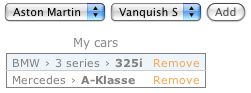
This module defines the "hierarchical_select" form element, which is a greatly enhanced way for letting the user select items in a hierarchy.
Hierarchical Select has the ability to save the entire lineage of a selection or only the "deepest" selection. You can configure it to force the user to make a selection as deep as possible in the tree, or allow the user to select an item anywhere in the tree. Levels can be labeled, you can configure limit the number of items that can be selected, configure a title for the dropbox, choose a site-wide animation delay, and so on. You can even create new items and levels through Hierarchical Select!
For a good overview of what Hierarchical Select can do, look at this demo!
Drupal 8 version
There are no plans for a Drupal 8 version at the moment.
One of the following modules can be used instead:
- Simple Hierarchical Select (for taxonomies, server-side)
- Client-side Hierarchical Select (for taxonomies, client-side)
- Menu link weight (to include client-side hierarchical select widget after beta2 for menu link parent selection)
Drupal 7 version
The Drupal 7 version integrates with:
- Taxonomy (Drupal core)
- Menu (Drupal core)
- Entity Reference (rudimentary support)
The Drupal 7 version does not yet integrate with: Forum (Drupal core), Views, etc. If you need support for something else than Taxonomy, please either contribute the required patches or sponsor them!
Recommended modules
- For people with more complicated menu structures, Hierarchical Select Menu works great together with the Menu link weight module.
- For very large menus with thousands of items, Menuperformance can offer a performance boost
Drupal 6 version
The Drupal 6 version is unsupported.
Related modules
Co-maintainers needed!
As Wim Leers is not involved with Hierarchical Select anymore, we are looking for co-maintainers with a solid track record of contribution on Drupal.org and/or to the Hierarchical Select module. Contact us if you can help!
Project information
 Seeking co-maintainer(s)
Maintainers are looking for help reviewing issues.- Project categories: Administration tools, Content editing experience, Content display
 6,997 sites report using this module
- Created by wim leers on , updated
 This project is not covered by the security advisory policy.
Use at your own risk! It may have publicly disclosed vulnerabilities.


