Dear node registration maintainers,
I hope you can help me with the following use-case:
1. User goes to my registration-enabled node
2. User presses "register for event" button
3. it is confirmed (user is now in list with registered users)
4. Users goes back to the same page, and there is no cancel link there
In short, I would like to enable users to "cancel their registration" for a node at the same place they went to register for it.
I also would love to have a page where users can go to and see all of their own registrations.
So something like "Name of node" "date of signup" "Date of node event" "cancel link"
I hope you can help me out ;)




Comments
Comment #1
rudiedirkx commentedYou can create these things with Views.
You can create a "My registration" block with a contextual filter (on nid from url) and add a cancel link in there. (Will redirect to confirmation page, not cancel directly.)
You can also create a "My registrations" page or block with a contextual filter (on uid from session). Be sure to exclude user Anonymous!
Comment #2
Epro Rajivgandhi commentedHi All.,
It shows only the list of events that I was registered already. My requirement is, I want to display the "Cancel Registration" link? Can anyone pls help me?
Thanks in Advance..
Comment #3
rudiedirkx commentedNode Registration adds a Views field: "Node registration: Cancel link". Instead of showing the registration's data/fields, you can show that field. Just a link.
Comment #4
njwrigley commentedHi there,
Love the module - thanks for all the hard work.
I too am trying to create a block/page which lists all the nodes that a user has registered for. I'm struggling to create what you have suggested above.
If it's not too much trouble, I was hoping for a little more guidance.
I would like a user to go to a page and see a table:
Name of node | Date from node | Register / Cancel
I hope that this might be possible.
Thanks.
Comment #5
rudiedirkx commentedThat's possible.
Like that?
Comment #6
hachesilva commentedFirst, thanks for your kind help @rudiedirkx.
I was also having hard times with the cancellation link. I was assuming (bad practice by the way :P) that all nodes SHOULD have a cancellation link. Now it seems clear to me that you have to create that link, but I suggest you to add this clarification to the README.txt file, or you can even create a very basic documentation page.
As an additional question I would like to ask why isn't this a default feature? Any difficulties implementig it or is it any particular preference?
Thanks again.
Comment #7
rudiedirkx commentedIt's not default, because not everybody wants it. I've used the module 4 or 5 times the last year and they wanted that only once (plus a whole lot more information, so that would be a custom View anyways).
I should update the documentation, but that's really boring and time consuming, so I probably won't for a long time.
Comment #8
hachesilva commentedI understant, but you can rely on the community then: give us permissions to add documentation, the issues section is not the right place to keep this. I know that someone asked for permissions to create the documentation, grant him or grant me some capabilities and surely this awesome module would come handy to someone else.
Thanks again.
Comment #9
rudiedirkx commentedI've given you permission to Write to VCS, Edit project and Maintain issues. If you could connect with that other someone, to make a plan or divvy up tasks, that would be great. You should create a new issue to monitor progress.
Comment #10
baschke commentedHi all,
I still have issues creating the cancel link. Selecting the "cancel link field" in views doesn't show a link at all.
Can anyone give me instructions how to create the cancel link in a view?
best regards
Christian
Comment #11
rudiedirkx commentedThe link doesn't show if the current user doesn't have cancel access.
Comment #12
baschke commentedAlle Users have permissions to cancel their own registration. But still there is no link in the view field
Comment #13
rudiedirkx commentedYou can debug it in the Views field handler in
includes/views/views_handler_field_node_registration_link_cancel.inc. Add anechoordpmabove thereturn.It must be access.
Comment #14
msg commentedI have the same problem. All permissions are enabled. I don't even see the link with my admin role which has all permissions. Is this some kind of bug?
Comment #15
rudiedirkx commentedAre you using the Views field? If so, debug it a la #13. If not, that's the only place with a Cancel link.
Some sites have more than 1 registration per user per node, so NR can't make 1 cancel link per node per user. That's up to the architect, you.
Comment #16
msg commentedI looked up in the code and saw this:
Even as an admin I don't see any cancel button at all. I checked everything, the dates and stuff.
Is this a bug of any kind?
Comment #17
rudiedirkx commentedWhat would the bug be? Too much access? You're just not showing the link. Where would you expect a cancel link? Why? It might not work the way you think.
Like I said before:
Comment #18
msg commentedI used it in both views and in the code I set everything to TRUE but it still didn't work.
I discovered though, that when I also add the Node registration: Registration ID field it DOES work.
But this is documented nowhere. Why does it need the registration ID field, while the register field doesn't have any further dependencies?
Comment #19
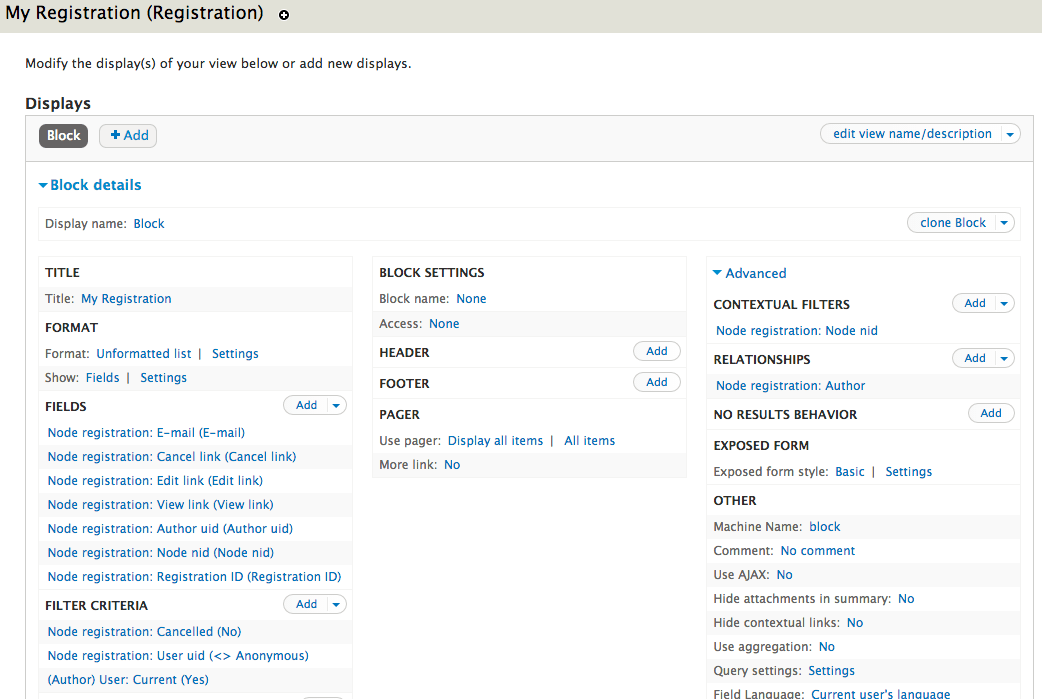
rudiedirkx commentedThat's not the case. I've just tried and this is my working View:
and it creates this block:
Your view must not be right.
I am using 1.14 though; not 1.8. Are you still using 1.8?
Comment #20
ladybug_3777 commentedI have the same exact issue with the cancel link as MsG. The cancel link does not show unless I add the Registration ID field. I noticed a couple of things that are different between my view and the view being shown above by rudiedirkx. One is that I'm working on a page view, not a block. My view is being set up so that a user can easily see ALL the nodes they've registered for on one page. The other difference is that this means I have set up a relationship to Node Registration or else I can't access Node Registration fields. (I noticed that MsG is ALSO has a relationship set up in his view).
I did try checking out the debugging in comment #13, but that file/function doesn't run unless I have the registration ID field added.
Soooo long story short, if you are setting up a view the same way I am then I think you have to construct the cancel link yourself with the rewrite rules. To do this I added the registration id field but I'm using the following rewrite to turn it into a link:
<a href="/registration/[registration_id]/cancel" title="Cancel">Cancel</a>***EDIT***
It looks like you can also add the registration id field, exclude it from display, then add the Cancel Link and it will display normally. The key is having that registration id field as part of the view (regardless of it actually being displayed or not)
***END EDIT***
Again, perhaps I am missing something or I'm going about the setup of this view all wrong? I think one of the reasons there is confusion around this issue is that this post was originally focused on showing the cancel registration link on the node itself, BUT this other post: https://www.drupal.org/node/1953460 is leading to this page leading people to think this is the right way to set up a full page view of registrations.
Comment #21
rudiedirkx commentedSoooooo, to summarize..? I could auto add the ID field if you're using the Cancel Link. Does that solve anything?
Comment #22
msg commentedIf that is technically needed for the cancel link to work on a node page, then yes please :-), because now it just creates confusion when the cancel link doesn't show up while it is added as field.
Comment #23
rudiedirkx commentedIt's not needed for the cancel link to work. You can make a view of Registrations with only 2 fields: Node registration: E-mail and Node registration: Cancel link, and it works.
I don't understand it won't work for you. Try making that simple view and see if the cancel links display correctly.
Comment #24
GerZah commentedI created the simple view, exactly as shown in your example in #19.
The problem is: It doesn't work like this. @rudiedirkx My suspicion is that your test data shown in the screenshot is too limited.
To reproduce our problems:
I display my view block in the content area underneath the node data; I limit the display to that particular node type.
What happens is: It does not honor the contextual filters – not at all.
Filtering for the registrations for the logged in user can be achieved – via a Relationship:
This way, a user will see only their own registrations. Plural "registrations": This does not filter for the current node ID.
… Bottom line is: It is definitely contextual filters that we are looking for, but as I said: Those doesn't work. (For me.)
Comment #25
GerZah commentedComment #26
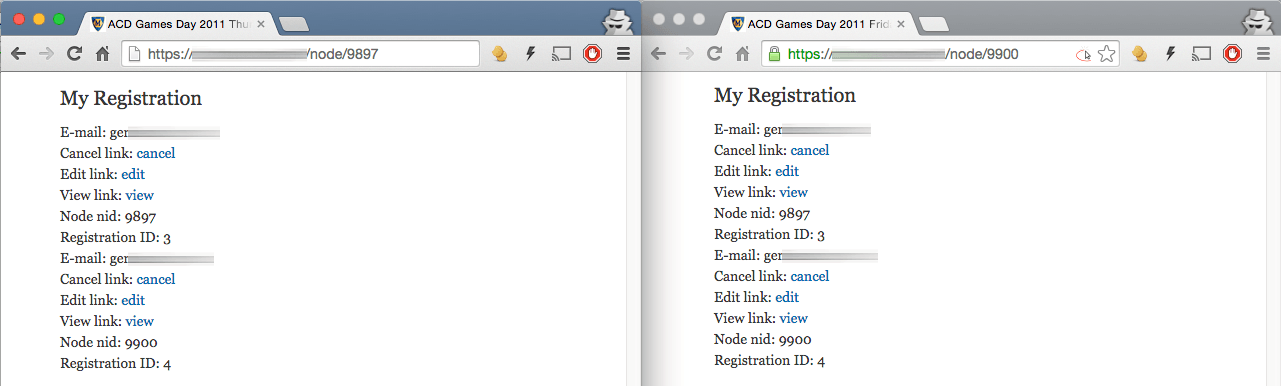
GerZah commentedAnd here's proof – both my view (including the mentioned Author relationship to filter for the logged in user's registrations) and the result, even in the "/node/xyz" notation.
Comment #27
rudiedirkx commentedI don't get it. It really does work perfectly for me. As user # 1 and as a normal permissionless user. 5 users, ~ 10 nodes, they see the right view results.
The issue is (or was) about NR 1.8. Are you still using 1.8? I'm using dev (which is 1.15+).
To be absolutely sure your view is correct, I've added mine as attachment. Import that and add the block to your event node pages.
Comment #28
rudiedirkx commentedYou can also test the view as root, even with contextual filters, by adding them in the Preview with contextual filters textfield in the View edit UI. As user 1 I see Cancel, Edit and View. As normal user I only see View. Works perfectly.
You could try with dev even, but I haven't touched Views for a while.
Comment #29
GerZah commentedI am using 7.x-1.15.
Now this I don't get. See screenshot: My view does not give a damn about the contextual filters and shows both registrations (with user filtering done through relationship) – while your view does as expected and shows only one.
*headscratch*
(UPDATE: Obviously, after importing your view, I added node ID and registration ID to see what's going on.)
Comment #30
GerZah commentedGot it!
My error was in the definition of the contextual filters. — For those of us who struggle like I did, please check your contextual filter for node ID and user ID and configure them as given in the attached screenshots.
… Anyways: It's a good approach to start with @rudiedirkx's view from #27 and modify that one. ;-)
Comment #31
rudiedirkx commentedYour view config screenshot in #26 shows only 1 argument. You need 2. The "with user filtering done through relationship" part probably doesn't work. I wouldn't even know how. Can you do argument + relationship in 1 in a relationship? You should separate those.
Comment #32
rudiedirkx commentedAlrighty then!
Comment #33
GerZah commentedThe relationship thing did work fine to show just registrations for the currently logged in user. I explained that in #24. But it was just a workaround because I couldn't handle my contextual filters. … I don't seem to be the only one who had this problem, so my screenshots of their bowels won't harm for future reference. Neither does your working view that can be imported. ;-)
Comment #34
ladybug_3777 commentedOh goodness after reading these new comments I'm a bit confused. The view I wrote only has relationships defined, it does not have any contextual filters at all. My view was created to simply show the logged in user all the items they have registered for. The URL itself does not contain any data to be used in a contextual filter as it is just a page view for ALL registrations (not a block placed on a node page and filtered by the node id). Did I construct it wrong then??? (it works fine and shows what I expect, but now I'm worried LOL!)
Comment #35
GerZah commentedActually it's quite simple: The two contextual filters limit the view's overall output by taking into account which user is logged on, and which page he is looking at right now. Creating a block from this view works nicely on the item's page: It will show if the logged in user has registered for this particular item, and (if so) offers view / edit / cancel links.
… And: No, it's not really looking at the URL alias, it looks at the /node/1234 URL. This way, the contextual filter will actually deliver the node ID that can be used to filter the user's registrations for this particular item that is displayed on the current page.
This being said: Creating a view that shows all items that the user has registered for (like perhaps an overview on their profile page) will work the same way, except the filter will need to check only the user ID and no node ID at all – we want all registrations.
Both you and I achieved that (I assume) by using a relationship between the registration's author ID and the logged in user ID. Works fine. But it can be achieved more elegantly by using the contextual filter for the logged in user ID. … Assuming that it is properly constructed as shown in my screenshot.
Comment #36
ladybug_3777 commentedYes, you are correct, I used the relationship between the author and the logged in user. I guess I normally think of using contextual filters when I expect filter values to be in the the URL. In my view's case they wouldn't be since I'm simply setting a single page like mydomain.com/my-registrations and all users go to that *same URL* to see their own personalized view. I do see what you are saying though about the default value if the value is NOT in the URL to default to be the logged in user. That now makes more sense.
I think I'll keep my view as is since I don't want different output based on the URL values, plus I've already put in a lot of testing and would hate to have to retest this change. :-)
Thanks for providing more detail!