We will use this issue as a placeholder so that we got something to refer to when discussing the documentation. The actual documentation page has already been set up but hasn't been filled with much valuable content yet and is a bit outdated already.
The actual handbook will end up here: Omega 4.x Handbook
We REALLY need to get started on that NOW. Anyone wishing to volunteer on writing the handbook, even if it's just a small subsection, feel free to ping me on IRC. I am more than willing to set up a Skype or Google Hangout chat with you to get you up to speed with 4.x in order to help you write about whatever topic you like. It's a win-win situation :).
Omega 4.x will NOT go into RC (Release Candidate) until it has FULL documentation coverage. So this issue is basically the highest priority release blocker.
Handbook tasks
Every question listed here has to be answered in the handbook. We will keep this list of questions here as a guideline and "manual quality testing" of the handbook. We will link these questions to their answers in the handbook once they have been answered there.
Questions
- How do the lazy loaded include files for preprocess/process and theme functions works?
- What are the benefits of Omega? What does it give you?
- How does Omega 4.x compare to Omega 3.x?
- What are the benefits of 4.x?
- What are the drawbacks of 4.x?
- What did we do to increase the performance of 4.x?
- How does Omega 4.x play with Panels, Display Suite and other display level modules?
- What are extensions and how do they work?
- What does the drush integration have to offer?
- How does 'drush omega-subtheme' work?
- How does 'drush omega-wizard' work?
- How does 'drush omega-revert' work?
- How does 'drush omega-export' work?
- What does the layout extension do?
- What are layouts?
- How does one use a layout?
- How does one switch a layout based on a context?
- How do layouts play with Panels or other display level modules?
- How does one create new, custom layouts?
- How does one override or change an existing layout?
- What does the development extension do?
- Explain all the features ...
- What does the stylesheets extension do?
- Explain all the features ...
- What does the scripts extension do?
- Explain all the features ...
- What does the compatibility extension do?
- Explain all the features ...
Original summary by dasjo
some notes from fubhy's BoF
http://munich2012.drupal.org/content/omega-4x-introduction
questions
- how to deal with regions that are layout-specific?
- combine theme suggestions with layout suggestions?
- how to version control CSS3 PIE configuration?
- can we change non-layout theme settings using context (like with delta), say context-specific compatibility settings?
- how to deal with module-provided breakpoints / integrate with responsive images module
documentation ideas/tasks
- naming conventions for lazy loaded theme functions (example: process/entity.process.inc)
- default mixins (definition-lists as base for responsive, inline fields & forms)
- epiqo layout features: responsive menu, sidebar
- changes & best practices for compatibility extension
- explain class rules (add or remove classes, example: -html[*] )
- layouts work with context which should deprecate delta module
- other magic that omega does and which of people should be aware of :)
- performance optimizations that omega applies, settings cache
- how to define custom libraries
- drush integration (export, import, revert theme settings and create a sub-theme)
- future of omega tools
- breakpoint definitions (not in theme-settings but in sass/css)
- custom javascript libraries: matchmedia, resizeend, ...
blog post with link to live demo:
http://epiqo.com/de/drupaljobs-responsively-relaunches-recruiter-rc1-and...
feel free to discuss and get this going.




Comments
Comment #1
Anonymous (not verified) commented1. The major difference between 3.x & 4.x is the introduction of the small core/pluggable extensions concept. The idea is that the core subtheme is a simple, lightweight framework that allows the toggling ON & OFF of as many or as few UI features as one prefers. For devs that have concerns about Omega 3.x in regard to performance and perceived administration "clutter" several of 3.x's features have been altogether removed from the theme settings. And of the remaining theme settings, one can simply toggle OFF any unneeded/unwanted features to prevent them from being added to the theme. For devs that prefer clickable interface tools for implementing more advanced operations in their themes, those same features can be toggled ON to be made available for use as they see fit. This available flexibility for servicing both levels/types of theme developer is a very welcome change. The concept of a "small-core" Omega base with optional pluggable extensions that extend Omega's capability is a win-win all around.
2. Another difference is the introduction of the concept of "layouts". The zone & region configuration settings in 3.x have been removed entirely in favor of these pre-fabricated "layouts". Similar to panels there will be several existing page structures that will be toggle-able to be made available for use out of the box. Once "layouts" are toggled ON, modules like context become aware of them. "Layouts" will be customizable and exportable and there is talk of providing a custom "layout" builder. It's purely conjecture at the moment but I suspect there will be some way to create custom "layouts". However it's probable that the extensive variation of available "layouts" in 4.x could make a custom "layout" builder unnecessary. Regardless, the introduction of "layouts" in 4.x essentially makes creating variations of page.tpl.php in code or the use of Delta to generate variations of your theme configuration settings unnecessary. That said, if for some reason one wanted to they still could. There will just be a way to accomplish the same goal available in the theme settings UI.
3. Additionally the 3.x way of triggering the application of delta "snapshots" using the context module will be replaced by a simple, lightweight module that will be released in parallel with 4.x, thereby making any reliance on context also obsolete. This new module "name TBD" will be very specific to this functionality and as such will be much lighter-weight and more secure than context. This will be huge for situations where a site developer may be forced to restrict the amount & types of modules they can include in their site build due to performance concerns. Basically the use of Delta & Context in 3.x for generating and triggering alternative page layouts will be completely removed in 4.x. The result is a huge performance gain without subtracting the advanced functionality that some developers have come to know and love.
4. There will also be support for any grid system. This means that the site developer can use any grid system they are comfortable using with confidence that it can be imported and toggled ON for use. Susy, Zen Grid, 960.gs, Omega.gs, etc., they will all work. Omega.gs will be included and enabled by default.
5. Several new javascript libraries are included and can be toggled ON/OFF as needed/desired. As of 09.05.2012 they include: css3mediaqueries, html5shiv, respond & selectivzr. The ability to move js to the footer is also toggle-able.
6. SASS is included. There are several .scss utility files and config.rb. Media query breakpoints(responsive magic) have been moved out of theme settings and into .scss.
7. Toggle-able Meta Tags & HTTP Headers options have been included to provide compatibility across more platforms and browser types. They are as of 09.05.2012: Conditional classes for IE, ClearType support for Windows, HandheldFriendly meta-tag for older Palm and Blackberry models as well as browsers like AvantGo, MobileOptimized tag for the PocketPC, Viewport support for modern phones (i.e iOS, Android, Palm Pre, Blackberry, Windows Phone 7), Chrome Edge support for Internet Explorer.
That's my current understanding of 4.x functionally as of 09.05.2012. As relates to timeframes people should expect that development will continue through winter and hope for a stable release sometime in Spring '13. As it is now, 3.x is still where it's at for production sites.
Comment #2
Anonymous (not verified) commentedI will update this list periodically to provide some perspective on where 4.x is in the development process:
Comment #3
dasjothanks banghouse for writing this down!
i'll try to comment in detail on the paragraphs soon, just a quick one: i'd like to expect a stable release sooner.
fubhy and me have been working on some foundational docs as well, i guess he will put them up soon.
adapting title accordingly
Comment #4
fubhy commentedRegarding 3:
Please remove this step from the agenda for now. Omega Tools will expose the layouts to Panels and Context so they can be triggered from there. Alternatively one can still trigger alternative layouts via custom code of course through a alter hook (
hook_omega_layout_alter()).The 'custom layout builder' (UI for building layouts) will be in a Omega Tools as well. It will provide a easy-to-use UI for building custom layouts which are then stored in the database and also exposed the same way as other, custom layouts that are hard-coded through the layout system. This means that every layout that you create using that UI will show up in the theme settings as well as in the Context module / Panels module plugin where you can then trigger that layout the same way as hard-coded layouts.
Just to be clear: Hard-coded layouts are those that ship with Omega (@see 'layouts' folder in Omega 4.x) as well as any other custom layout that your sub-theme provides (every sub-theme can add an unlimited number of custom layouts in the same way that Omega 4.x does that.
So in regard to 2:
The built-in set of layouts that Omega is going to ship with will cover many standard use-cases so that, for simple websites, you can simply fall back to using the existing layouts while, for websites that need more advanced/custom solutions you can easily provide your own layouts, either through the layout builder in Omega Tools / Omega UI or by creating a custom layout in code.
Regarding 4:
Saying that "There will be support for any grid system" may be slightly confusing. Omega does not make any assumptions for your CSS and so there won't be any assumptions for the grid system either. That means: You can use whatever you want. Omega doesn't need to and doesn't want to know what you are doing with your CSS. This is what the layout system is all about. In short: Omega 4.x simply doesn't care about your grid or any grid in general.
Regarding 6.
Saying that "SASS is included" may also be slightly confusing. Omega does not require you to use SASS. All the CSS files that ship with Omega (note: Those are only included on the backend to style the theme settings form) as well as all the CSS of the layouts that will ship with Omega are generated through SASS. That doesn't force you to use SASS in your sub-theme or for your custom layouts. You can also do it the old-fashioned-plain-css-way.
Note: The mixins that are currently in the 'partials' folder in Omega will be outsourced into a generic Drupal SASS extension that I am going to write in collaboration with @Snugug.
Regarding the timeframe / release date: I will work hard to create a first Beta including Omega Tools 4.x BEFORE November 2012! The first release candidate will be out BEFORE 2013. In fact I am currently aiming for a first Beta for Octobre 1st. The core of Omega 4.x is already very stable and all that is missing are more custom layouts as well as the UI for building layouts (this is going to be in Omega Tools / Omega UI) as well as a wider collection of libraries to choose from.
Comment #5
attiks commentedFYI #1787846: Themes should declare their layouts
Comment #6
samwillc commented#2 and #4 is what I'm most looking forward to.
I am intrigued to see how the 'layouts' work with any grid system. I actually quite like zones/regions but we must move on.
I've just spent quite a bit of time theming out a website with a custom grid using Omega 3. Is there a process of updating this to Omega 4 or is it back to the drawing board when a stable release comes out?
In the meantime, I will set up another test site with Omega 4 to see what it's about.
Sam.
Comment #7
fubhy commentedThere is already some documentation over here:
https://drive.google.com/#folders/0BxJdGxdzJlveTll3ckhmWGdQcHc
It's a very basic and unfinished version obviously but I will keep the majority of the documentation work over there until its worth publishing it on d.o.
Comment #8
fubhy commentedPlease don't add tags blindly :)
http://drupal.org/node/1023102
Comment #9
samwillc commentedThanks, I have looked through.
Interesting to see panels making a re-appearance, now for configuring display alongside context.
I never bothered with panels because the UI just didn't line up properly in Omega 3. I might give it another whirl after becoming quite a fan of display suite recently.
Sam.
Comment #10
vinoth.3v commentedany update?
Comment #11
dasjosee http://blog.amazeelabs.com/en/new-face-omega-4
Comment #12
vinoth.3v commented@dasjo
I got no new news from that blog other than I got from this issue queue.
Actually I am trying to build/understand layout.modue, breakpoint.module with the great Omega 4.x for my new D7 site to get mobile first, response, custom layout design.
:))
Comment #13
dasjowell, that's all the documentation resources that i'm aware of at the moment.
Comment #14
vinoth.3v commentedOK, Great.
one quick question.
I have my layout built with Omega 3. How can I convert it to Omega 4?
any easy methods?
Comment #15
draganeror@vinoth.3v this is not an issue for that question. Discussion can go in wrong direction. I guess there is already issue for that, try to search for it or create new one if doesn't exist already.
Comment #16
vinoth.3v commentedok, I understand
:)
Comment #17
fubhy commentedI am currently working 100% alone on the code-side of things. I would be extremely grateful for any help on the documentation-side! I am happy to get people up to speed with what's going on and show them around 4.x in exchange of a few lines of documentation along the way.
Help me, help you! :)
Comment #18
vinoth.3v commented@fubhy
HI, I can help you on the coding side.
But I am not good in documentation. I hope someone with good writing skills and technical knowledge of omega framework may help you.
Comment #19
lzimmerman commentedI'm just taking a look at Omega 4.x, and due to some trouble with Drush today, am trying out a manual subtheme install based on the Omega 3.x procedure and the functions in omega.drush.inc.
I would be glad to help out with some documentation.
Comment #20
fubhy commentedHey. What kind of problems did you run into with drush? Was it drush in general or the drush integration provided by Omega? If so, can you give me more detailed information on what exactly went wrong? Thanks!
Comment #21
lzimmerman commentedI received an error saying that 'sites/all/themes' wasn't writeable; that sounded like a reasonable error message regarding my host server. I'm also using Windows today, and git+drush+ssh can get argumentative on this machine.
I'll try the drush subtheme setup from a Linux box later with a local server and see how the process goes. But now I know that a basic manual setup works if needed. ;)
Comment #22
fubhy commentedRight... check out "drush owiz" or "drush omega-wizard" when you do. Thats the new magic part of the subtheme generator :P
Thanks!
Comment #23
lzimmerman commentedJust used the "drush owiz" feature under Ubuntu with a locally-served site. Worked flawlessly - great feature! :)
Comment #24
lzimmerman commentedIn case it is helpful, I have attached some steps I used to create a layout and add subtheme-level styling. I suspect there's a better way to add subtheme styles, but for now have used a drupal_add_css() function in the subtheme's template.php.
Comment #25
vinoth.3v commentedFinally, I made my successful Omega subtheme with 5 different layouts :)
I have used the Salsa (layout system of sasson theme) to build the layout grids.
Now, I need the way to change the layouts dynamically based on the pages/panel. I hope Omega_tools.module may provides this facility for context? or Does Omega going to have this facility of its own without any dependency since it allows multiple layouts?
Thank you Omega
Comment #26
PCateNumbersUSA commentedI know Omega v4 will be incorporating Sass, but will it also incorporate Compass?
Comment #27
dasjoomega 4.x uses compass, see for example
http://drupalcode.org/project/omega.git/blob/refs/heads/7.x-4.x:/config.rb
http://drupalcode.org/project/omega.git/blob/refs/heads/7.x-4.x:/sass/om...
Comment #28
fubhy commentedUsing Sass or not is your choice and not the choice of the theme/base theme... Same with Compass. Even Less, if you wanted to use it. So... To make this clear once and for all: You can use Compass / Sass with _ANY_ theme. I can just make it easier for you by providing the config.rb file and some starterkits that come with a pre-defined Sass structure (which is what we did in 4.x)... That's about it.
Comment #29
fubhy commentedWe will use this issue as a placeholder so that we got something to refer to when discussing the documentation. The actual documentation page has already been set up but hasn't been filled with much valuable content yet and is a bit outdated already.
The actual handbook will end up here: [#1768686]
We REALLY need to get started on that NOW. Anyone wishing to volunteer on writing the handbook, even if it's just a small subsection, feel free to ping me on IRC. I am more than willing to set up a Skype or Google Hangout chat with you to get you up to speed with 4.x in order to help you write about whatever topic you like. It's a win-win situation :).
Omega 4.x will NOT go into RC (Release Candidate) until it has FULL documentation coverage. So this issue is basically the highest priority release blocker.
I've updated the issue summary with the contents of this post.
Comment #29.0
fubhy commentedUpdated the issue summary.
Comment #30
Anonymous (not verified) commentedThe place for discussing the OMega 4.x documentation effort is in the #drupal-omega IRC channel. We have established a systematic process for developing quality, consensus based, thorough documentation. Our process was developed over several weeks through many debates by numerous contributors. The quality of the 3.x docs is outstanding and proves our approach is worthy of repeating for 4.x.
If you are interested in participating in future documentation sprints, please join us in IRC to voice your interest. You will be added to our shared draft doc and your timezone/availability will be added to the discussion when considering sprint scheduling. Our sprints are conducted in IRC so if you need help getting plugged into IRC read: http://drupal.org/irc.
We do not conduct organizing efforts on d.o. or g.d.o. We do this in real-time for obvious reasons. Once all of the details have been ironed out and agreed upon an event will be created here: http://groups.drupal.org/omega-framework and announcements will go out via twitter and elsewhere. But it is critical that anyone who wants to be involved with organizing join us in IRC. Once the event details are decided they will not change.
Comment #30.0
Anonymous (not verified) commentedUpdated issue summary.
Comment #31
fubhy commentedWe _really_ need this soon. Any way I can help with that @banghouse? Not trying to sound pushy but we really desperately need this :)
Comment #32
fubhy commentedComment #33
Anonymous (not verified) commentedI have culled and transferred all the documentation that has been drafted up to this point into the handbook: http://drupal.org/node/1768686
If there are any other threads out there floating around that have documentation discussions, suggestions, questions, etc please list them in this thread as I'm trying to distill the docs conversation into this thread and IRC (#drupal-omega). Thanks.
Comment #34
Kendall Totten commentedThank you again @Fubhy for the run-though of Omega 4. I am still practicing & parsing my notes, I just have a few questions for you. I'm posting here because I think they could be useful & pertinent to this discussion and should probably be mentioned in the documentation.
1. Is the need for Mac users to download the extra bit of xcode developer tools a bug, or is that something mac users will have to do before they can use Omega 4 at all?
2. Would you say that with or without SASS, users should still be using inline media queries to set up their responsive site (using the SMACSS approach?) Or is it really up to each person to decide how and where to implement media queries? Should we include some general guidelines in the documentation?
3. Is it assumed that if someone uses the "extended" drush starter kit that they will be using SASS & SUSY?
4. Do you have any recommended tutorials for folks explaining the concept of semantic grid systems?
5. Is there a list already being created anywhere of the perks of using Omega 4 as it pertains to the Drupal core markup overrides? For instance, I noticed that the taxonomy term pages already display any custom fields added to the taxonomy term when using Omega 4, whereas with other themes you must go in and add your own functions to make those appear. I think these would be excellent to list out in documentations under "Reasons to choose Omega 4 as a base theme".
Thanks!
Comment #35
msmithcti commentedHi @starryeyez024, I should be able to shed some light on some of your questions:
Comment #36
bigfatrat commentedWhat are the differences between the Default and Extended starter kits in 4.x? I Googled a bit but couldn't find the answers, and my knowledge of Omega doesn't allow me to tell by looking at the source.
Thanks.
Andrew
Comment #37
dddbbb commented@bigfatrat: I think it's mainly to do with how the Sass partials are structured in the sass/ directory. 'Extended' uses a much more granular setup. Beyond that, I'm unsure of the difference.
Comment #38
elgwiedo commentedI am considering using Omega (4) as responsive base theme, but with the current documentation I don't feel comfortable. Is it a question of days or months before the documentation will be complete ?
Tx.
Comment #39
metakel commentedI am totally lost after reading all the existing documentation of Omega 4. I have been using Omega 3 for a few projects already, but still cannot figure out how to start using Omega 4 because:
1. I have not used SASS / SCSS / SUSY before, just "pure" CSS. Should I install the Ruby tools on the server in order to start using Omega 4? Or after I've installed Omega 4, these tools are already installed together? Currently my development server only serves the PHP language. The existing documentation assumes very good knowledge of SASS.
2. I got lost when looking into the directory structure of the Omega base theme. Many README.txt were non-informative (only contains one sentence: "Fill me"). And there seems no documentation explaining this.
3. The concepts on Omega 3 and 4 are too different. I would say, Omega 4 is a totally different project with version 3. It should use another name (or namespace). If there will be a section on the handbook to let user of Omega 3 to "convert" their knowledge to Omega 4, it will be perfect. (Somethings like "Using Omega 4 for Omega 3 users").
4. I cannot tell whether some sections of the existing documentation were outdated already. Some were written months to half year ago. This confuses a beginner a lot.
Comment #40
fubhy commented@metakel: If you are happy with 3.x then it's fine if you continue using it. Take your time. If you feel the desire to explore Sass and all these other "new" things then feel free to come back and check out 4.x. Note: These things are not "that" new anymore at this point, and there is quite good documentation all across the web for most of it. We can't (and won't) replicate all of the documentation for these external things (Sass, Ruby, etc.) in the Omega handbooks and will only cover how they work WITH Omega and how give you a kick-start for how to set them up/introduce them to you and point you to resources where you can learn more about them. We can't fill our handbooks with documentation for all these things (that would probably lead to a book easily beyond the 2000 pages mark). I've tried to answer these fundamental questions in the issue queue previously (in a very beginner-friendly manner too). For example here: #2009540: What the what? How do I actually start using Omega 4 with Ruby or SASS or Compass or whatever?
And the 4.x handbooks are starting to get some traction too. Also, the Ohm demonstration theme is slowly reaching a point at which we can include that in the Omega stack to provide a cool self-explanatory demo-/documentation-resource in the Omega package.
Yes, Omega 4.x is different than 3.x ... But if you want to learn these things (you should) then you will. It takes some effort - But that's always the case when learning something new.
Comment #41
metakel commentedRight, I wish to use SASS too. I shall study that on my own.
Omega (at least version 3) is such a good base theme. But it seems that we have to give up most of what we have learnt about it to use the version 4. I think it is okay to keep up with the latest technology or trend. The problems at the moment are that the documentation is not that organised (at least for a "beginner" like me) and not all stuffs are ready (e.g. the Ohm demo theme and other extensions, more layouts, helper modules). I know that it will be improved as time goes by.
P.S. the thread #2009540 you have pointed to me is very helpful. I'd missed that. Thanks!
Comment #42
5n00py commentedI write little article about omega 4 in Russian lang, on this(maybe next) week I will translate it to English.
Now you can translate it in Google.translate. In my article I show how to prepare new omega 4 theme with using sass/guard/bundle.
http://dboyko.name/ru/node/8 Feel free to comment my post.
Comment #43
dddbbb commentedTo anyone worried about the use of Sass in Omega 4:
It's entirely possible to start using Sass in Omega 3. That way you can learn one thing at a time and keep the amount of change at any one time to a minimum. This is exactly what I did a while ago (before Omega 4 popped up) and found it a very useful and rewarding process. Once you get your head around Sass, start looking at extensions like Compass etc - these will still be very useful tools within Omega 3 (just stay away from grid systems like Susy in Omega 3 as that'll probably confuse things a little too much - do that in Omega 4 instead).
Before long you'll be looking at Omega 4 again, with renewed enthusiasm, itching to get stuck in and give it a whirl. Less of it will be baffling. More of it will be exciting. And by that point there's bound to be a bunch more documentation & tutorials around for it ;)
Comment #44
Courtney.B commentedLet's consider the folks who solely work in the front-end landscape and have a hard time dealing with the server environment. These users may:
So, if a "themer" is someone who is fluent in HTML, CSS, JS, and enough PHP knowledge to manipulate the template system successfully, they would also then need to be knowledgeable enough in order to set up and maintain some sort of development environment with Ruby locally or on their server in order to take full advantage of Omega 4.x.
Somehow, this seems wrong to me. It sets the entry to 4.x higher than a lot of other starter themes and the 3.x branch Omega. It also may induce a lot of grumbles from 3.x users looking to switch to 4.x. Think about it: 3.x had a significant user interface for Omega, installing subthemes, etc. 4.x still has a user interface but it has been changed significantly. So, not only do these folks need to spend time learning the ins and outs of a new system, they also need to set up their own server environment with Ruby in order to make full use of the system? That's how the documentation comes across.
My recommendation is to include alternative methods:
Comment #45
fubhy commentedIf you work in the software industry (professionally/semi-professionally) you should definitely have enough knowledge to use the command line to an extend that makes setting up these things possible. If you don't then you should learn it anyways. Even if you are on windows. Just to make your life easier basically. To be honest, if you are on windows as your main environment that's totally fine. But running these things in windows directly IS a major challenge and very painful. My answer to that: Don't. Use a virtualized development environment. It takes 1 day of self-education when reading through the various guides for how to set up a proper virtualized web development environment on your machine. Whatever host environment you are on.
You are not supposed to work on the remote server directly anyways. Install these things locally, work with these things locally, compile your stuff locally, then push it to your repositories. I can't see any valid reason for anyone to not be able to set up a proper dev environment due to access restrictions. If your employer does not allow you to install stuff on your developer machine then the problem lies on a whole different level.
Yeah, Windows is a pain. You can work with it, and I do know several folks who do. But don't run your server stack on that (apache, database, etc.) or any of these ruby tools (sass, compass, etc.). Do that in a virtualized environment. You won't regret it. Invest a day or two in properly setting up your development environment and profit from that in the future. There is no excuse to not have a proper environment that supports all these things. There are various tutorials (even from Drupal folks) for how to get started with this. Everyone deserves a proper development stack.
Not an excuse either. I myself wrote at least 3 lengthy posts in this issue queue for how to set it up. Run the RVM web-installer, navigate to your theme folder, run "bundle install" --- profit. There is nothing that blocks your way, nothing.
Omega 4.x tries to bring things to the next level. We want to share our knowledge and experience that we have gained over the years and we want to show you the right path for providing your clients with better results. Better performance, better, maintainable code and reliable modern tools and techniques that help you reach your goals faster and better than before. You have to be willing to learn, of course, but you really owe that to yourself anyways if you want to make your life as a front end developer less frustrating. Omega 4 is a step forward and it's a step in the right direction. Deprecating the features that we deprecated and removing the crufty and inflexible layout builder UI and all these other things and replacing them with these cool new tools and techniques was the right step. Not making this move for would've been a mistake.
I don't assume that a themer is on a mac, I am on Ubuntu myself :P
Anyways:
If you feel that the existing documentation (yes, it's not finished) and google don't provide enough information for you to start with Omega 4.x just yet then don't and simply stick with 3.x until you feel comfortable to make the switch. It's definitely worth it and a drastic improvement over Omega 3.x so the next time you have some spare time, invest it in your development stack, get that right, take a look at the latest tools and techniques around front-end (some of which we leverage or basically push in your face in Omega 4.x) and become a happier front-end developer once you internalized these tools. It's worth it. Trust me. I wouldn't say it if it wasn't.
Comment #46
fubhy commentedYes, we need documentation to make it easier for people. But it's not like it's impossible to start right away either. It just takes a little more effort then it would if we had full documentation that explained every single step.
We are not going to go back to where we came from though. So yes, let's write the documentation but let's also stop complaining about what Omega 4.x has become. As arrogant as that might sound, but: Omega 4.x is a step in the right direction. ;)
xoxo
Comment #47
cellar door commentedHey everyone -
Some great conversation and great points raised here! I think the best thing to do is to organize a sprint for docs where we can all do a google hangout / chat / google doc editing and get some helpful guides up around creating 4.x themes. I've gotten some contact info from people at the Drupalcon in May but if you weren't there drop me a line via the contact form and I'll add you to the list. I'll then send around a mega email so everyone can chat and come up with a good time to do the sprint. I think once we do this much will be explained and 4.x will start getting the love it deserves (it does rock! it's just a bit obscure for folks coming from 3.x)
Look forward to sprinting!
Comment #48
Courtney.B commentedI'm pretty comfortable with the command line myself in terms navigating directories, doing what I need to do to get my job done. I'm just trying to be a voice for those who are not. If it helps to explain further, I am primarily a graphic designer/UX and taught myself HTML, CSS, some javascript and some PHP in order to implement my designs. I've also used LESS extensively but am in the process of learning SASS. However, some people coming to 4.x may not have that experience. This is my attempt to help with the documentation by pointing out some other ways to compile SASS. It may not be ideal but it gets people across some of the environment hurdle and into using 4.x.
I may be able to set up a virtual environment but as someone who has never installed Linux, has never set up a server, this is DEFINITELY going to take more than one day. People who may want to adopt 4.x may not have the option of installing a VM, or putting together the perfect workflow of local to dev to staging to production.
If dreams could come true... That being said, I avoid doing a lot of work on a remote server. I have been working locally and exporting that work out as features. Just to be clear, I do not work for a development house. I work for a county government in the United States. If you have any familiarity at all with the public sector (which it seems Drupal is getting a lot of traction in), then you may have some idea of how difficult it can be to implement new technologies as well. Just as an illustration of where I'm coming from: my employer currently uses EpiServer as their CMS (optimized for IE6) and I was tasked with rebuilding and retheming the site in Drupal.
I totally understand that and applaud everyone for their efforts and the work that has been done with the 4.x branch. To be perfectly honest with you, I learned the 3.x branch and I had A LOT of issues with it, including the very clunky UI... and after using it for a few projects, switched to the Twitter Bootstrap theme. When I heard about 4.x, saw the changes, I was sooo excited and still am! There are so many awesome improvements and changes; what is there not to love? Having SUSY, SASS, SMACSS makes my little designer heart just SING!!! :D
I just want to be crystal clear here: I'm not advocating for changing anything with 4.x. It's amazing. All I'm advocating for is added documentation to assist those who may find the process of installing Ruby daunting, even with the excellent documentation on how to do so. If you want me assist writing documentation, I'm more than happy to provide it since I will be using Scout or PrePros to compile SASS.
Then it might be helpful to include resources for Windows users as well in the documentation. Not everyone is going to be able to set up a VM to run the perfect local environment. If anyone takes an exclusionary stance of "oh, well they should just get with the times" then what potential impact does that have on more people adopting the much better 4.x branch?
That's the thing, I want to use 4.x and not 3.x. Unfortunately, I will not have an ideal set-up and that's just a fact of my life. I have to deal with my current hand and make do. When this gigantic project I'm working on is over, then yes, I will definitely work on optimizing my stack.
My entire point was that 4.x has a learning curve. It does a lot of awesome things. Well, let me help write some documentation that can get people into 4.x straight away if installing Ruby locally is not really an option. That is all I was trying to do with my above post.
You do sound pretty arrogant and actually very condescending. I am in NO way, shape or form, complaining about 4.x. I am VERY excited about 4.x. I was merely pointing out that there are other ways of compiling SASS that do not involve the amount of set-up detailed currently in the documentation. Yes, it may not be ideal to use Scout, PrePros or CodeKit and yes, it is a definite benefit to have an awesome local stack. However, there may be people who do not have the time or the resources to spend to get it all set up. Sometimes, the job just has to get done.
Comment #49
fubhy commentedI am sorry if I sounded arrogant or condescending. That was not my intend. In fact, the first thing that I did after reading your post was going to IRC in the #drupal-omega channel and pinging @banghouse and @cellardoor to contemplate how we can manage to set up a documentation sprint including a proper pre-sprint briefing and google hangout to fill the gaps and brief/inform everyone to then fill our handbooks with adequate information for every audience. I am definitely interested in making this happen. This is exactly why we started the Ohm demo theme too: to illustrate all the techniques we have been preaching about lately. It's not my intend to sound arrogant... I am just very passionate about this problem space and want to spread all the awesomesaue that I have learned about in the past years while working with all these amazing people on this great community. I have done numerous discussion sessions on IRC trying to help people and I jumped on Skype call with a whole lot of people to explain and share these things with then. Hell, I even remote controlled the machines of a few to set them up with all the dependencies for them. I have even done that while at code sprints or camps. Bottomline: it is my secret dream and desire to share all this with as much people as possible and get them equally excited about it.
Comment #50
Courtney.B commentedIt's all good fubhy, you're super awesome!!! I just wanted to help out with some of the documentation so that gaps for people who may not have as much experience can jump right into SASS to get rolling and, hopefully, set up a more robust environment later.
4.x just looks amazing and I'm so excited to use it!!! :D
Since I come from a design background instead of a development background, I thought I could help fill in some holes. I completely understand and realize just how much blood, sweat and tears went into the 4.x branch. That's why I was offering to help out with some of the documentation if you guys need it. Especially since I'm kind of in a position where I'm not able to set up the perfect environment at this time and will be using some of these other tools to accomplish some necessary tasks. I can take screenshots and will have my own personal documentation to share.
I also completely understand if it's not needed or wanted. I just wanted to make sure that those who don't have the best environment or time to set up a slick environment could at least get into 4.x to play around with it, use some SASS, etc and see how amazing it is! :)
Comment #51
fubhy commentedTotally needed - and totally wanted. Please get in touch with @banghouse or @cellar-door. We are going to try and coordinate a good date for when we can do the aforementioned docs sprint.
Thanks for getting involved.
Comment #52
jessicakoh commentedI've been using Omega3 for all my projects. Thank you for Omega3.
Would you recommend against running Omega4 for production?
Comment #53
fubhy commentedOmega 4 is fully production ready. I always recommend Omega 4 instead of 3... Although it of course depends on whether or not you can live without the UI for building the layout.
http://vimeo.com/69736259
Comment #54
jessicakoh commented@fubhy Sweet. That's reassuring to hear it's production ready. I will dive into Omega4.
Yes, UI is great but having a UI might slowdown development of Omega4. Instead, create a separate layout generator (e.g. CSS grid generator).
I'll have to embrace SUSY and move forward.
Comment #55
samwillc commentedThis is my experience of Omega 4 and sass. This is purely what happened step by step when I tried to do the following task:
Task: Change my main menu css output when using demonstration 'Ohm' theme.
Ok, find the scss that generates the main menu css. HTML output of the page:
So, looking for some class or ID called .block--menu-block ul, .block--nav-bar ul or #block-menu-block-1, or something similar.
Nope, only action links and breadcrumb in there. I thought my main menu was a menu? Oh well. Ok, what's in 'ohm-hero-layout.scss'?
Good. This sets the grid for the navigation, but what about the list items themselves?
What about in 'partials/_components.scss'
Aha, looks promising. So in the partial '_nav-bar.scss':
Bingo! Found the bit that changes my main menu.
What's that? Another search and I found:
which contains:
Ok so this takes the list-style off my main menu (and any other lists I add '@extend %hlist;' to). For brevity, that's all I'm concerned about at the moment. Phew, it's 30 degrees in here and I'm starting to sweat.
So, the final output refers to .block--nav-bar in three different places:
1)
2)
and 3)
And there we go, my final output for my main menu. Anyone fancy a pint of abstract?
And a screenshot:
https://dl.dropboxusercontent.com/u/63070476/subtheme-menu-ecoop.png
On a more serious note, I would be happy to contribute to documentation for this theme once I get my head around it.
Comment #56
Courtney.B commentedHey fubhy, just wanted to say I'm sorry for being a little upset about stuff. I totally get where you're coming from now and I've been able to switch to a vm and have everything set up for some Omega-y goodness using CentOS.
I've added a comment to the documentation page and I hope that you'll consider using some of that for the installation portion. I've copied and pasted the linux section below. Personally, I was having a problem deriving a step-by-step process for setting up Ruby and the doc page seems to be more about the "why" versus the "how".
Aside: I'm attaching my documentation that I put together for Windows but since I've ceased and desist with that route, I'm not going to be working on it further. However, it may be helpful for putting together a more comprehensive guide to get Windows users working with Omega 4.x. It's in markdown, however. Since drupal.org doesn't allow
.mdattachments, I've saved it as.txt. You may need to re-save it as.mdin order for the text editor parser-thing to pick it up. (I'm using Sublime Text 2).I've attached it and the screenshots I put together to this comment. Do with it what you will.
==== Comment SNIP ====
My fiance took the above documentation and compressed it into a list of commands for me to run. You guys might want to consider adding it here for kind of a tl;dr. The above documentation was a little difficult for me to process being completely new to Linux and is more like an explanation of the "why" in regards to using SASS/COMPASS but not necessarily straightforward on the "how". Either that or I just really, really love lists.
Assumptions
Part One
yum install gitcurl -L https://get.rvm.io | bash -s stableshutdown -h nowrvm requirements. Follow the prompts and you should then be able to install Ruby.rvm list. which should show the ruby version information.Part Two
bundle install. This will pull all of the gems you need for SASS/COMPASS etc.ls -a.compass watchto make sure it's working properly.I hope the above is useful!
Comment #57
samwillc commentedHere are some instructions for the setting up to use Omega 4 for Mac OSX 10.8.4 running MAMP locally.
**--DRUSH--**
Follow this guide:
http://www.drupergy.com/tools/drush/installing-drush-on-mac-os-x
I had to also do the following in order to get it to work (i.e. before I could complete step 8 in the instructions above). Open terminal and type:
and add this line at the end (this path is specific to the above instructions, change as necessary):
then, refresh the file to save logging out:
I'm using MAMP locally, so I also needed to do this:
http://workingmatt.blogspot.co.uk/2013/05/using-drush-to-sync-live-and-d...
then edit drush.ini and add:
to the end of that file.
I also got a PDO error whenever running drush, this fixed it:
http://www.webbykat.com/2012/05/link/fixing-drush-error-pdoconstruct-200...
In terminal (from anywhere, no need to navigate to particular folder), type:
Should ouput:
or whatever version you're running.
**--INSTALL SUBTHEME--**
Open terminal, navigate to the folder where your Drupal installation is, for example, mine is at:
To be more specific, this is the same folder as update.php, authorize.php, cron.php etc...
Type:
Follow the instructions. This should generate you a subtheme with a folder name which is generated from whatever you chose as the machine name.
Now you have an Omega 4 subtheme :) but you still need (want) compass/sass/susy grid.
**--UPDATE RUBY AND INSTALL GEMS--**
<--BE TO EDITED, HOMEBREW+ RUBY RVM INFO HERE-->
Once all this is done you can watch your sass files by pointing to the folder which contains the config.rb file. My config.rb file for my subtheme is in:
So in terminal, I can type:
so I'm in the correct directory. Then:
which should give you:
Now, whenever you make changes in your .scss files, your css files will update.
----------------------------------------------------
Hopefully this will help some mac users get up and running quickly with Omega 4 :)
Comment #58
fubhy commentedHey @samwillic, Thanks for taking time to help with the documentation. Really appreciated.
However, I am afraid (and very sorry) I have to tell you that the method you are using for setting up your Ruby/Gem environment is NOT suggested. In fact, that's more or less how I did it until about a year ago when stuff in a Project that I was working on started to go haywire due to gem incompatibilites and a lot of other, related issues.
Don't install Ruby/Gems directly if you want your project to work and compile properly in the future too.
Use RVM and Bundler in the way explained here: https://drupal.org/node/1936970 or here (which that previous link obviously copied quite a bit from) https://drupal.org/node/2009540#comment-7485186
This also works on Mac. In fact, there seems to be a fully (out-of-the-box) working solution for Mac right here: http://jewelrybox.unfiniti.com/ (never tried it myself though)
Thanks for helping with the documentation though, really appreciated.
However, may I ask you to edit your comment to reflect that it's absolutely NOT encouraged to install it like that? Thanks :)
Comment #59
fubhy commentedNote: The way you installed Drush is probably fine (never installed it on a Mac). Just the part related to Ruby and Gems is wrong ;).
Comment #60
samwillc commentedI removed the method as there's no point in it being there if this is not the recommended way. I will attempt with RVM bundler and change the documentation when it works. Thanks.
1) http://jewelrybox.unfiniti.com
and
2) https://gist.github.com/zenkay/3237860
are the options, with option 1 seeming more appealing for out the box ease. Attempting to use jewelrybox and see how it goes.
**edit**
Not having a good time here, got xcode installed and the command line tools (as required by jewelrybox documentation) and keep getting errors on various attempts:
Actually get this error for all versions! Tried:
Still error on install. Tried ticking 'use clang', still error. This time:
**edit 2**
After some searching, a simple command won the day. In terminal:
No problem whatsoever! Now I open jewelry box and there it is, 'ruby-1.9.3-p448' in my manage rubies pane.
Comment #61
jessicakoh commentedFor those trying to install RVM.
This helped me.
http://misheska.com/blog/2013/06/16/using-rvm-to-manage-multiple-version...
Comment #62
fubhy commentedJust skimmed through that blog post really quickly. Seems like a very good resource so far.
@samwillc if you are having trouble installing it that article might help you. At least judging by the commands the author lists it's doing the right thing.
Comment #63
samwillc commented@fubhy, I got it working ok now (I think), no prior experience with ruby.
https://dl.dropboxusercontent.com/u/63070476/jewelerybox.png
I haven't installed a further version of ruby but I do now have the folders:
Not 100% whether compass/sass goes in the former or latter of these two. I set this version as default and did 'sudo gem install compass' in terminal which installed it to (a). I can now see this gem as part of a gemset for this specific ruby version in the jewelerybox app.
It looks like if I were to install a further ruby, I would get something like this:
I believe this is what you meant by keeping the versions separate as I can change the default ruby and install gems through each one individually. Please correct me if I'm wrong.
Anyway, with this out the way I can try and make a full theme. Got the site done, got the content, enabled subtheme, just need to tweak to my liking/get it responsive/get a mobile menu in somehow etc. Already I feel this is going to be much easier to theme out sites than Omega 3, once I understand it better. I like the modular approach.
I'm more than happy to contribute my experiences, any pitfalls etc... of which I imagine there will be a few. I will also edit my earlier post about getting up and running on a mac once we have established the best route, be it via an app (like I did), or via jessicakoh's post above with the link although I guess there would be no harm in offering both options.
Comment #64
fubhy commentedOkay, now that you have RVM and the first ruby in your RVM stack the next step would be to install your theming gems in your project's gemset. This is done by navigating into your sub-theme folder (assuming that you created it using "drush omega-wizard") . Once in there, invoke "rvm list" / "rvm use" (shows you if the used ruby is 1.9.3 as specified in the .ruby-version file in the sub-theme folder. Also, invoke "rvm gemset list" / "rvm gemset name" (the latter should show "omega.YOUR_THEME" -> this is the gemset specified in .ruby-gemset). This ensures your further actions are specific to your local gemset/ruby stack.
This works seamlessly. When you navigate into the sub-themes folder in the command line the RVM shell script notices that there is a .ruby-version and .ruby-gemset file in there. It then parses them, and switches your active environment to that specified in those files. All following commands/actions you take in regard to ruby/gems will happen for that local set only.
Okay, now let's install your gems for theming. There are a few useful commands
Check if the bundle is properly installed: "bundle check"
Install the bundle (all gems specified in Gemfile): "bundle install"
Show all the gems in the bundle (after installling it): "bundle show"
Installing the bundle would be your next step. Run "bundle install"... That will read all the gems from the Gemfile and install them for you.
Comment #65
samwillc commented@fubhy, many thanks for the help, you're a good man!
This is what happened:
a) Terminal begin: https://dl.dropboxusercontent.com/u/63070476/1.terminal-1.png
b) After bundle check: https://dl.dropboxusercontent.com/u/63070476/2.terminal-2.png
c) Jewelerybox: https://dl.dropboxusercontent.com/u/63070476/3.gemsets.png
Ok, compass/susy/toolkit, all of the gems I can see in 'default':
https://dl.dropboxusercontent.com/u/63070476/4.default.gemsets.png
I'm also happy to report, that gemfile.lock has automagically appeared in my subtheme folder:
https://dl.dropboxusercontent.com/u/63070476/5.gemfile.lock.png
So I'm presuming that this bundle is now set up, and if I were to switch environments, these exact versions of each gem would be installed based upon the contents of the gemfile.lock file?
**edit**
Seems I installed them in the wrong place! Navigated:
then
got error:
So, tried 'bundle install' again, now have this in jewelerybox:
https://dl.dropboxusercontent.com/u/63070476/6.bundle.show.png
This looks correct. Test:
For comparison:
BEFORE: https://dl.dropboxusercontent.com/u/63070476/3.gemsets.png
AFTER: https://dl.dropboxusercontent.com/u/63070476/6.bundle.show.png
**edit**
I also have a new folder here:
Comment #66
fubhy commentedYeah, as I said, always check "rvm use" and "rvm gemset name". They should be equal to what's specified in your .ruby-version and .ruby-gemset files. When you installed your bundles the first time you even said
Okay, but "default" is wrong! You want to install it into your project-specific gemset, not "default".
Yes, correct. Put the Gemfile.lock into git or whatever you use for version control (hopefully git).
Comment #67
samwillc commentedHi, yeah, I screwed it up first time but this shows the gems installed into my omega.ecoop gemset:
https://dl.dropboxusercontent.com/u/63070476/6.bundle.show.png
You've been a great help so I hate to say this, but never used git either. I am self taught at Drupal over the past couple of years (steep learning curve and all that), and have made a few sites, but gotta be honest, this is the closest I've ever come to some kind of 'proper' version control. I can see the need and am willing to learn it. Downloading git now and will read the manual, then apparently I need GitHub GUI, presumably so you can work on the desktop with the app automatically syncing with the github website (and other goodies).
Comment #68
cellar door commentedHey everyone - just wanted to update that I just sent out an email blast on getting some sprints together. If you didn't get an email that means I don't have your contact info. let me know if you want to be on the mailing list and I'll add you in.
Can't wait to get these docs official!
Comment #69
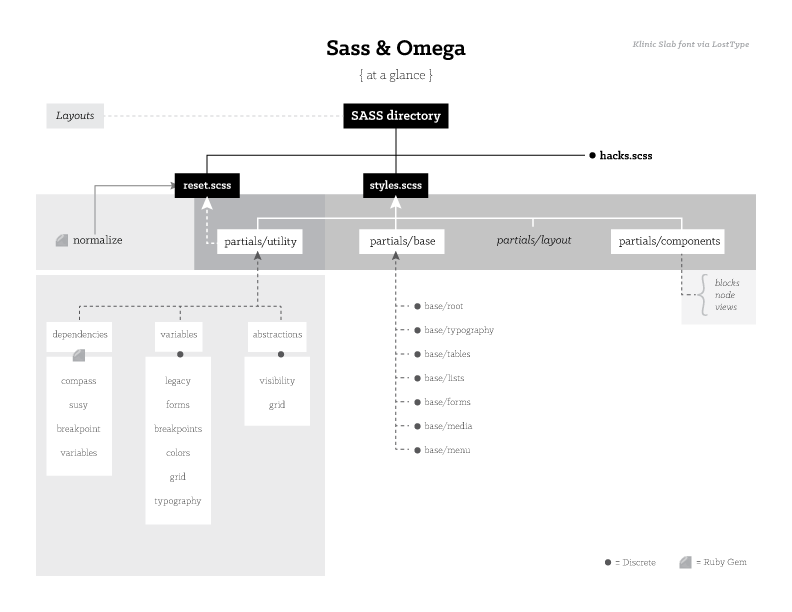
Courtney.B commentedI MADE A CHART ABOUT THE SASS DIRECTORY!!! (Woohoo?) (It's geared for printing but I can make it a bit larger for web).
But I'm still not 100% sure on some things. Like what does base/root or variables/legacy mean? And what the difference is between base/typography vs. variables/typography.
I was going to include the chart source files (AI) but the widget's hating me even though it's below 3MB.
Comment #70
dddbbb commentedvariables/legacy is for setting preferences used in generating reset.css (Compass Normalize - see reset.scss). More info here: https://github.com/ksmandersen/compass-normalize
The difference between base/typography and variables/typography is that one is used just to set variables to do with typography (e.g. font stacks that you'll use) and the other is designed to actually use those variables (e.g. apply the font stack via the font-family property).
base/root looks a little trickier to explain: all I can say is that it's imported first out of all the base partials, but after any of the utilities and isn't specific enough to fall under any of the other base categories of typography/tables/menus and so on. Lame answer! Sorry, I tried :D
Nice diagram btw. One thing that it doesn't show, which I would consider very important, is the order in which certain partials are imported. For one example, it's important that utility/variables is imported before utility/abstractions (as you may want to use some of those variables in your abstractions).
It also shows layouts as a totally separate island all on its own when this isn't necessarily the case (with good reason): have a look at the code for the Ohm example theme.
Also, you have "variables" down as a Ruby gem under dependencies - it's not a gem, it's just an imported partial. It's confusing because that import is indeed there in the code in Ohm but I think it's actually a mistake - I can't make sense of it and removing it seems to have no effect. That reminds me, I meant to open an issue... UPDATE #1: Issue opened here. UPDATE #2 - Yep, it was a mistake so you might want to get rid of "variables" under "dependencies".
In short, I think it's a good first stab at trying to visualise something that's actually pretty hard to visualise. But I do think it needs a bit more work in order to be a true aid in understanding the Sass structure in Omega 4 at present.
Comment #71
brst t commented20131102 - removed by author
Comment #72
fubhy commentedThanks @brst t, very good, detailed run-through. Looks like you did it all right at the first attempt. Very good.
Comment #73
fubhy commented@brst t, would you mind adding some of that to a step-by-step guide for how to install RVM? Our handbooks currently only cover that "theoretically" (no actual step-by-step run-through guide). Would be HIGHLY appreciated if you could do that :).
Comment #74
brst t commentedSure. I wrote it out with that intention to contribute and to make some kind of use of the notes I made along the way.
Do you want me to simply append it to https://drupal.org/node/1936970 ?
Comment #75
fubhy commented@brst t: Adding a sub-page for "How to install this stack on Ubuntu" would be best I guess! That way we keep that intro-page intact and can provide system-specific installation guides underneath.
Thanks for your efforts!
Comment #76
brst t commentedYou're welcome. Glad to help.
It's here: How to install this stack on Ubuntu https://drupal.org/node/2052955
Comment #77
Anonymous (not verified) commentedDoing my best to make sense of all this, I feel I'm on the right path!
I'm using Linux and I already had Ruby/SASS installed, so I just installed RVM as you recommended. Will there be some sort of conflict? Also, I noticed there is a Gemfile.lock already in the main theme folder. What does that do compared to sub-theme? Does just running bundle install on my sub-theme make it all work?
How can I make sure I'm using the right specific versions of Ruby/Sass for my project (so it doesn't screw up in the future)?
Edit: OK so I did the following -
1. installed rvm
2. typed "drush omega-wizard" to create sub-theme
3. typed "bundle install" in sub-theme folder
4. typed "bundle show susy" (or other gemname, compass etc) to show where its installed for that folder.
All seems good. What is the next step? How do I get the scss files to automatically compile? Is it some sort of daemon or do I have to log into ssh and watch that folder everytime I want to change something?
Comment #78
brst t commented20131102 - removed by author
Comment #79
brst t commented20131102 - removed by author
Comment #80
Anthony Fok commentedSpeaking as a Debian Developer and Ubuntu user myself, I am not so sure that installing RVM on Ubuntu or Debian is necessary or recommended any more, if the end result is to simply have Bundler working. Call me paranoid, but I am wary of the changes
rvm-installerwould make to my system when it asks for my password forsudo.The good news is, Bundler has already been packaged for Debian since 7.0 (wheezy), and for Ubuntu since 12.04 (precise), so, I think it is best to stick with Ubuntu’s default Ruby and Bundler installation, and skip RVM installation altogether.
Edit: It seems that Omega 4 requires Bundler >= 1.2, so this only works in Ubuntu 13.04 and beyond...
For Ubuntu 12.04 (precise):sudo apt-get install ruby-bundler7.0 (wheezy)testing (jessie), Ubuntu12.10 (quantal)13.04 (raring) and beyond:sudo apt-get install bundlerWhat do you think? :-)
Comment #81
brst t commented20131102 - removed by author
Comment #82
fubhy commentedExactly. We are promoting RVM for managing different named gem sets and ruby versions. When you have to get back to a project at a later point in time and your Scss doesnt compile properly anymore due to some gem-provided mixins that changed in the meantime you are basically screwed. And even if you still have them Gentile.lock - Do you really want to remove all your installed Sass gems globally and reinstall them from your stored Gemfile ? And do that over and o er again? This is why we are promoting RVM. And yes, that bundler is included is a good and welcome bonus. But why did you conclude that we are just promoting it for bundler?
Comment #83
Courtney.B commented@danbohea, thanks for the amazing feedback! I'm actually quite glad that I posted this here because I probably wouldn't have remembered about import order until I was facing down some kind of import order problem.
The only reason why Layouts is kind of off in its own little island is that I was trying to chart out what a default Omega 4.x subtheme's SASS structure looks like. While layouts definitely are a big part and are extremely useful (especially when used in conjunction with Context Layouts module), there really isn't anything there to go on until one actually creates the layout.
That being said, I definitely think there is some value in charting out layouts, especially in how it impacts the default SASS structure.
I'm going to propose that instead of having a single chart that tries to cover everything, that instead, I create three separate charts.
The first would be a continuation of my previous post with the recommended corrections being made. I can adjust the Layouts so that they're not in their own little island and maybe add just a few more details based on what I'm seeing in the Ohm theme (an arrow going from ../../partials/utility to the layouts text mayhaps?). It's still within the spirit of my original version—an quick visual flowchart of 4.x and SASS.
The second would be a chart of the Ohm subtheme, illustrating how it all works together. This will also help for a birds-eye comparison between what 4.x gives you by default and possibilities showcased via Ohm. (Comparing to chart one).
The third would be an extended chart that basically provides additional context. The context would be a 1-2 sentence description of what that particular file means or area means. So for example—that wonderful tidbit you shared about variables/legacy... "variables/legacy is for setting preferences used in generating reset.css" would be the context that's provided.
I think my next step is to incorporate the feedback provided as well as make a more web-friendly version. I like to print out stuff like this because two monitors only holds so much, ;), but it's a bit small for the web. I'll probably bump it up to legal size for Ohm and the Default charts and then tabloid size for the extended version.
Any thoughts before I start my edits?
Comment #84
Anthony Fok commentedSince RVM, especially the rvm-installer script, is not officially packaged for Debian/Ubuntu yet, a security-minded user, especially those who were brought up in "the Debian Way" / "the Ubuntu Way", would treat it with more scrutiny and precautions. Speaking as one such user myself, I was brave enough to run the rvm-installer up until it asks me for my password sudo rights.
Maybe I am paranoid, but I believe many who have worked as a system/network admin, especially those who have dealt with security breaches, would agree with me on concerns such as the following:
curl -L https://get.rvm.io | bash -s stable --ruby: Very handy command indeed! But what if get.rvm.io were hijacked by someone (from outside, or even inside my company LAN) and redirects to a malicious script...sudo apt-get installduring installation, but it does not tell me that, and I had no way of knowing what it was trying to do without digging into RVM's code...Disclaimer: I trust that RVM is a very reliable and popular piece of software. I am simply exercising due caution for any 3rd party software that do not come from official Debian or Ubuntu repositories and signed by their developers.
RVM might be the best thing since sliced bread, and while it is good that you promote it, I think you need to be aware of the possible security risks, and that some users would be turned off by it. That is why it is important to offer an alternative to users who may find executing commands like
\curl -L https://get.rvm.io | bash -s stabletoo risky or even intrusive. Skipping RVM and installing Debian/Ubuntu pre-packaged bundler package is one such alternative.Of course, I will definitely re-consider RVM when I run into dependency problems. But for now, being a security-wise paranoid minimalist, I am happy with running Bundler and Ubuntu's default Ruby, without RVM changing my system default.
Just my 2 cents, as a way to cater Omega 4 documentation to users from different backgrounds. :-)
Comment #85
dddbbb commented@Courtney.B - No worries. A couple things:
1) Maybe this should be a separate issue as it's already getting a little crowded here and your chart angle can be easily re-classified as a sub-issue of documentation. That way you can continue a dialogue on helping people visualise the structure etc without clanging into other issues related to documentation. You can always cross link from here as and when you hit milestones of progress if you feel the need.
2) Keep in mind that the structure still appears to be changing and that a chart graphic will always need updating in order to remain relevant & up-to-date. Make sure your source PSD/AI/whatever is set up with this in mind (especially if you're now thinking of making 3 charts) - otherwise, it won't be worth doing.
Comment #86
brst t commented20131102 - removed by author
Comment #87
fubhy commentedRelax, guys ;). I am sure everyone's just trying to add some value to the discussion. Anyways... The reason why it asked you for sudo access was because you were missing dependencies. It doesn't ask for sudo for no reason as it installs to ~/.rvm unless you install RVM system-wide which is not default (and not recommended unless you know what you are doing). Normally you DON'T run RVM installation through sudo (and if you have the right packages in place and all dependencies are met) I am pretty sure it doesn't ask for sudo.
Comment #88
brst t commented20131102 - removed by author
Comment #89
Anthony Fok commentedHello @brst t ,
Relax. I was not editing against your opinion. I was simply correcting my own mistake, because I wrongly assumed that the official Debian/Ubuntu bundler package from older version would work. However, as I grepped Omega 4 source code and noticed this in omega/includes/omega.drush.inc:
Omega 4, at least in the drush code, requires bundle >= 1.2. Perhaps @fubhy could elaborate? :-)
So, for Ubuntu 12.04 and 12.10, which came with ruby-bundler (1.0.15-0ubuntu2), /usr/bin/bundle would not work with Omega 4.
Go ahead and
apt-get install ruby-bundlerin those older systems. Trust me,drush omega-commands won't like it.For Ubuntu 13.04, ruby-bundler is just a dummy transitional package which depends on bundler and on bundler only, so the point is moot.
Did you actually read my edit to your article? I was telling people who use Ubuntu 12.10 and older to forfeit the "Ubuntu Way" (due to bundler too old) and to go with the RVM route! So I thought I was aligning myself with what you had in mind: promoting RVM in more cases! Were you somehow reading the opposite? :-p
Comment #90
Anthony Fok commented@brst t,
To avoid installing the extra dependencies, try this:
sudo apt-get install --no-install-recommends bundlerFor more information, see the output of
apt-cache show bundler. There is a "Recommends:" line which would pull in ruby-dev and friends, but those are not strictly necessary.Mind you, even with the "Recommends:" pulled in, these are very normal and common packages.
I would say that RVM (with autolibs) pull in more dependencies on development packages than I would like. :-p
Comment #91
brst t commented20131102 - removed by author
Comment #92
Anthony Fok commented@fubhy,
Thank you for your explanation. I eventually read more about it, and a way to prevent RVM installer from asking for sudo access is to use this:
\curl -L https://get.rvm.io | bash -s stable --ruby=1.9.3 --autolibs=read-failThis way, instead of asking for sudo access, it would instead show what it intends to install. For example, on my system:
So I could then manually run
sudo apt-get install libreadline6-dev libyaml-dev libgdbm-dev libncurses5-dev bisonand know exactly what is being done, then re-run the rvm-installer. This is a lot more readily acceptable for security paranoid people like me. :-)Since I am only using Ruby for Omega 4 alone (on Ubuntu 13.04), and have not run into any version conflicts,
apt-get install bundleralone suits my need at the moment. However, if the need arises, I will definitely come back to RVM in the future. Very neat stuff indeed! Thank you for promoting it!Comment #93
Anthony Fok commented@brst t,
Actually, in your case, you might just as well
sudo apt-get remove --purge ruby-bundler bundlerbecause/usr/bin/bundlemight interfere with~/.rvm/bin/bundle. Try runningwhich bundleand see which one is called? Most likely/usr/bin/bundle, when~/.rvm/bin/bundleshould be used instead.That is because RVM installer adds its own path after the other system paths:
PATH=$PATH:$HOME/.rvm/bin # Add RVM to PATH for scriptingIt may work just fine for you now, but since you are very wary of nasty version conflicts in the future, might just as well make your system even cleaner by removing the Ubuntu bundler packages.
Remember my first edit, where I had "Option 1" and "Option 2"? I meant "either apt-get install bundler or use RVM", not both.
RVM comes with its own bundler.
Comment #94
brst t commented20131102 - removed by author
Comment #95
fubhy commentedOmega 4, at least in the drush code, requires bundle >= 1.2. Perhaps @fubhy could elaborate? :-)I tried different setups and anything below 1.2 I eventually ran into weird problems. I did not dig further, so I simply put 1.2 there.
However, don't worry too much about "drush ogrd". If it blocks you, simply manually invoke "bundle exec guard" in your theme folder and skip the drush command (after all it's just a wrapper so you don't have to navigate to the theme folder or can run it remotely).
Comment #96
swim commentedSlightly off topic; in regards to everyone wearing their sysadmin hats xD.
Omega 4.x, responding to window resize with JavaScript.
Omega 4.x removes the omega-mediaqueries.js which adds classes to the body allowing reaction on window resize. The old technique we used to react on window size would differ slightly per use case but it essentially rested on those classes being added & removed from the DOM.
Achieving the same thing in Omega 4.x was as simple as adding an event listener with machMedia. Not sure if this has been documented yet (could not find myself) but an example would look like such.
I'm also not sure if this would be considered "Drupalesk" as I could not find a solution specific to Omega. Hope this helps.
Comment #97
brst t commented20131102 - removed by author
Comment #98
fubhy commentedNo, that's not good as that will not add it to your Gemfile.lock. In order to add a new gem, add it to your Gemfile and run "bundle install" again (that will update your Gemfile.lock (note: It ONLY adds the new gems, won't update/change any of the existing gems, which is exactly what you want)).
Yes, that's exactly how you do it. Except you don't have to use "bundle exec gem uninstall gemname" a plain "gem uninstall gemname" is enough. When you run "bundle install" again after that it will update the Gemfile.lock accordingly and remove it from there too (which is what you want).
Comment #99
fubhy commentedThe documentation effort is going too slow for my taste. @banghouse, @cellar-door can I help somehow to speed this up? I am willing to help in any way. I got some time off this week and can assist with whatever is required.
I just looked through the handbooks and fixed some of the ugly/incorrect parts. But it's 5 AM now so I decided to go to bed. Can we discuss this tomorrow? We need to finally finish this. I have reached a point where I am willing to write it on my own. Please just give me realistic estimates regarding the amount of time y'all are willing to invest so we can move on. I want to ship a full release asap. It's been in beta (just waiting for docs) for too long now.
Comment #100
brst t commented20131102 - removed by author
Comment #101
fubhy commentedPlease don't take cloudy as an example atm. - @epiqo is currently refactoring that ;).
You can use whatever pattern works for you... The starterkits are just blueprints to give ppl an idea. The article you linked is absolutely beautiful. If you want to go with that, go ahead... Whatever works for you. It's just important that you have a clear and maintainable structure that separates the different parts of your application so you can easily manage it even if it becomes large. That's the only requirement. And if you feel more comfortable with another structure, sure, use it... That's also why we added the ability for people to define custom starterkits (yes, you can add your own starterkits... just create a personal omega based base-theme and put your own starterkit in there).
Comment #102
brst t commented20131102 - removed by author
Comment #103
cellar door commentedGreat time yesterday during our docsprint. We covered a lot of meta-issue material and were able to come up with a good structure to walk people through the first steps of using Omega 4.x. Take a look and see if you've got any input to how we can continue to add content.
To elaborate on the structure - The first three steps (Before you Theme, Creating your Subtheme, and Customizing your Subtheme) should remain at the high level of very basic setup. We don't want to overload people with advanced ruby setups and configs if they're just exploring. Those pages have been moved to the "rabbit hole" section of the docs since they can go pretty deep pretty quick.
If you want access to the google doc where we'll continue editing the pages and to be notified of the next sprint just send me a message and I'll add you to the next sprint's mailing list.
Thanks again for everyone who stopped by yesterday to help!
Comment #104
brst t commented20131102 - removed by author
Comment #105
brst t commented20131102 - removed by author
Comment #106
Geijutsuka commentedI caught a tweet from Drupalize.me the other day for something called http://walkthrough.it
There's an article about using it for free here: http://www.pronovix.com/blog/diana/module-maintainers-get-your-module-do...
Is this option something we may want to look into doing alongside or after the documentation?
Comment #107
fubhy commentedThere will be a Omega 4.x BoF during DrupalCon Prague 2013. I'd like to invite everyone who is going to attend DCon to come and say "hi". We are going to tag and ship the full release for Omega 4.x (Omega 4.0 that is) during the BoF.
https://prague2013.drupal.org/bof/omega-4
Comment #108
fubhy commentedPlease add a comment to the BoF if you have anything you would like us to talk about while we are there. I am going to add a proper agenda for it later and will incorporate your ideas and suggestions for topics.
https://prague2013.drupal.org/bof/omega-4
Comment #109
dddbbb commentedDammit, I so wish I was going!
Comment #110
fubhy commentedWell, the UK is not that far! You can still buy tickets ;)
Comment #111
brst t commented20131102 - removed by author
Comment #112
friendlymachine commentedI'd be willing to help with the docs, if you're still looking for help.
Comment #113
osopolarWould be nice to have more informations on how to use custom layouts and how they fits in the SMACSS structure. See #2063747: Need explanation where are custom layouts for.
Comment #114
brst t commented20131102 - removed by author
Comment #115
brst t commented20131102 - removed by author
Comment #116
serg2 commentedThis seems like as a good a place as any to post my confusion :s
Steps (successfully taken) so far:
1. installed rvm
2. "drush omega-wizard" to create sub-theme
3. "bundle install" in sub-theme folder
Here it went wrong and returned:
To try and fix this i have run (all from in the subtheme directory):
gem install bundlerrvm --default use ruby-1.9.3-p448@omega.subthemeThe only info i can find relating to this sort of error is when there is an error in the gemfile (a missing comma or something) or if the is a gemlock in place (there is not a gemlock file in the subtheme but is in the main, omega theme) .
Any ideas/suggestions/pity? I will create a new subtheme and see if the issue occurs again, but think understanding the problem and solution would be helpful.
Update: I create a new subtheme and still see the same error. Not sure where to go from here.
Update: I tried
bundle install --full-indexto see if it was an issue with site mirrors or something, guess not.So, and I think this is wrong but... I ran
bundle updateand thenbundle install.This pulls in loads of gems that are listed in the gemfile but also a lot which are not, so I guess it was the wrong thing to do.
Comment #117
brst t commented20131102 - removed by author
Comment #118
serg2 commentedthanks for the reply brst t.
I did not get the response
RVM is not a functionso didnt dosource ~/.rvm/scripts/rvm.I understand than I by using
bundle updateI have defeated the whole point of the gemsets :sAs all the sub themes I have created run into the same problem, I will delete the whole server and start from scratch, I have run so many different commands I may have broken stuff elsewhere :s
I will report back.
Comment #119
brst t commented20131102 - removed by author
Comment #120
drupov commentedWindows users watch out: I've written a short guideline on how to install and run RVM with bundler on Windows (Drupal Omega 4 specific). Check it out here.
Comment #121
serg2 commentedYesterday I thought it was I who messed up, not following the guide, missing a step of doing things in the wrong directory or something but.. now I am not so sure. One thing probably worth noting... that really just popped into my head is...(!) I am installing on centos not ubuntu.
Process so far: Omega(4) is installed, drush wizzard run to create a subtheme named "subtheme".
Everything goes fin until
bundle installIt returns"Could not find gem" 'sass (>= 0) ruby' "in the gems available on this machine."I have gone back and forth, trying differnt things, comands, removing gemsets etc. I cleaned all up and tried again to no avail.
My gem enviroment:
Does that all look correct? The only thing that looked wrong to me was the http://rubygems.org/ rather than http://rubygems.org/ so i added that as a source but it made no difference.
I have cleaned up my failed attempts using:
Any suggestions?
Comment #122
brst t commentedWhat's the result of
rvm gemset list?Is your subtheme's gemset highlighted with '=>' ?
If not, then what's the result of
rvm gemset use omega.yoursubthemenamefollowed byrvm gemset list?If there are no errors in that, then step ahead. Run
rvm requirementsand then following, what's the result ofbundle install?Comment #123
serg2 commentedBrst t, thanks so much for your help!
As suggested:
Any suggestions?
Comment #124
fubhy commentedPlease open a separate issue for support questions. You are spamming everyone's mailbox with absolutely unrelated stuff. This is a META issue about discussing the overall documentation concept for 4.x.
Comment #125
brst t commentedIt seems rather late in the thread (#124) to be labelling it 'spam' in this topic fubhy. It was ok when you responded at #58 but it isn't any more.
Send people looking to get started and set up with the very basics of this theme you set up as requirements further into a convoluted maze?? What?!
Comment #126
dddbbb commentedChill folks :)
This thread is now meandering a bit too much IMHO (read the OP). I think that when #116 popped up with:
...we should have probably responded with something in the region of:
"That might once have been true but now it's probably a better idea to open a separate issue. Go for it, there's plenty of support in this queue - someone will wade in and help you out. In the meantime, there's 63 followers of this thread and they could probably do without hearing a blow by blow account of one person's headache setting up rvm (and if I'm wrong about that, they could still subscribe to the new issue that you'll hopefully now create)."
Benefit of hindsight though eh? No disrespect to @Lostandfound (you were probably hoping for a quick solution) or @brst t (your dedication to supporting others is beyond commendable ) - it's more our failing as followers of this thread. Let's try to stay on topic for the benefit of everyone (or rather, get back on topic as is now more the case).
Comment #127
serg2 commentedApologies for posting in the wrong place. I have now reposted the guts of my specific issue ( Could not find gem 'sass (>= 0) ruby' in the gems available on this machine.) into a support request in Omega >> Issues @ https://drupal.org/node/2095357 . I hope that is the right place :)
Comment #128
dddbbb commentedTop work! :)
Comment #129
fubhy commentedThis is not a support issue. That's all. #58 was documentation related. This, however, is a very specific problem that a single person is facing. It's awesome that you are trying to help, but this is not the right place for that.
I assume that you mean the issue queue when you say "convoluted maze". The issue queue is not optimal for support, true, but it's still better than basically dropping a unrelated support request into a META issue. In that regard, a 120 comment long meta issue is far more a maze than a separate support request in the queue.
Also, I didn't label the support request 'spam'. I said "You are spamming our mail boxes with an unrelated discussion".... Which is very true.
I am not sure what made you so angry about my reply... I am glad that you are here on the issue queue to help newcomers. We can never have enough people on the issue queue who are willing to invest time in supporting others. It's not possible for me and splatio to do this alone obviously.
Comment #130
muntjac commentedA couple of things to add to the documentation (I would do it myself, but as yet don't trust myself as an authority):
1. An explanation of the environment variable - and how to disable debugging. (The compass -e production --force command)
2. An explanation of where the css/layouts/layoutname folder and its css file come from. It's confusing when you first look into the layout's .inc file and see a path to an as yet unexistent css/layout folder and css file. (But compass watch will generate it)
Comment #131
bramvandenbulcke commentedI have spent a couple of days reading through the documentation and watching the screencasts. I'm an intermediate front-end developer.
Omega 3 has always been my base theme of choice. It had a user interface but you could also dig into the files in the theme folder. And with Delta and Context you could create different layouts. Omega 4 is totally different. I have been in the terminal for several hours and this is normally not in my workflow. The remark has been made earlier: front-enders, even the very good ones, overal don't like using the command line. I also note even the best web agencies, with 50+ employees, use Codekit and other apps with a visual interface to compile Sass.
Don't get me wrong. I believe Omega 4 is extremely powerful. Because it's really advanced, the documentation should be detailed, explaining each step. An advanced user may skip through it but it would certainly help the intermediate level front-enders, like me. At the moment the biggest gap in the documentation for me is how to install the RVM and butler on OS X. In the end I managed to get it working but don't ask me to do it again.
Comment #132
dddbbb commented@eburomagus Hang in there :)
I'm a "front-ender" and yes it was quite a learning curve, but I understand the reasons to be sound when compared to the alternatives and once you're set up it's really quite simple (in many ways it's more convenient - hint: bundle install). Plus, any improvements to a front-ender's command line chops are a good thing in this day & age.
The real issue is that apps like "Codekit and other apps with a visual interface to compile Sass" simply aren't geared up for robust collaborative workflows and/or per-project Ruby/Gem requirements. That's the responsibility of the developer/agency, not a Drupal theme, yet themes like Omega 4 have made massive progress in correcting that and exposing Drupal developers, front & back, to a more enlightened approach.
There's nothing to stop you from compiling your Sass in an Omega 4 sub theme using a tool that only deals with singular Ruby & Gem versions, just don't expect it to be dependable in collaboration with other devs and don't expect it to still work when you're flip-flopping between projects with different Ruby/Gem requirements and don't expect it to be a happy return when you come back to a project in a few months after you've upgraded some of your Gems. Personally, I'm not particularly keen on falling fowl of any of those scenarios so my compilation GUI tools are now mostly in the bin (thanks Omega 4, for pointing out what a massive mess I was about to get myself in).
Now, if someone wants to develop a GUI tool that can handle precompilation where each project can retain its own specific Ruby/Gem requirements, in an easy portable way so as to aid collaboration, and for free & cross platform so as to be as inclusive as possible, then I'm all ears. But until then, the RVM/Bundler recommendations made in the docs for Omega 4 are going to be the way I do things for a while yet. Front-enders need to step up if they're gonna start relying on Gems & precompilation in their workflow.
Good luck @eburomagus. You'll get there, it'll be worth it and eventually you'll wonder why you did it any other way.
Comment #132.0
dddbbb commentedrestored original issue below summary
Comment #133
devendra.mishra commentedI am using omega 7.x-3.1 and my site get distorted in IE 8 in window 7. It is working fine in Vista. Can anyone suggest, how can we fix this issue?
Comment #134
dddbbb commented@devendra.mishra I suggest you open a new issue along the same lines and provide a little more detail (links, screen grabs, better description etc).
I also suggest that you pay more attention to issue titles before commenting in future: this issue is about documentation for Omega 4.
Comment #135
bramvandenbulcke commentedI found a tutorial that helped me a lot: it is written for Mac OS X by LevelUpTuts and explains the whole process: installing ruby and bundler, the necessary configuration and working with Sass: http://www.youtube.com/playlist?list=PLLnpHn493BHH5nnK2dKE_42l1oXA6Tq6H.
Comment #136
karolus commented@eburomagus: I had some issues myself, when starting with Omega 4, and found the LevelUpTuts series to be extremely helpful.
As far as documentation goes, it may be helpful to have a quick start guide for setting up a base site. Some of this is already here on the site, at this page. For those well familiar with CSS grid frameworks, it may be easy, but for those coming from GUI models (such as Omega 3.x), it could be extremely helpful, and cut down on the number of posts here on the Omega boards.
Comment #137
dudeshane01 commentedHI
The Zone and Layouts has been removed from the Omega 3 version as well.
Can you kindly re-enable it for 3.x ?
We thought the changes were applicable to 4.x only.
Comment #138
swim commented@dudeshane01, That's one of the fundamental differences between 3.x & 4.x. Just keep using 3.x if you want the GUI for layouts.
Comment #139
steinmb commentedOld thread. Have not read it all. Not sure what issues that is left in here. Perhaps we can go ahead and close this. I know the 4.x docs should be updated but not sure it should be done in here.