Active
Project:
Image Assist
Version:
5.x-1.x-dev
Component:
Code
Priority:
Normal
Category:
Feature request
Assigned:
Unassigned
Reporter:
Created:
16 Sep 2007 at 20:59 UTC
Updated:
19 Sep 2007 at 03:56 UTC


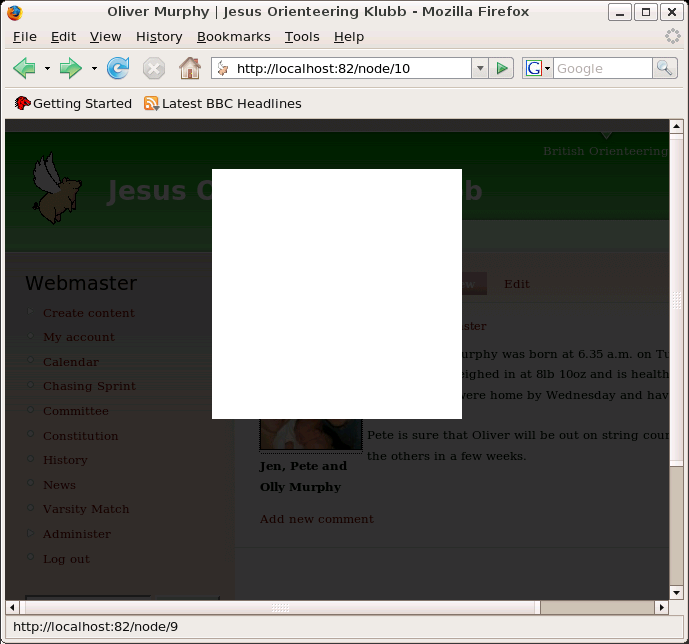
Trying to get this working with Drupal 5.2 and Image Assist. When I click on the image I get the gray background and a white box but that's as far as it goes (see attached screenshot). This is viewing with Firefox 2.0. If I click the white box then it clears correctly back to the page. Any ideas where I'm going wrong?
(Aside: if I click on the white square before the background has reached the darkest shade of gray then everything just locks up and I have to refresh the page to clear back to the page.)
Thanks,
Dave
| Comment | File | Size | Author |
|---|---|---|---|
| lightbox.png | 47.78 KB | djc |

Comments
Comment #1
djc commentedOkay - I'm guessing that the problem is that the anchor wrapped round the image is to the image node and not directly to the image itself (having selected "Link to image page" in the Image Assist popup when adding the image). However, even if I wanted to link directly to the image (and I don't, as for non-JavaScript I'd rather they went to the image node), I don't see how I would given the options Image Assist provides: "Not a link", "Link to image page", "Open in popup window", "Go to URL"; unless I used the last of these and entered the URL of the image explicitly (thereby avoiding most of the assistance it provides!). This project claims it supports Image Assist - at the moment I'm failing to see how!
Dave
Comment #2
sunI see. Currently, Image Assist only links to the actual image if you select "open in popup window". If jLightbox is enabled, it will parse all linked images in a content and attaches the Lightbox behaviour to them. Thus, the user will see the image(s) in Lightbox instead of a popup window.
Lightbox basically depends on the anchor linking to the image. This means, that having both Lightbox working and a separate link to an image node for users without JavaScript is not possible.
Comment #3
sunCommitted this extra info to README.txt:
Comment #4
sunImage Assist currently provides the options "Not a link", "Link to image page", "Open in popup window" and "Go to URL" only. In the meantime, there are plenty of other modules (such as jQuery Lightbox) that might need to add output options to this list.
In case of jLightbox, a user has to select "Open in popup window" to achieve the desired behaviour. However, the Image Assist popup window handler is added to all image links using this option, which is actually needless then.
I'd like to propose a new hook_img_assist_link_properties() and hook_img_assist_link_output() that let other modules add custom output formats for inline images.
So basically, by converting default link properties into this hook:
Comment #5
drewish commentedsubscribing... i'd be interested in making this a more standardized hook. i've got similar code in the image module that i'd like to open up.
Comment #6
sun@drewish: Do you already have more detailed requirements for these hooks than those I exemplary copied from img_assist? I just had a quick look into image.module and did not find a function that outputs images with different properties/links.
To make things even more complicated (tm), maybe we should simply adopt cck's field formatter functions? If we would do that, we would automatically implement all possible output styles for Imagefields, too.
Comment #7
djc commentedI don't know if it's because I'm using the latest dev versions of image and image assist but the popup option doesn't work for me. If you look at the generated link then it's probably not surprising:
Comment #8
djc commentedLet's see if it allows me to include the anchor this time...
<a href="http://localhost:82/files/" onclick="launch_popup(9, , ); return false;" target="_blank">Comment #9
drewish commentedsun, it's an option in the newer version of the image module. there's no hook yet... that was what i'd been thinking about adding.
Comment #10
sun@djc: That's another issue. You may subscribe to this issue to stay up2date.
@drewish: Do you mean the column "Link" in the image settings where one is able to select a target window? If it is, then I'm a bit afraid that the generated links do not contain an image (i.e.
<a><img /></a>) in the output. AFAIK, they only link to the same node with an additional parameter. However, if you think that it would be valuable to abstract image links and images, we can certainly go that way, too.@all: What's your opinion about re-using CCK's field formatter function schema? Of course, our (image*) modules would have to implement an additional default argument for hook_field_formatter_info() to have them not included by CCK. F.e.:
To learn more about CCK's field formatter functions, you might have a look into jQuery lightbox or Imagefield modules.