The Telvue module includes some basic functionality to show upcoming airings in a Now Playing block as well as more advanced functions to push metadata from Drupal to the Telvue.
To configure the Telvue module on your site or the Community Media Archive, you'll need 3 things:
- Public URI - The IP address or URL you use to access the Telvue
- Username of API enabled, non-admin user
- Password for that user
- API Key for that user
Public URI
This is the address you add to your browser to login to the Telvue without the login/profile. It can be an IP address like http://198.214.231.xxx:3000 or a domain name like http://b3400.ourchannel.tv. The Telvue module allows 2 different Telvues to be added. It is possible to support dozens of Telvue, but that requires some custom configuration. On Community Media Archive, the Telvue configuration is linked to the user profile.
The URI is the only information required to use the Telvue Blocks.
Creating and API Enabled User (Advanced Features)
The more advanced features require you to create an API enabled user on the Telvue. By default, Telvue includes 2 users (psgadmin and psguser).
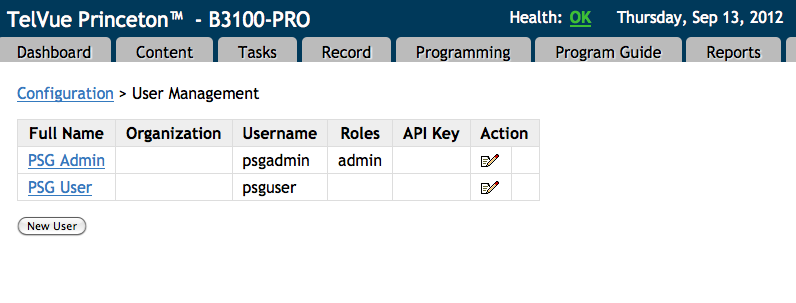
Create a new User called API (or something that will allow you to separate the API activity from changes made by other users).
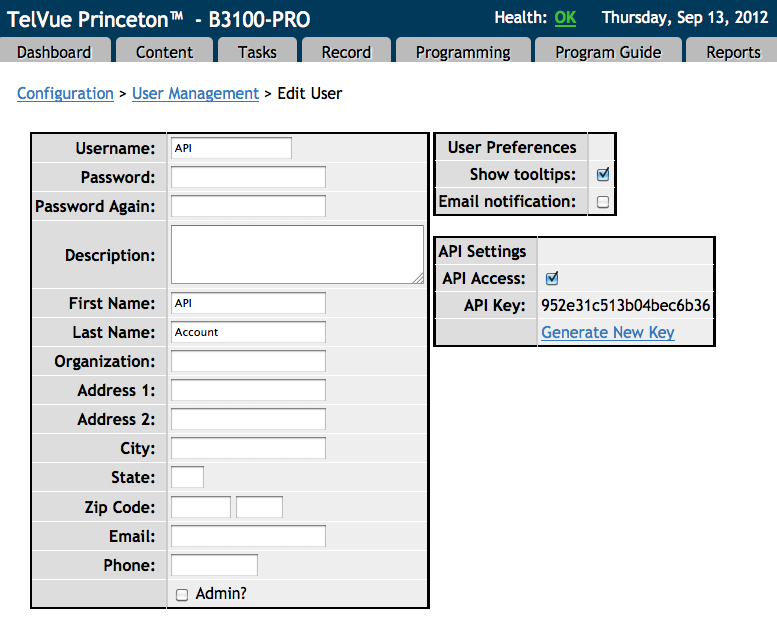
Once you've created this user, add the account information to the Telvue module under Admin -> Configuration -> Community Media -> Telvue Configuration
Pushing to Telvue
Once you've enabled the Telvue push module, you can either automatically have all newly created shows pushed to Telvue, or you can manually push individual shows to Telvue when desired.
To automatically push all shows:
- Navigate to Admin -> Configuration -> Community Media -> Telvue Push Configuration (or admin/config/system/telvue-push)
- Check the box that says 'Push Metadata to Telvue when Show is Created or Updates'
To manually push individual shows to Telvue when desired:
- First you need to determine what roles on your site will have permission to push shows to Telvue. To do this, navigate to Admin -> People -> Permissions, and then search for the Telvue Push permission that says "Allows users to push Show metadata to Telvue with Save and Push button". Apply this to any role who should be allowed to push shows.
- Now when you create a show, at the bottom of the form where you see the 'Save' button there is also a 'Save and Push' button. Clicking this will push the program to Telvue.
(Saves node, then redirects to node/[nid]/telvue-push)
To learn how to make sure your fields are mapping correctly to Telvue, see this section of the documentation:
Creating Telvue Fields on the Show Content Type
Pushing with View Bulk Operation


