

 The 2026 Drupal Business Survey is open. Your response will help shape the future of the Drupal business ecosystem.
Problem/Motivation
The responsive toolbar planned for Drupal 8 included a search/jump/command feature that was not implemented due to "feature freezing" at the time. The feature is extremely useful to navigate the menu, for example to jump to permission management or views from anywhere on the site. It is also very practical on mobile screens where trying to click around in the dropdown menu while scrolling the menu to find the right items take a lot of effort. On the other hand, entering a part of the page title or path is much less effort.
There is already a perfectly fine contributed module called Coffee to make this happen, so we can just review and clean that up and move to core. Features of the module include:
1. Configured to search in admin menu paths and titles by default but can be configured to search in any menu (also makes it easy to jump to frontend pages if needed).
2. Adds a button to the toolbar but can also be invoked with a keyboard shortcut (alt-d).
3. Supports an extensible list of commands that contrib can extend to add easy options to jump to parts of Drupal.
Proposed resolution
Review design and code of Coffee module, change name to fit core, change icon to be more generic.
Remaining tasks
Review design and code.
User interface changes
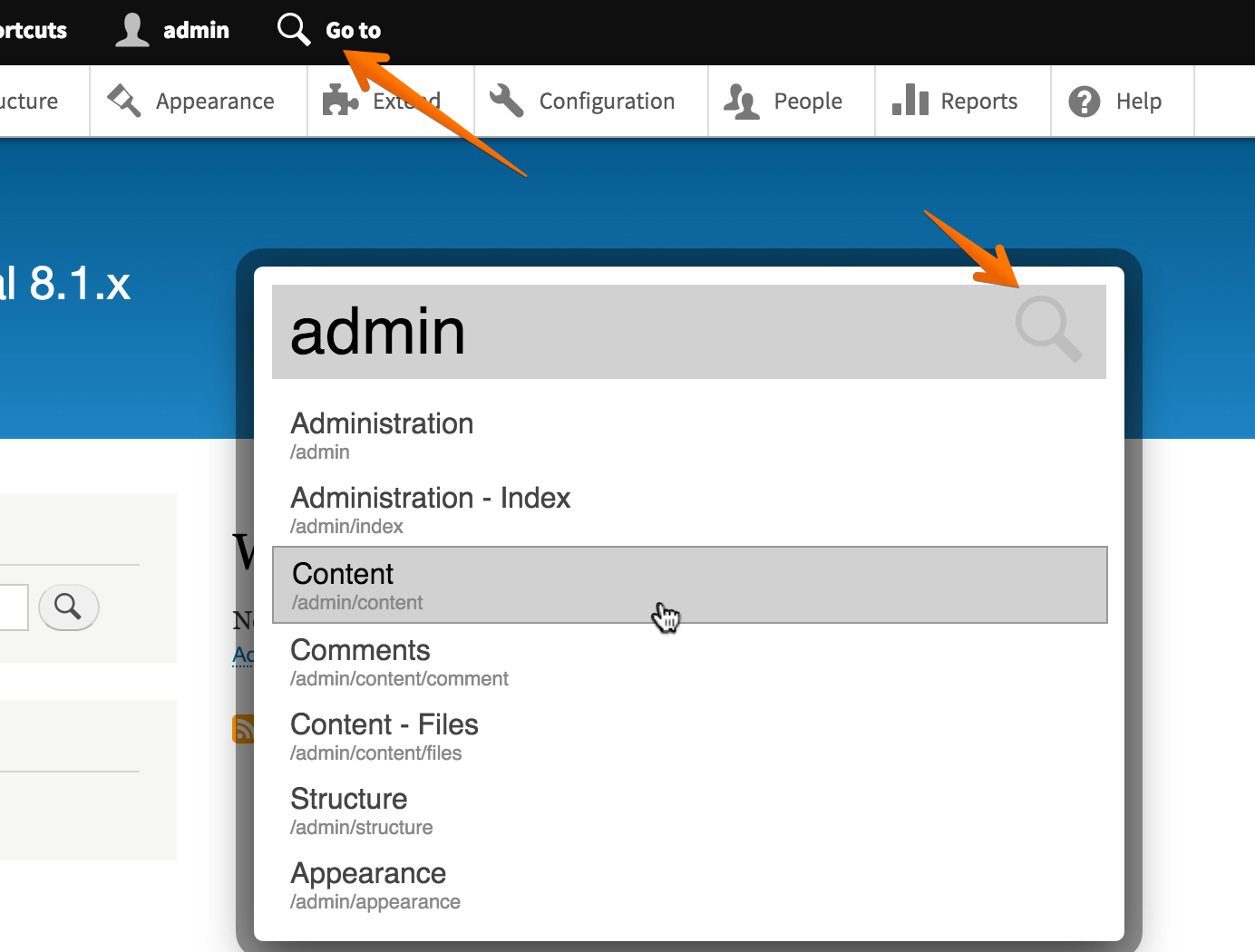
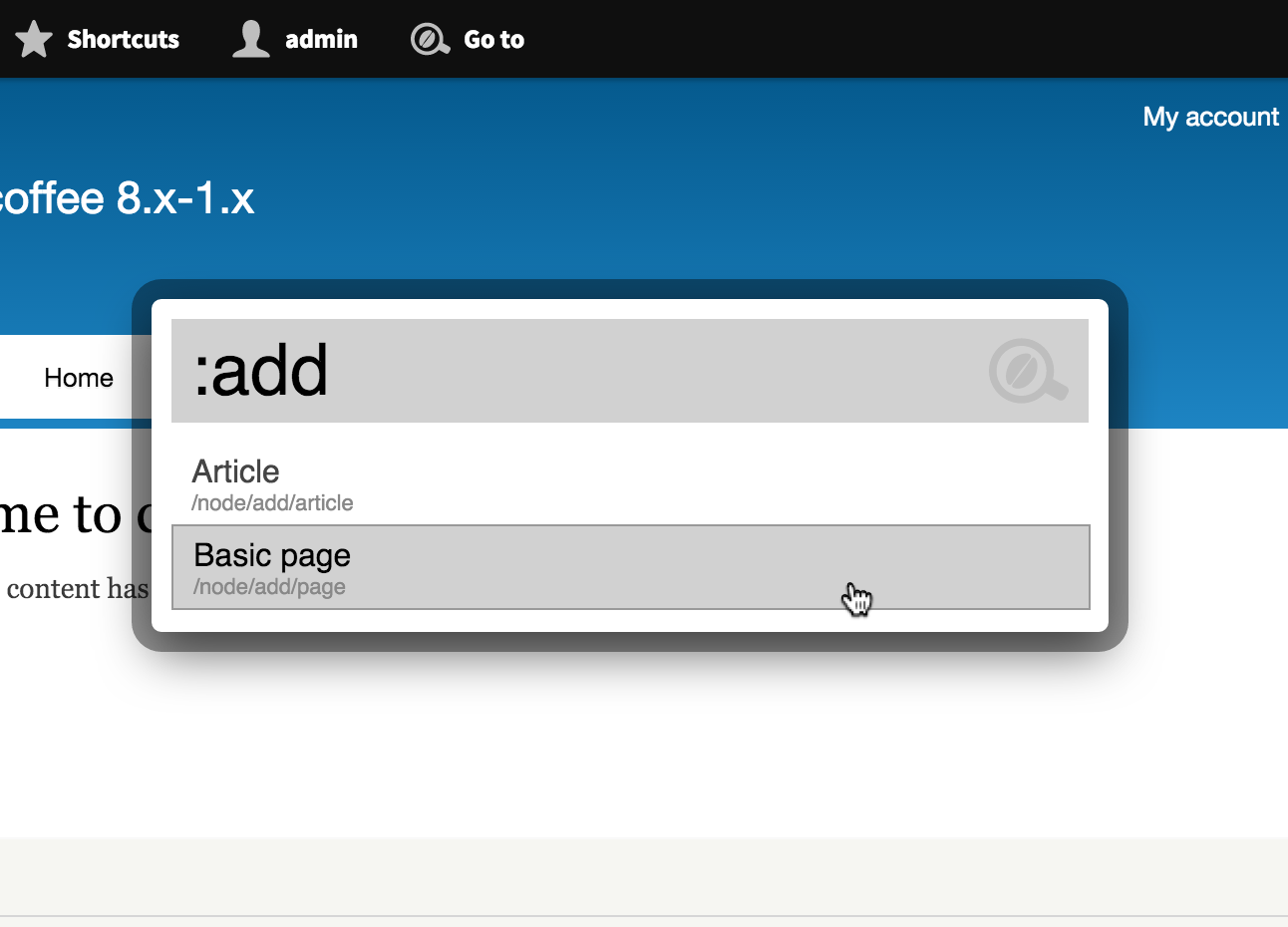
Adds a search icon to the toolbar. Pressing that pops up a search field with a list of results. Screenshot with results:

Video demonstration of the contributed module:
https://www.youtube.com/watch?v=OU5mSeXylaU&feature=youtu.be
API changes
None. The module is entirely independent.
Data model changes
None.
| Comment | File | Size | Author |
|---|---|---|---|
| #80 | interdiff.txt | 1.15 KB | willzyx |
| #80 | add_search_jump_command-1781422-80.patch | 47.25 KB | willzyx |
| #71 | Welcome to drupal 8.1.x | drupal 8.1.x 2016-02-11 15-20-37.png | 156.59 KB | gábor hojtsy |
| #69 | 1781422-69.patch | 47.26 KB | gábor hojtsy |
| #64 | icons.zip | 6.33 KB | grienauer |


Comments
Comment #1
botrisI think it should be the branch node/1137920-responsive-toolbar-with-dropbutton-patch as patch from #1608878 is not committed yet.
Comment #2
jessebeach commentedBoriss, there's no work against this issue yet from my side. The dropbutton patch should land any time now. Just a couple styling issues. After that, we'll be working on the the node/1137920-responsive-toolbar branch. In fact, you'd be totally safe to work against node/1137920-responsive-toolbar now.
Comment #3
botrisOk first try, this code is largely from the Administration menu module. I left out the part where the menu item get's displayed / highlighted when you hover over the auto-complete drop down, as that doesn't make sense for a mobile device. It's just the JS now, it needs some styling.
Comment #4
jessebeach commentedThis is great! I refactored the JS into the prototype format we've got going in core lately. I hope the refactor helps to illuminate how we'd like these objects to be structured.
Seems like your still working in the styling.
The one thing I'd suggest you have a look at is jQuery.proxy(). The event handlers are established as proxied functions so that the
thisof the handler function when it's called is the ToolbarFilter object, not the HTML element that triggered the event. This is an important distinction. To get the triggering element, you have to go into the event object.Comment #5
botrisThanks for the feedback. I will look into the proxy function, and implement where applicable.
As far as the styling goes, I'm a bit reluctant to 'design in code'. As far as I can tell there is no mockup for this functionality, if that's true I'll just have a go, but a design would help.
Comment #6
jessebeach commentedI've asked tkoleary to have a look. He should chime in here shortly with some designs.
Comment #7
tkoleary commented@Boriss Hi. I slapped together a quick prototype of this (attached). I don't do js so it's just static html but you should be able to use most of the markup and CSS. Feel free to change the class names if there are namespace conflicts.
Comment #8
tkoleary commented@Boriss Oops. Just realized I had local links in those files.
Also I think it looks a little better with these attributes changed:
.searchbox_open {
border-top: 1px solid #ddd;
border-left: 1px solid #ddd;
border-right: 1px solid #aaa;
border-bottom: 1px solid #aaa;
overflow: hidden;
}
.searchbox_open li:hover {
padding-left: 20px;
margin-left: -20px;
width: 120%;
}
Comment #9
Bojhan commentedI don't fully understand why we are discussing style already :) This probably shouldn't be too tightly coupled to the toolbar, so admin_menu can reuse the api's.
Let's get some more discussion around this, I'd be interested in knowing if we can also incorporate actual content/user title searching.
Comment #10
jessebeach commentedPresentation styling like padding, bordes, colors etc will go into
toolbar.theme.cssand be removeable.Let's not extend this issue beyond simply making the jump-to search bar bring up menu items. We can add another issue to extend it to content or let contrib do that. If we make this issue too big, we'll never get the foundations in.
Comment #11
jessebeach commentedComment #12
botrisSorry, for the late reply, I was trying to get this sorted over IRC, but timezones don't match I think. Anyway, at the moment the original code from the sandbox has an
<input type="search">. This allows for very limited styling. You can get around this partly by:But I don't know if you want to go and override default search styles on all the devices that might use the search box?
Comment #13
jessebeach commentedWell, only browsers that recognize
type="search"will also recognize theappearanceproperty. All other browsers will render the input element as a text element.I think the only property we'll want to eliminate is the border on the field, no?
If not, we can be confident that the appearance property will only target those browsers that render the input as a search box. I'd write it like this.
Comment #14
moshe weitzman commentedIt would be super super good if we built a Command Bar for Drupal. It would let you zip to Nodes, Users, Menu items, etc. See
https://github.com/blog/1264-introducing-the-command-bar for a terrific implementation. The spark team is pretty swamped right now, so if anyone else could pick up this effortl, you'll be a Drupal Hero forever.
Comment #15
botris@moshe weitzman: that would certainly be great or more fuzzy like search / command as is implemented in the Sublime Text Command Pallet. But at the moment I think thats beyond the scope of searching through the menu. As much as anyone wants to be a Drupal hero.
I've implemented most of the styling in the new patch. Attached as well are the screenshots of this functionality.
Comment #16
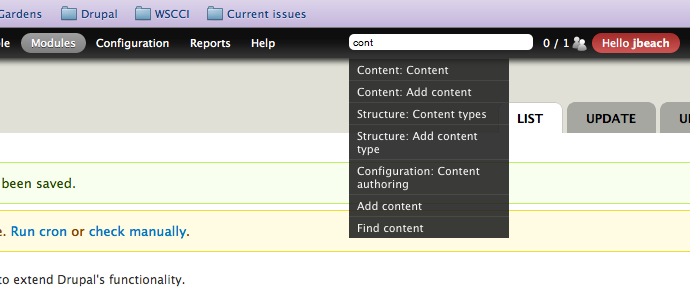
sunFWIW, I think this is missing a crucial point - I don't think I would have added the search box to admin_menu without the major underlying idea of discovery and learning. #806350: Add a search widget to find links in admin menu
Comment #17
botris@sun: with "missing a crucial point" do you mean the proposed command bar in #14? Because the patch is about finding links, so I don't see how that differs from 'discovery and learning'.
Comment #18
jessebeach commentedI think sun is referring to the type of real-time indication of where the menu item you've searched for is found in the menu structure, with a kind of scripted navigation of the menu.
I really really really like that type of 'discovery and learning' model. What I'd like to suggest is we at least get a simple menu item search proposed in this issue and then open another issue to improve the UX.
I want to make sure we get some kind of quick menu searching into the core toolbar and not miss that mark because we shot for the moon and missed.
44 days until feature freeze
Comment #19
tkoleary commented@ Boriss Any progress on this. I can't wait to see it! :)
Comment #20
jessebeach commented@tkoleary, boris posted a patch in #15 above. I'll set up a publicly accessible demo site with the patch in a couple hours.
Comment #21
jessebeach commentedI did a little refactoring to get this to apply to the latest stable patch (1137920_responsive-toolbar_69.patch) at #1137920: Fix toolbar on small screen sizes and redesign toolbar for desktop.
The demo is up at http://toolbar.qemistry.us
u: toolbar_tester
p: uS8593!k
Comment #22
Bojhan commentedOMG :) Nice, that works pretty good. Could you outline what needs to be done to get this near core level except reviews?
@sun You'r concern is valid, but also an attribute to the way admin_menu works. Given that admin_menu is not in core, I do not see it being necessary in this patch.
Comment #23
tkoleary commented@boriss, @Jessebeach Looks cool. Some very minor bugs I'll add. Awesome work.
Comment #24
corbacho commentedLooks nice and is fast ;)
I'm wondering if we could expand autocomplete.js, adding an extra method
.searchthat doesn't make an AJAX call, but searches inside a built-in collection.Otherwise, autocomplete.js is very well tested and has all kind of accessibility parameters, keyboard events, etc .. and is not bloated
It also has highlighting of the matched substring.
------------------------------------
@sun , if we manage to show in the vertical menu a constant reference of "where I am" now, it could add that extra factor of "learning". (Although it won't show it until you land in the page and see the menu again)
Comment #25
johnalbinWe're going to postpone this work until after our must-have-before-feature-freeze work.
Also, the decision has been made (since we were able to come up with consensus) that, for the horizontal/desktop toolbar, it will remain as-is without any 2nd level or deeper menus. So some of the above discussions are now moot.
Comment #26
shyamala commented+toolbar-followup tag
Comment #27
Bojhan commentedI think this is a great idea, makes it feel like a modern app. But sadly the effort involved in making this truly awesome, is not in scope of the current cleanup phase. I'd be open to move this back, but it seems like few people are involved in making it happen - and it needs quite some work and thinking still (possibly to include actual pages).
Thanks for all the effort so far!
Comment #28
jessebeach commentedMoving to 9.x.
Comment #29
lewisnymanThis seems like relevant information - http://engineering.twitter.com/2013/02/twitter-typeaheadjs-you-autocompl...
Comment #30
chrisshattuck commented(I'm adding the word 'search' to the title since that's what I was looking for in the issue)
I realize this has been listed as something that won't get into D8, but it feels like it would make such a huge difference for discovery and help new Drupal 8 users map their current experience with other CMSes and software (and Drupal 6 and 7) to Drupal 8's information architecture. It's not just a quick way to get around, it seems like it would be truly significant as a way to find things for the first time. A lot of users bail on Drupal because it's confusing and being able to simply find stuff initially is a big deal.
I'm going to reach out to Jesse and Boris to see how close this is to being worthy of inclusion and what major hurdles there still are, an to figure out what I can do to help.
Sorry I only discovered this now, for some reason I was assuming that search was going to be shipped with the new toolbar and found out in PDX from Kevin that it wasn't.
Comment #31
chrisshattuck commentedAlso talked about this with cweagans and some relevant comments were posted here on #1340626: Add a search/autocomplete to the toolbar:
Comment #32
jessebeach commentedchrisshattuck, this feature isn't being actively worked on as far as I know. The chances of it getting into D8 core are slim slim slim. This'll be something that contrib will need to produce.
Comment #33
lewisnymanContrib already does :-)
Comment #33.0
lewisnymanUpdated the participation details.
Comment #34
catchComment #35
tkoleary commentedNice.
Comment #36
wim leersadmin_menualso has code for this (in the7.x-3.x-searchbranch). We should probably also learn from the contrib module Lewis pointed to: https://drupal.org/project/coffee.Comment #37
gábor hojtsy@WimLeers suggested I look at this issue. It is 95% frontend, so would ideally have someone working on it who is familiar with how to integrate this into the backbone models/views of the toolbar. ATM the toolbar manages an active tab but only for those tabs that come with a tray. Otherwise the tab should be active itself.
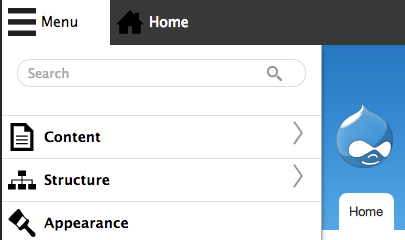
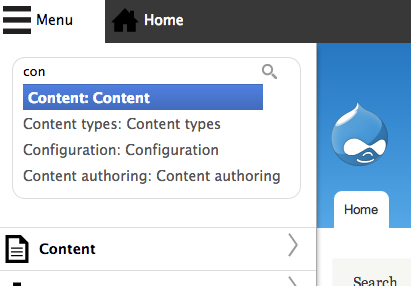
Even before that though, we should decide where to integrate this feature. The original design called for a search field in the toolbar. That needs to somehow visually fit and be properly collapsed on small screens, so it needs an icon representation after all. I started with that, but it looks odd when on a smalls screen to have the icon (a hamburger for now given lack of search icons for toolbar ATM) on the right, while the menu you are searching is on the left. We could build in search to the menu itself on small screens, like that in #15 3 years ago, but then how do we integrate it in the "desktop" wide toolbar?
Comment #38
wim leersFirst: this does not need to be integrated in the Toolbar's JS at all, this can be completely independent.
Second: I don't think there's anyone with such knowledge. The last significant work on the Toolbar's JS was in 2013, in #1927174: Complete the work to make the Toolbar administration menu sub tree rendering more efficient. Fortunately, it's pretty well documented, and thanks to Backbone Models being the only things that change (and Views just reflecting the state of those models), it should be easy to understand.
Just like #15 buts before the first menu item () while the toolbar tray is vertical, we could put it as the first thing while the toolbar tray is horizontal. Then it's in a consistent place, and highly discoverable.
Comment #39
gábor hojtsyCurrently my "best of breed" toolbar integration experience is at http://cgit.drupalcode.org/l10n_client/tree/l10n_client_ui/js/l10n_clien... ;) I guess I can dive into how backbone is supposed to be structured and is in fact used in toolbar, but not sure I'd get there sooner than someone with actual frontend experience in JS written in a style suitable after 2003.
There is certainly a lack of events/integration for buttons that are not trays in toolbar module. Also if this code would not live within toolbar module, then where would it be?
Comment #40
gábor hojtsyAll right, had a long chat with WimLeers. It seems pointless to try and reimplement this from scratch given Coffee module, which is amazing. Some great things:
1. It puts an icon in the top toolbar which invokes the search feature (additionally to the keyboard shortcut). That helps on small screens when you of course close the admin menu and also is at the same place regardless of vertical or horizontal orientation.
2. It is configurable to search in other menus as well and not just the admin menu. Admin menu only by default though.
3. It is extensible with commands in contrib, and has the built-in command :add for example to get the list of content types one can create new nodes with. This is infinitely extensible.
4. It is still a very tiny module even considering the tests.
I see no good reason to reinvent the wheel honestly. Rather we should iterate on this one (and find a good core-compatible name for it :). I was inclined to name it "Commander" given the generic extensible nature of it, but then figured its pointless to go through and rename everything for this patch, so just rolling a patch version of the current published release of the module for now (beta1), without the readme and license.
Comment #41
gábor hojtsyThe main limitation of this implementation btw is the lack of integration for tabs. Eg. if you search for "Permissions" or "Custom block" it will not find the relevant tabs. Other than that it works like a charm.
Comment #42
gábor hojtsyOpened an issue for that in the contrib module: #2665304: Tabs are not found in 8.x.
Comment #44
michaelmol commentedAs willzyx said in #2665304: Tabs are not found in 8.x integration of "tabs" was fixed in the 8.x-1.x-dev version.
Comment #45
gábor hojtsyComment #46
gábor hojtsyComment #47
gábor hojtsyComment #48
gábor hojtsyComment #49
gábor hojtsyThe three fails respectively are:
- missing help, I submitted a patch to the module for that in #2666008: Missing help in 8.x
- missing composer ignore, we can add that
- missing stable css override file (not sure its stable if we modify it, but its easy to get over it by copying the file over)
Comment #50
swentel commented+ 1, looks great!
Couldn't get it work though, got 'Unable to load data, please reload the page' in the search box - which is hard to read, so that will have to be cleaned up a bit I think.
Comment #51
swentel commentedComment #52
swentel commentedchanged text format because some users didn't see the comment
Comment #53
gábor hojtsyNew patch with the following:
1. Fixes from the dev version of the module (now searches in tabs too). See interdiff-module.txt.
2. Fixed the lack of listing of the module in composer.json and in the stable theme (which required a copy of the css file there too). See interdiff-testfix.txt.
3. Fixed the info files so it is listed as a core module and no packaging info anymore. See interdiff-yaml.txt
Should only fail now with #2666008: Missing help in 8.x theoretically.
Comment #56
gábor hojtsyFixing the whitespace. Opened to fix it in the module: #2666222: Whitespace issues in 8.x
Comment #57
hansfn commented+1
It would be amazing to have Coffee in core. Yet another thing I don't have to install every time I create a Drupal site.
Comment #59
gábor hojtsyIndeed now the only fail is #2666008: Missing help in 8.x (because I rolled in the fix for #2666222: Whitespace issues in 8.x). Let's get it fixed in the module.
Comment #60
michaelmol commentedJust commited #2666008: Missing help in 8.x
Comment #61
michaelmol commentedComment #64
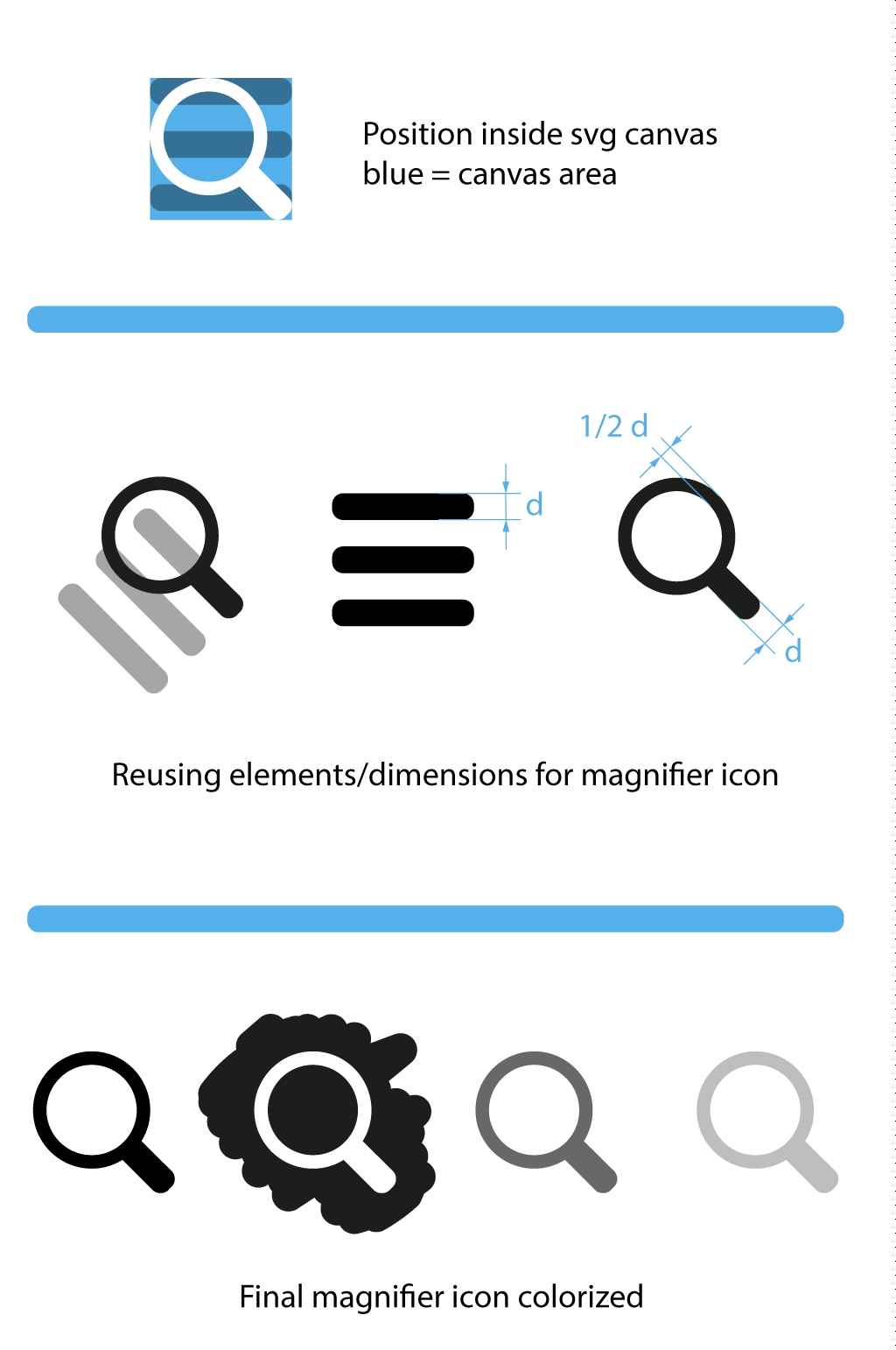
grienauerI designed the coffee logo so I am exited to follow the progress here :)
So there is no suitable icon for the quicksearch function...
I created a search icon (magnifier.svg) from scratch.
Screenshots from testimplementation

I think this should be a nice fit to the rest of the icons...
Beside I uploaded the final svg files (icons.zip) with the right file structure and 4 colors to put under core/themes/stable/images/core/icons
Sorry, I don't included already a patch. But core/patch etc is too much for me as a designer :P
p.s. icon can be Public Domain or whatever, just wanted to make this clear, that this is a small contribution from me and I don't want to put some special license. Please go for the best fit.
If there is something unclear, or we have to change something or want another icon/idea, let's discuss, I am open for changes.
Hope you like it and to see a bit of me in core ;P :)
Comment #65
gábor hojtsyWill reroll the patch with these update soon.
Comment #66
wim leers#64: Actually, we already have an icon for that:
core/misc/icons/505050/loupe.svg. All of Drupal 8's icons originate from https://github.com/ry5n/libricons.Comment #67
grienauerYes, I saw this, when I finished everything...
But it is not as adjusted as the one I did and also not in the colors saved.
Same width of the magnifier handle as the Burger line, not round on the end, Size... and not (jet) available in the needed colors... ;p
but ok... if you want to stay with it...
Comment #68
gábor hojtsyWell, the lack of roundness looks more in context at https://github.com/ry5n/libricons, it is clearly off when compared to the hamburger only. Wim Leers says that copying the loupe over and modifying the hex colors in the svg should be enough. Let's see.
Comment #69
gábor hojtsyUsing the core loupe image for now + updated the module from dev. Let's figure out if we want to make it more aligned with the hamburger (in which case we should update all copies of the loupe).
Comment #70
wim leers@Grienauer I think you did great work! :) But AFAIK the intent is that we contribute any changes we want to those icons back upstream to
libricons, so that everything stays in harmony/in sync. Perhaps LewisNyman/Cottser/Bojhan/yoroy/… know more.Comment #71
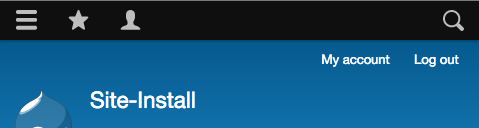
gábor hojtsyThis is how it looks now:
Comment #72
droplet commentedCSS:
should be #coffee, #coffee *, #coffee *:before...etc
JS:
DrupalCoffee should not here. If we exposed that, it should be Drupal.coffee instead.
it modified jQuery UI globally.
$body
PHP:
is it correct ?
Other Stuff:
Comment #73
Bojhan commentedThis looks like a really interesting development. I am not so concerned about the styling, that's easy to fix.
I am wondering what the chanses are of being able to also search content. As that is the utility most of our content editors will be looking for.
Comment #74
tim.plunkettThis seems like a clear use case for plugins. Let's not add another hook to core!
This entire portion should be its own plugin, or if that's decided against, in a _coffee_commands hook somewhere. No reason to privilege this over other commands.
(Sorry if this has been brought up, I didn't finish the entire thread)
Has any consideration been given to renaming the module? AFAIK Coffee doesn't mean anything related to this functionality outside of the module, and while popular it is not ubiquitous.
I can help with the plugin-ify-ing. Or I can do that in the Coffee queue, in order for that work to not be lost in case this doesn't end up in core.
Comment #75
gábor hojtsy@Bojhan: yeah in fact there is a built in settings page to configure any menu, so it makes it very easy to jump to any frontend page **that you put into a menu**. It also has an extension feature where you can implement commands in other modules, eg. a "content: ..." command could search in content. I sense you would say this is not very intuitive. I think if it finds frontend content on the same top level as admin menu items by default that could be pretty confusing. Like you would type "Admin" and it would find "Administer" (backend) and "Administrators" (maybe a subpage of your staff section on the frontend).
@tim.plunkett: re renaming, I posted this in #40:
We should do a rename once we have some agreement. We can fix any other concerns in the meantime regardless of the name though.
Comment #76
Bojhan commented@gabor Are you working on this from the OCTO? Perhaps we should just have a review session, we dont have to copy over all functionality. Just the ones we need for core.
@tim You'r right the naming is a bit off. We can go for a namespace that fits core, like "quick find/search" or something.
Comment #77
gábor hojtsy@droplet/@michaelmol: can you work on updating the patch with the issues found fixed? Looks like the review is of benefit for the module too either way.
@Bojhan: been looking for you a bit to discuss the UI (and get any review points posted in the interest of full transparency). I did post a youtube video earlier above and put it in the issue summary which explains ALL the features of the module / patch, there is really not much to it. See https://www.youtube.com/watch?v=OU5mSeXylaU&feature=youtu.be that may be helpful. Anyway I am happy to review it in person too :)
Comment #78
willzyx commented@Gábor Hojtsy I have checked the patch and it seems to contain all the latest issues fixed in the dev branch. If further changes will be made, I will update the patch
@tim.plunkett your proposal of replace hook_coffe_commands() with plugins sounds good! We can work in the coffee issues queue for now, so that work to not be lost in case this doesn't end up in core. EDIT opened #2675082: Replace hook_coffee_commands() with plugins
Comment #79
gábor hojtsy@willzyx: erm, I meant to apply the suggested changes from #72 and #74 to the module itself and then circle back with an updated patch, that surely did not happen yet?
Comment #80
willzyx commentedUpdated the patch with the latest commits. Also there are some progress on #2675082: Replace hook_coffee_commands() with plugins; Any review/help with this issue is appreciated :)
Comment #81
gábor hojtsy@willzyx: I see two minor changes in the commits on the module. Are you interested in fixing the review points above? There are 2 more days to go for 8.1.x features, and features opened for 8.1.x will move to 8.2.x after that (https://groups.drupal.org/node/508968) I see you updated the code re the jquery autocomplate snippet.
Comment #83
willzyx commentedI'm sorry, I did not have time to work on this :( at this point this issue is 8.2 material
Comment #84
andrewmacpherson commentedOne concern I have for accessibility is that a hot-key may not work for every user. Users with accessible needs can employ a wide variety of web browser add-ons, with their own hot-key behaviours. Clashes are likely, and we can't predict them. (Regardless of accessible needs, there are many cool add-ons with keyboard shortcuts, which any user might want...)
For example: as a sighted keyboard user (without a screenreader...) I can use a Firefox add-on to navigate the page by ARIA landmark regions. The N and P keys move back and forth through the landmarks. It's really handy for reaching the right-hand sidebar to navigate the Drupal.org handbook pages!
However, some browser-based applications also want to use these keys. In Trello, N creates a new card, but I can't use it because the Firefox XUL-based add-on catches this key first.
This problem will be mitigated if there is an easy alternative way to reach the search box, such as tabbing along the toolbar. From the last screenshot in #71, this appears to be the case :-)
Customizing the hot-key may also help, but it would need to be a per-user preference.
As it happens, the suggested Alt+D shortcut is already widely used by Windows and Linux web browsers to access the browser's location bar - we probably should avoid that one. (Bizarrely, the location bar is overloaded with several hotkeys. I think the browsers started respecting each other's shortcuts along the way!). See theTable of Keyboard Shortcuts article on Wikipedia.
Comment #85
andrewmacpherson commented+1 for having a text label next to the icon, such as "Go to" from the screenshot in #71.
We added a text label to the edit button along the way too - is this policy for all items in the toolbar?
Comment #94
nod_related to hotkey topic.
Comment #97
nod_Comment #103
quietone commentedThe Toolbar Module was approved for removal in #3476882: [Policy] Move Toolbar module to contrib.
This is Postponed. The status is set according to two policies. The Remove a core extension and move it to a contributed project and the Extensions approved for removal policies.
The deprecation work is in #3484850: [meta] Tasks to deprecate Toolbar module and the removal work in #3488828: [meta] Tasks to remove Toolbar module.
Toolbar will be moved to a contributed project before Drupal 12.0.0 is released.