

Closed (works as designed)
Project:
Date
Version:
7.x-2.6
Component:
Date Field
Priority:
Normal
Category:
Support request
Assigned:
Unassigned
Reporter:
Created:
4 Oct 2012 at 13:46 UTC
Updated:
5 Jun 2019 at 08:27 UTC
Jump to comment: Most recent, Most recent file


Comments
Comment #1
davidwhthomas commentedI was looking for the same thing, but unfortunately it appears in
date_entity_metadata_property_info_alterThat the "setter callback" is explicitly unset for some reason.
unset($property['setter callback']);For that reason, it appears there's no way to set a date field value using the entity api and entity_metadata_wrapper - because no setter callback exists :(
DT
Comment #2
davidwhthomas commentedP.S Note, as a workaround, you can do this type of thing instead:
Comment #3
kevinob11 commentedI'm able to use the set method if I pass it a unix timestamp as created by strtotime().
Comment #4
ralt commented@davidwhtthomas: using
[LANGUAGE_NONE]kinda beats the point of using wrappers.@kevinob11: Awesome! Thanks a lot.
Comment #5
davidwhthomas commented@ralt, not using the entity wrapper for the profile date field set was the point of that example.
Nevertheless, good to hear the date field may now be set using entity wrapper with a timestamp value.
I was using a slightly older version of the date module so wasn't able to set the field using a timestamp with that version.
Comment #6
fengtanLooks like this also works. Not sure why though:
Comment #7
focal55 commentedI was struggling with this tonight. Here is what worked for me:
Using field_my_date[0] cleared the error I was seeing in watchdog "General error: 1366 Incorrect integer value: 'value' for column 'delta' at row 1". I am not sure why, but seems as though the insert query was using 'value' as the delta value.
The post by Alice Heathon also helped me discover my solutions.
Comment #8
thumb commentedAnd, if you have a date field without an end date, the following should work.
Comment #9
psychobyte commenteddate fields have timezone information. Is there a way to get that as well?
Comment #10
jeff h commented@psychobyte: I believe this field is not defined correctly inside the date module — field_info_field('your_date_field_name_here') returns an array of info one piece of which describes the columns associated with the field. This is currently incorrectly (I believe) stating that the date field has just one column: "value", whereas I think it should return timezone info as well as date_type.
Looking at a sample entity object containing this field, I see the following on my sample date field:
I see no way to set all that using entity metadata wrappers.
Comment #11
jeff h commentedActually, the patch at https://www.drupal.org/node/1392472#comment-8403055 fixed the issue I was having.
Comment #12
glass.dimly commentedSo also, if you're using entity_metadata_wrapper->set it will invoke the node_save hooks, and if you've got logic there that assumes a normal Drupal date object, it will fail because entity_metadata_wrapper->field_date->value() in the node_save validdate, submit, or rules-invoked functions will return a timestamp rather than a drupalish date.
I did this, it's a little verbose but it works.
Comment #13
texas-bronius commentedI am really confused by this. It appears that ->value() (and ->raw() for that matter) convert the date in the field to, what, site timezone maybe? But setting does not care about timezone. Here's a test:
I can see that entity_metadata_wrapper is presenting the date out of pmaster's field as a timestamp (1117602000), and by passing this same timestamp into the field wrapper set() sets the time back on retrieval (1117584000).
I think, therefore, the right way to set the field is to the retrieve it as UTC as it is stored in the db. (Incidentally, it's *stored* as a varchar like 2000-03-19T00:00:00) What's the best way either to retrieve the UTC timestamp or to offset it by the correct (assume site?) timezone? That is to say, this appears to work for me, offsetting for site's timezone of America/Chicago:
when copying one metadata wrapper date field to another.
Comment #14
hgoto commentedI met the same problem @texas-bronius pointed. This comment is for people who will meet the same issue for future. My workaround is as following.
*EDITED*
It's better to explicitly set timezones. The following page may be useful for people who have the same trouble.
- http://drupal.stackexchange.com/questions/26948/programmatically-set-dat...
Comment #16
kir lazur commentedIt's easy. In example of commerce line item set dates from-to.
You are free to receive dates from any other source, like submitted form etc...
Comment #17
texas-bronius commentedI've run a lot of manual tests just now in a cumbersome /admin/devel window :), and here's what I've come up with:
Assignment of Date Field values in a Entity Metadata Wrapper differs according to cardinality (how many date fields you have) and whether or not Collect End Date is enabled on the field's configuration. Also, always assign timestamp (epoch), and Drupal/Date will handle value conversion to what it wants to store in the database.
Generic note on cardinality
With cardinality of 1 (single value), use:
field = $date;
or
field->value = $date;
With cardinality of 2+ (multiple or unlimited), use:
field[n] = $date;
or
field[n]->value = $date;
The difference between assignment and assignment to ->value property are due to Collect End Date below.
Whether Collect End Date is enabled
If the date field configuration does not have Collect End Date checked, your wrapper receives assignment like:
field->$date;
But if Collect End Date is checked (field accepts both start and end dates):
field->value = $date;
field->value2 = $date; (or just don't set it if it's not required, but this is how to set it)
I recommend this format instead of the handbook suggested format for dates because that seems to apply only to updating existing nodes. The format I recommend works both on Create Node and Update Existing Nodes.
I found that by assigning a complete array('value' => $date, 'value2' => $date2), as opposed to separate assignments to the properties value and value2 on the wrapper individually as shown above, you will circumvent date string format conversion before storage and will blindly store the timestamp regardless of how it should be stored (and is expected to be retrieved, say, by Views). In this case, when an ISO Date field presents a timestamp to Views, your Views will not output the retrieved date value but the current date/time. Refresh and see it update with the current time.
Date string format to use when setting Entity Metadata Wrapper values
Always use epoch timestamp regardless of the field's configured Date Type. The wrapper or the date module or some spirits from the underworld take care of conversion from timestamp. Attempting to guess at the right, alternate format always ended in sudden death for me, regardless of the field's date type.
Given an existing content type "testtest" with three fields on it as referenced below, here's the test I ran in Devel /admin/devel Execute PHP block. These fields each Collect End Date. To try without Collect End Date checked, repeat the same below but instead of field->value = $startDatetime, use field = $startDatetime. Seriously.
(omit the wrapping PHP tags, as per the Devel module's instructions)
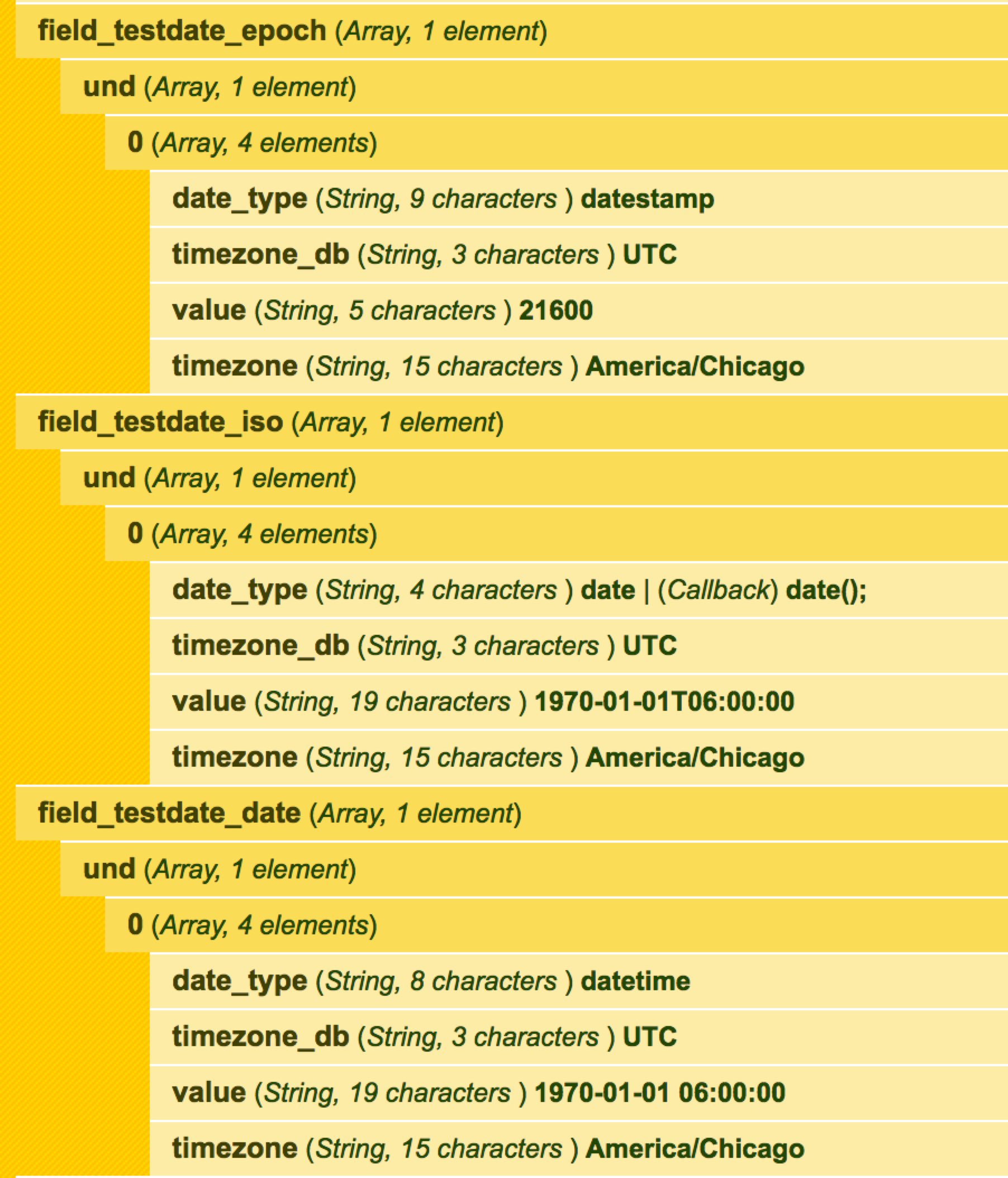
For some visual aids for future of life, see the dpm output of these fields before $wrapper->save() and immediately after save (without actually doing another wrap or anything.. it's EntityMetadataWrapper magic!) attached as jpg to this issue queue.
I hope this helps!!
Comment #18
texas-bronius commentedComment #19
kellyimagined commentedThis thread here was helpful but run strtotime() on the value before setting and it will work as expected.
Comment #20
StarBoyX commentedThe problem for me is that my date time field store data in database in not as timestamp,
but in function `entity_property_verify_data_type($data, $type)` the date is verified as an integer by code
but date is string like 2019-06-05 00:00:00.
No something like case 'date_popup': check if is valid string date.